

Antivirus Deep
- 5.00
- 4.8
- Installs
- 10.00K
- Price
- Free

Screenshots

Analysis by Reviewed
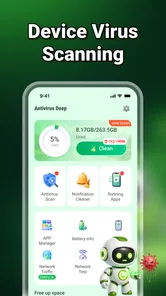
I approached Antivirus Deep as a practical Android tool rather than as a replacement for every security feature already built into a phone. Its purpose is easy to understand: bring virus scanning and junk-file cleaning together in one place. That combination can be useful when I want a quick check without opening several separate utilities, but the experience depends heavily on what I need from a security app and how much control I expect over the cleanup process.
In my testing mindset, the most important question is not whether an all-in-one tool sounds convenient. It is whether the app makes routine maintenance clearer, safer, and less annoying. Antivirus Deep has a straightforward role for people who want a simple place to start when a phone feels cluttered or behaves oddly. It is less convincing for someone who wants a full security suite with extensive explanations, advanced privacy controls, or a long history of independent testing.
How the combined tools fit everyday phone use
The app comes from Secret Notes and belongs to the tools category. It is free, carries an Everyone age rating, and is aimed at a broad audience rather than a specialist group. That accessibility matters because virus checks and storage cleanup are tasks many people postpone when the available options feel technical. A focused utility can make the first step less intimidating.
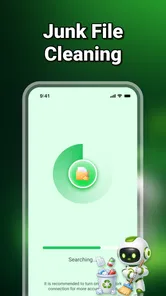
The central value is the pairing of two jobs that are often treated separately. A scan addresses the possibility of harmful software, while junk cleaning addresses unnecessary files that may make storage management harder. These are not the same problem, and I would not treat a cleaner result as evidence that a phone is secure. Keeping that distinction in mind prevents one of the most common mistakes with combined maintenance apps: assuming that a tidy device is automatically a protected device.
The app has a 4.8 average from around 180 ratings, with over 10 thousand installs. Those figures suggest that the concept has found an interested audience, although they should not be read as a substitute for detailed security testing. I see the numbers as a reason to take a closer look, not as proof that every device or situation will produce the same result.
Where connectivity becomes part of the experience
Security tools often involve network-dependent moments, even when the action begins on the phone. A scan may need current information to make its results useful, and a cleanup review may involve checking what is stored locally before I decide what to remove. Because of that, I prefer to open the app when the connection is stable rather than starting an important check while moving between weak networks.
This is especially relevant when I am dealing with a suspicious download or an unexpected warning. If the process pauses, takes longer than expected, or presents a result that I do not understand, I want to avoid making a rushed decision. Waiting until I have a reliable connection and enough time to read the screen is a small habit, but it makes the tool easier to use responsibly.
More From Our News Desk

 Gmail
GmailGmail in a Busy Inbox: Who Benefits Most?
From first account to crowded workday, Gmail earns its place through dependable search and flexible sorting—but its best fit depends on how much inbox maintenance you can tolerate.

 Prime Video
Switching to Prime Video: What Changes in Your Viewing Routine
Prime Video can make a compelling second home for streaming, but switching means learning a different catalog, rental layer, and route from browsing to playback.

 Universal TV Remote Control
Universal TV Remote Control Works Best as a Reliable Backup
A phone remote earns its place through quick setup and reliable habits. Here is how to get more from Universal TV Remote Control—and where its limits show.

 Weather - By Xiaomi
Weather by Xiaomi Review: Clear at a Glance, Less Clear Up Close
Xiaomi’s weather app makes everyday forecasts quick to scan, but its calm surface can leave useful details and recovery paths harder to find than they should be.

 X
XX Under Pressure: Can It Recover When Posting Goes Wrong?
A resilience-focused review of X, examining setup, mistaken posts, interruptions, weak connections, and the gaps that matter when recovery needs to be dependable.

 Clash of Clans
Clash of Clans Is Won Between the Battles
Its raids are quick; its community is a long-term project of coordination, teaching, rivalry, and shared responsibility—with all the friction that entails.
Latest News



I would also avoid treating a completed scan as a permanent answer. Security conditions change, and a scan is a moment in time. If I install something unfamiliar, receive a questionable file, or notice unusual behavior after a previous check, I would run the process again instead of relying on an old result. That is a sensible workflow for Antivirus Deep and for similar tools.
A realistic mobile routine
Imagine that I am preparing for a trip and my phone reports that storage is getting tight. I might use the cleaning side of the app to review unnecessary material, then run a security check before downloading maps, documents, or entertainment for the journey. The useful part is the order: first understand what can be removed, then check the device before adding more content.
That routine is more helpful than tapping a large cleanup button without reading the categories. On a phone used for photographs, work files, messaging attachments, and downloaded documents, “junk” can be a broad label from a user’s point of view. I would inspect each recommendation carefully, especially when the phone contains files that are difficult to recreate. A few extra seconds of review are worth it when the alternative is losing something important.
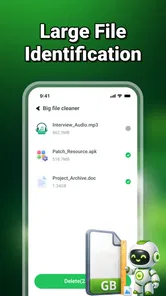
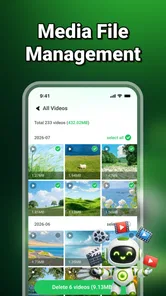
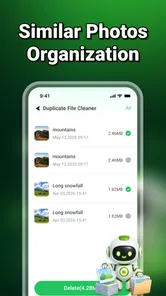
The same approach works after a busy week of messaging. Group chats can leave behind repeated images, videos, and documents, while browsers and other apps may accumulate temporary material. Antivirus Deep can serve as a starting point for finding clutter, but I would still use the phone’s own file manager when I need to identify a particular item. The app is most useful as a guided overview, not as permission to delete blindly.
What happens when a check does not go smoothly
Every utility app needs a recovery plan, and this is where I would keep my expectations realistic. If a scan appears stuck, returns an unclear message, or behaves differently after a connection change, I would first stop and reopen the task rather than repeatedly pressing controls. I would also check whether the phone itself is busy with another demanding operation and try again later.
For cleanup, recovery means being especially cautious before confirming removal. I would not use a broad action while distracted, and I would keep copies of irreplaceable photographs or documents elsewhere before performing maintenance. This is not a criticism unique to Antivirus Deep; it is the basic trade-off of any cleaner that can identify multiple types of unwanted material at once.
The app’s current version is 1.1.0.0, so I would pay attention to how its screens and results are presented on my particular device. A version number is useful context, but it does not tell me whether every phone manufacturer will expose the same behavior. Android interfaces can differ, and a tool that feels clear on one handset may require more careful reading on another.
One practical recovery habit is to separate security troubleshooting from storage troubleshooting. If the phone is acting strangely, I would scan first and avoid deleting files merely because the device feels slow. If the issue is clearly a lack of space, I would review cleanup suggestions without assuming malware is involved. Keeping those two investigations separate makes it easier to understand what actually helped.
Using it without wasting attention or data
For data-conscious use, I would avoid launching checks at inconvenient times, such as during a limited mobile-data period or when the battery is nearly empty. A stable Wi-Fi connection can be the sensible choice for any activity that may communicate with online services, while charging is useful when I expect a longer review of the device. I would not assume that every operation has the same network or battery impact.
The app’s free price makes trying it low-risk from a purchase perspective, but free does not mean I should ignore the information shown during setup or use. I would read requests and result descriptions rather than granting access automatically. A security tool deserves the same careful attention as the files it is inspecting.
Another data-saving strategy is to use the cleaner selectively. Instead of running maintenance every time I unlock the phone, I would wait until there is a real reason: storage pressure, a buildup of downloads, or a need to review the device after installing unfamiliar material. Frequent unnecessary checks can create noise and make genuine warnings harder to notice.
I also prefer a deliberate two-stage workflow. First, I look at what the app has identified and decide whether the category makes sense. Second, I confirm only the items I am comfortable removing. This is slower than an instant sweep, but it gives me a useful audit trail in my own mind and reduces the chance of confusing temporary files with personal content.
Who will appreciate this app most
Antivirus Deep is a good fit for an Android user who wants a simple starting point for two common maintenance tasks. It may suit someone who is uncomfortable navigating several system menus, a family member who wants a plainly focused utility, or a user who prefers to review security and clutter from one screen. The Everyone rating also makes its general audience clear, although adults should still guide younger users through deletion decisions.
I can also see value for people who frequently download attachments or move between many apps and want a regular reminder to inspect the phone. The strongest use case is not emergency rescue; it is routine awareness. A short, careful check can help a user notice what is accumulating and think twice before keeping every downloaded item forever.
On the other hand, I would skip it if I were looking for a complete privacy platform, detailed app-behavior analysis, parental controls, identity monitoring, or a documented enterprise security stack. I would also be cautious about relying on it alone for a work phone containing sensitive business material. In that situation, built-in Android protections, trusted device-management tools, and established security products may be more appropriate.
Someone who already has a preferred antivirus and a well-organized file-management routine may gain little from adding another layer. Extra tools can create overlapping notifications and competing recommendations. The app makes more sense when its combined approach simplifies a messy routine, not when it duplicates a setup that is already working well.
How it compares with the usual alternatives
The built-in Android security features have an important advantage: they are already integrated into the operating system and are familiar to many users. A dedicated utility such as this one can feel more approachable when I want a single maintenance destination, but I would not replace core platform protections with it. The two approaches can serve different purposes.
Dedicated file managers are usually better when the main problem is precise organization. They let me browse folders, rename items, move documents, and decide exactly what stays. Antivirus Deep is more convenient when I want a broad cleanup review, but it is not the tool I would choose for detailed file-by-file housekeeping.
Specialist antivirus products may be preferable when I need extensive scan explanations, broader security controls, or a recognized security ecosystem. Their extra depth can also mean more settings and more notifications. Antivirus Deep’s appeal is the shorter path between opening the app and beginning a basic check, provided I am comfortable with a more focused feature set.
Phone-brand maintenance tools can also have an advantage because they understand that manufacturer’s storage categories and device settings. In contrast, an independent app may offer a more consistent idea across different phones, but the exact usefulness can vary with Android version and handset design. Antivirus Deep requires Android 9 or later, which keeps it available to a wide range of compatible devices while still leaving the final experience dependent on the phone.
Small habits that make the tool safer
Before cleaning, I review names and categories instead of accepting every suggestion automatically.
When a scan raises concern, I note the affected item and investigate it separately rather than deleting it immediately.
I run maintenance when the connection is dependable and I have enough battery and time to read the results.
I keep irreplaceable files backed up before using any broad cleanup action.
I compare the app’s findings with Android’s own storage and security screens when a result seems surprising.
These habits reveal the main trade-off. The app can reduce friction, but it cannot make judgment unnecessary. A cleaner has to make assumptions about what may be unwanted, while a user knows the personal context behind a file. The better experience comes from using the app to narrow the review, then making the final decision myself.
My connectivity verdict
After looking at the app through the lens of network use, mobile situations, recovery, and data awareness, I see Antivirus Deep as a convenient first-line maintenance tool rather than a complete security answer. Its combination of scanning and junk-file review is genuinely practical for users who want a compact workflow. The free model also makes it easy to test on a compatible Android phone without committing to a purchase.
My recommendation is strongest for people who want guidance and simplicity. I would use it before a period of heavy downloading, after a cluttered stretch of messaging, or when I want to perform a calm review of a phone that feels untidy. I would keep the connection stable, read every cleanup suggestion, and treat scan results as prompts for sensible action rather than unquestionable verdicts.
For advanced users, the limitations are clearer. Anyone needing deep security reporting, exact file management, or a broader privacy toolkit may be better served by specialized alternatives. Even so, the best way to use Antivirus Deep is as a careful checkpoint, not an automatic delete-and-forget button. With that expectation, it offers a focused and approachable way to combine two routine Android tasks.
Secret Notes has positioned this app as a tools-focused utility, and that description fits my overall impression. It does not need to replace every existing protection layer to be useful. If your goal is to bring a basic virus check and a cleanup review into one accessible routine, I think it is worth trying. If your needs go beyond that focused role, I would keep it secondary and choose a more specialized solution for the parts that matter most.
Antivirus Deep Frequently Asked Questions
Who develops Antivirus Deep, and what kind of app is it?
Antivirus Deep is a Tools app developed by Secret Notes. Its focus is practical phone maintenance, combining virus scanning with junk file cleaning in one place. That makes it relevant to users looking for basic security and cleanup features together. The app is rated for Everyone, though the usefulness of its tools will depend on your device and how you prefer to manage security and storage.
What is Antivirus Deep and what does it do?
Antivirus Deep is designed to help protect Android devices from potentially harmful apps, files, and security threats. Its main functions focus on scanning installed applications and stored files, identifying suspicious items, and providing basic security guidance. It should be viewed as an additional layer of protection rather than a complete replacement for safe browsing habits, system updates, and the security tools already included with your device.
Is Antivirus Deep free to download and use?
Antivirus Deep is free to download. Its current version is 1.1.0.0, and it requires Android 9 or later. Before installing, check the app’s store page for any current details about available features and usage terms. As with any security tool, review requested permissions and understand what the app does before relying on it for regular scans or cleanup.
Does Antivirus Deep slow down the phone or drain the battery?
As with most antivirus applications, Antivirus Deep may use processing power, storage, and battery while performing scans or monitoring activity. The impact is normally more noticeable on older devices, phones with limited memory, or when frequent full scans are enabled. To reduce battery consumption, users can schedule scans for convenient times, close unnecessary background apps, and avoid running several security or cleaning applications simultaneously.
What permissions does Antivirus Deep require, and is it safe to grant them?
The permissions requested by Antivirus Deep can vary according to its features and Android version. Security apps may ask for access to files, installed applications, notifications, or accessibility-related functions in order to scan content or provide alerts. Grant only permissions that are clearly connected to the app’s purpose, review the developer and privacy policy, and avoid continuing if a request seems excessive or unexplained.
Pros
- Scans installed apps for potential threats and suspicious behavior.
- Simple interface makes core security tools easy to find and use.
- Can help identify risky permissions granted to installed applications.
- Useful extra protection when downloading apps from outside official stores.
- Lightweight design should have limited impact on everyday device performance.
Cons
- Protection quality may vary depending on the app’s detection database.
- Some features may require payment or an upgraded subscription.
- Background scanning can increase battery use on some devices.
- Security alerts may occasionally be difficult for nontechnical users to interpret.
- It should not replace cautious browsing or downloads from trusted sources.








