

Animal Sounds and Ringtones
- 418.00
- 4.6
- Installs
- 1.00M
- Price
- Free

Screenshots
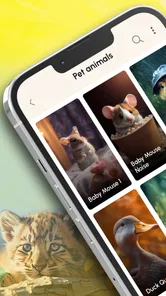



Analysis by Reviewed
I like animal-sound apps best when they’re easy to dip into: choose a sound, enjoy it, and move on without turning a spare minute into a project. That’s the appeal of Animal Sounds and Ringtones. It pairs animal audio with phone-personalization options, so it can work as a bit of family entertainment as well as a way to give a ringtone a more unusual character. I’d think of it as a playful sound collection first, rather than a full nature encyclopedia or a serious audio tool.
A simple routine for exploring sounds
My most useful approach is to start with a clear purpose. If I’m showing a child an animal, I pick a sound and listen together, then use the description as a prompt to talk about what the animal is and where it lives. If I’m browsing for fun, I follow a loose theme—birds one moment, mammals the next—instead of tapping randomly until the sounds blur together. That small habit makes the collection feel more engaging and keeps a quick visit quick.
For a realistic everyday use, imagine a quiet stretch at home while dinner is cooking: a child asks what a particular animal sounds like, and the app gives you something immediate to listen to and discuss. It can also be an easy conversation starter on a family trip. I wouldn’t use it as a substitute for a book or a detailed wildlife resource, but it offers a lively first listen that can lead to better questions.
Making a short listening session more useful
There’s a practical difference between browsing for amusement and using the sounds to spark a conversation. When I’m with a child, I’d pause after a clip and ask what they noticed before moving to another animal. That gives the sound room to register and makes the description more than a label. With an older listener, I’d use the same pause to compare calls: which one seems loud, soft, or distinctive? It is a simple way to get more out of a short session without expecting the app to act like a formal lesson.
This is also a good fit for a brief shared activity when everyone is waiting around, but I wouldn’t rely on it to occupy a child for a long stretch. Repetition is part of the fun at first; after a while, a collection of short clips can lose its novelty. I’d keep the activity focused—choose a few sounds, talk about them, then put the phone away—rather than treating it as background audio.
Discover the Wild World of Sounds
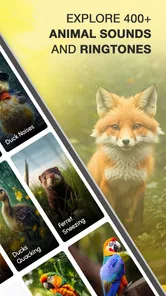
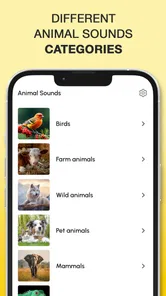
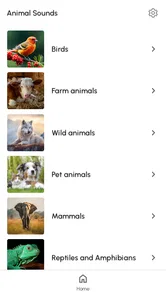
Upon launching the app, you’re greeted with a colorful and inviting interface, making navigation a breeze even for the youngest of users. The app categorizes sounds into different animal groups, such as mammals, birds, and aquatic creatures. This feature is particularly handy if you’re on the hunt for a specific sound. I found myself lost in the sea of sounds, exploring everything from the majestic roar of a lion to the playful squawks of a parrot.
Educational Yet Entertaining
One of the standout features of this app is its educational aspect. Each sound comes with a brief description of the animal, offering a quick learning opportunity. For parents, this is a goldmine for turning playtime into learning time. Imagine your little one not only having fun but also learning about the diverse animal kingdom. It’s like having a teacher in your pocket!
More From Our News Desk

 Weather - By Xiaomi
Weather by Xiaomi Review: Clear at a Glance, Less Clear Up Close
Xiaomi’s weather app makes everyday forecasts quick to scan, but its calm surface can leave useful details and recovery paths harder to find than they should be.

 X
XX Under Pressure: Can It Recover When Posting Goes Wrong?
A resilience-focused review of X, examining setup, mistaken posts, interruptions, weak connections, and the gaps that matter when recovery needs to be dependable.

 Clash of Clans
Clash of Clans Is Won Between the Battles
Its raids are quick; its community is a long-term project of coordination, teaching, rivalry, and shared responsibility—with all the friction that entails.

 Android Auto
Android Auto Makes the Case for Quieter Car Software
The car interface is no longer judged by how much it can do, but by how quietly it helps. Android Auto shows what drivers now expect—and what still gets in the way.

 MobiOffice: Word, Sheets, PDF
MobiOffice: Transforming Mobile Productivity with Seamless Integration
MobiOffice: Word, Sheets, PDF is redefining mobile productivity with a surprising blend of functionality and innovation.

 EA SPORTS FC Soccer Mobile 26
EA SPORTS FC™ Mobile Soccer: Redefining Mobile Sports Gaming
Dive into EA SPORTS FC™ Mobile Soccer, where immersive gameplay and strategic depth transform mobile sports gaming.
Latest News



To make that learning stick, I’d ask a child to guess the animal before revealing it, then replay the sound and compare it with the description. This works better than simply playing a long string of clips, especially for younger listeners who may lose focus. For adults, the same idea is a nice way to explore unfamiliar animal calls without expecting the app to provide a deep lesson on each species.
Settings worth checking before choosing a ringtone
When I’m considering an animal call as a ringtone, I listen for two things beyond whether I like it: how easily I can identify it and whether its character suits the moments when my phone may ring. A sound can be memorable without being comfortable at high volume. I’d try the candidate at the volume I normally use, then decide whether it would still feel welcome during a quiet conversation or a busy day.
It also helps to think about the difference between a ringtone and a notification sound. A distinctive call may be fun for an incoming call but too prominent for frequent alerts. I’d avoid assigning the same novelty sound to every phone event; otherwise, its usefulness as a recognizable cue disappears, and the sound may become irritating sooner. Keeping the phone’s own sound settings in mind makes the choice more deliberate.
Making the ringtone feature work for you
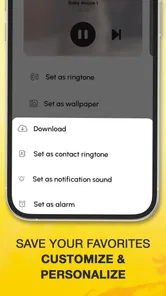
And let’s not forget the ringtone feature. Who wouldn’t want to wake up to the gentle coo of a dove or set a reminder with the trumpeting sound of an elephant? It’s a unique way to personalize your phone, and it definitely sets you apart from the mundane ringtones everyone else seems to have.
I’d be selective about where I use a distinctive animal tone. A loud or startling call may be funny at home but distracting in a shared office, classroom, or quiet waiting room. Before settling on one, listen to it at a comfortable volume and consider whether you’ll recognize it quickly among everyday notifications. A sound that makes you smile is not automatically the best choice for every alert.
Faster habits for repeat use
For someone who returns to the app often, the simplest time-saver is deciding what the visit is for before opening it. If I’m choosing a ringtone, I’d browse with that goal and stop once a sound feels suitable instead of auditioning everything. If I’m using it with a child, I’d pick a small theme—such as birds or mammals—and let the conversation guide which clip comes next. These are ordinary habits rather than hidden tools, but they prevent aimless browsing and make a short session feel complete.
A useful follow-up is to note mentally which animal sound worked well and which one felt too sharp or too easy to confuse with other alerts. That way, if I revisit the collection, I’m not starting from scratch. I’d also test a selected tone in the setting where it will actually be heard: a sound that seems amusing through a phone speaker in a quiet room may feel very different in a crowded place. The trade-off is that this takes a little attention up front, but it can prevent a novelty choice from becoming an everyday annoyance.
User-Friendly and Accessible
The app is remarkably user-friendly. You don’t have to be a tech whiz to navigate through its features. Whether you’re a kid or just young at heart, you’ll find it intuitive and easy to use. The sounds are crisp and clear, adding to the overall enjoyable experience.
If you’re mainly interested in customizing your phone, the practical question is whether you want animal calls specifically. The usual alternative is to keep a built-in tone or choose a song or general sound from another ringtone option; those may suit someone who wants a subtle alert or a familiar tune better. This app’s appeal is its more playful, nature-themed character, not a promise of studio editing or a highly configurable sound library.
Where it fits among other sound apps
Compared with a standard ringtone picker, this app is more entertaining to browse because the animal sounds give you a theme to explore, and the descriptions add a small learning angle. A general audio library or music-based ringtone option is more appropriate if you want a song, a conventional chime, or more control over shaping a sound. I see this app as a focused choice for people who enjoy animal calls, rather than a replacement for every audio-personalization tool on a phone.
That focus is useful when you want something memorable, but it also narrows the audience. Someone who only needs a quiet work ringtone may find the animal character unnecessary, while a person who wants detailed wildlife facts will outgrow the short descriptions. The best reason to try it is the combination of quick animal listening and playful personalization, not the expectation that it can serve as a reference library or an audio editor.
Settings and sensible limits
When choosing a tone, I’d check the phone’s own sound settings afterward: make sure the intended alert is assigned where you want it, and test it at the volume you normally use. Keeping one distinctive animal sound for a specific purpose can make it easier to recognize than assigning novelty sounds everywhere. The exact setup can depend on the device, so I treat the app as the source of the sound and the phone settings as the place to manage how it behaves.
There are trade-offs. Animal calls can become repetitive if you hear the same one often, and a playful tone may not fit every social or work setting. The brief descriptions are useful for casual learning, but anyone seeking detailed species information, recordings for research, or precise audio controls should look to a specialist resource instead. This is also not the right pick if you simply want a discreet, conventional ringtone.
For practical planning, I’d also consider how often a chosen call will play. A sound reserved for incoming calls may stay amusing longer than one used for frequent alerts. If the novelty wears off, changing back to a familiar phone tone is a sensible option; personalization should make the device more pleasant, not create a new distraction. The app is best approached as a source of choices, not a commitment to use an animal sound everywhere.
What to expect from the app and its cost
Peaksel Ringtones Apps makes this free Music & Audio app, which is rated for Everyone and has reached over a million installs. It has a 4.6 average from around 8,500 ratings, and its current version is 1.2.4. The app first appeared on November 28, 2023, and runs on Android 7.0 or later. Optional in-app purchases range from $0.99 to $44.99 per item, so I’d check the purchase details before paying for anything; the basic app is free.
The practical question is whether the free experience already matches what you want from it. If you’re only curious about animal calls or want to try a playful ringtone, there’s a low-commitment way to see whether the idea suits you. If an optional purchase is presented, I’d pause and confirm what it covers before proceeding rather than assuming it is necessary for ordinary listening or phone personalization.
Who will enjoy it most
I’d recommend it to families who want an easy listening activity, curious kids who enjoy matching sounds to animals, and anyone who wants a ringtone with a bit of personality. Its Everyone age rating suits a broad audience, though younger children will get more from it with an adult helping turn each sound into a conversation. If you prefer subtle alerts, need advanced audio tools, or want comprehensive wildlife reference material, a standard ringtone setting or a dedicated educational resource is likely a better fit.
It can also suit adults who like small, lighthearted ways to personalize a phone but don’t want to spend time editing audio. I’d skip it if my main goal were a carefully curated nature collection, a scientific learning resource, or a tone that blends into a professional setting. Those aren’t flaws so much as a reminder that the app’s strongest use is casual listening with the option of a more playful alert.
For a smoother repeatable routine, I’d keep browsing sessions short, choose one animal group at a time, and decide in advance whether the goal is play, learning, or selecting a tone. That avoids treating every sound as something to save or use and makes the app more purposeful. It’s a small distinction, but it helps this particular mix of listening and personalization feel less like random tapping.
Moreover, the app doesn’t bombard you with ads, which is a pleasant surprise. It’s all about enjoying the sounds without unnecessary interruptions. For those concerned about storage space, the app is lightweight and doesn’t hog your phone’s memory.
In conclusion, the app is a charming and practical addition to your mobile device. It’s not just about having fun; it’s about learning and enjoying the beauty of nature through sound. So, if you’re ready to embark on a sonic safari, this app is your ticket to the wild world of animal sounds. Give it a try, and I guarantee you’ll be hooked just like I was.
A balanced recommendation
My verdict is strongest for someone who wants a quick, cheerful animal-sound collection and might use one of its calls to make a phone alert feel less generic. It’s easy to imagine sharing a few clips at home, using the descriptions to start a conversation, or testing a single unusual ringtone for everyday use. Those small purposes suit the app better than expecting it to become a deep educational resource or a complete sound-customization suite.
I’d approach it with modest expectations and a little selectiveness: browse with a purpose, choose a tone that suits the places you spend time, and switch back to a conventional sound if the novelty stops being fun. If that sounds like your kind of lightweight entertainment, I think it’s worth trying. If you need precision, depth, or discretion above all else, another option will serve you better.
Animal Sounds and Ringtones Frequently Asked Questions
Who develops Animal Sounds and Ringtones, and what is the app’s focus?
Animal Sounds and Ringtones is a Music & Audio app from Peaksel Ringtones Apps. Its focus is straightforward: animal sounds that can also be used to personalize your phone’s audio. The app’s store description calls it “Ringtones gone wild!” and its short description is “Animal Sounds,” so it is aimed at people looking for animal-themed sound options rather than a general music player.
What features does the Animal Sounds and Ringtones app offer?
The Animal Sounds and Ringtones app offers a vast library of animal sounds, including domestic and wild animals. Users can customize their ringtones, alarms, and notifications with these sounds. The app also features a user-friendly interface, allowing easy navigation and selection of sounds. Additionally, it supports offline usage, meaning you can enjoy the sounds without an internet connection.
Is the Animal Sounds and Ringtones app free to download and use?
Yes, the Animal Sounds and Ringtones app is free to download and use. However, it may contain ads or offer in-app purchases to unlock premium features or remove advertisements. These purchases are optional, and users can still enjoy the core functionalities of the app without spending money. In-app purchases are listed from $0.99 to $44.99 per item, so check the purchase details before confirming anything.
Can I set animal sounds as my ringtone or notification sound on my phone?
Absolutely! The Animal Sounds and Ringtones app allows you to easily set any animal sound as your phone's ringtone, alarm, or notification sound. The app provides step-by-step instructions within its interface to ensure a seamless experience when customizing your phone's sound settings with your favorite animal noises.
Does the app work on both Android and iOS devices?
Yes, the Animal Sounds and Ringtones app is designed to be compatible with both Android and iOS devices. Users can download it from the Google Play Store for Android devices and the Apple App Store for iOS devices. The app is optimized to provide a smooth user experience across different platforms and devices.
Pros
- Wide variety of animal sounds available.
- Easy-to-use interface for all ages.
- High-quality audio for clear sound.
- Supports setting sounds as ringtones.
- Frequent updates with new sounds.
Cons
- Contains ads that can be intrusive.
- Limited customization options.
- Requires internet for some features.
- Some sounds may not loop smoothly.
- May drain battery quickly on use.











