

ALGO Traffic
- 20.00
- 4.1
- Installs
- 10.00K
- Price
- Free
Screenshots
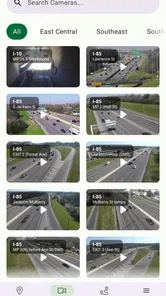
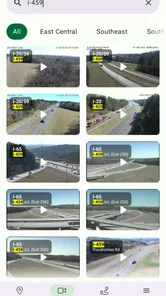
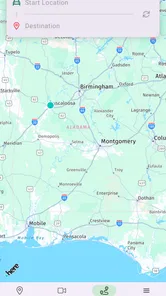
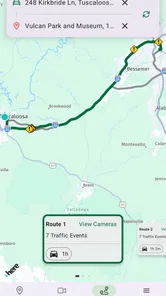

Analysis by Reviewed
I found ALGO Traffic most useful when I treated it as a focused Alabama road-awareness tool rather than a complete replacement for a general navigation service. Developed by the Alabama Dept of Transportation, this free Maps & Navigation app puts state-level traffic information in a compact mobile format. Its main appeal is straightforward: when I want to understand what is happening on Alabama roads, I would rather start with information connected to the state transportation department than rely only on a broad map app that covers everything from restaurants to walking routes.
That focus is also the reason I would not recommend it to everyone. If you need turn-by-turn directions across several states, offline route planning, or a single app for every kind of journey, a mainstream navigation platform will probably remain more convenient. ALGO Traffic makes more sense as a practical companion for Alabama drivers, commuters, travelers, and anyone checking road conditions before setting out.
What the app does well in everyday use
The strongest part of the experience is its purpose. The app is built around access to ALDOT information, so it feels more like a direct window into state transportation updates than a general-purpose map with a traffic layer added on. That distinction matters when a driver is deciding whether to leave now, delay a trip, or take a different route through Alabama.
I can imagine using it before a morning commute rather than waiting until I am already stuck. A quick check before leaving gives me a chance to compare the expected drive with what is happening on the roads. The same habit is useful before a longer weekend journey: I would check the route while still at home, note any trouble areas, and then use my usual navigation app for the actual directions if necessary.
The practical strength is specialization: ALGO Traffic is designed around Alabama transportation information, not around trying to be a universal digital travel assistant. That narrower mission can make the app easier to understand when the question is simply, “What should I know about the roads before I go?”
It is also a sensible option for people who prefer official state sources. Information from the Alabama Dept of Transportation has a different value from crowd-sourced reports alone. Community reports can be fast and helpful, but they depend on someone noticing an incident and submitting it. A state-focused service gives the user a more direct place to look for transportation information associated with Alabama’s road network.
One useful workflow is to separate checking from navigating. I would open ALGO Traffic before the trip to get a state-specific picture, then switch to a familiar navigation app only if I needed detailed spoken guidance or a route recalculated around changing conditions. That two-app approach may sound less convenient than using one service for everything, but it gives each app a clearer job and avoids expecting ALGO Traffic to behave like a full navigation suite.
More From Our News Desk

 Weather - By Xiaomi
Weather by Xiaomi Review: Clear at a Glance, Less Clear Up Close
Xiaomi’s weather app makes everyday forecasts quick to scan, but its calm surface can leave useful details and recovery paths harder to find than they should be.

 X
XX Under Pressure: Can It Recover When Posting Goes Wrong?
A resilience-focused review of X, examining setup, mistaken posts, interruptions, weak connections, and the gaps that matter when recovery needs to be dependable.

 Clash of Clans
Clash of Clans Is Won Between the Battles
Its raids are quick; its community is a long-term project of coordination, teaching, rivalry, and shared responsibility—with all the friction that entails.

 Android Auto
Android Auto Makes the Case for Quieter Car Software
The car interface is no longer judged by how much it can do, but by how quietly it helps. Android Auto shows what drivers now expect—and what still gets in the way.

 MobiOffice: Word, Sheets, PDF
MobiOffice: Transforming Mobile Productivity with Seamless Integration
MobiOffice: Word, Sheets, PDF is redefining mobile productivity with a surprising blend of functionality and innovation.

 EA SPORTS FC Soccer Mobile 26
EA SPORTS FC™ Mobile Soccer: Redefining Mobile Sports Gaming
Dive into EA SPORTS FC™ Mobile Soccer, where immersive gameplay and strategic depth transform mobile sports gaming.
Latest News



A better pre-trip routine
For a regular commuter, the most effective use is not repeatedly staring at the app while driving. I would check it before leaving, especially on days when weather, construction, a major event, or an unfamiliar route could change the journey. If something looks concerning, I would decide on a backup before starting the car instead of making that decision while moving.
For occasional travelers, the app can serve as a state-specific second opinion. Suppose I were driving across Alabama to visit family. I would first plan the broad route in my normal map app, then use ALGO Traffic to inspect the Alabama portion separately. That approach is valuable because it keeps the state transportation view in the decision-making process without forcing me to abandon tools I already know.
There is another small but important benefit to this workflow: it encourages realistic expectations. Traffic information changes, and no app can guarantee that a road will remain clear for the entire trip. I would use the app to improve my starting decision, not to assume that every later delay has already been predicted.
Where it fits beside familiar alternatives
Compared with a general navigation app, ALGO Traffic is narrower but potentially more relevant for Alabama-specific checking. General services usually win when I need address search, route options, voice instructions, live rerouting, business information, or a journey that crosses state lines. They are built to guide me from one place to another.
ALGO Traffic has a different advantage: it gives the state transportation perspective a dedicated place on my phone. That can be more useful than opening a broad map and hoping its traffic display answers a state-road question clearly. In my view, the choice is not necessarily either-or. Drivers who travel often in Alabama may get the best result by using ALGO Traffic for situational awareness and their preferred navigation tool for route execution.
It also compares differently with social or crowd-sourced traffic apps. Those alternatives can offer a lively stream of driver observations, but they may be uneven depending on how many people are reporting in a particular area. ALGO Traffic is the better fit for someone who values a transportation-department source and does not want the experience to depend entirely on community activity.
The trade-off is that a specialized app may feel less complete. If I open it expecting the same breadth as a large mapping platform, I may find the experience limited by comparison. That is not necessarily a flaw in its intended role, but it is something to understand before installing it.
The limitation that matters most
The biggest weakness is the narrow scope. ALGO Traffic is not the app I would choose as my only travel tool. A driver who wants one place for directions, destination discovery, route planning, and traffic avoidance may become frustrated if the app does not cover every part of that broader routine in the same way as a major navigation service.
There is also a practical friction in using a dedicated traffic app alongside another navigation app. Switching between services adds a step, and some people will decide that the convenience of a single familiar platform matters more than a separate state-focused view. For a casual driver who rarely travels beyond a predictable local route, installing another app may not feel worthwhile.
I would also avoid treating any traffic display as a promise. Conditions can change between checking the app and reaching the road. The responsible habit is to review information before departure, keep attention on driving, and follow posted signs and official instructions once on the road. The app can support a decision; it cannot remove the uncertainty from travel.
Another consideration is audience. Someone who lives outside Alabama and only passes through once may prefer the tools already installed on the phone. The value of a dedicated Alabama traffic resource becomes clearer for residents, frequent visitors, commercial drivers working in the state, and commuters whose routes regularly depend on Alabama roads.
Who will get the most from it
I would recommend ALGO Traffic first to Alabama residents who want a quick state-focused check before commuting. It is also a good candidate for people who regularly drive between Alabama cities, travel on unfamiliar state roads, or want an official transportation source available without searching through a general website each time.
It may be particularly helpful for households with different drivers and different levels of route familiarity. A parent checking a teenager’s planned drive, a worker preparing for an early commute, or a traveler organizing a long day on the road can use it as one part of a simple preparation routine. The app does not need to replace every other tool to be useful; it only needs to answer the traffic-information question efficiently.
On the other hand, I would suggest skipping it if your main requirement is detailed navigation rather than traffic awareness. If you need turn-by-turn guidance as the central feature, a full navigation app is likely the better first installation. I would also skip it if you almost never drive in Alabama, because the app’s regional focus will have little practical value elsewhere.
Compatibility, cost, and current position
The app is free, carries an Everyone content rating, and supports devices running Android 8.0 or later. Those requirements make it accessible to many Android users, although anyone with an older phone should check compatibility before planning around it. The lack of a purchase price also makes it easy to test without committing money, which is useful for deciding whether a dedicated Alabama traffic tool fits your routine.
Its current version is 3.1.5, and the app was released on February 26, 2025. I would still keep expectations grounded: a recent release and an updated version can make an app feel current, but they do not automatically make it the best match for every driver. The real question is whether you value its state-specific purpose enough to include it in your travel habits.
Public interest appears modest but meaningful. The app has more than ten thousand installs, an average rating of 4.1 from dozens of ratings, and twenty reviews. I would read that as a sign that it has found a real audience without treating the rating as a guarantee. With a relatively small review pool, my own judgment would depend more on whether I regularly need Alabama road information than on the number alone.
Small habits that make the app more useful
First, I would check it at two different moments on a significant trip: once while planning and again shortly before departure. The first check helps shape the route or departure time; the second catches changes that occurred while I was getting ready. I would not keep refreshing it during the drive, because that creates distraction and does not improve safe decision-making.
Second, I would use it to confirm assumptions rather than only react to problems. If my usual commute normally takes the same route, a quick pre-trip look can tell me whether “normal” is a reasonable expectation today. That is more useful than opening the app only after traffic has already caused a delay.
Third, I would pair it with a written backup plan for unfamiliar journeys. Before leaving, I would identify a reasonable alternate road in my navigation app and remember the general direction, rather than depending on a last-second reroute. ALGO Traffic can inform that preparation, while the navigation app can handle the detailed instructions.
Finally, I would judge the app over several real trips instead of one glance. Traffic tools are most valuable when they become part of a repeatable routine. After using it for a week of commutes or a few longer drives, I would know whether the state-focused information actually changes my decisions or merely duplicates what I already receive elsewhere.
My verdict for Alabama drivers
ALGO Traffic is a focused, sensible app with a clear role. I like it because it does not need to pretend to be an all-purpose map: its value comes from giving Alabama road information a dedicated home on a phone. For the right user, that focus is more useful than another overloaded navigation screen.
My recommendation is strongest for Alabama residents, frequent in-state drivers, and travelers who want to check transportation information before relying on a broader navigation service. I would install it as a companion, not automatically as my only driving app. If your needs center on directions and destination search, choose a full navigation platform first. If your priority is a state-specific traffic check, this free app is worth trying.
In short, ALGO Traffic works best when used before the journey: check the road situation, make a calmer plan, and then drive with the appropriate navigation tool if you need more detailed guidance. That is a modest role, but it is a useful one, and the app earns its place for anyone whose daily routes depend on Alabama roads.
ALGO Traffic Frequently Asked Questions
Who develops ALGO Traffic, and who is it intended for?
ALGO Traffic is a Maps & Navigation app developed by the Alabama Department of Transportation. It is intended for people who want to check traffic information and road conditions in Alabama, particularly before setting out or while planning a journey. Its focus is practical travel awareness rather than entertainment, so it may be most useful to drivers who want to review road disruptions as part of their trip preparation.
What is ALGO Traffic, and what does it do?
ALGO Traffic is a traffic-information app designed to help drivers check current road conditions, congestion, incidents, construction activity, closures, and other travel disruptions. After exploring the app, its main value is giving users a quick overview of what is happening on nearby roads before or during a journey. Coverage and available features can vary depending on the region supported by the service.
Does ALGO Traffic provide live traffic updates and road cameras?
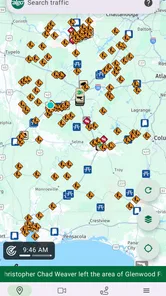
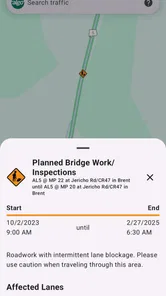
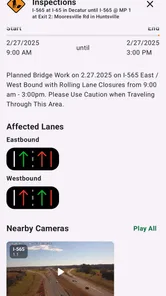
The app is intended to display updated traffic information, which may include incidents, congestion levels, roadwork, closures, and traffic camera views where those services are available. However, users should remember that traffic data is not always instantaneous. Updates depend on information supplied by transportation agencies and other sources, so conditions may change between the time an alert appears and when you reach the location.
Can ALGO Traffic help me plan a route or avoid traffic jams?
ALGO Traffic can be useful for checking the roads along a planned trip and identifying possible delays before leaving. It is particularly helpful when comparing major routes, viewing reported incidents, or checking whether construction and closures could affect your journey. It should not be treated as a complete replacement for a dedicated navigation app, since routing, turn-by-turn directions, and alternate-route suggestions may be limited.
Is ALGO Traffic free to download and use?
ALGO Traffic is free to download, allowing users to access the traffic information provided through the service without purchasing a subscription. Normal mobile data charges may apply when loading maps, alerts, or camera images, depending on your mobile plan. If you are comparing apps before downloading, its free price makes it straightforward to try, while data use is worth keeping in mind when checking information away from Wi-Fi.
Pros
- Provides real-time traffic updates for informed route planning.
- Helps identify congestion and potential delays before starting a trip.
- Useful for commuters who regularly travel through busy areas.
- Clear traffic information can make driving decisions easier.
- May help users save time by avoiding heavily congested roads.
Cons
- Accuracy can vary when traffic data is delayed or incomplete.
- Requires location access for the most useful traffic information.
- Frequent GPS use may increase battery consumption.
- Coverage and update quality may differ between regions.
- Limited value in areas with little traffic or sparse road data.











