Alarm.com
- 11.30K
- 4.1
- Installs
- 1.00M
- Price
- Free

Screenshots
Analysis by Reviewed
When I think about whether a home-security app is worth keeping on my phone, I start with a simple question: does it make a real task easier, or does it just give me another screen to check? Alarm.com makes the most sense as a companion to an Alarm.com security setup, bringing check-ins and connected-home controls into one place. Its value depends less on the download itself than on what system and equipment you already use.
Cost: free to download, not a complete cost picture
Alarm.com is a free Lifestyle app from Alarm.com Mobile, so downloading it does not carry an app price. I would keep that point separate from the cost of using the security setup itself: the app is a way to interact with a system, not proof that the system or its services are free. If you are considering it, check what access your particular Alarm.com arrangement includes before treating the zero app price as the whole cost.
That distinction matters when comparing it with a standalone smart-home app. A free controller can be useful, but the value depends on whether you already have compatible equipment and access to the Alarm.com system. If you are starting from scratch and only want to switch a few lights, a simpler device-specific app may be the more direct choice.
It is rated for Everyone, which makes the age suitability straightforward for households choosing an app to install. That does not mean every control is appropriate for every family member: I would still agree on who can manage security settings and who should simply use the app for everyday check-ins. The relevant access should match each person’s role at home.
Bringing security and home controls together
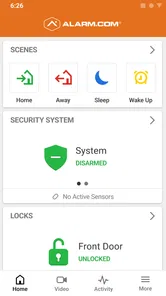
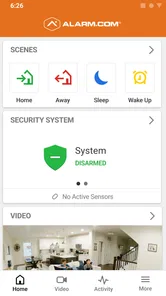
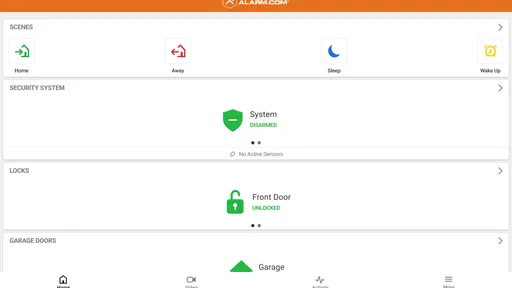
The first thing that caught my eye with this app is its ability to seamlessly integrate with a wide array of smart home devices. Whether it's your security cameras, lights, locks, or thermostats, Alarm.com brings all these elements together under one roof. Imagine being able to control your entire home with just a few taps on your smartphone. It's like having a remote control for your house!
Security check-ins that have a purpose
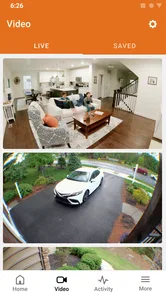
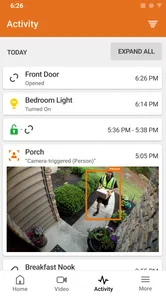
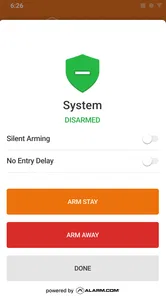
Now, let's talk about what truly sets Alarm.com apart—its security features. The app offers real-time alerts and live video feeds, allowing you to keep an eye on your home no matter where you are. Whether it's a delivery at your doorstep or an unexpected visitor, you can see it all. The app also provides tamper-resistant technology, which ensures that your security system remains operational even if someone tries to disable it. This gives you peace of mind, knowing that your home is protected 24/7.
What the security workflow is good for
I find the alerts most useful when they help answer a practical question quickly: is someone at the door, or does a household event need my attention? A short check-in can be more useful than repeatedly opening a camera feed without a reason. For a delivery, for instance, I would look at the alert, check the available view, and then decide whether I need to take another step. That makes the app a companion to a security routine, rather than a substitute for thinking through one.
More From Our News Desk

Weather by Xiaomi Review: Clear at a Glance, Less Clear Up Close

X Under Pressure: Can It Recover When Posting Goes Wrong?

Clash of Clans Is Won Between the Battles

Android Auto Makes the Case for Quieter Car Software

MobiOffice: Transforming Mobile Productivity with Seamless Integration

EA SPORTS FC™ Mobile Soccer: Redefining Mobile Sports Gaming
There is a trade-off here: notifications only help if they are relevant and you notice them. I would take time to understand which alerts matter to me and avoid treating every notification as urgent. If several people share responsibility for the home, agreeing on who responds to which kinds of alerts can also prevent duplicate checks or confusion. The app is most valuable when it supports a clear household plan.
Convenience without handing everything over to automation
Besides keeping your home safe, Alarm.com makes life a lot more convenient. With its easy-to-use interface, you can automate everyday tasks like turning off lights or adjusting the thermostat. You can even set schedules for your devices, ensuring that your home runs smoothly even when you're not around. It's like having a personal assistant that never takes a day off!
Schedules and location-based actions suit different habits. A schedule is predictable, so it can be a better fit for a regular weekday routine; a location-based action can respond to an irregular departure or return. I would start with one low-stakes task, such as a light, and observe how it behaves before relying on an automated action tied to leaving home. That small test helps reveal whether the routine matches how everyone in the household actually moves around.
For example, if I leave in a rush, I can use a location-based routine as a useful reminder layer instead of relying on memory alone. But I would still check the app when a door or security setting matters; automation should reduce friction, not create a reason to assume everything happened exactly as intended. That is a sensible balance between convenience and control.
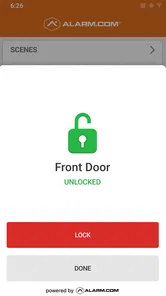
One of the coolest features is the geo-services function. This nifty tool uses your phone's location to automatically perform tasks as you come and go. Forgot to lock the door? No worries, Alarm.com has got your back. This feature ensures that your home is always secure, even if you happen to forget.
A realistic day-to-day routine
Picture a weekday when I leave home in a hurry and later remember that a delivery is due. I can use a location-based routine for a low-risk task, then check an alert when the delivery arrives and open the available live view if I need more context. The useful part is the sequence: automation handles a routine action, while the alert gives me a reason to look. I would not assume the routine succeeded without checking when the outcome matters.
That distinction also helps avoid overusing the app. I would not open it every few minutes just because I can; a few deliberate check-ins tied to real events are more useful than constant monitoring. For a household with more than one person handling arrivals, a shared plan about who checks a notification can keep the workflow calm rather than turning every alert into a group interruption.
How it compares with separate device apps
Compared with a collection of separate apps for a camera, lock, and lights, the appeal here is having security and home controls together instead of jumping between tools. That joined-up approach is particularly useful if the security system is the center of your setup. On the other hand, someone who owns only one brand of connected bulb or thermostat may find that brand's own app more focused and easier to manage. The better fit depends less on a long feature list than on what equipment and system access you already use.
Another practical point is that remote control is only helpful when the device and the connection are available at the moment you need them. I would not build a household safety plan around a phone app alone. Keep normal habits in place, and use the app as an extra way to check in or manage connected equipment. That is a more realistic expectation than treating any one app as a guarantee.
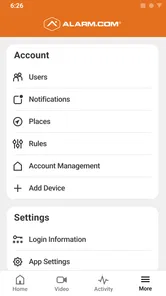
Another aspect worth mentioning is the app's user-friendly design. Navigating through the app is a breeze, and setting up devices is straightforward, even for those who aren't tech-savvy. This makes it accessible to a wide range of users, from tech enthusiasts to those just starting with home automation.
Small setup choices that can prevent frustration
Before depending on a particular workflow, I would test it at a time when there is no pressure. Try a routine while you are at home, confirm that the intended device responds, and see whether the resulting alert is clear enough to act on. This is especially sensible for location-based actions, where the household’s real comings and goings may not match a tidy schedule. A trial run can show whether a routine needs adjusting before it becomes part of a daily habit.
I would also think carefully about which events deserve attention. If every minor change produces a prompt, important alerts can become easier to overlook. The useful goal is not to turn on every notification, but to make the app’s messages fit the way the household actually responds. That is a practical trade-off: a little time spent deciding what matters can make check-ins less distracting.
Who is likely to get the most value?
I would recommend it most to someone who already relies on an Alarm.com security setup and wants a convenient way to check in while away, with home controls gathered alongside it. A household member who handles deliveries, lets in a visitor, or checks the home during a commute may appreciate having those tasks in one place. The app is less compelling if you do not use the relevant system, have no compatible devices, or simply want a basic control for a single smart product.
It is also a better fit for people who are comfortable treating an app as one part of a broader home routine. If you want a dedicated view for a single camera, or only need to adjust one thermostat, a simpler manufacturer app can mean fewer screens and less setup. If you are choosing a security arrangement from scratch, compare the overall system and access that suit your home rather than selecting on the basis of a free download alone.
Alarm.com is rated for Everyone, and its established presence is reflected in a 4.1 average from around 37,000 ratings, with over a million installs. Those figures can offer a little context, but they cannot tell me whether the app matches your equipment or your preferred routine. For that, the useful question is whether you can sign in to the system you already use and whether its controls cover the jobs you actually need.
So, can you use it without an Alarm.com setup? I would not choose it on the assumption that the app itself supplies a complete security service; its purpose is to connect with a system and equipment you use. Does the free price mean there are no other costs? No—the download is free, while the cost of the related setup or services is a separate matter to check for your own arrangement. Those are the two questions I would settle before building a routine around it.
Final Thoughts
In conclusion, if you're looking to enhance your home security while adding a layer of convenience to your daily routine, Alarm.com is a top contender. Its comprehensive features, ease of use, and reliable performance make it a standout choice for anyone serious about smart home technology. So why wait? Give Alarm.com a try and experience the future of home security and automation today!
My verdict is more specific: I would try it when it connects to a security setup I already use, because the free app can make everyday check-ins and routine controls easier to reach. I would skip it if I am shopping for an all-in-one security service based on the app price alone, or if a simpler, single-device tool already covers my needs. The real value is the convenience of managing a connected home through one familiar place—not a promise that every system or service comes at no cost.
Alarm.com Frequently Asked Questions
Can I use Alarm.com on both Android and iOS?
Alarm.com is a mobile app for people who want to check in on an Alarm.com security system. Before downloading, confirm that you are choosing the version available for your phone’s operating system. The app is free to download, but using its connected features depends on having access to an Alarm.com system and the associated service.
Who is Alarm.com intended for?
Alarm.com is most useful for people who already use an Alarm.com security system or are considering one. Its purpose is to let users check in on that system through a mobile app, so it is not a general-purpose home security app for every household. If you are researching it before installation, first consider whether you expect to use an Alarm.com service.
Is Alarm.com free to download, and what should I know before installing it?
Alarm.com is a free lifestyle app from Alarm.com Mobile, intended for people who use an Alarm.com security system. Downloading the app is only one part of getting started: the service is designed to connect with a system and its associated services. The app has an Everyone content rating, so its store age classification is suitable for all audiences.
What is Alarm.com and how does it work?
Alarm.com is a comprehensive home security and automation app that integrates with various smart devices to provide a centralized control system. It allows users to monitor and manage security systems, cameras, and home automation devices, all from a single platform. The app provides real-time alerts, remote control capabilities, and seamless integration with devices like thermostats, lights, and door locks, enhancing home security and convenience.
Is Alarm.com compatible with my smart home devices?
Alarm.com is designed to be highly compatible with a wide range of smart home devices. It supports integration with devices from leading brands such as Google Nest, Amazon Echo, and Z-Wave. Users should check the compatibility list on Alarm.com’s website to ensure their specific devices are supported. This broad compatibility helps users build a more cohesive and automated smart home system.
Pros
- User-friendly interface
- Real-time alerts
- Remote control of devices
- Customizable settings
- Energy management features
Cons
- Requires subscription
- Limited integrations
- Occasional app crashes
- Slow customer support
- Complex initial setup











