

Air Traffic - flight tracker
- 3.00K
- 4.5
- Installs
- 5.00M
- Price
- Free

Screenshots

Analysis by Reviewed
I like flight-tracking apps most when they answer a real question, not just when a moving plane on a map catches my eye. Air Traffic - flight tracker is built around that simple appeal: it lets me look across the sky, follow aircraft, and connect a flight’s movement with the journey happening on the ground. The first few sessions are naturally absorbing, especially if I enjoy travel or aviation, but the more useful test is whether I still open it once the novelty wears off.
A practical way to try it is to start with a flight you already know about: a family member’s trip, an upcoming journey, or aircraft passing near home. That gives the map a purpose and helps me judge whether the information is useful for my needs. For someone meeting a traveler, it can provide context while they are en route; for someone who simply enjoys aircraft, it turns an ordinary look at the sky into a chance to follow where planes are going.
From first look to a lasting habit
Air Traffic - flight tracker is a free Maps & Navigation app from scoutant.org. It has a 4.5 average from around 135,000 ratings, and more than five million installs. It is rated for Everyone, with version 23.6 and a minimum operating-system requirement of 11. Those details make it an accessible option for many people, though the value still depends on whether checking air traffic fits naturally into their routine.
The first-week appeal: a map with a purpose
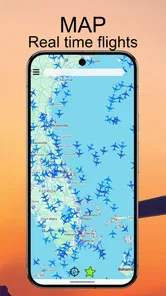
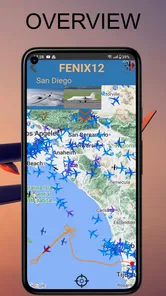
When I first downloaded Air Traffic - flight tracker, I was immediately intrigued by its sleek and intuitive interface. The main screen greets you with a dynamic map, displaying live air traffic updates. You can easily zoom in and out to focus on specific regions or airports. For someone like me who loves to travel and has a keen interest in aviation, this app felt like a window to the skies.
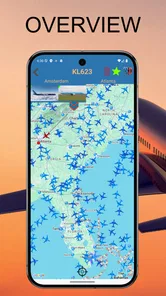
That map is also a useful starting point for deciding how to use the app rather than simply browsing without a goal. I can focus on a particular area, then search for a flight or airport when I have a specific question. If I am checking on someone’s journey, I would treat the map as a helpful view of the trip, not as a replacement for an airline’s own updates when I need to make a decision about pickup plans.
What keeps it useful after the novelty
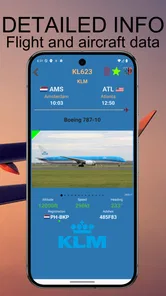
The app offers a plethora of features that make it stand out. One of the most impressive aspects is the real-time flight tracking, which allows you to follow any flight as it traverses the globe. You can tap on any airplane icon to view detailed information such as the airline, aircraft type, altitude, speed, and estimated time of arrival. This feature is particularly useful for those who want to keep tabs on their loved ones' flights without having to constantly check airline websites.
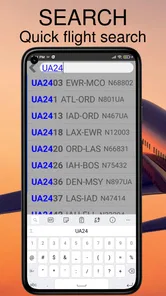
For a more dependable everyday workflow, I would search for the flight or airport I care about instead of repeatedly scanning a crowded map. A live map is engaging, but a focused search makes it easier to answer a practical question: is the aircraft still moving toward its destination, or should I check the airline’s own service for a schedule change? This distinction matters because a tracker is most useful as a quick source of situational awareness, not as the final authority for every travel arrangement.
More From Our News Desk

 Weather - By Xiaomi
Weather by Xiaomi Review: Clear at a Glance, Less Clear Up Close
Xiaomi’s weather app makes everyday forecasts quick to scan, but its calm surface can leave useful details and recovery paths harder to find than they should be.

 X
XX Under Pressure: Can It Recover When Posting Goes Wrong?
A resilience-focused review of X, examining setup, mistaken posts, interruptions, weak connections, and the gaps that matter when recovery needs to be dependable.

 Clash of Clans
Clash of Clans Is Won Between the Battles
Its raids are quick; its community is a long-term project of coordination, teaching, rivalry, and shared responsibility—with all the friction that entails.

 Android Auto
Android Auto Makes the Case for Quieter Car Software
The car interface is no longer judged by how much it can do, but by how quietly it helps. Android Auto shows what drivers now expect—and what still gets in the way.

 MobiOffice: Word, Sheets, PDF
MobiOffice: Transforming Mobile Productivity with Seamless Integration
MobiOffice: Word, Sheets, PDF is redefining mobile productivity with a surprising blend of functionality and innovation.

 EA SPORTS FC Soccer Mobile 26
EA SPORTS FC™ Mobile Soccer: Redefining Mobile Sports Gaming
Dive into EA SPORTS FC™ Mobile Soccer, where immersive gameplay and strategic depth transform mobile sports gaming.
Latest News



Another great feature is the airport information section. Air Traffic - flight tracker provides details about arrivals, departures, and even gate numbers for major airports. This is a lifesaver when you're planning a trip or waiting for someone at the airport. The app also offers weather updates, ensuring that you're aware of any potential delays due to adverse conditions.
For example, if I am collecting a friend after work, I can check the flight while deciding when to leave, then use the airport details to get a clearer sense of what is happening at the destination. I would still confirm important changes through the airline or airport, especially before changing a pickup time: live tracking can add context, but it should not be treated as a promise that a gate or arrival plan will stay fixed. That is a sensible trade-off for any map-centered tracker.
Ease of use, and where it can feel busy
Navigating through the app is a breeze. The developers have done a fantastic job in organizing the features, making it easy for anyone to use, regardless of their tech-savviness. I particularly like the search function, which allows you to quickly find specific flights or airports. The app's performance is generally smooth, with minimal lag even when viewing high-traffic areas.
The map is also where the app’s strengths and limits meet. When many aircraft are visible, there is plenty to explore, but that activity can make a casual glance less focused. I find it more useful to zoom toward the airport or region that matters, then select a plane for its details, rather than trying to make sense of every symbol at once. People who want a simple arrival time without any aviation context may find an airline’s flight-status screen quicker and less distracting.
In terms of visuals, the app uses a combination of realistic and simplified graphics to represent aircraft and flight paths. This strikes a nice balance between being informative and not overwhelming the user with too much detail. The color scheme is easy on the eyes, which is important for an app that you might be using for extended periods.
Compared with the usual alternatives, Air Traffic - flight tracker is better suited to people who want a broad view of planes and their routes than to travelers who only need one airline’s latest trip notice. Airline apps are often the more direct place to check details tied to a specific booking; this app’s appeal is the wider map and the ability to explore aircraft around a flight. I would keep it for curiosity and context, and use the airline as a second check for time-sensitive arrangements.
Making a useful check part of an ordinary day
A realistic routine might be checking a relative’s flight before leaving home to collect them. I would search for the flight first, inspect its progress, and then look at the destination airport rather than leave the map open as a live dashboard. That gives me a reason to return only when the trip is relevant, and helps avoid the false impression that a moving aircraft icon alone confirms a final arrival time. For an important pickup, I would still agree on a meeting point directly with the traveler.
There is also a quieter use for people who live near a busy airport or enjoy recognizing aircraft overhead. Instead of treating every plane as an event, I can use the map to identify a particular aircraft when curiosity strikes, then close the app once I have the detail I wanted. That brief, intentional visit is more sustainable than continually refreshing a map without a question in mind. It turns the app into a small reference tool rather than another feed competing for attention.
One practical tip is to decide what you need before opening it: a specific flight, activity around an airport, or a general look at traffic in an area. Search is more useful than scanning when the goal is narrow, while zooming out makes sense when I want the broader picture. Switching between those approaches keeps the map from becoming visual noise and makes the app easier to revisit after the initial excitement has passed.
Month-to-month value and the long-term verdict
The app has the strongest chance of earning a lasting place for someone who naturally checks flights more than once in a while: frequent travelers, people who regularly meet arriving passengers, and aviation fans who enjoy following routes. For occasional travel, it can still be handy around departure and arrival days, but I would not expect it to become a daily essential if I rarely have a flight to follow. Its free price makes trying that routine straightforward, while the real question is whether the map and flight details solve a recurring need.
Its long-term value is therefore tied less to how many planes it can show at once and more to whether it answers a question I actually have. A traveler who takes a few trips a year may install it before a journey, use it to understand the route, and then leave it untouched for weeks. That is not a failure; it is simply a specialist tool whose usefulness comes in bursts. Someone who follows several people’s flights or enjoys watching regional traffic has more reason to return regularly.
The main maintenance burden is modest in the sense that the app does not demand a complicated routine: I can open it when a flight matters and leave it alone otherwise. The more important upkeep is mental. I have to remember that a live map and estimated arrival information are useful context, not a substitute for direct communication or official updates when plans are changing. Keeping that boundary clear prevents the tracker from creating extra worry instead of reducing it.
There are a few reasons it might not become a fixture. If I only want a notification about my own booking, an airline app is a more focused companion. If I do not travel, meet arriving passengers, or care about aircraft, the map may be interesting for a short spell but offer little recurring value. And if a dense view of traffic feels distracting, the broad overview that makes this app appealing to aviation fans may be more information than I want.
Air Traffic - flight tracker is a robust and feature-rich app that delivers on its promise of providing real-time flight tracking. Whether you're an aviation enthusiast, a frequent traveler, or someone who simply wants to keep an eye on flight schedules, this app is a fantastic tool. It's easy to use, packed with useful features, and offers a unique glimpse into the world of aviation. So, if you haven't already, give it a try and let your curiosity take flight!
My lasting recommendation is a little more specific: I would keep it installed if I regularly follow flights, enjoy exploring the air traffic around a place, or want a convenient map to consult alongside official travel updates. If I only need a firm gate or schedule notice, I would reach for the airline or airport instead. Used for the right job, the app offers more than a brief novelty; used as a substitute for every travel source, it can create unnecessary second-guessing.
Air Traffic - flight tracker Frequently Asked Questions
Can I use Air Traffic - Flight Tracker to follow a flight before picking someone up?
Air Traffic - Flight Tracker is intended for exploring aircraft and flight activity on a map, so it may be useful when you want to check on a flight’s progress before heading to meet someone. Keep in mind that the app’s stated focus is live planes on a map, and you should confirm time-sensitive travel arrangements with the airline or airport as well.
Does Air Traffic - Flight Tracker show photos of aircraft?
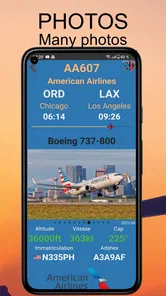
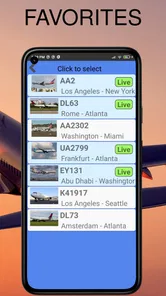
Yes. Plane photos are one of the app’s highlighted features, alongside a map showing live planes. This can add a visual reference while you browse aircraft and air traffic. If you enjoy aviation or want to connect the planes shown on the map with what they look like, the photo feature is a useful part of the experience.
Can I use Air Traffic - Flight Tracker without aviation experience?
Yes. The app is a flight tracker with live planes displayed on a map, so its main idea is straightforward even if you are new to aviation. You can explore aircraft movement visually and browse plane photos without needing specialized knowledge. It is best approached as a map-based way to follow air traffic rather than as a tool for making travel arrangements.
What should I check before downloading Air Traffic - Flight Tracker?
Air Traffic - Flight Tracker is a free Maps & Navigation app for viewing live planes on a map and exploring plane photos. Before downloading, check that your device meets the platform requirements and consider whether a flight-tracking map suits what you need. The app is intended for viewing air traffic, not for booking tickets or managing a reservation.
Can Air Traffic - Flight Tracker help me identify planes around me?
Yes. Air Traffic - Flight Tracker presents live planes on a map, making it useful for exploring air traffic in an area and seeing where aircraft are moving. The app also features plane photos, which can make aircraft easier to recognize while browsing. It is a flight-tracking tool in the Maps & Navigation category, rather than a service for booking or changing flights.
Pros
- Real-time flight tracking
- Global coverage of flights
- User-friendly interface
- Detailed flight information
- Customizable alerts
Cons
- Requires internet connection
- Some features are premium
- Occasional data lag
- Limited offline functionality
- Ads in free version











