AiDot – Smart Home Life
- 880.00
- 3.8
- Installs
- 500.00K
- Price
- Free

Screenshots

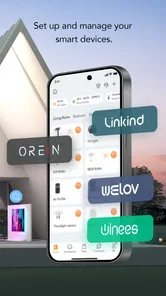
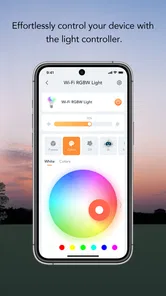
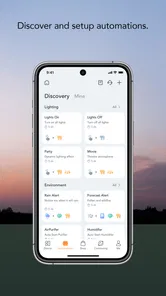
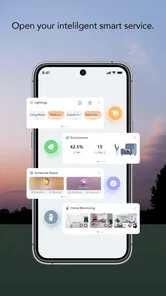
Analysis by Reviewed
I approached AiDot – Smart Home Life as a practical lifestyle app rather than something to open once and forget. Its job is to bring compatible home devices into a more manageable routine, with an emphasis on making connected spaces feel more colorful and secure. That sounds simple, but the real value depends on whether your devices fit its ecosystem and whether you are willing to spend a little time organizing the setup.
In my experience, the app makes the most sense for someone who already owns supported smart-home products or is building a room around connected lighting and related devices. It is free, aimed at Everyone, and developed by AiDot Inc, so the barrier to trying it is low. The more important question is not the price; it is whether the app can replace several separate controls with a routine that you will actually use every day.
Building a dependable everyday workflow
The best way to start is with a deliberately small setup. I would not begin by adding every device in the house and trying to create an elaborate system immediately. Adding the products you use most often first gives you a clearer view of how AiDot fits your habits. A bedroom light, a living-room device, or another frequently used product is enough to test the basic experience without turning setup into a project.
Once the main device is available in the app, I find it useful to think in terms of moments rather than individual controls. Instead of asking which light to change, ask what you are doing: waking up, settling down in the evening, watching something, or leaving home. This approach makes a smart-home app easier to live with because the goal is not to admire a list of devices. The goal is to reduce small decisions.
A realistic evening routine shows where the app can earn its place. I might adjust the atmosphere in the living room while preparing dinner, then use the same control again when I want a calmer setting later. If I have to open several device pages and repeat the same changes manually, the benefit is limited. If the arrangement lets me reach the desired state with fewer steps, the app becomes part of the routine instead of another task.
That distinction is important for new users. Connected-home apps often look impressive during the first setup because every device feels novel. After that, convenience comes from consistency. I recommend choosing a small number of repeatable actions, giving them clear names, and resisting the temptation to create complicated arrangements before the basic workflow feels natural.
The strongest starting habit is to organize around repeatable situations, not around a long device list. This also makes troubleshooting easier. When something feels wrong, you can identify whether the problem is with one device, one room, or one routine instead of searching through an overloaded collection of controls.
More From Our News Desk

Weather by Xiaomi Review: Clear at a Glance, Less Clear Up Close

X Under Pressure: Can It Recover When Posting Goes Wrong?

Clash of Clans Is Won Between the Battles

Android Auto Makes the Case for Quieter Car Software

MobiOffice: Transforming Mobile Productivity with Seamless Integration

EA SPORTS FC™ Mobile Soccer: Redefining Mobile Sports Gaming
What the first setup tells you
The initial experience also helps reveal whether AiDot is the right match for your home. If your products are compatible and you mainly want a unified way to manage them, the app has an obvious purpose. If your devices come from unrelated ecosystems or you expect one application to control everything you own, the experience may be less straightforward. Compatibility is not a minor detail in smart-home software; it shapes the entire value of the app.
I would also pay attention to how clearly devices are labeled. A name such as “lamp” may be enough when you have one, but it becomes confusing when several rooms contain similar products. Names based on location and purpose are more useful, especially when you are tired or in a hurry. “Desk light” and “bedroom light” are easier to act on than a sequence of generic product names.
Another sensible habit is to test each important action immediately after creating it. Change the setting, close the app, return later, and check whether the result is still understandable. This is not glamorous, but it prevents a common smart-home problem: a setup that looked clear during installation but becomes confusing after a few days.
Settings worth checking before daily use
I would spend time reviewing the controls for each device instead of assuming that the first visible option is the best one. The useful settings will depend on the product connected to AiDot, but the principle is consistent: separate controls you use constantly from options you only need occasionally. A clean daily path matters more than having every possibility in front of you at once.
For lighting-focused use, I prefer to decide in advance which adjustments are genuinely useful. Color changes can be enjoyable, but a small set of dependable choices is often more practical than endlessly browsing shades. A brighter setting for active tasks, a softer setting for relaxing, and a neutral option for ordinary use may cover most situations. The trade-off is clear: more customization offers more expression, while fewer choices make the app quicker to operate.
Security-related expectations deserve the same careful thinking. AiDot presents itself as helping make the home more secure, but I would treat it as part of a wider home routine rather than a replacement for dedicated security equipment or sensible household habits. A connected control can support awareness and convenience, yet it should not be mistaken for a complete security plan. That distinction keeps expectations realistic.
Before relying on the app, I would also check whether the current version behaves consistently with the devices you care about. The current version is 2.24.2, and the app requires Android 6.0 or later. Those details make it accessible to many Android users, but compatibility with the phone is only one part of the equation. The connected products and the way they communicate with the app matter just as much.
One useful test is to operate the system when you are not in a patient setup mood. Try a quick change while carrying something, moving between rooms, or preparing to leave. If the controls are difficult to identify under ordinary pressure, simplify your organization. A smart-home app should remove friction, not demand that you remember a complicated map of screens.
Small organization choices that pay off
I recommend keeping names short and consistent. Start with the room, then the object, and avoid decorative labels that are fun during setup but vague later. If the app allows you to arrange devices or routines in a way that matches your home, mirror the physical layout. Mental mapping is powerful: when the digital order resembles the rooms you walk through, mistakes become less likely.
Another practical tip is to make one change at a time when adjusting several devices. If you alter multiple settings together and dislike the result, it is harder to know which change caused the problem. Testing gradually takes longer at first but saves time once your preferred arrangements are established.
I also prefer to keep a simple fallback in mind. If the phone is unavailable, the app is not responding, or a device is temporarily inconvenient to reach through software, you should still know how to use the physical control or the product’s ordinary method. That is not a criticism unique to AiDot. It is a sensible rule for any connected-home system.
Faster patterns for repeat users
After the basic workflow feels stable, the next improvement comes from reducing repeated decisions. I would identify the three actions I perform most often and make those the center of my routine. This may mean opening the app for one familiar adjustment rather than exploring every available device each time.
Experienced use is less about adding complexity and more about removing unnecessary movement. If I want the same atmosphere in a room every evening, I do not want to rebuild it from the beginning. If I regularly switch between two practical arrangements, I want both to be easy to recognize. The exact options available will depend on the devices connected, so I would only create repeatable controls that the hardware and app actually support.
A helpful pattern is to separate “temporary” changes from “default” changes in your own thinking. A temporary adjustment might suit a particular activity, while a default arrangement is the state you want most of the time. Without that distinction, it is easy to keep changing a device and then forget what normal looked like. I find it easier to return to a known baseline before experimenting.
For example, imagine a shared living room. One person wants brighter light for reading, while another prefers a softer atmosphere for a film. Rather than treating this as a disagreement over one perfect setting, I would treat the two preferences as separate repeatable states. That makes the app more useful because it supports quick transitions instead of forcing everyone to renegotiate the controls each time.
This is also where AiDot can feel more personal than a conventional wall switch. A physical switch is excellent for a direct action, but it usually does not help you think in terms of several coordinated devices or changing moods. On the other hand, a smart-home app is slower when you only need to flip one light immediately. I would use the app for organized changes and keep ordinary controls for simple, instant actions.
When the usual alternatives are better
The comparison with separate manufacturer apps is more nuanced. A device-specific app may offer deeper controls for one product, while AiDot can be more convenient when your priority is a broader, simpler home workflow. If you are an enthusiast who wants every advanced setting exposed, the original manufacturer’s software may remain important. If you want a manageable daily layer across supported AiDot products, a unified app may be easier to live with.
General smart-home platforms can also be a better choice for people who already own products from many brands and want a large cross-brand system. AiDot is more appealing when its supported ecosystem matches what you already use or plan to buy. I would not choose it solely because the idea of a single dashboard sounds convenient; I would first consider the devices that need to work together.
The app’s average rating is 3.8 from around 2.5 thousand ratings, with roughly 880 written reviews. I read that kind of response as a reminder to keep expectations grounded. The concept is useful, but connected-device software can be sensitive to individual hardware combinations and personal setup habits. A good experience for one home does not automatically guarantee a perfect one for another.
Advanced limits and sensible expectations
The main limitation is that the app cannot make incompatible hardware cooperate simply because they share a room. The ecosystem boundary matters. Before reorganizing your home around AiDot, I would confirm that the products you care about are supported and that the app covers the controls you actually need. This is especially important if you are replacing several existing apps rather than adding one new device.
There is also a difference between visual customization and genuine automation. Changing colors or managing devices can make a room feel more responsive, but it does not automatically create a sophisticated home. I would judge the app by the routines it helps me perform reliably, not by how many possibilities I imagine during setup.
Another limit is human attention. Even a well-designed smart-home system can become tiring if every small action requires a phone. I would avoid using AiDot for tasks that are faster by hand. The best arrangement usually combines app-based coordination with ordinary physical interaction. That hybrid approach is less dramatic than trying to automate everything, but it is more comfortable in daily life.
Privacy and household trust are practical considerations too. A shared home needs clear agreement about who manages connected devices and which changes are welcome. I would not create arrangements that surprise other people in the home, especially if a color or security-related action could be misunderstood. Good smart-home design is partly technical and partly social.
For families, the Everyone content rating makes the app broadly approachable, but ease of use still depends on how the controls are arranged. I would show other household members the few actions they need instead of expecting them to learn the entire system. A setup that only one person understands is not truly convenient.
AiDot has passed the half-million-install mark, which suggests it has reached a substantial audience without making popularity a substitute for fit. I would still make the decision based on my own devices, room layout, and tolerance for setup work. A widely installed app can be a useful sign of interest, but it does not remove the need to test the workflow personally.
Who should use it, and who should skip it
I would recommend AiDot to someone who wants a free lifestyle app for compatible smart-home devices, particularly when color, atmosphere, and straightforward device management are central to the experience. It is also a reasonable option for a person who prefers repeatable room states over constantly adjusting individual products.
I would be more cautious if you have a mixed collection of products from many unrelated brands, need highly specialized automation, or dislike spending time naming and organizing devices. In those cases, a broader platform or a device-specific app may be a better fit. I would also skip it if your home has only one basic light and you rarely change it; a physical switch may be simpler and faster.
The app is free and was released on August 8, 2021, so it is not a brand-new experiment. That gives it a more established place in the lifestyle category, but I would still approach updates and device compatibility as ongoing parts of the experience. Connected-home software is never entirely finished from the user’s perspective because the hardware around it keeps changing.
My verdict after settling into the routine
My overall view is positive but practical. AiDot – Smart Home Life is most convincing when I use it as a calm control layer for compatible devices, not as a promise that every part of home life will become automatic. Its strengths appear in repeatable arrangements, clearer organization, and the ability to bring color and connected control into ordinary routines.
The app rewards users who build a baseline, check their settings, and keep their most common actions easy to reach. It is less satisfying for people who expect universal compatibility or deep control over every brand in the home. That is not a flaw that can be fixed by enthusiasm; it is the central trade-off of choosing an ecosystem-focused app.
If I were recommending it to a friend, I would say: start with one or two devices, create a small number of useful room states, and test them during a normal busy day. Do not judge the app by the excitement of the first setup. Judge it by whether it saves effort a week later. If it does, the free price and approachable age rating make it easy to keep using. If it does not, returning to simpler controls or choosing a broader alternative may be the smarter decision.
For my own use, that makes AiDot a worthwhile choice for the right home rather than an automatic recommendation for everyone. Its best quality is not endless customization; it is the possibility of turning familiar device changes into a repeatable habit. When the supported products line up with your needs, that can make a noticeable difference in how comfortable and manageable a connected room feels.
AiDot – Smart Home Life Frequently Asked Questions
Is AiDot suitable for someone who is new to smart-home apps?
AiDot is a Lifestyle app for managing compatible connected-home products, so it can be useful if you want to bring supported devices into one place rather than control each one separately. Your experience will depend on how straightforward your devices are to pair and which functions they support. New users should check device instructions during setup and begin with the controls and routines relevant to their home.
What should I check before installing AiDot on my phone?
Check that your phone runs Android 6.0 or later if you are installing the Android version, and confirm that the devices you plan to use are compatible with AiDot. You should also be prepared to connect the products to your home network and, where needed, create an account and grant setup permissions. The app is free to download, but compatible smart-home hardware may need to be purchased separately.
What is AiDot – Smart Home Life, and what can I use it for?
AiDot – Smart Home Life is a smart-home management app designed to bring compatible devices from different product categories into one control center. Depending on the devices you own, you can use it to add and manage lighting, plugs, sensors, cameras, appliances, and other connected products. The app may also support automation routines, schedules, remote access, device sharing, and voice-assistant integration, making everyday home control more convenient.
Which smart-home devices are compatible with AiDot?
Compatibility depends on the device brand, model, region, and the features supported by the particular product. AiDot is commonly associated with smart lighting and other connected-home accessories, but not every device will offer identical controls. Before downloading, check the product packaging, user manual, or official compatibility information and make sure your phone, Wi-Fi network, and device meet the required specifications.
Does AiDot require Wi-Fi, Bluetooth, or an internet connection?
Most AiDot devices need a compatible wireless network during setup, and many features rely on an internet connection for remote control, account synchronization, notifications, and automation access when you are away from home. Some products may use Bluetooth for initial pairing or local communication. Performance can also depend on your router’s frequency support, signal strength, and whether the device works only with a 2.4 GHz network.
Pros
- Supports many smart-home devices from one central app.
- Automations can simplify repeated daily routines.
- Remote control is useful when you are away from home.
- Device status updates help monitor connected appliances.
- Clean interface makes basic controls easy to find.
Cons
- Some features depend on compatible AiDot ecosystem devices.
- Initial pairing may require patience and several permission requests.
- Advanced automation options can feel limited for power users.
- Performance may vary with Wi-Fi strength and device response times.
- Cloud-based controls may not work during internet outages.











