AI Interior Design - Interio
- 215.00
- 4.4
- Installs
- 1.00M
- Price
- Free

Screenshots
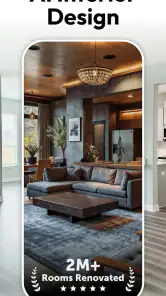
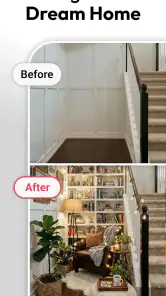
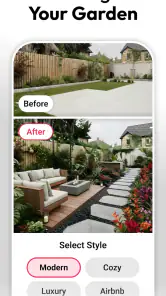
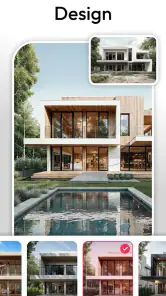
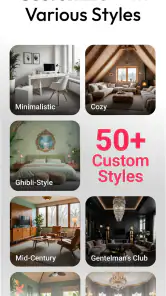

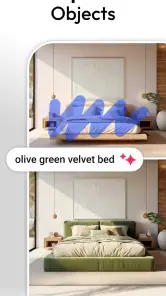
Analysis by Reviewed
I judge a room-design app not just by whether its ideas look appealing, but by how much confidence it gives me before I change a real space. AI Interior Design - Interio is a home-design app from DeepVision Apps, and its appeal is easy to understand: it turns a photo of a room into a starting point for imagining a different look. That can be useful when I know a room feels tired but cannot yet picture what would improve it. I’d treat its suggestions as inspiration, though, rather than professional advice or a promise that a design will work exactly as shown.
What I would check before sharing a room photo
Room images can reveal more than furniture and wall color: family photos, personal belongings, and details of a home may appear in the frame. Before using any photo-based design tool, I’d take a moment to choose what is visible and avoid including anything I would rather keep private. A tidy, well-lit image can also make it easier to judge the design itself, so this small step serves both privacy and usefulness.
I also look for clear choices in an app before I make an image part of a project. I would check the permission prompts and the app’s privacy information on my device, and decide whether the access requested makes sense for the way I want to use it. I don’t assume that an AI design app needs access to every part of a phone, and I would decline anything that feels unrelated. Those checks are sensible habits, not a claim about particular permissions or data practices.
Keep control of the decisions
The most comfortable way to use AI design suggestions is to stay in charge of the brief. I’d start with one clear goal, such as making a cramped-looking corner feel calmer, and compare ideas against the furniture and routines I actually have. I would not treat a generated look as a shopping list: measurements, walking space, lighting, cleaning needs, and existing items still need a human check before I buy or move anything.
Interio is free to install, with in-app purchases listed from $4.99 to $39.99 per item, so I’d explore what the free experience offers before paying for anything. It is rated for Everyone, and the app has a 4.4 average from around 25,000 ratings, with over one million installs. It was released on August 7, 2024; version 5.1.1 supports Android 6.0 and later. Those figures suggest a sizeable audience, but they cannot tell me whether a particular design will suit my home or whether I’ll like the app’s results.
When a room photo helps—and when it does not
A photo-based concept is most useful when I can identify the decision I’m trying to make. If I’m choosing between a softer, lighter feel and a darker, more dramatic one, seeing alternatives against the room I already know can make the conversation easier. If my real question is whether a sofa will clear a narrow doorway, an image cannot settle it; a tape measure and a basic floor sketch are more reliable.
I’d also avoid asking one image to solve an entire home. Starting with a single corner or one room gives me a manageable comparison and makes it easier to notice what I actually like. For a shared space, I could show a few concept directions to the people who use it, then ask what feels practical to them: where they sit, what needs storage, and which paths must remain clear. That turns a visual result into a useful discussion rather than a verdict.
More From Our News Desk

Weather by Xiaomi Review: Clear at a Glance, Less Clear Up Close

X Under Pressure: Can It Recover When Posting Goes Wrong?

Clash of Clans Is Won Between the Battles

Android Auto Makes the Case for Quieter Car Software

MobiOffice: Transforming Mobile Productivity with Seamless Integration

EA SPORTS FC™ Mobile Soccer: Redefining Mobile Sports Gaming
There is a trade-off in using AI for early inspiration. A polished-looking proposal can make a room seem more spacious or orderly than it will feel day to day. I’d look past the overall impression and ask whether the idea respects the room’s real constraints: door swings, frequently used shelves, pets, children, and the places where clutter naturally gathers. Those details are easy to overlook when an image is attractive.
Transform Your Space with Ease
What caught my attention about AI Interior Design - Interio is how user-friendly it is. Upon launching the app, you're greeted with a sleek, intuitive interface that even those who aren't tech-savvy can navigate with ease. You start by snapping a photo of the room you want to redesign. The app then analyzes the space and suggests design options to suit your style preferences. It's like having a personal designer who knows you better than you know yourself!
Personalized Design Suggestions
One of the standout features is its ability to provide personalized design suggestions. The AI takes into account your tastes, existing furniture, and even the dimensions of your room. It’s almost eerie how accurately it can suggest pieces that fit seamlessly into your existing decor. You can choose from a wide range of styles, from minimalist to bohemian, ensuring there's something for everyone.
For a more useful first pass, I’d photograph the room from a position that shows its main layout, then assess whether the proposed look preserves practical details such as the route from a doorway to a seat. AI images can make rooms feel more balanced than they are in person, so I’d use the result to identify a direction—perhaps a calmer palette or a lighter visual feel—rather than assume every suggested piece will fit. This makes the app most helpful during early planning, when I’m comparing moods, not making final measurements.
That workflow also helps distinguish Interio from familiar alternatives. A mood-board app is better when I want to collect exact references and control every image; a conventional room planner is better when accurate dimensions and furniture placement are the priority. Interio’s photo-led approach is appealing when I want quick visual inspiration from my own space, but it is not the tool I’d rely on for construction plans, precise purchasing decisions, or a measured floor layout.
Making a better first comparison
One practical way to get more from the visual suggestions is to decide what should remain unchanged before exploring alternatives. I might want a different wall color while keeping the existing sofa, or a new feeling of warmth without replacing the flooring. Having that boundary in mind helps me judge whether a concept is useful instead of simply reacting to a dramatic transformation.
I’d compare ideas one at a time rather than trying to settle style, layout, and shopping choices in a single session. For example, I could first decide whether the room should feel brighter, then consider whether the furniture arrangement supports that feeling. This order helps prevent a visually impressive suggestion from distracting me from the small, affordable change I was actually looking for.
Experiment with Augmented Reality
The app also boasts an augmented reality feature, allowing you to visualize how different elements will look in your space before making any commitments. This feature is a game-changer! You can virtually "place" furniture in your room, experiment with different color palettes, and even try out various art pieces on your walls. It's a fantastic way to experiment without the risk of buyer's remorse.
In practice, I’d still treat an on-screen preview as a rough comparison rather than proof that an item will fit. A realistic everyday use would be taking a picture of a living-room corner before rearranging it, trying a few different visual directions, and then checking the favorite idea against the actual floor space and daily traffic. If a room is unusually shaped, cluttered, or poorly lit, I’d expect the image to be less useful as a planning reference and would rely more on direct measuring and a simple sketch.
For an everyday example, imagine I have a free afternoon and want to make a small sitting area feel less crowded before guests visit. I could photograph the space, use the concepts to choose a visual direction, and then try moving one existing chair or lamp rather than shopping immediately. The useful outcome would not have to be a finished makeover; it might simply be realizing that the room needs a clearer path or fewer competing colors. I’d make the physical change only after checking that it works in the room itself.
Stay Within Budget
If you're worried about breaking the bank, this app has you covered. AI Interior Design - Interio allows you to set a budget for your project, and it provides options that fit within your financial constraints. It’s refreshing to see an app that’s not just about aesthetics but also about practicality.
I’d use that budget guidance as a way to keep a project grounded, not as a guarantee that every recommendation is available at the displayed cost. Before acting on a design, I’d separate what can be achieved by rearranging or reusing existing items from what would require buying something. That is especially helpful if I’m refreshing a rental or a spare room: I can explore a new look without assuming a large spend is necessary, and avoid treating a suggested finish as a commitment.
It also helps to set a limit for the experiment itself. I would decide in advance whether I’m only exploring ideas or genuinely ready to spend, then check the app’s in-app purchase options before paying for anything. Since the app is free to install but offers paid items, I wouldn’t assume every tool or result is included at no cost. If I only want a quick sense of possible colors or styles, I’d first see whether the free experience answers that question.
Who will get the most from it
I’d recommend Interio to someone who wants a quick visual nudge before rearranging a room, or who struggles to explain a decorating idea to a partner or housemate. It can help turn “this corner feels wrong” into a concrete style direction to discuss. It is less suited to anyone who needs exact architectural measurements, dependable product sourcing, or a complete renovation plan; a measured planner or a human designer is the better choice for those decisions.
It may also suit renters and people making gradual changes, especially when they want to explore a room’s potential before buying paint or furniture. The strongest use case is low-stakes experimentation: a spare room, a living-room refresh, or deciding how to make a work corner feel more settled. Someone planning structural changes, coordinating trades, or needing exact dimensions should start with a purpose-built planning method and treat any generated visual as secondary inspiration.
One question people often have is whether they need to know interior design before starting. The photo-and-suggestion workflow makes experimentation approachable, but I’d still get better results by deciding what I want to change and what must stay. Another practical question is whether the visual output can settle a purchase decision. I would use it to narrow choices, then verify dimensions, materials, and costs elsewhere rather than relying on an attractive rendering alone.
What I would verify before acting
Before buying a suggested item, I’d check its real-world dimensions against the room and consider how it will be used, not just how it appears in a concept. A compact-looking chair still needs space to pull out; a pale surface may be harder to keep clean in a busy household. I’d also confirm that a suggested color or finish can be tested in the actual lighting, since daylight and evening lamps can change how it looks.
For a project that depends on accuracy, a conventional room-planning app has a different strength: it asks me to work with measurements and placement rather than begin with a styled visual. A mood board is often better for collecting specific products, fabric samples, and reference images. I’d choose Interio when seeing my own room reimagined is the useful first step, but switch tools as soon as the question becomes exact fit, availability, or a construction detail.
A cautious recommendation
In conclusion, if you’re looking to transform your living space without the hassle and expense of hiring an interior designer, this app is definitely worth a download. It's a blend of technology and creativity, offering a personalized approach to home decor that's both fun and functional. So go ahead, unleash your inner designer, and watch your space come to life!
My more cautious take is that Interio is strongest as an idea generator, not as an authority on what to buy or how to remodel. I’d install it if I wanted an approachable way to explore styles using a room photo, while keeping private details out of the image and checking the app’s choices before granting access. If I needed precise planning or wanted strict control over every design element, I’d choose a different kind of tool. Used with those limits in mind, it can make the first step toward a room refresh feel easier and more concrete.
AI Interior Design - Interio Frequently Asked Questions
Who develops AI Interior Design - Interio, and is it an established app?
AI Interior Design - Interio is developed by DeepVision Apps and is listed in the House & Home category. It has been available since August 7, 2024, and its current version is 5.1.1. If you are comparing room-planning tools, the developer and app history can help you identify the product and check that you are downloading the intended app.
Can I use AI Interior Design - Interio to explore ideas before changing a room?
The app’s store summary describes it as an AI home designer and room planner for decorating interior spaces. That makes it a useful option to consider when you want to explore design directions before making changes at home. Treat generated concepts as inspiration and review them against your room’s real measurements, practical needs, and budget before buying furniture or starting a project.
Does AI Interior Design - Interio require an internet connection to create designs?
Whether you need an internet connection can depend on how the app’s features are delivered and which tools you are using. Before planning a session away from Wi-Fi, open the app and check how its design functions behave on your device. If you are preparing a room project, keeping a connection available while trying the AI features is a sensible way to avoid interruptions.
Is AI Interior Design - Interio free to download, and are there optional purchases?
AI Interior Design - Interio is free to download, so you can try the app without paying an upfront purchase price. It also offers in-app purchases, with prices ranging from $4.99 to $39.99 per item. Consider these optional costs if you expect to use paid features or content, and check the purchase details in the app before confirming anything.
Is AI Interior Design - Interio appropriate for all ages, and what device does it support?
The app has an Everyone content rating and is intended for a broad audience. It is available for Android, with a minimum operating system requirement of Android 6.0. Before downloading, check your device’s operating system and available storage, and use the official app store to confirm compatibility for your particular phone or tablet.
Pros
- User-friendly interface for quick design.
- Wide range of design templates.
- Includes 3D visualization feature.
- Offers real-time collaboration tools.
- Frequent updates with new features.
Cons
- Limited free version capabilities.
- Requires internet connection.
- Occasional glitches in 3D view.
- Subscription model can be pricey.
- Learning curve for advanced features.
- Category
- House & Home
- Version
- 5.1.1