

AI Hair Try On & Color Changer
- 36.00
- 4.7
- Installs
- 10.00K
- Price
- Free

Screenshots
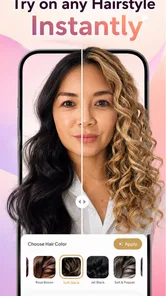
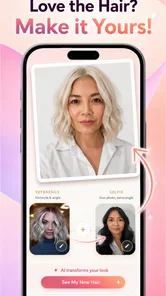
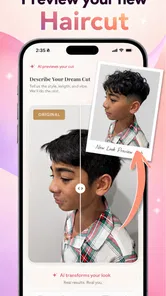
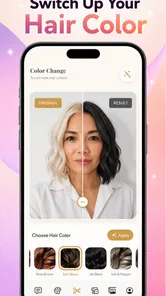
Analysis by Reviewed
For an app about changing your look, ease of use matters as much as the preview itself. I’d approach AI Hair Try On & Color Changer as a way to make a hair decision feel more manageable: explore a direction, keep the options that speak to you, and leave the final call to your own preferences and a stylist’s practical advice. That balance is especially important when you want visual help but do not want an app to make the choice feel urgent or definitive.
Start with the question you actually need answered
Before opening a beauty app, it helps to name the uncertainty. Are you wondering whether to lose length, change your colour, or simply see yourself with a different overall style? Picking one question makes it easier to judge whether a preview is useful, and it can prevent a string of dramatic variations from turning a small curiosity into pressure to change.
I would also decide in advance what a successful session looks like. It might be finding one broad direction to discuss at an appointment, or confirming that you prefer your current look. Either outcome is useful. There is no need to settle on a specific style just because you have spent time trying options.
The app’s value depends on that modest expectation. It is a private place to explore a visual idea, not a test of whether you are adventurous enough or a judgment of your current appearance. If trying a look makes you uncomfortable, stopping is a sensible choice, not a failure to use the app properly.
I found the most useful way to judge AI Hair Try On & Color Changer was not to ask whether a simulated haircut could replace a salon consultation. It can’t. The better question is whether it helps someone explore an idea before committing to a change, and whether that process feels approachable across different everyday situations. As a beauty app from Dream Prayer Developer, it is built around trying out hair looks digitally, with a focus that makes sense for anyone who is curious but hesitant about a cut or colour.
My overall impression is that AI Hair Try On & Color Changer is most valuable as a visual brainstorming tool. A virtual preview can help turn a vague thought such as “maybe shorter” into a more concrete conversation with a stylist, or show that a dramatic colour is not quite what you imagined. It is less useful as a promise of exactly how a real style will look. Hair texture, lighting, face framing and the salon’s technique all affect the result in ways a preview cannot fully capture.
Making the preview easier to read
I find that a preview is easier to use when I decide what I’m trying to compare before I start: for example, overall length rather than colour and cut at once. That gives each image a clearer purpose and makes it easier to describe the difference to someone helping me decide. Next, I’d look at how the same deliberate approach can work across different abilities and everyday situations.
More From Our News Desk

 Gmail
GmailGmail in a Busy Inbox: Who Benefits Most?
From first account to crowded workday, Gmail earns its place through dependable search and flexible sorting—but its best fit depends on how much inbox maintenance you can tolerate.

 Prime Video
Switching to Prime Video: What Changes in Your Viewing Routine
Prime Video can make a compelling second home for streaming, but switching means learning a different catalog, rental layer, and route from browsing to playback.

 Universal TV Remote Control
Universal TV Remote Control Works Best as a Reliable Backup
A phone remote earns its place through quick setup and reliable habits. Here is how to get more from Universal TV Remote Control—and where its limits show.

 Weather - By Xiaomi
Weather by Xiaomi Review: Clear at a Glance, Less Clear Up Close
Xiaomi’s weather app makes everyday forecasts quick to scan, but its calm surface can leave useful details and recovery paths harder to find than they should be.

 X
XX Under Pressure: Can It Recover When Posting Goes Wrong?
A resilience-focused review of X, examining setup, mistaken posts, interruptions, weak connections, and the gaps that matter when recovery needs to be dependable.

 Clash of Clans
Clash of Clans Is Won Between the Battles
Its raids are quick; its community is a long-term project of coordination, teaching, rivalry, and shared responsibility—with all the friction that entails.
Latest News



A visual idea, not a salon guarantee
The app’s central appeal is easy to understand: it lets you consider different hairstyles, cuts and colours without changing your actual hair. That straightforward purpose is a plus for people who do not want to learn a complicated editing workflow just to test an idea. I would use it to compare broad directions—such as keeping length versus going shorter, or staying close to my natural shade versus trying something noticeably different—rather than to select a precise salon formula.
That distinction matters for readability as much as accuracy. A picture can make a look feel instantly understandable, but it can also make a result seem more definitive than it is. I recommend treating each preview as a prompt: What do I like about this? Is it the length, the fringe, the brightness, or the overall mood? That makes the image more useful when you explain your preferences to a hair professional.
The app is in the beauty category, and its narrow focus keeps the decision task clear. In contrast, a general photo editor may offer more control over individual image details, but often asks you to do the visual work yourself. A salon consultation is better for judging what is technically achievable for your hair; this app is more convenient when you want to explore possibilities privately before booking or asking for advice.
Keeping the navigation low-pressure
For a first-time user, the best workflow is to start with a clear, front-facing photo and make one kind of change at a time. If you test a new cut and a vivid colour together, it becomes harder to tell which part you like. Comparing a few focused variations gives you a more readable result and helps prevent the familiar trap of choosing a look because the whole image feels dramatically different.
I would also keep a simple record of what you were testing, such as noting “shorter around the face” or “warmer brown.” That small habit makes a set of visual experiments easier to discuss later, especially if you are showing them to someone else. It is a practical workaround for anyone who finds side-by-side visual decisions confusing or tiring.
The app has a 4.7 average from around 438 ratings, which suggests that many users have found the experience worthwhile. I would still judge it by your own purpose: someone looking for inspiration may be satisfied by a convincing direction, while someone expecting a precise preview of a complex cut may be disappointed. Ratings cannot tell you whether a particular image will work well with your hair, photo or preferences.
Using it across different abilities and situations
I’d treat comfort as part of the decision, not a hurdle to overcome: a brief session, help from someone I trust, or a stylist conversation may be better than extended screen-based comparison. The useful question is whether the preview helps the person whose hair is involved express a preference, while leaving them free to reject any option. From there, it’s worth considering which barriers may still make the app a poor fit.
Motor and sensory considerations
A hairstyle preview is a relatively low-stakes activity: you can explore an idea without handling hair tools, chemicals or salon equipment. That can be appealing if you prefer to make decisions at your own pace, or if an in-person consultation feels like too much pressure before you know what you want. It also makes the app potentially useful for someone who wants to communicate a preference visually rather than rely only on describing a style aloud.
There are limits to that advantage. Digital try-on still depends on interacting with a screen and judging images, and I would not assume that the app is comfortable for every person with reduced dexterity, low vision or sensitivity to visual effects. If tapping, adjusting or comparing images is difficult, a trusted person can help operate the phone or review the options together. That is a practical way to make the exercise collaborative without treating the preview as a substitute for the user’s own decision.
For sensory comfort, I suggest keeping the session purposeful and short: decide whether you are exploring cut, colour or both, then stop once you have a few useful directions. A long run of near-identical images can become tiring and may make it harder to notice meaningful differences. If a result feels visually overwhelming or simply does not resemble you, there is no reason to keep pushing through it; the app should support a choice, not create pressure to change your appearance.
Useful at home, before a conversation
A realistic everyday use would be opening the app at home before a haircut appointment. You might be unsure whether to keep your current length, add a shorter shape or experiment with a new shade. Instead of arriving with only a celebrity reference that may not suit your own features, you can use a few previews to identify what you are drawn to and what you would rather avoid. The stylist can then help translate that preference into something suitable for your hair.
It can also help when the person making the decision is not ready to visit a salon. A private experiment removes the immediate social element: you can look at possibilities, dismiss them and return later without needing to justify the choice. For a parent or caregiver helping someone consider a change, it can offer a shared visual starting point, provided the person whose hair is involved remains in control of the decision.
The app is free to download, with in-app purchases ranging from $3.99 to $34.99 per item. I would begin with the free experience and decide whether the available previews answer your actual question before spending. The purchase range makes it especially sensible to avoid buying on impulse: first work out whether you need a quick idea or expect a deeper set of options, and only pay if the app’s current choices genuinely serve that need.
It is rated for Everyone, has over 10,000 installs and runs on Android 7.0 or later. Those details make it accessible to a broad range of Android users in the basic compatibility sense, though they do not establish how comfortable the interface will be for a particular person. The current version is 1.0.12, and it was released on February 8, 2026. I would check that your device meets the minimum requirement before planning to use it for an appointment or a time-sensitive decision.
Where the experience can fall short
The biggest practical limitation is that an edited preview is still an interpretation of a photo, not a physical test of a hairstyle. A colour that looks flattering on screen may behave differently under indoor lighting, and a simulated cut cannot show how your hair naturally falls, how much styling it needs or whether its texture supports the shape. For a major change, use the image to start a conversation with a stylist rather than treating it as the final specification.
Photo choice also affects how useful the exercise feels. If the image is poorly lit, taken at an unusual angle or obscures the hairline, it may be harder to judge the result. I would choose a simple, well-lit picture with the hair visible and avoid comparing previews made from very different photos. That is not a guarantee of realism, but it gives you a fairer basis for deciding whether one direction appeals more than another.
Another trade-off is that visual experimentation can encourage overconfidence. A dramatic transformation may look exciting precisely because it is dramatic, while the day-to-day upkeep is not represented in a still image. Before taking a preview to a stylist, consider practical questions such as how much length you are comfortable losing, whether you want regular colour maintenance and how much time you want to spend styling. The app can help you articulate the look; it cannot answer those lifestyle questions for you.
People who need precise colour matching, professional technical advice or a detailed plan for textured or highly individual hair may be better served by a stylist consultation. Likewise, if your priority is extensive manual photo retouching rather than choosing a hairstyle, a general editing tool may give you more direct control. This app makes the most sense when the goal is focused and exploratory: “Would I like this kind of change?” rather than “Can I reproduce this exact image?”
Who is likely to benefit
I would recommend it to someone who is curious about a haircut or colour but wants a low-commitment way to narrow down the possibilities. It may be especially handy for people who find visual examples easier to discuss than verbal descriptions, and for anyone who wants to prepare a few talking points before a salon visit. Because the app is free to start, it is also a reasonable option for a casual experiment, as long as you keep paid items in mind before making a purchase.
I would skip it if you expect an exact preview of how a stylist will cut or colour your hair, or if visual simulations tend to make appearance decisions more stressful. It is also not the right tool for someone seeking accessibility assurances beyond what can be observed through personal use; needs differ, and a quick trial on your own device is the best way to see whether the interaction suits you. Asking a companion to help can make the process easier, but should not be necessary to accept a look you do not want.
A useful decision aid, with your comfort in charge
For someone deciding whether to try it, I’d separate two questions: does the app help me picture a direction, and does interacting with it feel comfortable on my device? A “yes” to the first but “no” to the second is a good reason to use another route, such as bringing a verbal description or reference image to a stylist. A beauty preview should widen your choices, not become a barrier to getting advice.
If you do use it, try to keep the final selection in your own hands. A friend can help compare images or describe what stands out, but their reaction should not outweigh how you feel about the result. That distinction matters when a virtual change is being considered by someone who is young, uncertain or relying on another person to operate the screen.
AI Hair Try On & Color Changer is a focused beauty app from Dream Prayer Developer that works best as a starting point for decisions, not a verdict on how you should look. I like the idea of using it to make a salon conversation more specific and less intimidating, while staying honest about the limits of a digital image. My recommendation is to use it slowly, compare only a few meaningful options, and let your comfort and real-world hair needs decide what happens next.
AI Hair Try On & Color Changer Frequently Asked Questions
What does AI Hair Try On & Color Changer do?
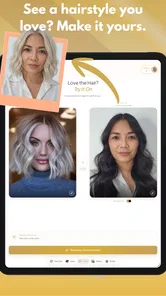
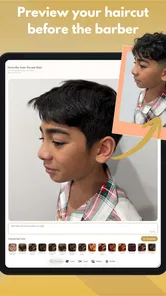
AI Hair Try On & Color Changer lets you preview different hairstyles and hair colors on a photo before making a real-world change. Depending on the app’s available features, you can choose a picture or take one, then experiment with styles and shades to see how they might look on you. Treat the result as a visual preview rather than a guaranteed representation of how a salon service will turn out.
How can I get the most realistic hairstyle preview?
For a clearer preview, use a well-lit, front-facing photo with your face unobstructed and your hair visible. Avoid strong shadows, filters, hats, and busy backgrounds, since these can make it harder for the app to identify your hair and facial outline. Results may vary from one image to another, so trying a second photo can help if a style looks misaligned or does not blend naturally.
Is AI Hair Try On & Color Changer free to use?
The app may offer some features at no cost while reserving additional styles, colors, or editing options for a subscription or in-app purchase. Pricing and available features can change, so review the current listing and any purchase screens before confirming a payment. If you only want to test the basic experience, check which options are available for free and whether a trial renews automatically.
Does the app upload or store my photos?
Photo handling depends on the app’s current privacy settings and how its image-processing features work. Before choosing a personal photo, read the privacy policy and check the app-store privacy details to understand whether images are processed on your device, sent to a service, retained, or used for other purposes. You can also review camera and photo-library permissions and grant only the access needed for the features you plan to use.
Can I rely on the preview before getting my hair cut or colored?
Use the preview to explore ideas and compare looks, not as a precise prediction of a haircut or dye result. Image editing may not fully account for your hair’s texture, length, thickness, lighting, or starting color, and the finished style will depend on the stylist and products used. Save or show a favorite preview to your hairdresser, then discuss what is practical for your hair and maintenance routine.
Pros
- Try different shades without committing to a real dye job.
- Useful for comparing subtle color changes with bold looks.
- Can make hairstyle planning easier before a salon visit.
- A quick way to explore styles you might not otherwise consider.
- Lets you preview a new look using your own photo.
Cons
- Results may look less convincing with poor lighting or blurry photos.
- Hair edges can be difficult for the app to detect accurately.
- Virtual color may not match how dye appears on your actual hair.
- Some styles or features may require payment or a subscription.
- Photo access may be needed to use the main try-on features.











