

AI Clothes Try-On: DressTry
- 29.00
- 3.7
- Installs
- 100.00K
- Price
- Free

Screenshots
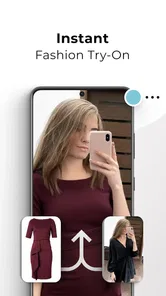
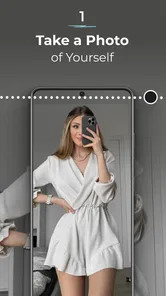
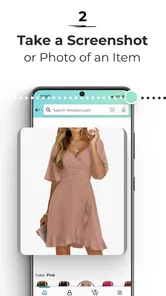
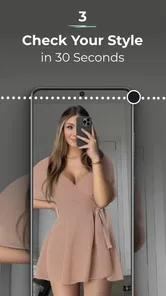
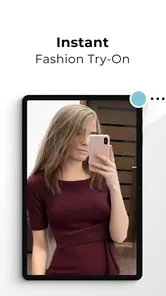
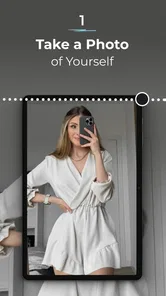
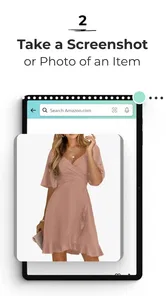
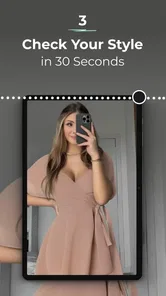
Analysis by Reviewed
I find virtual try-on most useful when it helps me narrow choices, not when it promises to replace a real fitting room. That is the lens I’d use with DressTry, a free beauty app from Glovo Studio built around previewing outfits on a phone. It may make browsing more visual, but an AI image should be treated as a styling aid rather than proof that a garment will fit or feel right.
Reading the screen and finding a useful flow
The appeal is straightforward: take a photo, choose clothing, and see a generated preview. That simple sequence could suit someone who wants to explore outfit ideas without learning a complicated design tool. The app is currently version 1.5.2 and supports Android 7.0 or later, so it may be an option for people using older Android devices as well as newer ones. Its Everyone age rating also makes the intended audience broad, though that alone does not tell me how comfortable every person will find the interface.
For a clearer comparison, I’d use the same well-lit photo and try a few different clothing choices rather than judging the result from a single image. Keeping the pose and framing consistent makes it easier to see whether a change in the preview comes from the outfit or from how the image was captured. That small habit can make the experience more useful without assuming the app offers controls it may not have.
I’d also treat the first preview as a starting point, not a verdict. A photo that is too dim, busy, or loosely framed can make it harder to judge the overall look, so I’d keep the background simple and make sure the clothing outline is easy to see. This is a practical way to reduce distractions in the comparison; it does not make the generated image a measurement tool.
Different bodies, hands and sensory needs
A camera-based fashion tool can be helpful for people who prefer to explore looks privately before asking for advice or visiting a shop. It may also let someone compare a dressier option with an everyday look without physically changing clothes. Still, I would not treat an AI overlay as a reliable representation of every body shape, mobility aid, garment texture or way of dressing. If an image feels unlike you, that is a limitation of the preview, not a reason to change your own expectations.
There is also a practical motor and sensory trade-off. Taking a photo and choosing items may be easier than navigating a busy store, but camera positioning, tapping small controls, or looking at a screen for a long time can be tiring for some users. I’d try the basic flow at a comfortable pace and stop if the interface or image processing becomes frustrating. DressTry is a visual tool, so it is not the best fit for someone who needs a non-visual way to assess clothing.
For anyone who finds repeated posing uncomfortable, I’d make one photo session do more work: choose a neutral stance and save or reuse the same suitable image where the app allows it. That avoids having to recreate the setup every time just to compare a new style. If the flow instead requires a fresh capture, it is worth keeping the session short and asking someone you trust to help position the phone, rather than pushing through an awkward setup.
More From Our News Desk

 Gmail
GmailGmail in a Busy Inbox: Who Benefits Most?
From first account to crowded workday, Gmail earns its place through dependable search and flexible sorting—but its best fit depends on how much inbox maintenance you can tolerate.

 Prime Video
Switching to Prime Video: What Changes in Your Viewing Routine
Prime Video can make a compelling second home for streaming, but switching means learning a different catalog, rental layer, and route from browsing to playback.

 Universal TV Remote Control
Universal TV Remote Control Works Best as a Reliable Backup
A phone remote earns its place through quick setup and reliable habits. Here is how to get more from Universal TV Remote Control—and where its limits show.

 Weather - By Xiaomi
Weather by Xiaomi Review: Clear at a Glance, Less Clear Up Close
Xiaomi’s weather app makes everyday forecasts quick to scan, but its calm surface can leave useful details and recovery paths harder to find than they should be.

 X
XX Under Pressure: Can It Recover When Posting Goes Wrong?
A resilience-focused review of X, examining setup, mistaken posts, interruptions, weak connections, and the gaps that matter when recovery needs to be dependable.

 Clash of Clans
Clash of Clans Is Won Between the Battles
Its raids are quick; its community is a long-term project of coordination, teaching, rivalry, and shared responsibility—with all the friction that entails.
Latest News



Privacy is another reasonable part of the decision whenever a personal photo is involved. I’d choose an image I’m comfortable using for this purpose, avoid including other people or identifying details in the background, and review the app’s current privacy information before uploading anything sensitive. That’s sensible caution for any photo-based service, not a claim about how DressTry stores or processes images.
Where it fits into an ordinary shopping day
Picture me getting ready for a work event after dinner, with two possible outfits in mind. I could use a consistent photo to compare the overall impression, then check the garment’s real size information and fabric details on the seller’s page before buying. That division of labour matters: DressTry can help with the “does this style appeal to me?” question, while ordinary product pages, size charts and return terms are still better for purchase details.
Compared with browsing product photos or using a retailer’s own model images, a personal preview can make the choice feel more relevant to my wardrobe. Compared with trying clothes on in person, though, it cannot tell me how a sleeve moves, whether a waistband pinches, or how the material feels. I’d use it to shortlist possibilities, not to skip a fitting when comfort, construction or precise fit is important.
A useful routine is to decide on the question before opening the app. If I’m choosing between a bold colour and a quieter one, a preview can help me picture the mood; if I’m deciding whether a coat will layer over a thick jumper, a generated image cannot settle that. Naming the decision keeps the tool in its strongest role and prevents a polished-looking result from being mistaken for evidence about fabric, warmth, or construction.
It may be especially handy when shopping remotely for an occasion, when I want to discuss options with a friend, or when I’m trying to make better use of clothes I already own. A preview can give the conversation a concrete visual reference, even if it is only approximate. For a fast purchase of a familiar basic, I might skip the extra step and rely on the seller’s product details instead; the value depends on whether seeing a look on my own photo changes the decision.
Compared with a collage or mood board, the personal-photo approach can make proportions and styling feel more immediate. A collage is often better for collecting references and mixing items from different sources, while an in-person fitting is better for comfort and movement. I see DressTry as occupying the space between those options: more personal than a flat inspiration board, but much less conclusive than trying on the actual garment.
Costs, expectations and who should pass
The app is free to install, but it includes in-app purchases priced from $3.99 to $43.99 per item. I’d explore the free experience first and check what a paid item unlocks before spending, especially if I only want an occasional outfit preview. The audience figures suggest it has attracted over 100,000 installs and an average rating of 3.8 from around 600 ratings, alongside 23 written reviews. Those figures offer a little context, but they cannot predict whether its results will work well for my photos or preferences.
Before paying, I’d ask myself whether I expect to use the app regularly and whether the specific paid option addresses a need I actually have. A one-off curiosity is a poor reason to buy something I may not use again, while someone who enjoys comparing looks may see more value in a repeatable visual tool. Since purchases are priced across a range, I’d read the in-app description carefully and confirm the cost shown at the point of purchase rather than assuming every option costs the same.
I would skip it if I wanted dependable sizing advice, detailed garment specifications, or a fully hands-free and non-visual shopping experience. I’d also keep expectations modest if my main goal were to judge exact tailoring: camera quality and the way an image is captured can affect the preview, and a generated look is not a physical fitting. The app was released on May 12, 2024, and its Everyone rating makes it broadly approachable, but accessibility still depends on whether its particular visual workflow suits the person using it.
Device compatibility is worth checking before making it part of a routine: the listed Android minimum is version 7.0, which makes it usable on a range of Android devices, but does not guarantee the same speed or image quality on every phone. If a preview takes too long or looks poor, I’d first try better lighting and steadier framing before deciding the concept itself is not useful. Those adjustments can help with the input, though they cannot fix every limitation in a generated result.
Your Virtual Fashion Companion
First off, let's talk about how DressTry works. Imagine scrolling through a catalog of trendy outfits and being able to see what they'd look like on you without ever stepping foot in a store. The app uses advanced AI technology to map your body and overlay the chosen garments, giving you a realistic preview. It's like having your own personal stylist who knows exactly what suits your vibe.
Easy to Use Interface
Navigating through the app is a breeze. Even if you're not a tech wizard, you'll find the interface intuitive and user-friendly. Just snap a quick photo, and the app does the rest. It's designed to feel as natural as flipping through a magazine or browsing your favorite online store.
For someone who is unsure about trying a new fashion app, that direct photo-to-preview idea is easy to understand: I don’t need to build a digital wardrobe or learn a complicated editing workflow before exploring a look. I would still take a moment to learn where the photo and clothing choices sit in the interface, especially if I’m using it with limited time or have difficulty with small touch targets. A simple concept helps, but individual comfort with the actual controls matters more.
Variety is Key
One of the standout features of DressTry is the extensive library of clothing items. Whether you're looking for casual wear, formal attire, or something in between, this app has got you covered. It's regularly updated with the latest fashion trends, so you're always in the loop.
In practice, I’d browse with a specific occasion or wardrobe gap in mind instead of scrolling at random. That makes it easier to tell whether the available choices are relevant to my taste, and it reduces the chance of confusing an interesting preview with a useful purchase lead. If the styles I’m looking for are not represented in the selections I can see, a general fashion catalog or a retailer’s own range may be a more direct route.
Beyond Just Trying On Clothes
DressTry isn't just about trying on clothes; it's about making smart purchasing decisions. With its precise fit predictions, you can say goodbye to the hassle of returns and exchanges. Plus, it offers styling tips tailored to your body type and preferences, ensuring you always step out in style.
I’d be cautious about relying on the claims of precise fit or tailored styling when making a real purchase. For me, a visual preview can help answer whether I like the broad silhouette or colour combination, but fit depends on measurements, cut, fabric and personal comfort. I’d verify those details independently and use the preview as one input among several, not as a guarantee against returns.
That distinction is particularly useful when two garments look similar in a generated image. I’d compare their written measurements and fabric descriptions, then check the seller’s return conditions before choosing. The preview may help me decide which look I prefer, but only the product information can clarify practical details such as care instructions or the garment’s stated construction.
A Few Considerations
While DressTry is a fantastic tool, it's important to remember that the app relies on your phone's camera quality for the best results. So, make sure your device is up to date to enjoy the full experience. Also, the app requires a stable internet connection to function seamlessly, which is something to keep in mind if you're on the go.
That makes the timing of use part of the experience. I’d do comparisons at home or somewhere with steady connectivity rather than counting on the app during a commute or in a shop with unreliable service. A stable connection is especially relevant if I want to show a friend several options in real time; if I’m offline, I’d use saved product information or a simple notes list instead of expecting the preview flow to work smoothly.
For the same reason, I wouldn’t plan an important outfit decision around a last-minute session. Trying the app when I have a few calm minutes lets me adjust the photo, look at alternatives, and verify purchase details without feeling rushed. It also gives me room to stop if the output seems misleading or the process becomes inconvenient, rather than treating the first generated image as the answer.
A more inclusive way to judge its usefulness
My overall view is that DressTry is most promising for people who enjoy visual experimentation and want a quick way to compare broad outfit ideas from a personal photo. It may also be a comfortable first step for someone who would rather explore privately than make a decision under pressure in a shop. The best test is personal: can you capture and view the image comfortably, and does the result help you make a choice without being mistaken for a fit guarantee?
For users who need larger text, spoken guidance, keyboard access, or other specific accommodations, I’d try the app directly before relying on it as a regular shopping aid. I don’t want to assume those options are present. If the photo workflow or visual presentation creates a barrier, retailer product pages, help from a trusted person, or an in-person fitting may serve that user better.
All in all, DressTry is a useful idea for making outfit browsing feel more personal, provided I keep its role modest. I’d recommend giving it a try if you want a visual shortlist and are comfortable using a camera-based app; I wouldn’t choose it for accurate sizing, sensory certainty, or a non-visual shopping journey. Its value comes from helping me imagine a style, while the final decision still belongs to the real garment, its details, and the wearer’s comfort.
AI Clothes Try-On: DressTry Frequently Asked Questions
Can I use AI Clothes Try-On: DressTry without paying?
AI Clothes Try-On: DressTry is free to download, and it also offers in-app purchases. The app describes itself as an AI personal outfit and fashion try-on assistant, so you can explore its virtual styling purpose before deciding whether any paid options suit you. Check the purchase details shown in the app before confirming a transaction.
What is AI Clothes Try-On: DressTry and how does it work?
AI Clothes Try-On: DressTry is an innovative application that allows users to virtually try on clothes using advanced AI technology. By simply uploading a picture of yourself, the app superimposes various clothing items onto your image, giving you a realistic preview of how an outfit will look on you. This eliminates the need for physical try-ons, making it easier to shop online.
Is AI Clothes Try-On: DressTry free to use?
AI Clothes Try-On: DressTry offers a freemium model. Users can access basic features and a limited wardrobe for free. However, to unlock premium features such as a wider range of clothing options and exclusive styles, there is a subscription fee. This allows users to have a more comprehensive virtual fitting experience.
What are the device requirements for AI Clothes Try-On: DressTry?
The app is available for Android devices and requires Android 7.0 or later. Since the main idea is to create outfit previews from photos, your experience will depend on being able to provide a clear image and use the app comfortably on your device. Check that your device meets the minimum system requirement before downloading.
How does AI Clothes Try-On: DressTry ensure the accuracy of its virtual try-ons?
AI Clothes Try-On: DressTry employs sophisticated AI algorithms and machine learning to ensure high accuracy in its virtual try-ons. The app uses a blend of 3D body mapping and image recognition technology to provide a realistic and precise fit visualization. Continuous updates and improvements are made to enhance the accuracy and user experience.
Pros
- Realistic clothing visualization.
- Wide selection of styles.
- User-friendly interface.
- Quick outfit loading time.
- Compatible with various devices.
Cons
- Limited free options.
- In-app purchases can be expensive.
- Occasional app crashes.
- Requires internet connection.
- Privacy concerns with data usage.











