ADT+
- 1.19K
- 4.7
- Installs
- 100.00K
- Price
- Free

Screenshots
Analysis by Reviewed
ADT+ is the kind of lifestyle app I would judge less by flashy extras and more by how calmly it fits into a real home routine. It is designed around home protection, and in my experience that makes its value very practical: the app should help you stay aware of what is happening at home without turning every small check into a chore. It is free to download, rated for Everyone, and developed by ADT LLC ®, so it is clearly aimed at ordinary household use rather than a specialist audience.
What interested me most is the way the app brings the ADT experience into a phone-based control point. Instead of treating home security as something you only think about when an alarm sounds, ADT+ encourages a more regular habit of checking in, reviewing the state of your home, and using the app as part of leaving, arriving, or settling in for the night. That sounds simple, but simple is exactly what I want from a security companion.
How ADT+ feels in everyday use
The current version is 4.6.0.329951, and the app has built a strong response in its category, with a 4.7 average from around 11K ratings. Those figures do not replace hands-on judgement, but they do match my general impression: ADT+ feels like a mature, actively used product rather than an experimental dashboard. It has also passed the 100K-plus install mark, which suggests that many households are already treating it as part of their daily setup.
The first useful distinction is that this is not just another generic smart-home controller. A typical home automation app may be excellent for lights, thermostats, plugs, or routines, but security has a different priority. I want the important information to be easy to notice, and I do not want the central purpose buried under a long list of unrelated controls. ADT+ keeps its identity focused on protecting the home and providing reassurance.
That focus makes the app especially suitable for people who already rely on ADT equipment or services and want a mobile way to stay connected to them. It is also a sensible choice for someone who prefers having one recognizable security environment instead of assembling separate camera, alarm, and automation apps from different companies. The trade-off is equally important: if you are looking only for a standalone camera viewer or a general smart-home remote, this may feel more specialized than necessary.
I found the strongest use case in the small transitions of the day. Before leaving, I would use a security app to confirm that the home is in the state I expect. When returning, I would want the app to support a quick check rather than make me navigate through several unrelated screens. At night, the value is not entertainment; it is reducing uncertainty. A well-organized security app earns its place by making those moments quicker and less stressful.
A realistic home routine
Imagine leaving for work while thinking about whether the house was properly secured. The useful workflow is not to open the app and explore every option. It is to open ADT+, look for the current home status, and make the necessary adjustment with as little hesitation as possible. If another family member is home, that same glance can help avoid an unnecessary action based on an incorrect assumption.
More From Our News Desk

Weather by Xiaomi Review: Clear at a Glance, Less Clear Up Close

X Under Pressure: Can It Recover When Posting Goes Wrong?

Clash of Clans Is Won Between the Battles

Android Auto Makes the Case for Quieter Car Software

MobiOffice: Transforming Mobile Productivity with Seamless Integration

EA SPORTS FC™ Mobile Soccer: Redefining Mobile Sports Gaming
That scenario highlights a less obvious strength: a home-security app is partly a communication tool, even when only one person is holding the phone. A clear status view can prevent repeated messages such as “Did you set the alarm?” or “Is everything okay at home?” It does not eliminate the need for household communication, but it gives everyone a shared reference point.
Another practical habit is checking the app before making a change, rather than tapping through a routine from memory. Homes are not always in the same state. A guest may be inside, a delivery may be expected, or someone may have changed the security setting earlier. The app is most useful when it supports awareness first and action second.
What the current release tells me
The release information places the app’s original arrival on December 7, 2022, while the current version shows that it has continued to evolve. I would not interpret a newer version number as proof that every possible weakness has disappeared, but it does indicate an ongoing product rather than a forgotten download. For existing users, that matters because security software needs maintenance and attention over time.
In practical terms, the current release should be viewed as a continuation of the app’s role, not a reason to expect a completely different product. The important question is whether the latest build makes everyday security tasks feel dependable and understandable. My answer is mostly positive: the app’s direction remains coherent, and its purpose is easy to grasp once it is connected to the way a household actually operates.
There is also a useful difference between product evolution and feature accumulation. A security app does not become better simply because it offers more buttons. Improvements that matter are the ones that reduce confusion, make status information easier to interpret, and help users recover from mistakes. That is the standard I would apply to future updates as well. A quieter interface can be more valuable than a longer feature list.
Who will benefit most
ADT+ is best suited to people who want a dedicated home-protection companion and are comfortable making security part of their phone routine. It should appeal to households where more than one person needs confidence about the home’s current state, especially when people leave and return at different times.
I would also recommend it to users who dislike switching between several unrelated apps. A collection of separate tools can sometimes offer excellent individual functions, but it creates a mental burden: one app for cameras, another for alarms, another for access, and perhaps a fourth for notifications. Keeping the security experience together is a meaningful convenience, even if it does not replace every other smart-home tool.
On the other hand, I would not choose ADT+ solely because it is free. The download price is free, but the app’s usefulness depends on the broader ADT setup it is meant to support. Someone who has no interest in a dedicated security ecosystem may find that a simpler standalone product is a better fit. A free app can still be the wrong choice if it does not match the equipment, habits, or level of protection you want.
Where it differs from ordinary alternatives
Compared with a basic camera application, ADT+ is more about the home’s overall protection context than about opening a live view and watching one room. A camera-only app can be the better option for a user who wants a narrow, inexpensive way to check a pet or entrance. ADT+ makes more sense when the goal is broader awareness and a more unified security routine.
Compared with a general smart-home platform, its advantage is concentration. General platforms often excel at combining lights, appliances, media, and sensors, but security information can become one category among many. ADT+ puts the home-protection purpose in the foreground. The downside is that users who want a single app for every connected device may still need another platform for the rest of their home.
Compared with a traditional alarm experience that is mostly managed from a physical panel, the phone adds flexibility. I can think about the home when I am away from the wall-mounted control point, and I can make checking part of an existing phone habit. Yet that convenience also creates responsibility. A phone can be misplaced, silenced, or ignored, so I would never treat an app as a substitute for understanding the physical security setup.
Small habits that make the app more useful
My first tip is to establish a consistent check before leaving rather than relying on memory. The point is not to stare at the app; it is to create one repeatable moment when you confirm the home’s state. This is particularly helpful in busy households where people leave at different times.
My second tip is to avoid testing controls casually when other people or pets are at home. Security actions can have consequences, and a quick experiment can create confusion if someone else is relying on the existing state. I would first make sure everyone understands who normally handles changes and how the household communicates about them.
My third tip is to treat the app as part of a layered routine. I would keep the phone updated, make sure the household knows the basic physical procedure, and avoid assuming that a single screen can explain every situation. The app is strongest when it reinforces good habits rather than replacing them.
A fourth useful insight is to review your routine after a change in the household. A new roommate, a visiting relative, a different work schedule, or a pet sitter can alter what “normal” looks like. The app may still work exactly as before, but your assumptions may no longer be correct. Security tools are only as reliable as the habits built around them.
Friction and remaining gaps
The main limitation is not necessarily a missing button; it is the possibility of overconfidence. A polished mobile interface can make home protection feel effortless, but users still need to understand what their connected setup covers and what it does not. I would be cautious about recommending the app to someone who expects a phone download alone to provide complete protection.
There is also a learning curve for households that do not already think in terms of security states and shared responsibility. A single user may find the routine straightforward, while a family has to agree on who checks the home, who makes changes, and how unusual situations are handled. The app can support that process, but it cannot make household coordination disappear.
Another point is ecosystem commitment. The more a person wants a unified experience, the more important it becomes that their devices and services fit that environment. Someone who values maximum flexibility across brands may prefer a broader smart-home platform, even if it feels less focused. ADT+ is a better match for users who prioritize a dedicated security relationship over mixing and matching every component.
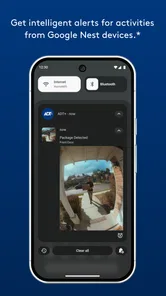
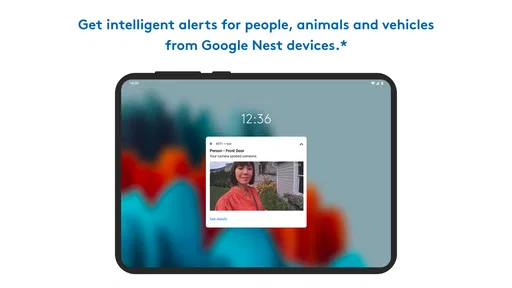
I would also keep expectations realistic about notifications. Alerts are useful only when they are understandable and actionable. Too many vague messages can lead to alert fatigue, while too little information can leave users uncertain. When evaluating the app in your own home, pay attention not just to whether notifications arrive, but whether you can quickly understand what they mean and what you should do next.
Questions to consider before installing
If you are wondering whether the app is suitable for an older family member, my answer depends on the person’s comfort with smartphones. The Everyone age rating makes it broadly approachable, but age suitability is not the same as ease of use for every individual. I would set it up together, explain the few actions that matter most, and avoid overwhelming the person with every available possibility.
If you are asking whether it can replace all other smart-home apps, I would not assume that. Its identity is home protection, not universal device management. It may reduce the number of security-related apps you use, but a household with extensive lighting, heating, media, or appliance controls may still prefer a separate general platform.
If you are concerned about whether a free download means there is no broader commitment, I would look at the app as the mobile part of an ADT-centered experience. The download itself costs nothing, but the reason to install it is strongest when it belongs to the security arrangement you actually intend to use. That is a more useful way to judge it than comparing download prices alone.
If you are moving from a camera-only application, expect a change in emphasis. You may spend less time watching a feed and more time checking the overall state of the home. That is beneficial for security-minded households, but it may feel like unnecessary complexity if your only goal is occasional visual monitoring.
What I would watch in future updates
For the next stage of the product, I would watch how ADT+ handles clarity. Security software should make unusual situations easier to interpret, not simply add more information. I would value improvements that explain status changes plainly, distinguish routine activity from something needing attention, and help several household members understand the same situation.
I would also watch how the app balances speed with safeguards. Fast controls are convenient, but security actions deserve confirmation and context when a mistake could affect someone at home. The best evolution would make common routines quicker while keeping less common actions difficult to trigger accidentally.
Finally, I would look for continued attention to existing users. The current version, 4.6.0.329951, suggests an active product path, and that makes consistency important. People who depend on a security app do not want every update to force them to relearn basic tasks. Improvements should feel like careful refinement: clearer information, smoother routines, and fewer moments where the user has to guess.
My overall view is that ADT+ is a focused lifestyle app for people who want their home-security routine available from a phone. I like its clear purpose, its usefulness during everyday transitions, and the way it can give a household a shared point of reference. I would recommend it to users already invested in the ADT environment or considering a dedicated security ecosystem.
I would skip it if I only needed a simple standalone camera tool, or if I wanted one completely brand-neutral app for every connected device in the house. For everyone else, the free download makes it easy to explore, while the real decision is whether its security-first approach matches your home and habits. In my experience, ADT+ works best when used thoughtfully: as a dependable part of a wider routine, not as a magic replacement for one.
ADT+ Frequently Asked Questions
Is ADT+ free to download, and does using it require a paid service?
ADT+ is free to download, but the app is designed to work with eligible ADT security services and compatible equipment. Any monitoring or other service costs depend on the ADT plan you choose, rather than the download itself. Before installing, consider whether you already have an ADT account or intend to set up an eligible system, since the app may have limited practical use without one.
Which devices can install ADT+, and is it suitable for all ages?
ADT+ is a lifestyle app from ADT LLC ®, with an Everyone content rating. Its minimum operating-system requirement is version 12, so check that your Android or iOS device meets that requirement before downloading. The app is intended for managing a compatible ADT setup; having a supported phone alone does not provide access to security-system features without the relevant account and equipment.
What is ADT+ and what can I use it for?
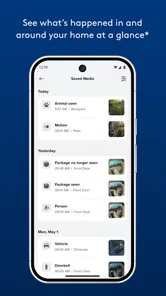
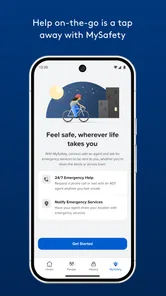
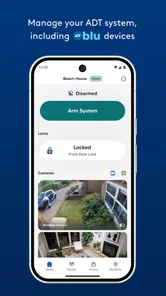
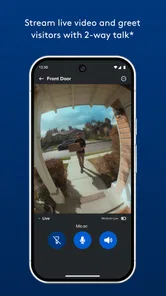
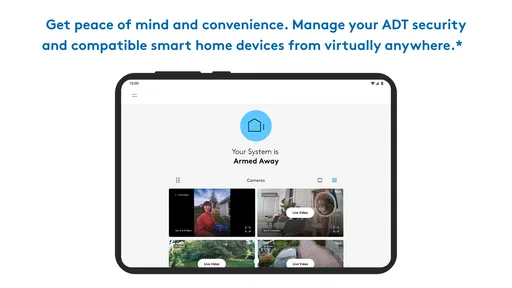
ADT+ is the mobile companion app for ADT security systems, allowing customers to monitor and manage compatible home security equipment from an Android or iOS device. Depending on the services and devices included in your plan, you can view cameras, arm or disarm the system, receive alerts, check activity, control smart-home accessories, and communicate through supported video doorbells or cameras.
Do I need an ADT subscription or compatible equipment to use ADT+?
Yes. ADT+ is primarily designed for customers with an eligible ADT security service and compatible devices. The features available after installation depend on your monitoring plan, account configuration, and the products linked to your system, such as sensors, cameras, smart locks, thermostats, or video doorbells. Without an activated ADT account or supported equipment, the app may offer little practical functionality.
Can ADT+ be used to arm and disarm my security system remotely?
In most supported ADT configurations, ADT+ lets you arm or disarm the system remotely after signing in to your account. This can be useful when leaving home, returning unexpectedly, or checking the system while away. However, availability may vary according to your plan, device setup, permissions, and current system status. Always confirm that doors and windows are secure before arming.
Pros
- Live TV and on-demand content are available in one streamlined app.
- Supports multiple profiles for a more personalized household experience.
- Search tools make it easy to find shows
- movies
- and channels quickly.
- Parental controls help families manage what children can watch.
- Regular content updates keep the entertainment library feeling fresh.
Cons
- Some content may require an additional subscription or premium package.
- Video quality can vary depending on connection speed and device support.
- The app may use significant mobile data when streaming over cellular networks.
- Availability of channels and programs can depend on your location.
- Certain features may work differently across Android and iOS devices.











