

Acrylic Nails Makeover Salon
- 0.00
- 0.0
- Installs
- 10.00K
- Price
- Free

Screenshots
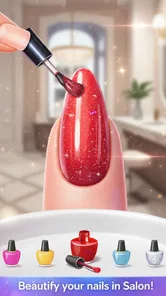
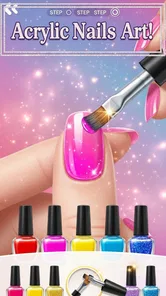

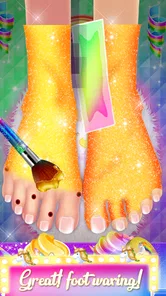




Analysis by Reviewed
I spent time with Acrylic Nails Makeover Salon as a small, playful beauty app, and its appeal is easy to understand: it turns a manicure session into a simple touch-based activity built around a cute kitty theme. Rather than trying to replace a real nail-design tool or teach professional salon technique, it works best as a relaxed fashion game for short breaks. I found it especially approachable because the basic idea is immediately clear: choose a look, work through the salon-style activity, and enjoy the visual result.
The app comes from Genius Unicorn Girls Games and sits in the beauty category. It is free, aimed at Everyone, and supports devices running Android 6.0 or later. Its current version is 1.9, while the app first appeared on October 14, 2021. Those details matter mainly because they place it in the casual, accessible end of mobile beauty games rather than among serious design utilities. It has passed over ten thousand installs, so it has found a modest audience without feeling like a mainstream professional platform.
How the manicure workflow feels in everyday use
My usual starting point was to treat each session as a quick creative exercise rather than a long game. I would open the salon, follow the visible activity, and focus on making the nails look coordinated instead of rushing through every tap. That approach suits the app well. The experience is built around the charm of the makeover theme, so the satisfaction comes from seeing a plain set become more colorful and decorative.
The first useful habit is to decide on a general style before making individual choices. I found that a soft color theme looks more polished when the polish, decorations, and surrounding salon choices feel related. If I changed every element simply because it was available, the result could become visually busy. A better routine is to choose one main color, one supporting shade, and then add decoration sparingly. This is a small distinction, but it makes the activity feel more like designing and less like randomly selecting items.
The kitty presentation gives the app a friendly personality, particularly for younger players who enjoy character-led beauty games. The controls are uncomplicated enough for someone who is not familiar with mobile games. I did not need to learn a complicated menu system before beginning, and that makes it suitable for a child exploring independently, provided a parent is comfortable with the app being used on the device.
For an everyday scenario, I can see this working well during a short wait at a café, before a family outing, or as a calm activity after school. A player can complete a small salon session without committing to the kind of extended attention demanded by a larger simulation game. I would not choose it for a long journey if I wanted deep progression, but it is a pleasant way to fill a few spare minutes.
The strongest part of the experience is the immediate visual feedback. Each choice contributes to a visible makeover, so even a simple change in color or decoration feels meaningful. That feedback also makes it easier for a beginner to understand the relationship between choices. Instead of reading instructions about nail fashion, the player learns by trying combinations and seeing which ones look balanced.
More From Our News Desk

 Gmail
GmailGmail in a Busy Inbox: Who Benefits Most?
From first account to crowded workday, Gmail earns its place through dependable search and flexible sorting—but its best fit depends on how much inbox maintenance you can tolerate.

 Prime Video
Switching to Prime Video: What Changes in Your Viewing Routine
Prime Video can make a compelling second home for streaming, but switching means learning a different catalog, rental layer, and route from browsing to playback.

 Universal TV Remote Control
Universal TV Remote Control Works Best as a Reliable Backup
A phone remote earns its place through quick setup and reliable habits. Here is how to get more from Universal TV Remote Control—and where its limits show.

 Weather - By Xiaomi
Weather by Xiaomi Review: Clear at a Glance, Less Clear Up Close
Xiaomi’s weather app makes everyday forecasts quick to scan, but its calm surface can leave useful details and recovery paths harder to find than they should be.

 X
XX Under Pressure: Can It Recover When Posting Goes Wrong?
A resilience-focused review of X, examining setup, mistaken posts, interruptions, weak connections, and the gaps that matter when recovery needs to be dependable.

 Clash of Clans
Clash of Clans Is Won Between the Battles
Its raids are quick; its community is a long-term project of coordination, teaching, rivalry, and shared responsibility—with all the friction that entails.
Latest News



A practical starting routine for new players
When I first approach a salon session, I avoid tapping through every option as quickly as possible. I look at the available choices and establish a direction first. A bright, playful set benefits from a different treatment than a softer, elegant one, even though the app remains casual. This simple pause reduces unnecessary backtracking and helps the final design feel intentional.
I also recommend using the early part of a session to test the overall color relationship. A shade that looks attractive on its own may clash with the other decorations. If the design starts to feel crowded, removing visual competition is usually more effective than adding another detail. The game is easy to play, but this kind of restraint gives it more creative value.
Another useful approach is to treat each completed set as a reference for the next one. I noticed that repeating the exact same style becomes less interesting, while changing only one element creates a clearer comparison. For example, keeping a similar base color but changing the decorative direction lets a player see how much personality comes from the finishing choices. This turns a short activity into a basic experiment with style.
What I would check before handing it to a child
The Everyone content rating makes the app broadly suitable from an age-rating perspective, and the gentle salon theme is clearly designed to be approachable. Even so, I would still open it once myself before giving it to a younger child. That is a sensible habit with any free mobile app, especially when a child may be using a shared phone or tablet. I would also make sure the device is running a compatible version of Android, since the minimum requirement is Android 6.0.
The free price is convenient for trying the experience without an upfront purchase. At the same time, parents should use their normal family-device habits around any free app: supervise younger users, check the device’s purchase protections, and decide whether the amount of screen time fits the child. Those are not reasons to reject this particular salon game, but they are part of using it responsibly.
Settings and habits that make the experience smoother
There is no need to search for complicated configuration before playing. The most useful “setting” is really the way I prepare the session. I prefer a quiet moment, a comfortable screen brightness, and enough time to finish a design without repeatedly switching away. Because the app is focused on visual choices, a screen that is too dim can make colors less enjoyable, while a very bright setting may make the experience tiring during a longer session.
I also suggest checking the device itself if taps feel inconsistent. Closing demanding apps in the background, keeping the screen clean, and making sure the game has loaded properly can make a casual touch experience feel more responsive. These are ordinary phone habits rather than special features inside the salon, but they matter more in a game where the main interaction is selecting and applying visual elements.
Experienced users can make the session more repeatable by adopting a small design checklist. I use this order: choose a base direction, settle the main color, add one supporting element, then review the complete set before adding anything else. The benefit is not speed alone. It prevents the common mistake of decorating too early and then trying to force the rest of the design around an element that no longer fits.
For younger players, a parent can turn that routine into a gentle creative prompt. Asking whether the design should feel cheerful, calm, bold, or cute gives the child a goal without taking control away. The app then becomes more than a sequence of taps; it becomes a simple way to talk about color, matching, and personal taste.
Faster patterns for short sessions
When I only have a few minutes, I use a “one decision per stage” approach. I pick the first option that fits the intended mood, avoid reopening choices repeatedly, and reserve the final moment for checking whether the whole set looks coherent. This is faster than trying every combination, and it keeps the activity relaxing rather than turning it into a search for a perfect answer.
A second pattern is to create a repeatable theme. I might begin with a light base and then consistently choose decorations that support it, or start with a stronger color and keep the remaining details simple. The advantage is that the player can build confidence without needing to understand every choice immediately. Once that pattern feels comfortable, changing one part at a time makes experimentation easier.
The app is also well suited to shared play. One person can choose the color while another chooses the finishing details, making the salon activity a small collaborative game. This works particularly well with children and siblings because the rules are easy to explain. It also reveals one of the app’s limits: the fun comes from the choices themselves, not from a complex competitive system, so players looking for multiplayer depth will want something else.
I would not recommend racing through the activities just to finish. The visual payoff is the reason to play, and skipping the creative part removes most of the value. A faster workflow should mean fewer indecisive taps, not ignoring the makeover. That distinction helped me enjoy the app more, especially when I treated each session as a tiny design challenge.
Where the salon game is genuinely useful
Its clearest use case is casual creative play. A child who likes nail polish, fashion, cute animals, and makeover themes will probably understand the appeal quickly. It can also suit adults who want something uncomplicated and cheerful, although adults seeking realistic nail preparation or professional inspiration may find it too light.
The app can introduce basic visual ideas without presenting itself as a lesson. Players naturally notice contrast, matching colors, and the effect of adding or removing decoration. That makes it a reasonable choice for a child who enjoys creating looks but is not ready for a more complex design program. The activity is forgiving, so experimentation does not carry the frustration that can come with precision-based games.
It is less useful for someone who wants to plan a real manicure, preview a design on their own hands, or learn salon procedures. A specialized nail-art reference app, a drawing tool, or a realistic makeover simulator would be a better fit in those situations. Acrylic Nails Makeover Salon is about playful transformation, not practical beauty instruction.
Limits that become clearer with repeated play
After several sessions, the simplicity that makes the app welcoming can also make it feel limited. There is not the same depth I would expect from a full fashion simulator with extensive customization, long-term progression, or a detailed collection system. The basic salon loop is enjoyable, but players who need constant new challenges may move on once they have explored their favorite combinations.
The experience also depends heavily on presentation. If a player is not interested in cute characters or nail fashion, there is not much outside that theme to provide motivation. This is a focused app, and that focus is both its strength and its boundary. It does not try to be a general-purpose game, which means it will not satisfy someone looking for puzzles, action, or a broader story.
Another trade-off is the difference between choice and control. The app lets the player make fashion decisions, but it should not be confused with a precise digital canvas. Anyone expecting fine-grained shaping, realistic textures, or professional-level layering may find the interaction too simplified. I see it as a guided creative toy: more expressive than a static picture, but less flexible than a dedicated art application.
The free model makes trying it easy, though free mobile games can be less appealing to people who prefer a completely uninterrupted experience. I would approach it with the expectations of a casual app rather than assuming it will offer the depth of a paid creative suite. That mindset makes the limitations feel reasonable instead of disappointing.
How it compares with common alternatives
Compared with a drawing app, this salon game is much easier to start because the player works within a beauty-focused activity instead of facing a blank canvas. The trade-off is that a drawing app offers far greater freedom. If the goal is to invent an unusual nail pattern from scratch, drawing wins. If the goal is to make a cute salon design without learning tools, this app is the friendlier option.
Compared with a realistic nail simulator, it feels lighter and more accessible. A realism-focused alternative may offer more detailed shaping, color control, or educational value, but it can also require more patience. I would choose this app for a quick, characterful session and a realistic simulator for planning or studying actual nail styles.
Compared with a broad makeover game, the narrower nail focus gives it a clearer identity. A larger makeover title may include hair, clothing, makeup, and character customization, which provides more variety. Acrylic Nails Makeover Salon is better when the player specifically wants the manicure activity and does not want to navigate a much larger fashion system.
That comparison helped me place it correctly. It is not competing on depth; it is competing on immediacy and charm. For the right player, that is enough. For someone who measures value by the number of systems, unlocks, or realistic tools, another category will be more satisfying.
Who should try it and who should skip it
I would recommend it to children and casual players who enjoy cute beauty themes, simple touch controls, and visible creative results. It is also a good pick for a parent looking for a straightforward salon-themed activity that can be understood quickly. The free price lowers the barrier to testing it, and the Everyone rating matches its broadly gentle presentation.
I would suggest skipping it if you want professional nail guidance, a planning tool for a real appointment, advanced editing, or a deep long-term game. It is also not the strongest choice for a player who dislikes repeating a focused activity. Once the novelty of trying different looks fades, the lack of broader gameplay may become noticeable.
My best advice is to decide what you want from the app before installing it. If you want a small creative break, it makes sense. If you want a serious beauty utility, look toward a dedicated design or reference app instead. That distinction prevents the most likely disappointment and gives this compact game a fair chance to do what it is built to do.
My final experience with the makeover
After using Acrylic Nails Makeover Salon with a more deliberate routine, I appreciated it as a simple, friendly beauty game rather than judging it by the standards of professional software. The enjoyable part is choosing a direction, seeing the nails change, and gradually learning which combinations feel balanced. Its kitty theme adds warmth, while the uncomplicated workflow makes it approachable for younger users and casual players.
Its weaknesses are equally clear: the creative space is limited, the salon loop may become repetitive, and there is little reason for players who want realism or extended progression to stay for a long time. Those are important limitations, but they do not undermine the app’s central purpose. A small game does not need to become a full design studio to be worthwhile.
I recommend it as a quick, low-pressure manicure activity, not as a professional nail-art tool. If that is what you are looking for, the free app from Genius Unicorn Girls Games is easy to try on a compatible Android device. Go in with a simple theme, make a few thoughtful choices instead of tapping randomly, and it delivers a pleasant creative pause. For deeper customization, real-world planning, or a wider makeover experience, I would choose a more specialized alternative.
Acrylic Nails Makeover Salon Frequently Asked Questions
What is Acrylic Nails Makeover Salon?
Acrylic Nails Makeover Salon is a casual beauty and makeover game focused on creating stylish nail designs. You can shape nails, apply acrylic extensions, choose colors, add patterns, and decorate them with accessories such as gems and stickers. It is designed for players who enjoy creative, relaxing gameplay rather than a competitive or story-driven experience.
How do you play Acrylic Nails Makeover Salon?
The game usually guides you through a series of salon activities, including cleaning and preparing the nails, selecting their length and shape, applying acrylic material, polishing the surface, and adding decorative details. You complete each makeover by following the on-screen instructions and using the available tools. The controls are simple, so it is accessible to children and casual players.
Is Acrylic Nails Makeover Salon free to download and play?
Acrylic Nails Makeover Salon can generally be downloaded without an upfront purchase, but the exact pricing model may depend on the Android or iOS version available in your region. Free versions may include advertising, optional purchases, or locked designs and tools. It is worth checking the store listing carefully before downloading, especially if the app will be used by children.
Does the game require an internet connection?
Basic nail-design activities may work without a constant internet connection, allowing you to enjoy some salon features offline. However, advertisements, updates, additional content, or certain interactive elements may require mobile data or Wi-Fi. Because offline availability can differ between versions, test the game after installation and review its permissions before relying on it during travel or in areas without internet access.
Is Acrylic Nails Makeover Salon suitable for children?
The colorful interface and straightforward tap-and-drag controls make Acrylic Nails Makeover Salon appealing to younger players. Nevertheless, parents should review the app’s age rating, advertising, in-app purchase options, and privacy permissions before allowing children to play. If the game displays third-party ads or purchase prompts, parental controls and device restrictions are recommended for a safer experience.
Pros
- Fun nail-design gameplay with many colors
- patterns
- and decorations.
- Simple controls make it accessible for younger players.
- Creative makeover options encourage experimentation and personal style.
- Relaxing salon theme with no difficult time limits or complex rules.
- Works well for short play sessions and casual entertainment.
Cons
- Some designs and tools may require watching ads or unlocking content.
- Gameplay can become repetitive after completing several makeovers.
- Frequent advertisements may interrupt the salon experience.
- Limited challenge may not appeal to players seeking strategic gameplay.
- The app may collect device data depending on its privacy settings.











