Abode
- 713.00
- 2.3
- Installs
- 100.00K
- Price
- Free

Screenshots
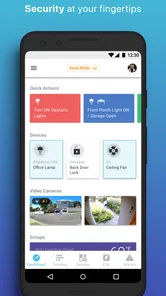
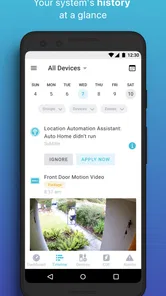
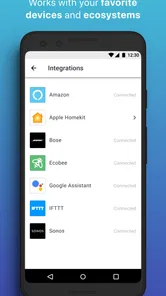
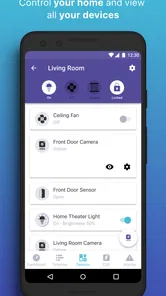
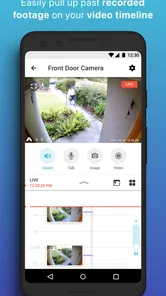
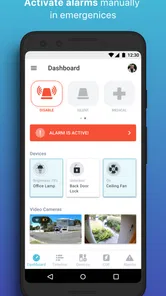
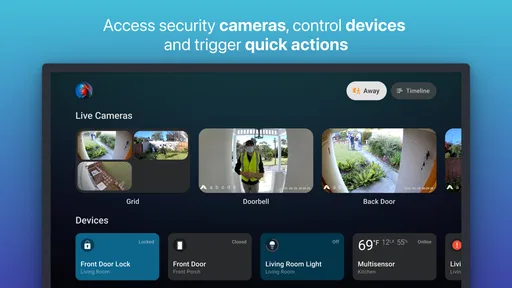
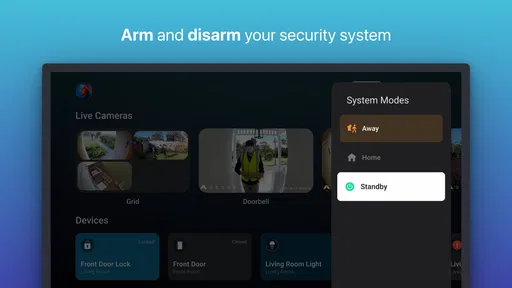
Analysis by Reviewed
Home security apps are easy to appreciate during the first few days, when every alert feels useful and every new setting promises more control. My experience with Abode is more measured: it can become a practical part of a home routine, but its long-term value depends on how consistently you configure it, check it, and respond to what it reports. This is a free lifestyle app from Abode Systems Inc., designed around home security without forcing users into long-term contracts.
That flexibility is the main reason I would consider it instead of immediately choosing a traditional monitored-security package. You can start without paying for the app itself, then decide how much of the wider Abode setup fits your home and budget. At the same time, the modest average rating of 2.3 from around 1.7 thousand ratings is a useful warning: the idea is appealing, but the everyday experience may not feel equally smooth for everyone.
What Abode feels like after the first week
The first-week appeal comes from turning security into something visible and manageable. Rather than treating protection as a service you forget after installation, the app gives you a place to interact with the system and build a clearer picture of what is happening at home. That is especially useful for people who want more involvement than a basic alarm panel provides, but less complexity than assembling several unrelated smart-home products.
I found the strongest early use case to be a simple routine: check the home before leaving, keep an eye on activity while away, and make sure the household follows the same basic security habits. The app is most valuable when it reduces uncertainty. If you are traveling, working late, or responsible for a property that is empty during the day, having a central security tool can make a quick check feel more deliberate than relying on memory.
It is also a sensible starting point for renters or homeowners who dislike the commitment attached to many conventional security providers. The absence of a long-term contract lowers the psychological barrier to trying the service. You can assess whether the system suits your household before treating it as a permanent part of your monthly expenses.
However, I would not mistake “no long-term contract” for “no ongoing decision-making.” The app is free to install, while in-app purchases range from $3.99 to $245.99 per item. That broad range matters because the initial download is only one part of the financial picture. Before buying anything, I would map out which capabilities I actually need and whether the recurring value justifies the total cost of the surrounding setup.
One practical tip is to avoid configuring every possible alert on the first day. Start with the events that genuinely require attention and live with that arrangement for several days. Security notifications have a habit of becoming background noise when they arrive too often. A quieter setup is usually more useful than an impressive one that encourages you to dismiss everything automatically.
More From Our News Desk

Weather by Xiaomi Review: Clear at a Glance, Less Clear Up Close

X Under Pressure: Can It Recover When Posting Goes Wrong?

Clash of Clans Is Won Between the Battles

Android Auto Makes the Case for Quieter Car Software

MobiOffice: Transforming Mobile Productivity with Seamless Integration

EA SPORTS FC™ Mobile Soccer: Redefining Mobile Sports Gaming
The app is rated for Everyone, which makes it approachable for a household with different levels of technical confidence. Still, an age rating does not guarantee that every family member will understand the routine immediately. I would show everyone who may use the system what the important status indicators mean and what to do when an alert appears. Security works best when it is shared knowledge rather than one person’s private project.
Useful routines that are easy to overlook
The first non-obvious strength is that a security app can act as a habit anchor, not just an emergency tool. I would use it at predictable transition points: leaving for work, arriving home, going to bed, and starting a trip. Those moments are easier to remember than random checks, and they reduce the chance that the system becomes something I only open after a worrying event.
A second useful approach is separating urgent attention from simple awareness. Not every event deserves the same response. If the app allows you to distinguish routine activity from something that needs immediate action, that distinction should be made early. If it does not fit your preferred level of control, that is a sign the experience may become tiring for you over time.
There is also a household trade-off. More people using the system can improve coverage, but it can also create inconsistent habits. One person may change a setting, another may ignore an alert, and a third may assume someone else is watching. I would agree on a small set of responsibilities before relying on the app during travel or overnight periods.
Whether it earns a place month after month
After the novelty fades, the central question changes from “Can this help protect my home?” to “Does it continue to help without demanding too much attention?” In my view, Abode has lasting value when it becomes part of a repeatable routine. It is less convincing for someone who wants to install a security product once and never think about it again.
The app’s best long-term role is as a control point for people who want to stay connected to their home security choices. That can suit a homeowner who enjoys adjusting the setup, a renter who wants flexibility, or a family that needs a shared way to check the home while away. It can also appeal to someone who dislikes being locked into a provider before understanding how well the service fits daily life.
By contrast, I would steer away from it if your priority is a completely hands-off experience. A professionally managed alternative may be better for someone who wants another party to take responsibility for monitoring and response. A simpler alarm solution may also be preferable if you only want a straightforward local warning and do not care about interacting with a broader app-based system.
The store presence shows more than 100 thousand installs and around 713 reviews, so this is not an obscure experiment with no visible user base. Even so, the rating suggests that popularity should not be confused with universal satisfaction. I would treat the app as something to evaluate against your own tolerance for setup and maintenance, not as an automatic replacement for every other security option.
One of the more important trade-offs is the difference between flexibility and consistency. A flexible security system lets you shape the experience around your home, but every choice creates another opportunity for confusion. A fixed package may offer fewer options while making the correct routine easier to repeat. I personally prefer flexibility only when the app makes the consequences of each choice clear.
For an everyday scenario, imagine leaving for a weekend trip. The useful workflow is not simply opening the app once as you drive away. I would first confirm the home’s intended status, check that the people staying or visiting understand the routine, and decide who will respond if an alert appears. During the trip, I would avoid repeatedly checking without a reason; scheduled moments are less stressful and reduce the temptation to treat every notification as an emergency.
The maintenance cost is mostly attention
Home security maintenance is not limited to replacing equipment or paying for a service. It also includes reviewing whether the alert pattern still matches your life. A new pet, a changed work schedule, a housemate, or regular visitors can make an old setup produce misleading activity. The app remains useful only if its behavior reflects the current household rather than the household you had when you first installed it.
I would set aside a short monthly check. Look at whether notifications were useful, whether anyone ignored them, and whether the household still understands what to do. This is not exciting work, but it is the difference between a security app that supports a routine and one that quietly becomes clutter on a phone.
Another maintenance issue is financial. Because the app itself is free but offers purchases, I would review the cost as part of the same monthly habit. Ask whether the paid element is still solving a real problem. A purchase that felt essential during setup may become less important once your routine settles, while another feature may prove worthwhile because it prevents repeated manual checks.
The broad purchase range also means two people can have very different experiences with the same app. One user may spend little and use it as a basic companion, while another may build a much more expensive security arrangement around it. That is why I would not judge the value from the download price alone. The meaningful question is how much reassurance, convenience, and practical control the complete setup provides.
There is a useful maintenance rule I would recommend: every alert should have an owner. If no one knows who is expected to react, the notification is not really part of a security plan. Assigning responsibility is particularly important when several people share the home or when relatives are checking in during a trip.
Where fatigue starts to appear
The biggest source of fatigue is notification overload. Security tools are designed to make activity visible, but visibility without prioritization can become exhausting. If I receive too many low-value alerts, I gradually stop treating them as meaningful. That is not a flaw unique to this app, but it is a serious risk for any system intended to protect a home.
Another source of friction is the gap between technical control and real-world behavior. The app may provide a neat way to manage security, but people still forget routines, misunderstand statuses, or assume that an alert has already been handled. The more a household depends on one technically confident person, the more fragile the arrangement becomes when that person is unavailable.
I would also be cautious about choosing it solely because the contract model sounds attractive. Avoiding a long commitment is valuable, but a contract-free arrangement does not remove the need to learn the system, maintain habits, or decide whether purchases are worthwhile. If you dislike troubleshooting or adjusting settings, the flexibility may feel like extra work rather than freedom.
The low average rating reinforces my caution. It does not tell me that every user will have a poor experience, but it does tell me to approach the app with realistic expectations. I would install it, test the daily workflow, and pay attention to how quickly the household adapts before expanding the setup or depending on it for a major security decision.
There is also a privacy and attention trade-off inherent in connected home security: the more closely you follow activity, the more often the app can pull your focus back to the home. For some people that is reassuring. For others, it creates a habit of checking repeatedly without adding meaningful safety. I would use the app to support confidence, not to encourage constant surveillance of ordinary household activity.
Who should use it, and who should choose something else
I think Abode is a good fit for someone who wants a flexible home-security companion, dislikes long-term contracts, and is willing to spend time creating a sensible routine. It is particularly suitable for users who value control and want to make their own decisions about how much of the broader system they adopt.
I would be more hesitant to recommend it to someone seeking a guaranteed hands-off response service, a very simple alarm with almost no configuration, or a product chosen purely by its free download price. Those users may be happier with a professionally managed security provider or a simpler alternative that sacrifices flexibility for fewer decisions.
It can also be a poor match for a household that cannot agree on basic procedures. No app can compensate for everyone changing settings independently or ignoring alerts. Before installing, I would ask a practical question: who will check the system, who will respond, and what happens when that person is unavailable? If the answer is unclear, the problem is organizational rather than technical.
For older relatives or less confident phone users, the Everyone content rating is encouraging, but I would still test the routine together. A security interface is only accessible when its most important actions are easy to recognize under stress. If family members need repeated explanations, a simpler interface or professionally supported alternative may be the kinder choice.
My long-term verdict
Abode earns lasting space on my phone only when I treat it as part of a household system rather than a one-time installation. Its contract-free approach and free entry point make it appealing, and the app can provide useful structure for people who want a more active relationship with home security. The value is strongest when regular checks, sensible alerts, and shared responsibilities become ordinary habits.
My reservation is that the same flexibility can create work. Purchases can expand the cost, alerts can become tiring, and a household that does not maintain its routine may gain less protection than expected. The rating of 2.3 is enough for me to recommend a careful trial rather than an enthusiastic blind commitment.
If I were recommending it to a friend, I would say: try it because you want flexible control and are prepared to maintain the habit, not because you expect a free app to solve home security by itself. Give the first week to learning the workflow, the first month to reducing unnecessary friction, and the following months to judging whether it still saves attention rather than consuming it. For the right user, that ongoing balance is where Abode becomes worthwhile; for everyone else, a simpler or more fully managed alternative may earn its place more easily.
Abode Frequently Asked Questions
Is Abode a home security app, and what does it help you manage?
Abode is a Lifestyle app from Abode Systems Inc. focused on home security. Its central appeal is a security solution without long-term contracts, so it may suit people who want to explore home protection without committing to a lengthy agreement. Before downloading, consider whether a home-security service is what you need; Abode is not a general lifestyle organizer or a creative tool.
What is Adobe, and what can I use it for?
Adobe is a suite of creative and productivity tools rather than a single application. Depending on the mobile app you download, you can edit photos, design graphics, create PDFs, scan documents, draw illustrations, or make videos. Each app has a different purpose, so it is worth checking the exact Adobe product name before installing it. The mobile versions are designed for quick edits and on-the-go work, while advanced features may require desktop software or a subscription.
Is Abode free, and are there additional costs?
Abode is free to download, and the app includes in-app purchases ranging from $3.99 to $245.99 per item. The free download is a starting point rather than a guarantee that every service or feature is included at no cost. Review the purchase details shown in the app store before buying, and consider whether any optional spending fits your needs and budget.
Is Adobe free to download and use on Android or iOS?
Most Adobe mobile applications can be downloaded for free, but the available features vary considerably. Basic tools are often accessible without payment, while premium editing options, advanced export settings, cloud storage, templates, or professional features may require an Adobe Creative Cloud subscription. Some apps also offer in-app purchases or trials. Before confirming a subscription, review the price, billing period, and cancellation terms shown in the Google Play Store or Apple App Store.
Do I need an Abode account or compatible equipment to get started?
For a home-security app, the experience is most relevant to people planning to use Abode’s security solution rather than simply looking for a standalone lifestyle utility. Think about your home-security needs and the equipment or services you expect to use before installing it. The app is developed by Abode Systems Inc.; checking the app’s setup flow and purchase details can help you decide whether it fits your situation.
Pros
- Clean interface makes browsing and managing content straightforward.
- Works well for organizing saved items and keeping information easy to find.
- Useful for users who want a focused experience without unnecessary distractions.
- Setup is generally quick
- with the main features accessible shortly after installation.
- Regular use feels convenient on both phones and larger mobile screens.
Cons
- Some features may require an account or additional setup before they work fully.
- The app can feel limited if you need advanced customization options.
- Performance may vary on older devices or when handling larger amounts of content.
- Certain functions are not as intuitive and may take time to discover.
- Users may encounter occasional notifications or prompts they would rather avoid.











