

a better meal - Meal Planner
- 13.00
- 3.9
- Installs
- 10.00K
- Price
- Free

Screenshots

Analysis by Reviewed
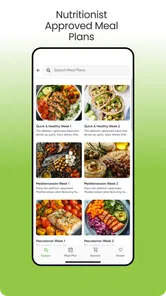
Planning dinner sounds simple until the week gets busy, the fridge contains a strange mix of ingredients, and everyone wants something different. I spent time with a better meal - Meal Planner to see whether it reduces that daily decision-making or merely gives it a nicer place to live. My impression is that it is aimed at households that want a custom dinner routine rather than a one-off recipe search. Its focus is weekly meal planning and menu preparation, with the family in mind.
This is a Food & Drink app from A Better Meal LLC. It is free to install, rated for Everyone, and available for Android devices running version 7.0 or later. The current release is 3.6.1, and the app has passed the early discovery stage with over ten thousand installs. Its average rating is 3.9 from roughly fifty ratings, alongside a smaller group of written reviews. That is enough to show some real interest, but not enough for me to treat the public reception as settled.
How the planner fits into a real week
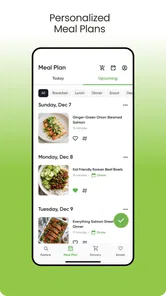
The useful idea here is not simply “find a recipe.” The app is built around the more practical question: what will I make across several evenings, and how can I prepare for that plan? That distinction matters. Recipe apps are good when I already know what I want to cook. A weekly planner is more valuable when I am tired on a Sunday evening and need to turn vague intentions into a workable dinner schedule.
I found the family angle especially relevant for people who repeatedly face the same problem: one person chooses meals, another shops, and somebody else ends up cooking. A shared weekly plan can give those tasks a common reference point. Even without treating the app as a complete household-management system, the planning approach can make the week feel less improvised.
A realistic use case would be a parent preparing for several school nights. Instead of deciding at the supermarket, the user can start with a weekly menu, look at the planned dinners, and prepare ingredients around that outline. The benefit is not that every evening becomes effortless. The benefit is that the decision has been moved to a calmer moment, when there is more time to adjust the plan.
That shift also reveals the app’s main trade-off. A planner only helps if I am willing to maintain it. If I ignore the schedule after creating it, the application cannot solve the underlying problem. It suits people who want a repeatable routine, not users who prefer choosing dinner spontaneously from whatever looks appealing that day.
What the free entry point means
The app can be downloaded without an upfront purchase, which makes it easy to test against your actual routine. That is important for this kind of tool because usefulness depends heavily on personal habits. Someone who rarely cooks at home may gain little from a weekly dinner planner, while a family cooking most nights can judge its value quickly.
More From Our News Desk

 Gmail
GmailGmail in a Busy Inbox: Who Benefits Most?
From first account to crowded workday, Gmail earns its place through dependable search and flexible sorting—but its best fit depends on how much inbox maintenance you can tolerate.

 Prime Video
Switching to Prime Video: What Changes in Your Viewing Routine
Prime Video can make a compelling second home for streaming, but switching means learning a different catalog, rental layer, and route from browsing to playback.

 Universal TV Remote Control
Universal TV Remote Control Works Best as a Reliable Backup
A phone remote earns its place through quick setup and reliable habits. Here is how to get more from Universal TV Remote Control—and where its limits show.

 Weather - By Xiaomi
Weather by Xiaomi Review: Clear at a Glance, Less Clear Up Close
Xiaomi’s weather app makes everyday forecasts quick to scan, but its calm surface can leave useful details and recovery paths harder to find than they should be.

 X
XX Under Pressure: Can It Recover When Posting Goes Wrong?
A resilience-focused review of X, examining setup, mistaken posts, interruptions, weak connections, and the gaps that matter when recovery needs to be dependable.

 Clash of Clans
Clash of Clans Is Won Between the Battles
Its raids are quick; its community is a long-term project of coordination, teaching, rivalry, and shared responsibility—with all the friction that entails.
Latest News



There are in-app purchases listed from $4.99 to $199.99 per item. I would not interpret the presence of that range as a reason to assume every useful function requires payment, nor would I treat the free download as proof that the full planning experience costs nothing. The sensible approach is to begin with the free access, build one genuine week of meals, and inspect the purchase choices before committing to anything.
This is where the app asks for a little discipline from the user. Before paying, I would check whether the free experience already handles the part I need most: creating a plan and making it practical for my household. If the paid value is tied to expanded planning depth or continued use, it may make sense for a regular cook. If I only need occasional inspiration, a free recipe collection may offer better value.
The broad purchase range also means I would avoid making a decision based on the smallest listed price alone. A low entry price can be reasonable for trying an extra function, but a much higher item price deserves a closer look at what it unlocks and how often I would use it. Since the app’s core appeal is long-term routine, the right question is not “can I afford one purchase?” but “will this save me enough repeated effort to justify the purchase?”
Where the planning approach delivers value
The strongest value is the reduction of mental clutter. Dinner planning consumes small amounts of attention throughout the day: remembering what is available, considering preferences, deciding what needs preparation, and avoiding another last-minute takeaway. A weekly structure can gather those decisions in one place.
I also like the distinction between a menu and a plan. A menu tells me what I intend to eat. A plan encourages me to think about the sequence of meals and the work around them. That can change how I shop. For example, I might place a more involved dinner on a day when I have time and reserve a simpler option for a late work night. This kind of scheduling judgment is more useful than collecting attractive recipes I never make.
Another practical strength is the family context. A solo cook may be happy improvising, but a household has more variables. Preferences, time limits, and different appetites can make dinner feel like negotiation. A custom planner gives that negotiation a structure. I would use it before shopping, not while standing in the store, because the value comes from making choices in advance.
There is also a subtle advantage for reducing waste, although the app should not be treated as an automatic inventory manager unless its current experience clearly supports the exact workflow you need. The planning habit itself can help me buy with more intention. I can group meals around ingredients that overlap and avoid purchasing items for a single ambitious recipe. That is a user-created benefit of the weekly structure, rather than something I would assume happens automatically.
The best result comes from treating the app as a decision-making tool, not a magic grocery list. I would use it to decide the week’s direction, then review the plan against my schedule, available ingredients, and realistic cooking energy. That final check is what turns a pleasant-looking menu into something I can actually follow.
Small workflows that make it more useful
My first tip is to plan around difficult evenings before filling the easy ones. If Wednesday is always rushed, decide that meal first. Then use the remaining days for dinners that require more preparation. This prevents a common planning mistake: creating a beautiful sequence that collapses as soon as real life interrupts it.
My second tip is to leave room for one flexible meal. A weekly plan does not need to be a rigid contract. A flexible slot can absorb leftovers, an unexpected invitation, or an evening when cooking is simply not realistic. That makes the planner more forgiving and increases the chance that I will continue using it instead of abandoning it after one disrupted week.
My third tip is to review the plan at two different times. I would make the first version when I have enough attention to think clearly, then revisit it before shopping. The second pass is where I would catch unrealistic preparation times, missing ingredients, or a run of meals that all demand the same type of effort. This two-pass method is more reliable than treating the first plan as final.
For families, I would also use the plan as a conversation starter rather than silently guessing what everybody wants. Even if the app does not replace a household chat, showing the intended week can expose disagreements early. That is much easier to fix before shopping than after ingredients have been bought.
Where it falls short compared with familiar alternatives
The usual recipe app is better when I want visual inspiration, a particular cuisine, or instructions for one dish immediately. A grocery-list app is better when my menu is already decided and I only need to remember what to buy. A calendar may be better for households that care mainly about assigning cooking responsibilities and fitting meals around appointments.
This planner sits between those tools. Its advantage is the connection between weekly choices and family dinner preparation. Its weakness is that it may feel unnecessary if I already have a dependable system using notes, a calendar, and a shopping list. Replacing a familiar setup takes time, so the app must save more effort than it adds through maintenance.
I would also be cautious if my household has highly specific dietary requirements or constantly changing preferences. A custom planner may still be useful, but I would want to verify every suggestion and make sure the planning process does not encourage me to accept meals that do not suit the people eating them. Personalization is helpful only when it reflects real constraints rather than merely sounding tailored.
Likewise, this is not my first choice for someone who enjoys spontaneous cooking and rarely repeats a weekly routine. That person may find a planner restrictive. The app’s central promise is organization, so the more I value structure, the more likely I am to notice its benefit.
Who is most likely to get their money’s worth
I see the clearest fit for busy families, couples coordinating dinners, and regular home cooks who are tired of making the same decisions repeatedly. It can also help someone learning to plan ahead, especially if the real problem is not cooking skill but lack of a dependable rhythm.
The free installation makes testing straightforward. I would give it a complete weekly trial rather than judging it after opening the first screen. During that trial, I would pay attention to three things: whether the plan reflects my household, whether I can adapt it when the week changes, and whether it reduces shopping and dinner-related stress. Those are better measures than simply counting how many meals appear on the screen.
Paid value becomes easier to justify for a user who repeats the workflow every week and sees a clear saving in attention or preparation. The same purchase is harder to justify for occasional cooks, people who already have a reliable planner, or anyone expecting a fully automatic solution that removes all decisions. The app can organize choices, but I still need to make sensible choices.
The Everyone rating makes it suitable for a broad audience from an age-classification perspective, although that does not mean every household will find the planning style appropriate. A young adult cooking alone, a large family, and a couple with strict dietary preferences may all approach the same tool differently. I would judge it by the complexity of my meals and the number of people I am planning for.
My verdict after weighing the trade-offs
a better meal - Meal Planner is worth trying if your biggest food problem is the repeated question of what to cook this week. I like its emphasis on a custom weekly menu and family preparation because it addresses the part of home cooking that often causes the most friction: organizing several ordinary evenings, not discovering one impressive recipe.
My recommendation is more measured when it comes to spending. Start with the free access, create a genuine plan for a busy week, and judge whether the routine feels easier. Because in-app items range from $4.99 to $199.99, I would examine the exact purchase option carefully rather than assuming the cheapest or most expensive choice represents the whole experience.
I would skip it if I want spontaneous recipe browsing, already manage meals comfortably with a calendar and notes, or need a specialized dietary system that requires careful verification. In those cases, a more focused alternative may be a better match. I would also skip paying if the planner does not become part of my weekly habit.
For the right user, though, the app offers a practical middle ground between recipe inspiration and household organization. It will not cook dinner or remove every compromise, but it can give those compromises a place to be made before the evening becomes hectic. With a little realistic scheduling and a willingness to review the plan, I think it is a sensible free download to test, and a potentially worthwhile paid tool for people who genuinely use it week after week.
a better meal - Meal Planner Frequently Asked Questions
Is Better Meal – Meal Planner available for Android, and what device version does it support?
Better Meal – Meal Planner is a Food & Drink app for Android, and it requires Android 7.0 or later. Before downloading, check your device’s operating system version to make sure it meets that requirement. The app is free to download, though some features may involve in-app purchases. Its focus is weekly dinner planning and menu preparation for families.
Who develops Better Meal – Meal Planner, and is it suitable for all ages?
The app is developed by A Better Meal LLC and is rated for Everyone, so its content is intended to be suitable for a general audience. It is built around planning family meals, but individuals with different routines may also find the weekly planning approach useful. If you are installing it for a child, remember that in-app purchases are available and should be managed through your device’s purchase controls.
What is Better Meal – Meal Planner, and who is it designed for?
Better Meal – Meal Planner is an app designed to help users organize meals, discover recipe ideas, and plan what they want to eat throughout the week. It can be useful for busy professionals, families, students, and anyone trying to follow a more structured eating routine. The app is especially helpful if you want to reduce last-minute food decisions and make grocery planning more manageable.
Can I customize the meal plan according to my dietary preferences?
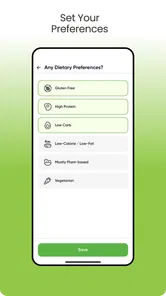
The app is intended to make meal planning more personal by allowing users to consider their food preferences, eating habits, and dietary goals. Depending on the available options in your version, you may be able to filter or adjust suggestions for specific ingredients, meal types, or dietary requirements. However, users with allergies or medical conditions should carefully check every recipe and ingredient rather than relying only on automated recommendations.
Does Better Meal include recipes and a grocery shopping list?
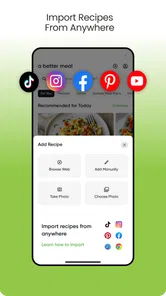
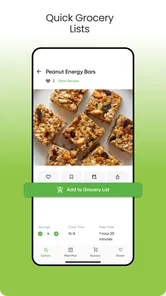
Better Meal – Meal Planner focuses on making the entire planning process easier, from choosing meals to preparing for shopping. Recipe suggestions can help you decide what to cook, while organized ingredients may make it simpler to create a grocery list. Before downloading, remember that the exact recipe collection, list features, and level of automation can vary by app version, region, or subscription plan.
Pros
- Creates organized weekly meal plans in just a few taps.
- Helps reduce food waste by planning ingredients ahead.
- Offers recipe ideas for different meals and occasions.
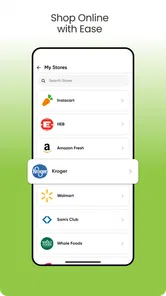
- Makes grocery shopping easier with a structured ingredient list.
- Useful for maintaining consistent eating routines.
Cons
- Some recipes or planning tools may require a premium subscription.
- Meal plans may need manual adjustments for specific dietary needs.
- Ingredient lists can include items you already have at home.
- Limited customization may frustrate users with complex preferences.
- Requires regular updates to keep plans aligned with your schedule.











