1DM+: Browser & Video Download
- 1.46K
- 4.7
- Installs
- 100.00K
- Price
- $3.99
Screenshots

Analysis by Reviewed
I’d consider 1DM+: Browser & Video Download if I regularly save files for offline use and want browsing and downloading handled in one place. The main appeal is the combination of a built-in browser, download management, and torrent support, rather than a single-purpose button for saving videos. That convenience has a clear trade-off: it suits people who actively manage downloads better than those who only occasionally save a clip.
How to judge the purchase
This is a paid Android tools app, priced at $3.99. I’d judge that cost against how often I download and whether having a browser and download manager together would replace tools I already use. If I save files regularly, paying for a dedicated workflow may feel worthwhile; if I only download something now and then, the usual browser may be enough.
There is no need to treat the price as proof that every download will work. Whether a site allows a file to be saved, and whether the format is useful on your device, still matters. I’d also check that the app fits my routine before buying: the value is in using its download tools, not simply having another browser installed.
Where the value comes from
The best case for paying is not simply that the app has several capabilities, but that they connect in a way I would use repeatedly. When I find files in its browser, I can keep the download task close to the page that led me there, then manage queued transfers without juggling separate apps. For someone who saves things every week, that can be a practical improvement over a browser that treats each download as an isolated event.
I would think about the purchase in terms of friction removed. If my current routine involves copying links, switching between a browser and a separate manager, and trying to remember which transfers need attention, consolidation could make those steps less annoying. If my routine is already simple, the same collection of tools may add little value. The useful question is whether it improves a repeated habit, not whether it has a long feature list.
A sensible first workflow
First off, setting up 1DM+ is a breeze. You simply download it from the app store, and you’re all set to explore its features. The interface is straightforward and user-friendly, so even if you’re not the most tech-savvy person, you’ll find your way around in no time. It’s like having your own personal media hub right on your phone!
Getting Started with 1DM+
The first few sessions are a good time to learn how the app behaves before relying on it for a large batch. I’d try one small, permitted file, confirm where it ends up, and check that I can find it again outside the active download screen. That simple test helps reveal whether the combined browser-and-manager approach suits the way I organize files, without committing time or storage to a big transfer.
More From Our News Desk

 Gmail
Gmail in a Busy Inbox: Who Benefits Most?
From first account to crowded workday, Gmail earns its place through dependable search and flexible sorting—but its best fit depends on how much inbox maintenance you can tolerate.

 Prime Video
Switching to Prime Video: What Changes in Your Viewing Routine
Prime Video can make a compelling second home for streaming, but switching means learning a different catalog, rental layer, and route from browsing to playback.

 Universal TV Remote Control
 Works Best as a Reliable Backup
A phone remote earns its place through quick setup and reliable habits. Here is how to get more from Universal TV Remote Control—and where its limits show.

 Weather - By Xiaomi
Weather by Xiaomi Review: Clear at a Glance, Less Clear Up Close
Xiaomi’s weather app makes everyday forecasts quick to scan, but its calm surface can leave useful details and recovery paths harder to find than they should be.

 X
X Under Pressure: Can It Recover When Posting Goes Wrong?
A resilience-focused review of X, examining setup, mistaken posts, interruptions, weak connections, and the gaps that matter when recovery needs to be dependable.

 Clash of Clans
 Is Won Between the Battles
Its raids are quick; its community is a long-term project of coordination, teaching, rivalry, and shared responsibility—with all the friction that entails.
Latest News



Finding files from the built-in browser
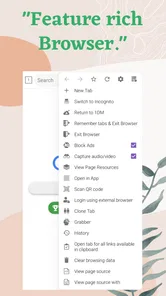
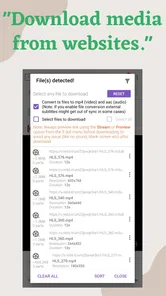
One of the standout features of 1DM+ is its built-in browser. This isn’t just any ordinary browser; it’s designed to detect media files on web pages automatically. So, if you come across a video you like, the app prompts you to download it right away. Gone are the days of hunting for download buttons or relying on third-party services.
In practice, automatic detection is useful when a page offers a downloadable media file but does not make the download route obvious. I’d still treat the prompt as a choice, not a guarantee: some sites restrict saving, and browser detection cannot turn a stream into a file when the site does not make one available. Before starting a large download, I’d confirm that I have enough device storage and that I’m allowed to keep a local copy.
A less obvious benefit of detection is that it can save repeated navigation when a page has several media items. Rather than treating every page as a simple video link, I’d inspect the available choices and start only the file that matches what I actually need. This is especially helpful for research or reference material, where an unwanted duplicate can be more nuisance than convenience. If no usable download appears, I would not keep retrying blindly; the page may not offer a file the app can save.
Making queues work for you
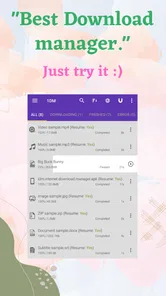
Another cool feature is its support for multiple downloads. You can queue up several files and let the app handle them simultaneously, which is a real time-saver. Plus, with the option to pause and resume downloads, you’re in full control. Ever started downloading a massive file only to have it interrupted? With 1DM+, that’s no longer a worry.
A helpful habit is to queue files you actually plan to use, rather than filling the list with every interesting link you encounter. For example, before a trip I might save a few permitted videos or other files over Wi-Fi, then check that they have finished before leaving. Pausing and resuming can make interruptions less frustrating, but it does not remove the need to revisit a download if its source changes or becomes unavailable.
For a more deliberate batch, I’d add a few files, review the queue, and let it run while I can keep an eye on storage and connectivity. The small trade-off is that a queue is only useful if I remember what I added and why. A quick check before starting helps avoid downloading a file twice or keeping something I no longer need. It also makes it easier to spot a transfer that has stalled, rather than assuming every queued item will finish unattended.
Speed, interruptions, and expectations
The performance of this app is stellar. It efficiently manages your downloads without bogging down your phone’s resources. Whether you’re downloading videos or other media, the speed is impressive, ensuring you get your content without a long wait.
Download speed is never just a property of the app: the connection, the source, and the file all affect how long a transfer takes. I would not choose it on the assumption that every download will be fast. Its more dependable advantage is having a place to organize queued work and resume interrupted transfers, rather than repeatedly searching for each file in a browser.
That distinction matters if I am deciding whether to leave a transfer until later. A pause-and-resume option is useful when I need to stop, but it cannot guarantee that every source will support resuming in the same way. For an important file, I’d check that the download has completed before deleting the original link or leaving the connection behind. I would also avoid treating an unfinished item as a usable offline copy.
When torrents belong in the workflow
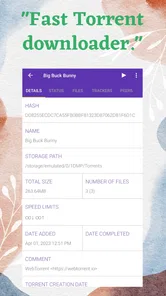
1DM+ also includes an option for downloading torrents, which is a huge plus for users who regularly use such services. The seamless integration means you don’t need another app to manage your torrent downloads.
That built-in torrent option is most useful if torrents are already part of your routine and you prefer one tool for different download types. It is less compelling if you only use ordinary web downloads; in that case, it should be a bonus rather than the reason to pay. As with any torrent client, I’d stick to content I have the right to download and keep an eye on the amount of data and storage a queued file may use.
There is also a practical choice between convenience and keeping tools separate. A single app can make everyday management simpler, but someone who depends on a particular torrent workflow may prefer a dedicated client they already know. I’d treat integration as a way to reduce app switching, not as a promise that every specialist option will suit every user.
How it compares with familiar alternatives
The developer, Vicky Bonick, has made an app with a focused job: combining web browsing with several ways to handle downloads. It has a 4.7 average from around 35,000 ratings, and more than 100,000 installs. Those figures suggest it has found an audience, but they don’t tell me whether it matches a particular person’s habits.
Compared with relying on a phone’s standard browser, 1DM+ puts download detection and queue management closer to the browsing experience. Compared with a separate torrent app plus a browser, it can reduce app switching. The flip side is that a person who prefers a familiar browser, or wants a simple downloader without an integrated browsing workflow, may find a dedicated alternative easier to stick with.
The standard browser is still the straightforward choice when I only need to open pages and occasionally save an ordinary file. A separate download manager may be preferable if I want to keep browsing habits untouched but need more control over transfers. A dedicated torrent client is the clearer fit for someone whose main task is torrent management. 1DM+ sits between these choices: its appeal is the combination, and that same combination may feel unnecessary if I only want one of those jobs.
For an everyday example, imagine finding a set of legitimate media files while researching a project. I could use the built-in browser to locate them, queue the files I need, pause the transfer if I have to leave Wi-Fi, and return later to finish. That is a more convincing use case than downloading a single short clip once in a while: the app earns its place when there are several files or different download sources to manage.
One practical question is whether it is only for video. No: its appeal is broader, with support for other media and files as well as torrents, so I would think of it as a download manager with a browser rather than a video-only tool. Another is whether it replaces every browser or torrent app. I would not assume that; it can consolidate those tasks for some users, while people who rely on specific features in their existing apps may prefer to keep their current setup.
Who is likely to get the most from it?
I see the strongest fit for people who regularly save permitted files, collect several downloads at a time, or already use torrents and would rather manage them alongside web downloads. Students gathering reference material, travelers preparing offline files, and anyone who often returns to interrupted transfers may appreciate the queue-based approach. The common thread is repetition: the more often I use these tools, the more meaningful it is to keep them together.
It is less suited to someone who mainly streams content, rarely saves files, or already has a browser workflow that feels effortless. It is also not a shortcut around a site’s restrictions. If I need a specialist browser feature more than download management, or a torrent client built around a particular routine, I would choose the tool that handles that job best instead of paying for a broader package I may barely use.
Why You Should Try It
If you’re someone who frequently downloads media from the internet, 1DM+: Browser & Video Download is practically a game-changer. It consolidates all the tools you need into a single app, eliminating the need for multiple applications cluttering your device.
That recommendation is strongest for people who routinely save permitted files, download in batches, or use torrents and want a single place to manage those tasks. I’d skip it if I browse casually, rarely save anything, or am satisfied with the download controls already built into my usual browser. A tool can be capable and still be unnecessary for a lighter routine.
What to expect from the app over time
Additionally, the app's developers are consistently updating it, ensuring that you have the latest features and security improvements. It’s reassuring to know that the app you rely on is continually evolving.
The app is rated Everyone, and its current version is 18.2; it was released on March 8, 2017. I see those details as useful context, not a substitute for checking whether its approach suits me. Since the purchase is $3.99, I’d make the decision based on repeated use: if the browser-based detection, queues, pause-and-resume controls, and torrent option solve problems I regularly encounter, the cost is easier to justify.
For a reader wondering whether the price buys a free-to-try arrangement, I would not assume that from the purchase details. The clear point is that this is a paid app, so I’d decide before buying whether the combined workflow is something I will actually use. If I only need an occasional download, sticking with the tools I already have is the more sensible value choice.
There is no need to install it just because its feature set sounds broad. I’d first list the tasks I want it to handle: finding downloadable media, organizing a batch, resuming interrupted work, or keeping torrent downloads in the same place. If only one of those comes up rarely, the convenience may not justify adding another app. If several are part of my normal routine, consolidation becomes a much stronger reason to choose it.
In conclusion, 1DM+: Browser & Video Download is more than just a video downloader. It’s a comprehensive tool that enhances your browsing and downloading experience. Whether you’re tech-savvy or a casual user, this app makes managing media files a breeze. Give it a try; you might just find it’s the app you didn’t know you needed!
1DM+: Browser & Video Download Frequently Asked Questions
Can 1DM+ help me manage several downloads at once?
1DM+ combines a browser with download-management tools, which can be useful when you want to save files while continuing to browse. Its store summary describes it as a fast video, movie, and torrent downloader, as well as an adblock browser. Before downloading, consider whether you want these tasks handled together in one app rather than relying on separate browsing and download tools.
Does 1DM+ include an ad blocker, and can I use it as my regular browser?
Yes, ad blocking is part of the app’s browser-focused feature set, alongside tools for downloading videos and other files. It may be convenient as a regular browser if you prefer having browsing and downloads in one place. Whether it suits your everyday habits depends on how you browse and which features you value most; you can assess that against your current browser before making the purchase.
Is 1DM+ free to download, and what should I know about its price?
1DM+ is a paid app priced at $3.99, so consider that cost before downloading. It is a tools app developed by Vicky Bonick, with a 4.7 average rating from around 35 thousand ratings. Its focus is on browsing and downloading files, so it may suit you if you want those functions in one app rather than a basic browser alone.
What is 1DM+ and how does it enhance my browsing experience?
1DM+ is a powerful browser and video download manager app designed to boost your browsing experience by allowing you to download videos, music, and other files directly from the web. With its advanced download capabilities, it supports multiple file types and offers fast download speeds, making it easier for users to access and save content for offline viewing. Its built-in browser also enables seamless navigation and file management.
Is 1DM+ safe to use and does it protect my privacy?
1DM+ is designed with user safety and privacy in mind. It does not collect or share your personal data with third parties, ensuring a secure browsing and downloading experience. Additionally, the app regularly updates its security features to protect users from potential threats and vulnerabilities, providing a safe environment for online activities. As with any browser, it is sensible to be careful about the sites you visit and the files you choose to save.
Pros
- Fast download speeds
- Supports various file formats
- Pause and resume downloads
- User-friendly interface
- Built-in browser
Cons
- Contains ads
- Lacks advanced download options
- Occasional crashes
- Limited support for streaming sites
- Requires permissions for full functionality