1 Second Everyday Video Diary
- 1.52K
- 4.0
- Installs
- 1.00M
- Price
- Free

Screenshots



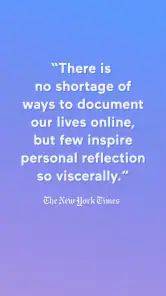
Analysis by Reviewed
I like the central idea behind 1 Second Everyday Video Diary: instead of asking me to film a polished account of my life, it gives me a small daily prompt and turns those brief clips into a record I can revisit. That makes it less like a conventional video editor and more like a habit for noticing what happened. It is a focused app from 1 Second Everyday, P.B.C., in the video-journaling corner of video players and editors, and its appeal depends on whether a tiny daily ritual sounds enjoyable rather than like another chore.
A small daily choice with a useful payoff
The best way to use it is to choose a moment that says something about the day, not necessarily the most impressive thing that happened. A train ride in the rain, a child’s drawing on the kitchen table, or the first quiet coffee after a busy week can all work. A single second is short enough to keep the task manageable, but it also forces a choice: what do I want future me to remember? That editorial decision is part of the experience, not just a step before making a video.
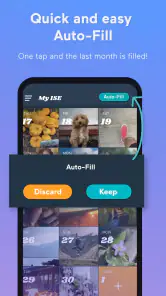
For a realistic routine, I’d capture something as it happens and pick the clearest second later, rather than interrupting a good moment to stage a perfect clip. If I miss a day, selecting a second from an older gallery video can help keep the timeline from feeling abandoned. I would use that option honestly, though: a clip from another day may fill a visual gap, but it is not the same as a record made that day. The calendar is most meaningful when its entries reflect the rhythm of real life.
Getting Started: A Simple Yet Powerful Concept
When I first downloaded 1 Second Everyday Video Diary, I was intrigued by its simple premise. The app encourages you to capture just one second of video daily. Sounds easy, right? Trust me, it’s more powerful than it sounds. The app's interface is pretty straightforward, making it easy to jump right in without a steep learning curve. You just need to give the app access to your camera and gallery, and you’re good to go.
Features That Make It Stand Out
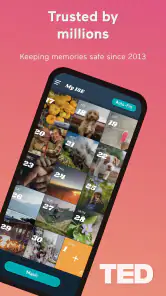
What I love about this app is how it organizes your snippets. It’s got a sleek calendar view where you can see which days you’ve recorded a second. This visual representation of your progress is incredibly motivating. Plus, the app allows you to select seconds from past videos in your gallery, which is super handy if you forget to record on a particular day.
Another cool feature is the ability to compile these daily seconds into a monthly or yearly recap. Imagine looking back at your year in just six minutes! Not to mention, the app supports multiple timelines, so you can create different video diaries for personal, professional, or even travel purposes.
Multiple timelines are particularly useful when one feed would become muddled. I’d keep a general everyday reel separate from a trip or a long-running project, so a work milestone does not crowd out ordinary home life. This works best when I decide what each timeline is for before collecting clips; otherwise, I can end up hesitating over where a moment belongs. The trade-off is a little organization up front in exchange for recaps that tell a clearer story later.
More From Our News Desk

Weather by Xiaomi Review: Clear at a Glance, Less Clear Up Close

X Under Pressure: Can It Recover When Posting Goes Wrong?

Clash of Clans Is Won Between the Battles

Android Auto Makes the Case for Quieter Car Software

MobiOffice: Transforming Mobile Productivity with Seamless Integration

EA SPORTS FC™ Mobile Soccer: Redefining Mobile Sports Gaming
The Joys of Looking Back
There’s something truly magical about watching your seconds come together. I found myself laughing at the silly moments and reminiscing over the more poignant ones. It’s like having a highlight reel of your life, filled with authentic, unfiltered moments.
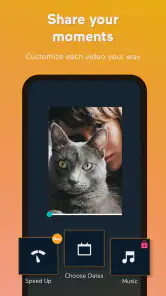
The app even lets you add music to your video compilations, which adds a nice emotional touch to your diary. And if you’re worried about privacy, fear not. The app doesn’t automatically share your videos; you have complete control over what you want to keep private and what you want to share with the world.
That makes the app a better fit for personal reflection than for people who want a fully hands-off archive. I’d still treat each clip as something I am deliberately choosing to preserve, rather than assuming the app will document everything around me. For anyone recording family life or a personal project, a useful habit is to review the calendar now and then and make sure the moments selected are ones they are comfortable keeping in a compiled video. The music can shape the mood, but the clips themselves carry the memory, so I would not let soundtrack choices become a reason to postpone making a recap.
Who will get the most from it
I’d recommend this to people who already take occasional phone videos but rarely revisit them. It offers a narrower, more intentional alternative to leaving everything in a camera roll, where meaningful clips can disappear among screenshots and longer recordings. It is also a good fit for someone who wants a lightweight travel diary: one small scene from each day can preserve the feel of a trip without turning every outing into a filming session.
On the other hand, it is not the right choice if you want a complete, chronological record, or if choosing one moment every day feels like pressure. A standard camera app is better for capturing events in full, while a conventional editor is more suitable when you want detailed control over pacing and presentation. This app’s strength is its constraint, and that same constraint is its main limitation: a brief excerpt cannot show all the context behind a day.
Cost, expectations, and a sensible routine
The app is free to download and is rated for Everyone. Its average rating is 4.0 from around 17 thousand ratings, with about 1.5 thousand written reviews and over a million installs. The current version is 4.12.5, and it requires iOS 11 or later. In-app purchases range from $4.49 to $249.99 per item, so I would try the basic daily workflow first and consider paid options only if I find a specific reason to spend. The purchase range is broad enough that it is worth checking the individual option before confirming anything.
One practical question is whether a missed day ruins the project. It does not have to: the ability to choose from past gallery videos gives you a way to fill a gap, though I would rather leave a blank than pretend a memory happened on a different day. Another is whether this replaces ordinary video recording. I would say no; I’d use the phone camera for moments that deserve more than a second, then choose a brief excerpt for the diary when I want it represented there. That separation keeps the app from dictating how I experience an event.
A routine that lasts beyond the first week
The most useful habit is to make capture easy without making the day revolve around the app. I’d keep the phone ready for moments that already feel worth remembering, then choose a second when I have a quiet minute. A quick evening check can help me notice an empty date while the day is still fresh, but I would not turn that check into a demand to film something ordinary just to maintain a streak. The point is to build a record I want to revisit, not to win a contest against the calendar.
It also helps to think in scenes rather than achievements. A meal shared at home, a familiar walk under changing weather, or the way a room looks during a move may say more about a period of life than a string of milestone events. When I frame the habit this way, the app becomes a prompt to notice surroundings and routines, not just a place to store celebrations. That makes it especially appealing for people who feel their camera roll is full but their memories still seem hard to find.
Where the one-second format asks for care
A one-second clip can be vivid, but it is not automatically understandable later. A quick pan or a camera pointed at a moving subject may look obvious in the moment and confusing in a recap. I’d favor a steady view with one clear subject, even if the scene is modest. If something important is happening, I would record it normally first and decide afterward whether a short extract belongs in the diary. This avoids sacrificing the fuller memory just to satisfy the format.
There is also a subtle trade-off between consistency and honesty. Choosing an older clip can make a timeline look complete, but the date may no longer represent when the footage was captured. For a personal diary, I would rather have a gap than blur that distinction. For a themed project, such as collecting scenes from a trip, an older clip may still make sense if the timeline is organized around the project rather than a strict day-by-day record. Thinking about that distinction before filling gaps can keep a polished recap from becoming a misleading one.
How it compares with other ways to keep memories
Compared with a camera roll, this app asks for more selection but gives the resulting clips a clearer shape. A camera roll is the better place for quantity, long recordings, and footage I may need for practical reasons; the diary is better when I want a compact sequence to watch. Compared with a general video editor, it is less about fine control and more about a repeatable collecting habit. That difference is a benefit if editing feels like work, but a drawback if I want to trim every shot, arrange a detailed narrative, or make a finished film with precise pacing.
Written journals also have an advantage: they can preserve thoughts, conversations, and context that a silent visual fragment cannot. I would not treat a video diary as a replacement for writing if the main thing I want to remember is how I felt or what I learned. The two can complement each other, though. A clip can bring back the look and movement of a day, while a short note can explain why it mattered. The app’s focused format works best when I accept that it captures an impression, not the entire story.
Who should choose another approach
If daily capture sounds like one more obligation, I would skip this and keep using the camera in a more occasional way. The app’s calendar can motivate, but visible gaps may also make some people feel behind. Likewise, anyone who needs dependable documentation of an event should use a regular recording workflow instead of relying on tiny highlights. The format deliberately leaves things out; it is not designed to be a comprehensive archive or a substitute for keeping important files organized elsewhere.
I would also pause before making it the center of a shared family record if other people appear in the clips. A moment that feels private or funny at home may not feel suitable in a compilation later. Choosing carefully and reviewing what goes into a recap are sensible habits, especially when the project includes people who did not choose to document their day. The app is most rewarding when selecting a clip feels thoughtful rather than automatic.
In conclusion, 1 Second Everyday Video Diary isn’t just another video app. It’s a beautiful way to capture life’s fleeting moments and cherish them forever. Whether you’re someone who loves documenting life or just wants to try something new, this app is worth giving a shot. It’s a delightful journey of self-discovery and reflection, one second at a time. So why not give it a try? You might just find that those little moments are the ones that matter most.
1 Second Everyday Video Diary Frequently Asked Questions
Can I keep a video diary if I don’t want to record something every day?
The app is built around collecting everyday pictures or video for a visual journal, so you can choose moments that feel worth keeping rather than treating it like a demanding filming task. A quick photo can be an easy alternative when you do not have a suitable clip. The result is a personal record shaped by the memories you decide to capture.
Can I use 1 Second Everyday Video Diary with photos as well as videos?
The app is intended for creating a visual journal from daily pictures or videos, so it can suit different kinds of everyday memories. You can use a quick photo when filming is inconvenient and choose video when you want to preserve movement or sound. That flexibility makes it easier to keep a diary even when each day looks different.
What is 1 Second Everyday Video Diary and how does it work?
1 Second Everyday Video Diary is an innovative app that allows users to record one second of video footage every day. Over time, these clips are compiled into a chronological video montage, capturing the essence of your life over weeks, months, or even years. The app is designed to help users cherish memories by building a visual diary effortlessly.
Is 1 Second Everyday Video Diary available for both Android and iOS?
Yes, 1 Second Everyday Video Diary is available for Android and iOS. On Android, look for it on Google Play; on iOS, it is available through the Apple App Store. The experience is intended to support making a visual diary on either platform, so you can choose the version that matches your device before installing.
Do I need to have technical skills to use 1 Second Everyday Video Diary?
No technical skills are needed to use 1 Second Everyday Video Diary. The app is user-friendly and designed with a simple interface that makes recording and compiling videos easy for everyone. Users can easily select their one-second clips from their daily activities and let the app handle the rest.
Pros
- Easy to use interface.
- Great for memory preservation.
- Supports video and photo inputs.
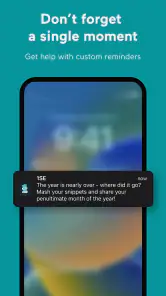
- Customizable reminders.
- No ads.
Cons
- Limited editing tools.
- Subscription required for some features.
- Can be storage intensive.
- Occasional app crashes.
- Exporting videos can be slow.
- Category
- Video Players & Editors
- Version
- 4.12.5