1.1.1.1 + WARP: Safer Internet
- 16.73K
- 4.1
- Installs
- 100.00M
- Price
- Free

Screenshots


Analysis by Reviewed
I often notice the same small internet risk in ordinary places: joining a café’s Wi-Fi, checking a message while out, or switching between home internet and mobile data without thinking about what travels across the connection. 1.1.1.1 + WARP is meant to make that routine less exposed with a simple on/off choice, rather than asking me to manage a complicated VPN setup. That convenience is its strongest everyday argument, though it helps to know what kind of protection it does—and does not—offer.
A quick setup that suits everyday use
Cloudflare, Inc. makes this free tools app, and I find its basic approach easy to understand: install it, choose the connection mode, and turn it on when you want the extra layer. The app is rated for Everyone, has a 4.2 average from around 1.3 million ratings, and has passed 100 million installs. Those figures suggest it is widely used, but they don’t tell you whether its particular approach fits your needs.
The useful first decision is whether to use its DNS service on its own or enable WARP. DNS is the part that looks up the addresses of websites; WARP adds an encrypted connection for traffic between your device and the network. I would treat these as related but distinct choices, not as interchangeable labels for a complete privacy solution. If your aim is simply to make routine connections less exposed, the default experience is approachable. If you need to control where your apparent location is, this is not the tool I’d choose.
What the one-switch approach changes
For me, the practical question is not whether an app can make every online risk disappear; it is whether I will actually use the protection it offers. A complicated VPN can provide more choices, but those choices take attention. WARP’s appeal is that it asks me to make a simpler decision before browsing, then lets me get on with the task. That can be a meaningful improvement for someone who tends to forget security steps when rushing out the door.
There is a useful distinction between protection on the route and privacy everywhere. WARP encrypts traffic between the device and the network, but it does not turn a suspicious link into a safe one or make an account immune to a weak password. I still treat website security, account protection, and connection protection as separate pieces. Thinking about it this way prevents the common mistake of switching on a tunnel and assuming all online activity is now private.
Getting Started with 1.1.1.1 + WARP
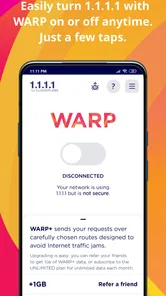
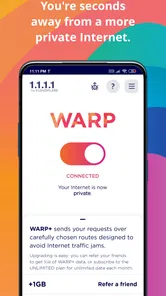
First things first, installing 1.1.1.1 + WARP is a breeze. Available on both Android and iOS, it’s as simple as downloading it from the app store and hitting the connect button. Within seconds, you’re promised an encrypted connection that shields your data from prying eyes.
How Does It Work?
The app leverages a DNS resolver, making your internet queries faster and more secure. What’s interesting about WARP is that it doesn’t just mask your IP like traditional VPNs but instead focuses on encrypting your data between your device and the internet. This means even if someone intercepts your data, they won’t be able to make sense of it.
More From Our News Desk

 Gmail
Gmail in a Busy Inbox: Who Benefits Most?
From first account to crowded workday, Gmail earns its place through dependable search and flexible sorting—but its best fit depends on how much inbox maintenance you can tolerate.

 Prime Video
Switching to Prime Video: What Changes in Your Viewing Routine
Prime Video can make a compelling second home for streaming, but switching means learning a different catalog, rental layer, and route from browsing to playback.

 Universal TV Remote Control
 Works Best as a Reliable Backup
A phone remote earns its place through quick setup and reliable habits. Here is how to get more from Universal TV Remote Control—and where its limits show.

 Weather - By Xiaomi
Weather by Xiaomi Review: Clear at a Glance, Less Clear Up Close
Xiaomi’s weather app makes everyday forecasts quick to scan, but its calm surface can leave useful details and recovery paths harder to find than they should be.

 X
X Under Pressure: Can It Recover When Posting Goes Wrong?
A resilience-focused review of X, examining setup, mistaken posts, interruptions, weak connections, and the gaps that matter when recovery needs to be dependable.

 Clash of Clans
 Is Won Between the Battles
Its raids are quick; its community is a long-term project of coordination, teaching, rivalry, and shared responsibility—with all the friction that entails.
Latest News



One of the standout features I noticed is the seamless transition between networks. Whether I was on Wi-Fi or mobile data, the connection remained steady, and there was no noticeable drop in speed. It’s a neat little feature that ensures you’re always protected without having to reconnect manually.
Performance and User Experience
Now, let’s talk about speed. Normally, VPNs are notorious for slowing down your internet connection, but with 1.1.1.1 + WARP, I was pleasantly surprised. The app uses Cloudflare’s expansive network to maintain speed, and in my tests, streaming and browsing were smooth with hardly any lag.
The user interface is clean and straightforward. Even if you’re not tech-savvy, you won’t find it hard to navigate through the settings. The app provides options to switch between WARP and WARP+, with the latter offering even faster speeds at a premium. However, the basic version is more than sufficient for everyday use.
When the automatic connection earns its place
A practical example is opening a laptop-free workday from a coffee shop: I connect to the café Wi-Fi, enable WARP on my phone, and then check messages, maps, and a work document. I don’t have to remember a different setting when I later leave and switch to mobile data. That kind of continuity is more valuable to me than a long list of controls, especially when I’m moving around and want a quick, repeatable habit.
There is a trade-off in that simplicity. A VPN service built around choosing a country or a server for a particular purpose is a better fit when location selection matters. WARP is more like a protective tunnel for an everyday connection than a travel switch for appearing to browse from somewhere else. I’d keep those goals separate instead of expecting one app to cover both.
Useful routines beyond public Wi-Fi
Public hotspots are the obvious use case, but the same simple habit can help when I am using a shared network in a hotel, waiting room, or temporary workspace. I can connect before opening an email or checking a booking, then leave the setting alone as I move to another network. The benefit is not that these places are automatically dangerous; it is that I do not need to judge every connection from scratch before deciding whether to add an encrypted layer.
Another sensible routine is to use the DNS-only option when I want the resolver without turning on WARP’s broader connection mode. I would test the two modes separately during a quiet moment rather than changing them while troubleshooting an urgent task. That gives me a clearer idea of which setting suits my everyday use and makes it easier to notice if a particular app reacts differently once WARP is enabled.
Privacy and Security
Security is where 1.1.1.1 + WARP truly shines. With its encryption protocols, your online activities are well-guarded. Plus, Cloudflare has a no-log policy, which means they don’t track or store your browsing data. This is a huge plus for anyone concerned about privacy.
However, it’s worth noting that this app isn’t designed to bypass geographical restrictions like some traditional VPNs. So, if you’re looking to access content from different regions, you might need another tool alongside this one.
What to expect compared with a conventional VPN
Compared with a typical VPN app that emphasizes server lists, country choices, and manual routing decisions, this one is deliberately narrower. That makes it easier to approach if I simply want an encrypted connection and do not want to choose a destination. The trade-off is clear: people who need to appear to connect from a particular region, or who depend on a specific server for work, will likely be better served by a VPN designed around those controls.
It is also worth separating speed from reliability. A quick connection on one network does not guarantee the same result everywhere, and a tunnel can sometimes complicate a site or service’s connection. I would not buy an upgrade just because a page loads slowly once. First, compare the same task with WARP on and off, and consider whether the underlying Wi-Fi or mobile signal is the actual problem.
Small checks that prevent frustration
If a particular site or app behaves oddly after you connect, I’d first switch WARP off briefly and retry, then turn it back on once I’ve identified whether the connection is the cause. That simple comparison helps separate a service-specific issue from a general network problem. It is also sensible to remember that encryption on the connection does not make every website trustworthy, hide activity after it reaches the destination, or replace careful account and device security.
For people who want more than the basic option, the app includes WARP+, and the current version is 6.38.6. The free app may be enough for common browsing, so I would try that before paying for an upgrade; faster routing is not automatically the answer to every slow connection. The listed in-app purchase is $4.99 per item, so check the purchase details in the app and decide based on a real need rather than assuming the upgrade is essential.
When troubleshooting, I would change one thing at a time. If a connection fails, turning WARP off and retrying can reveal whether the app is involved; if the problem remains, I would look at the network or the service itself rather than repeatedly switching modes. Likewise, I would avoid judging the app from one speed test alone. The more useful question is whether ordinary browsing and the apps I rely on behave consistently over several everyday connections.
Who should use it—and who should look elsewhere
I’d recommend trying it if you often use public Wi-Fi, move between networks, or want an easy way to add encryption without choosing servers and adjusting a stack of settings. It can also suit someone who wants a quick DNS-focused option and doesn’t need a full VPN toolkit. If you rely on regional streaming access, need a specific exit location, or require detailed network controls, a conventional VPN with those features is the more direct choice.
It is free to download, with in-app purchases, and its minimum operating-system requirement is Android 7.0. That makes it worth checking compatibility before installing on an older Android device. The app is also available for iOS, so the same general idea can serve people using either mobile platform, though the experience and available system settings can differ.
I would also pause before making it an always-on choice if a particular work network or app depends on connection behavior that the tunnel changes. In that situation, a short test with the tools I need most—email, messaging, document access, and any work login—can prevent an awkward surprise later. Someone who already uses a trusted VPN with location selection and detailed controls may not gain enough from adding another layer to justify the extra connection step.
Final Thoughts
In conclusion, 1.1.1.1 + WARP is a fantastic tool for anyone looking to enhance their online security without sacrificing speed. It’s perfect for everyday browsing and provides peace of mind with its robust encryption and privacy features. While it may not replace a full-fledged VPN for some users, it’s a solid choice for those who value simplicity and efficiency. Give it a try, and you might just find it becoming an essential part of your digital life.
My verdict is that its value is mostly measured in friction removed: one straightforward switch can make safer connectivity easier to remember during a busy day. I would not treat it as an all-purpose anonymity tool or a guarantee that every connection will be faster, but as a convenient everyday layer it makes sense. Start with the free mode, see whether it fits your routine, and choose a different VPN only if you need location selection or more hands-on control.
1.1.1.1 + WARP: Safer Internet Frequently Asked Questions
Does 1.1.1.1 + WARP work on both Wi-Fi and mobile data?
1.1.1.1 + WARP is intended to protect internet traffic from your mobile device, so it can be useful when you connect through Wi-Fi or mobile data. Its role is to route and encrypt traffic through the service rather than being limited to a particular kind of connection. You can turn WARP off when you prefer not to use it.
Can I use 1.1.1.1 + WARP while traveling or on public Wi-Fi?
The app may be useful when you connect to unfamiliar networks, including public Wi-Fi, because WARP is designed to add encryption to internet traffic from your device. It does not replace sensible caution online, though. You should still be careful with sensitive information and check that the app is active if you want its protection while browsing.
Will 1.1.1.1 + WARP let me access websites or services that are blocked in my region?
WARP focuses on privacy and how your internet traffic travels across the network; it is not described as a tool for choosing a specific country or location. If you need a VPN to reach a service available only in a particular region, check whether that requirement is met before relying on WARP. Its main purpose is everyday internet protection and connectivity.
Can I use 1.1.1.1 + WARP together with another VPN app?
Using two VPN-style services at the same time may affect how your device routes its connection, so it is sensible to check the behavior of both apps before depending on them together. WARP is designed to handle internet traffic through its own service. If you already use a VPN for work, specific locations, or other features, consider which connection needs to remain active.
Which devices can run 1.1.1.1 + WARP?
1.1.1.1 + WARP is available for Android and iOS devices, making it an option for users who want to protect internet traffic on a phone or tablet. On Android, the app requires version 7.0 or later. Before downloading, check that your device meets this requirement and that the app is offered in your device’s app store.
Pros
- Enhances online privacy seamlessly.
- Free to use with no hidden costs.
- Easy setup with user-friendly interface.
- Improves connection speed.
- Reliable VPN service for all devices.
Cons
- Limited server locations available.
- May slow down internet occasionally.
- Not ideal for advanced VPN needs.
- Can drain battery quickly.
- Limited customer support options.