

فیلتر شکن قوی پرسرعت Sai VPN
- 1.28K
- 4.6
- Installs
- 500.00K
- Price
- Free

Screenshots
Analysis by Reviewed
I see فیلتر شکن قوی پرسرعت Sai VPN as a simple connection tool for people who want to try a VPN without a complicated setup. Its focus is practical: getting a connection going, particularly for users on Iran’s first mobile operator or Irancell, as the app description indicates. That narrow point of relevance is more useful than broad promises of universal access. My main advice is to treat it as a convenience option, not as a substitute for careful privacy choices or a guarantee that every site and service will work.
Where a quick connection fits into a normal day
A realistic use for this app is a short, low-stakes browsing task: you are out on your mobile connection, a page will not open, and you want to see whether routing through a VPN helps. I would connect, try that page, then check that ordinary messaging and browsing still work. If they do, the app may be useful as an occasional tool; if they do not, I would disconnect rather than let a failed connection complicate everything else I need to do.
That workflow is more informative than testing only one speed result. Try the particular service you care about, then return to a familiar page so you can tell whether the VPN has changed your everyday experience. If you rely on a time-sensitive task, such as joining a call or sending a work file, test before the deadline rather than turning the app on at the last moment. The useful question is not whether a VPN can connect in general, but whether this one fits the network and task in front of you.
A quick connection is useful, but test it in context
VPN performance can vary with the network you use, the time of day, and the service you are trying to reach. So even if a connection feels quick at one moment, I would not assume the same result for a video call, a large download, or a crowded public Wi-Fi network. Before relying on it for something time-sensitive, connect and try the exact task you have in mind. If a page loads slowly, disconnecting and reconnecting later may be more sensible than repeatedly changing settings you do not understand.
That small test also helps answer a practical question: will it work well enough on your everyday mobile connection? Try a few ordinary tasks, such as opening a news page and sending a message, before making it your default. A VPN adds another step between your device and the service you use, so the right measure is not a general claim about speed but whether your own routine remains comfortable.
Ever found yourself stuck in a digital void, unable to access your favorite websites or apps due to regional restrictions? We've all been there, and it's frustrating! That's where a robust and speedy VPN like فیلتر شکن قوی پرسرعت Sai VPN comes into play. If you're hunting for a reliable VPN to bypass pesky restrictions and keep your data secure, let me take you through my experience with this app.
Your Gateway to a Free Internet
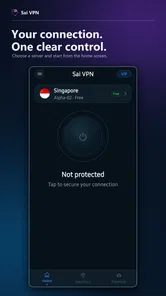
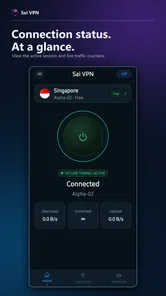
First things first, فیلتر شکن قوی پرسرعت Sai VPN is incredibly user-friendly. From the moment you install it, you're greeted with a clean, intuitive interface that makes navigation a breeze, even for VPN novices. No complicated setup processes here – just tap to connect and voila! You're surfing the web with a new IP address, shielded from prying eyes.
More From Our News Desk

 Gmail
GmailGmail in a Busy Inbox: Who Benefits Most?
From first account to crowded workday, Gmail earns its place through dependable search and flexible sorting—but its best fit depends on how much inbox maintenance you can tolerate.

 Prime Video
Switching to Prime Video: What Changes in Your Viewing Routine
Prime Video can make a compelling second home for streaming, but switching means learning a different catalog, rental layer, and route from browsing to playback.

 Universal TV Remote Control
Universal TV Remote Control Works Best as a Reliable Backup
A phone remote earns its place through quick setup and reliable habits. Here is how to get more from Universal TV Remote Control—and where its limits show.

 Weather - By Xiaomi
Weather by Xiaomi Review: Clear at a Glance, Less Clear Up Close
Xiaomi’s weather app makes everyday forecasts quick to scan, but its calm surface can leave useful details and recovery paths harder to find than they should be.

 X
XX Under Pressure: Can It Recover When Posting Goes Wrong?
A resilience-focused review of X, examining setup, mistaken posts, interruptions, weak connections, and the gaps that matter when recovery needs to be dependable.

 Clash of Clans
Clash of Clans Is Won Between the Battles
Its raids are quick; its community is a long-term project of coordination, teaching, rivalry, and shared responsibility—with all the friction that entails.
Latest News



Speed That Keeps Up with You
Now, let's talk about speed. I’ve tried my fair share of VPNs, and let's be honest, some of them slow your connection to a crawl. But not فیلتر شکن قوی پرسرعت Sai VPN. This app boasts high-speed servers that ensure your internet experience remains smooth and seamless. Whether you're streaming your favorite shows, downloading large files, or playing online games, the speed is impressive.
For a more grounded everyday example, imagine checking a route while you are out, then needing to open a blocked page during a short break. A VPN that is simple to start can be handy in that moment, but I would avoid beginning a large download or a work call until I had checked the connection. That is a useful trade-off: convenience matters for quick browsing, while demanding tasks deserve a connection you have tested first.
Making a fair speed comparison
Compared with the usual alternatives, Sai VPN is best judged as a simple mobile option rather than a full control panel for network tuning. A browser-based workaround may be enough when only one page is involved, but it will not serve the same role as a system-level VPN connection. On the other hand, larger VPN services often appeal to people who want a wide choice of settings or a clearly documented privacy approach. I would not choose Sai VPN simply because its name suggests speed; I would compare the actual result on the carrier and apps I use.
There is also a practical trade-off in switching tools too often. If one connection fails, repeatedly installing unfamiliar alternatives can make it harder to know which service is responsible for a problem. I prefer to test one option with a small set of familiar tasks, note what works, and keep a fallback such as waiting for a different network or using a trusted connection. Sai VPN makes most sense when its straightforward connection process is more valuable to you than extensive customization.
Security – Because Your Privacy Matters
In today's digital age, security is paramount. With this VPN, I felt secure knowing that my data was encrypted and my online activities hidden from potential snoopers. The app employs top-notch encryption algorithms that ensure your data stays private, making it an excellent choice for anyone concerned about online privacy.
I would still keep expectations measured. A VPN changes how your traffic is routed, but it does not make every online action anonymous or protect you from unsafe links, weak account passwords, or sharing personal details on a page you do not trust. I would not use any VPN as a reason to skip basic precautions. If your priority is a detailed privacy setup, clear technical documentation, or controls you can inspect closely, compare options on those points before choosing this one.
What to expect from a lightweight VPN choice
In the crowded VPN category, Sai VPN’s appeal is its straightforward role: connect when access is the immediate problem, rather than spending time configuring a long list of options. That can suit someone who mainly browses on a phone and wants a low-friction tool. It is less compelling for people who need fine-grained control over locations, advanced network settings, or a VPN they can configure across several devices. Those users may prefer a more feature-rich service, provided its extra controls are genuinely useful to them.
The app is free and developed by AkarinD. It has a 4.6 average from around 4,800 ratings, with about 1,300 written reviews, and has passed 500,000 installs. It is rated for everyone, runs on Android 6.0 or later, and its current version is 5.0.0. Those details make it approachable for many Android users, but they do not tell you whether it will suit your particular carrier, destination, or daily workload. I would make the decision based on a brief real-world trial rather than popularity alone.
Who is likely to get the most from it?
I would point a casual Android user toward Sai VPN when the goal is to attempt access on a mobile connection, not to build a carefully customized privacy setup. It may also suit someone who is new to VPNs and would rather test a simple connection than learn a collection of technical controls. The useful first check is whether the operator and services you depend on behave well with it, rather than assuming that a successful connection screen means the job is done.
I would steer away from it for people who need a VPN for critical work, sensitive account access, or a predictable connection throughout the day. In those cases, reliability and transparent privacy practices matter more than a quick setup. Someone who wants to select among detailed network options should also compare services built around that kind of control. A tool can be easy to use and still be the wrong fit for a user whose requirements are unusually strict.
Accessibility and Global Reach
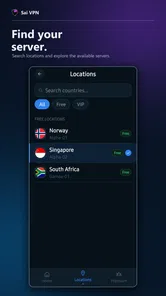
One of the highlights of using فیلتر شکن قوی پرسرعت Sai VPN is its extensive server network. With servers placed strategically around the globe, you can easily access content from different regions without any hassle. Got a favorite show that's only available in another country? No worries – just switch your server location and you're good to go.
For region-specific use, it is worth checking whether the connection actually reaches the service you need before planning around it. Streaming platforms and other sites can change how they handle VPN traffic, so a location switch is not a promise of access. If the goal is simply to open a page or use a messaging service, the experience may be different from trying to watch a region-locked catalogue. I would choose a VPN based on the job at hand, not on the assumption that one connection solves every restriction.
Moreover, the app supports multiple platforms, which means you can protect your data across all your devices. Whether you're using Android or iOS, this VPN has got you covered.
For someone deciding whether to keep it installed, I would start with a specific use case: connect on the mobile network where access tends to be difficult, test the few apps or pages that matter, and notice whether the extra connection step disrupts normal browsing. If it does, it may be better to turn the VPN on only when needed rather than leave it running throughout the day. That simple habit can make a basic VPN easier to live with, especially if you switch frequently between tasks that do and do not require it.
Questions worth settling before you depend on it
Does a successful connection guarantee that a blocked service will open? No: I would treat connection status and access to a particular website as separate checks. Does a fast first test mean streaming or gaming will stay smooth? Not necessarily; those activities place different demands on a connection, so test the exact use rather than extrapolating from a page load. And is it suitable for every phone? It is an Android app that supports Android 6.0 and later, so I would check that requirement before trying to install it on an older device.
Another useful decision is whether to leave it on or use it only when needed. For occasional access, switching it on for the relevant task can make it easier to spot when the VPN is causing a slowdown or a service is behaving differently. If you rely on it routinely, test your usual apps in sequence and make sure you can still handle essentials when the connection is active. That small routine gives you a more practical answer than relying on a broad claim about speed or reach.
Final Thoughts
In conclusion, if you're in the market for a VPN that's both fast and secure, فیلتر شکن قوی پرسرعت Sai VPN is definitely worth considering. It's easy to use, boasts exceptional speed, and prioritizes your privacy. Plus, with its extensive server network, accessing global content is a piece of cake. So go ahead, give it a whirl, and experience a freer internet today!
My recommendation is more specific: try it if you want a straightforward, free Android VPN and your main need is a quick attempt at reaching services that are difficult to access on your mobile connection. Skip it if you require verified privacy assurances, dependable access for critical work, or extensive control over how a VPN connects. A short test with your own carrier and everyday apps will tell you more than any general promise of speed. For casual use, that is a reasonable way to decide whether this tool earns a place on your phone.
فیلتر شکن قوی پرسرعت Sai VPN Frequently Asked Questions
Is Sai VPN suitable for beginners, and how easy is it to get started?
Sai VPN is presented as a straightforward tool for people who want to use a VPN without dealing with complicated settings. Its user-friendly interface is intended to make getting connected simple, including for users who are not especially tech-savvy. If you are new to VPN apps, its focus on easy access may make it approachable for everyday browsing.
What platforms is Sai VPN compatible with?
Sai VPN is designed to be compatible with both Android and iOS platforms, making it accessible to a wide range of smartphone users. Whether you're using a smartphone or a tablet, you can easily download and install Sai VPN from the respective app stores, ensuring you have a secure and private browsing experience on the go.
How does Sai VPN ensure user privacy and security?
Sai VPN employs high-level encryption protocols to protect user data, ensuring that your online activities remain private and secure. The VPN masks your IP address, making it difficult for third parties to track your browsing habits. Additionally, it has a strict no-logs policy, meaning it doesn't keep records of your online activities, further enhancing user privacy.
Is Sai VPN free to use, or does it require a subscription?
Sai VPN is free to use, which makes it an option for people who want to try a VPN without paying upfront. Its appeal is straightforward: you can install the app and explore its VPN service without a subscription cost. Consider whether its basic experience suits your needs before making it part of your regular browsing routine.
What are the main features of Sai VPN?
Sai VPN boasts a range of features including high-speed servers, a user-friendly interface, and a wide selection of server locations worldwide. It also offers unlimited bandwidth, making it ideal for streaming and downloading. The app is designed to be easy to use, even for those who are not tech-savvy, ensuring seamless connectivity with just a few taps.
Pros
- Easy to use interface
- High-speed connection
- Multiple server locations
- Strong encryption protocols
- No-log policy
Cons
- Limited free version
- Ads in free version
- Might slow down internet speed
- Not available in all countries
- Inconsistent connection at times








