Solitaire Collection
- 2.41K
- 4.7
- Installs
- 500.00K
- Price
- Free
Screenshots

Analysis by Reviewed
I tend to judge a solitaire app by what it feels like after the first few hands: does it make choosing a game easy, and does the screen stay pleasant when I’m looking at it for more than a minute? Solitaire Collection makes a good first impression by bringing several familiar forms of solo card play together. It feels suited to the small pauses in an ordinary day, rather than asking me to learn a larger game world or commit to a long session.
A familiar table, not a new world to learn
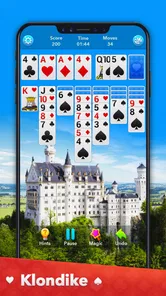
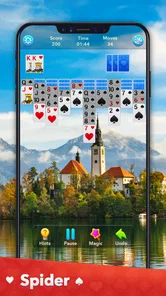
There is no story setting to follow here, and I don’t think that is a shortcoming. The visual language is the card table itself: a layout, a deck, and the quiet focus of deciding what to move next. The option to change card designs and backgrounds gives that familiar scene a little personality. I’d choose a design for legibility first and decoration second, especially if I plan to play several rounds in a row.
That modest presentation is a good match for the collection’s purpose. It does not need to compete with a richly illustrated adventure; it needs to make the cards easy to scan and the next decision easy to understand. I find the appeal less about spectacle and more about having a known ritual ready when I want a calm distraction.
Quiet pacing for short pauses and longer sessions
Solitaire’s pace comes from the player: I can take a moment over a move or play quickly when I already see a likely sequence. That makes the collection useful during a coffee break, while waiting for an appointment, or on a commute where I have a seat and a few spare minutes. If I’m interrupted, the appeal is that I can treat a hand as a small activity rather than needing to keep up with a team or a live match.
The sound and motion are not the main reason I would choose this game. Its mood rests more on familiar card play and a steady, unhurried rhythm than on audio cues or dramatic presentation. That is a plus when I want something unobtrusive, but not if I’m looking for a game whose soundtrack, effects, or unfolding events provide most of the entertainment.
Revisiting Classics with a Modern Touch
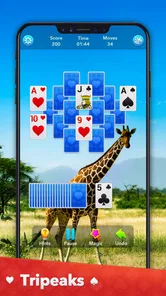
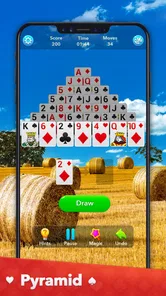
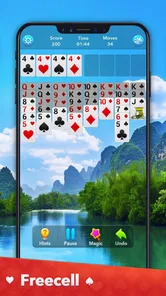
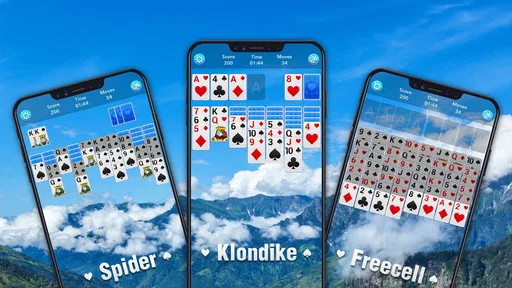
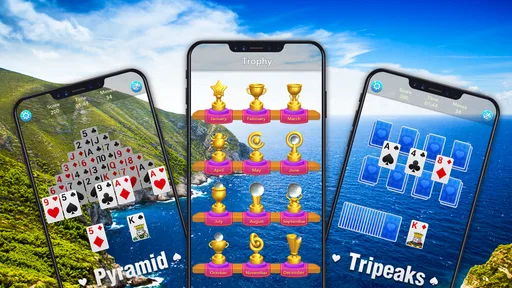
First off, let me tell you that the Solitaire Collection isn’t just your run-of-the-mill card game app. It’s like walking into a candy store where every shelf is lined with your childhood favorites. We’re talking Klondike, Spider, FreeCell, and even some less common gems like Pyramid and TriPeaks. The app bundles these games into a neat little package that’s easy to navigate and even easier to get lost in.
Why You'll Love It
What I love about this app is its simplicity. The interface is clean and user-friendly, which means you’re not spending ages trying to figure out how to start a game. Plus, the app offers daily challenges and rewards, adding a layer of excitement and a reason to come back every day. It’s like getting a fresh deck of cards with new strategies to try out each time.
More From Our News Desk

Weather by Xiaomi Review: Clear at a Glance, Less Clear Up Close

X Under Pressure: Can It Recover When Posting Goes Wrong?

Clash of Clans Is Won Between the Battles

Android Auto Makes the Case for Quieter Car Software

MobiOffice: Transforming Mobile Productivity with Seamless Integration

EA SPORTS FC™ Mobile Soccer: Redefining Mobile Sports Gaming
Now, let’s talk about customization. The app allows you to tweak the card designs and backgrounds to suit your mood. Feeling a little fancy? Switch to a more elegant card set. Want something quirky? There’s a fun, playful set just waiting for you. It’s these little touches that make the game experience feel personal and engaging.
Perfect for Quick Breaks
Another aspect that really stood out to me is how perfect this app is for quick gaming sessions. Whether you’re waiting for your coffee to brew or need a little mental break from work, these games are perfect for filling those small pockets of time. And with the offline mode, you don’t have to worry about being connected to the internet. It’s like having a deck of cards in your pocket wherever you go.
But hey, I’m not saying it’s all sunshine and rainbows. Like any app, there can be the occasional ad pop-up, but they’re not intrusive enough to ruin the experience. Plus, there’s an option for a premium version if you’re all about that ad-free life.
Flyfox Games keeps the focus on familiar solo card play, and the collection has a 4.7 average from around 33,000 ratings. It is free to start, rated for Everyone, and its current version is 1.1.8. There are optional in-app purchases, so I’d treat the core appeal as the range of games rather than assuming every extra is necessary. It has passed 500,000 installs, which makes it a well-established choice for this kind of casual play, though popularity alone won’t tell you whether its presentation suits you.
Choosing the Right Game for the Moment
The five variations are useful because they ask for different kinds of attention, not simply because they add more buttons to tap. I reach for Klondike when I want the familiar balance of planning and luck; Spider feels better when I have time to manage longer sequences. FreeCell is a stronger pick when I want each move to feel deliberate, while Pyramid and TriPeaks give me a different rhythm from building conventional suit sequences. A practical habit is to choose the game before opening the app: that small decision helps prevent a short break from turning into aimless switching.
For example, if I have a few minutes between errands, I’d pick a quick round of a game whose rules I already know rather than begin learning a new pattern in the middle of a busy day. At home, I’m more likely to try a mode that rewards patience. This is where a collection beats installing a separate app for each solitaire variant: I can change the kind of challenge without changing the basic setting. The trade-off is that someone devoted to one specific ruleset may prefer a specialist app that concentrates entirely on that version.
A Relaxed Look, With Practical Limits
The card and background choices give the table a personal touch, but I see them as a way to make repeated sessions more comfortable rather than a reason to play on their own. A high-contrast design is worth trying if small card details are hard to distinguish on your screen; a calmer background can also make a long session feel less visually busy. These are simple adjustments, but they can matter more than decorative options when you are choosing cards quickly.
I also wouldn’t assume that every round will feel equally rewarding. Solitaire can reach a point where a deal offers little room to progress, and moving among several variants does not remove the luck built into card games. If you want a story, competitive matches, or a steady stream of action, this is not the right fit. The collection is best when you enjoy quiet problem-solving and are comfortable with a session that may end without a satisfying win.
What to Expect Before You Settle In
The offline option makes this a sensible companion for a commute or a place with unreliable reception, while the daily challenges and rewards give regular players a reason to return when they do have time. I’d still approach those extras as optional motivation, not a promise that every day will bring a completely new kind of play. The core value is having several familiar solitaire styles together, ready for either a quick pause or a longer attempt to work through a layout.
Compared with a physical deck, the app saves setup and makes switching between rule variations easy, but it cannot offer the tactile feel of shuffling and moving real cards. Compared with a single-mode solitaire game, it gives me more choice, though that breadth may be unnecessary if I only ever play one variant. Ads can interrupt the flow, and the paid option is worth considering only if those interruptions bother you enough to justify spending; I would try the free experience first rather than buy extras on assumption.
Who will get the most from the collection
I’d recommend it most to someone who already enjoys solitaire but sometimes wants to change the kind of thinking a hand demands. Rather than keep several separate games on a phone, I can use one collection as a small menu: familiar Klondike for an easy entry, a more deliberate FreeCell hand when I want to plan, or a different layout when the usual routine feels stale. The useful part is not merely having five names on a screen; it is being able to match the game to the time and attention I actually have.
It also suits people who want a solo activity without social pressure. There is no need to coordinate with another player or be available at a particular time. On a day when I’m waiting for a delayed appointment, for instance, I can start with a familiar variant, play a hand at my own pace, and stop when my turn comes. That makes it more practical than a competitive card game for unpredictable gaps in the day.
On the other hand, I’d steer away if my main goal were to compete, collect a story, or feel a strong sense of progression through a campaign. The daily challenges and rewards may add a reason to return, but they don’t change the essential appeal: arranging cards and making decisions within a hand. If I wanted a more social experience, a multiplayer card game would be a better choice; if I wanted one exact ruleset with a highly focused presentation, a dedicated solitaire app could be more satisfying.
Small habits that make each hand smoother
One practical approach is to pick a variant based on attention rather than mood alone. When I’m distracted, familiar Klondike is easier to dip into; if I can give a hand more thought, I’m more likely to choose FreeCell or Spider. This avoids the frustration of beginning a more involved layout while I’m about to be interrupted. It is a modest choice, but it helps the app fit real breaks instead of turning every spare moment into a test of patience.
I’d also spend a little time settling on a card design that makes suits and ranks easy for me to distinguish. That matters more than repeatedly changing the table’s look: readability helps me assess a layout without second-guessing what I’m seeing. If I’m playing in a bright place or on a small screen, a clear design is a practical improvement; decorative variety is best treated as a bonus rather than the main attraction.
Another useful trade-off is to decide in advance whether I’m playing to unwind or to solve a difficult layout. The collection can serve both moods, but a run of unlucky hands may be annoying if I expect every session to end in a win. I find it more enjoyable to treat each hand as a self-contained puzzle, with a satisfying decision or two as the reward, instead of measuring a short break only by whether I cleared the layout.
Cost, age suitability, and the everyday choice
The game is free to start, with optional purchases ranging from $0.99 to $17.99 per item. I would begin without buying anything and see whether the basic collection and its interruptions suit me first. That is the sensible approach for a casual game: the different variants are the main reason to install it, while spending makes sense only if an optional extra genuinely improves the way I use it. It is rated Everyone, so its card-game premise is broadly approachable for families as well as solo adult players.
For someone wondering whether it works without a connection, the offline option is especially useful for travel or places with patchy reception. For someone wondering whether it is only Klondike, the answer is no: the collection includes five familiar styles, with noticeably different demands on planning and patience. And for anyone concerned that a free game must be played constantly to feel worthwhile, I’d say its strongest use is occasional. A few hands when I want a calm pause are enough; there is no need to make it a daily routine.
Flyfox Games has shaped this as a straightforward collection rather than a reinvention of solitaire. Its presentation is relaxed, its pacing is easy to control, and its variety gives me a reason to keep it installed even when I return to only one or two modes most often. The limitations are equally clear: ads may break concentration, card-game luck remains part of the experience, and the app cannot provide the texture or social feel of a real deck. Those are meaningful trade-offs, not deal-breakers for the right player.
A calm companion, with a clear purpose
So, if you’re on the lookout for a game that’s both relaxing and stimulating, the Solitaire Collection is definitely worth checking out. It’s a great way to unwind while keeping your mind sharp. Trust me, once you start, it’s hard to stop!
Solitaire Collection Frequently Asked Questions
What age group is Solitaire Collection suitable for?
Solitaire Collection has an Everyone content rating, so it is intended for a broad audience. Its card-game format also makes it easy to approach at different experience levels: newcomers can explore the familiar solitaire styles, while regular players can choose the variations they already enjoy. As with any game that offers optional purchases, a parent or device manager may want to review purchase settings for younger players.
Is Solitaire Collection free to download, and does it cost money to play?
Solitaire Collection is free to download, so you can install it and try its card games without paying upfront. Optional in-app purchases are available, with individual items priced from $0.99 to $17.99. You can decide whether those extras are worthwhile for you; the purchase options are separate from the initial download. Ads may also appear during play, which is worth considering if you prefer an uninterrupted experience.
Can I play different kinds of solitaire without downloading several games?
Yes. Solitaire Collection brings several familiar card-game formats together in one game, so you can switch between Klondike, Spider, FreeCell, Pyramid, and TriPeaks instead of installing a separate app for each style. Each version has its own rules and challenge, giving you variety in one place. This makes the collection a practical choice if you enjoy exploring different kinds of solitaire or want to keep your game library simple.
Is Solitaire Collection suitable for someone who has never played solitaire before?
Yes. Solitaire Collection brings several familiar card-game formats together, so beginners can try different styles and settle on the one they enjoy most. Klondike, Spider, FreeCell, Pyramid, and TriPeaks each have distinct rules and challenges. The variety makes it approachable for newcomers while still giving experienced players more than one way to play.
What is Solitaire Collection and what games does it include?
Solitaire Collection is a comprehensive app that offers a variety of solitaire games all in one place, perfect for enthusiasts of the classic card game. It includes popular versions such as Klondike, Spider, FreeCell, Pyramid, and TriPeaks. Each game comes with its own set of rules and challenges, ensuring hours of entertainment for players of all skill levels. By offering multiple games, users have the flexibility to switch between different types and enjoy a diverse solitaire experience.
Pros
- Wide variety of solitaire games included.
- Intuitive and user-friendly interface.
- Offline play available without internet.
- Daily challenges to keep you engaged.
- Customizable themes and card backs.
Cons
- Ads can be intrusive during gameplay.
- Limited hints in free version.
- Battery consumption is relatively high.
- Occasional lag on older devices.
- In-app purchases for extra features.