Solitaire - Card Game 2026
- 176.00
- 4.7
- Installs
- 500.00K
- Price
- Free
Screenshots
Analysis by Reviewed
I like a solitaire game best when it lets me settle into a puzzle without making a simple break feel like a project. Solitaire - Card Game is a free card game from Standard Game, and its appeal is easy to understand: it offers the familiar patience of arranging cards, with a few extras aimed at making repeat visits more inviting. It’s rated for Everyone, and its 4.7 average from around 3,400 ratings suggests many players enjoy the experience.
A familiar game for the current moment
What I value here is the directness: I can open a card game and focus on the layout instead of learning a new system. That makes this a practical choice for short pauses, but it also sets expectations. The appeal is the steady rhythm of a solo puzzle, not a constant stream of surprises or a large catalogue of activities.
The game has passed 500,000 installs, which tells me it has found an audience for that simple premise. Its reception is encouraging, but a rating can’t tell you whether the pace suits you personally. If you enjoy making a few deliberate moves at a time, it is worth trying; if you need competition or frequent novelty to stay interested, popularity alone won’t change that mismatch.
Why Solitaire? Rediscover the Classic
We all know that Solitaire is one of those games that never really goes out of style. It’s simple, addictive, and a perfect way to kill some time. The Solitaire - Card Game app takes this beloved pastime and enhances it with some modern features. Whether you’re on a coffee break or commuting, this game guarantees to keep you entertained.
How it fits into an ordinary day
I’d reach for this when I have a few quiet minutes: waiting for a takeaway, sitting through a short commute, or taking a screen break between tasks. A useful habit is to decide beforehand whether I’m playing one hand or settling in for longer. Solitaire makes it easy to keep going, so a small time-killer can quietly become a bigger commitment.
It suits people who already enjoy sorting out a card layout at their own pace, and beginners who want a familiar game rather than a complicated ruleset. If you mainly want direct competition, fast rounds against other people, or a changing set of game modes, a multiplayer card game or a broader solitaire collection may be a better fit. This app’s central attraction is the classic solo puzzle, not a substitute for every kind of card play.
Sleek Design and User-Friendly Interface
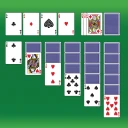
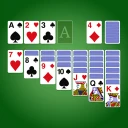
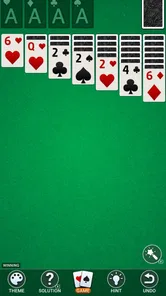
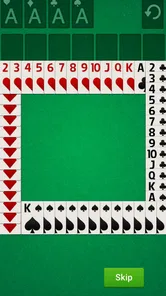
First off, let’s talk about the design. The developers have done a fantastic job in updating the visuals without straying too far from what we love about the original. The cards are clear and easy to read, with smooth animations that make the game more engaging. The interface is intuitive, so you won’t find yourself fumbling around trying to figure out how to play. Just launch the app and start stacking those cards!
More From Our News Desk

Weather by Xiaomi Review: Clear at a Glance, Less Clear Up Close

X Under Pressure: Can It Recover When Posting Goes Wrong?

Clash of Clans Is Won Between the Battles

Android Auto Makes the Case for Quieter Car Software

MobiOffice: Transforming Mobile Productivity with Seamless Integration

EA SPORTS FC™ Mobile Soccer: Redefining Mobile Sports Gaming
For a more comfortable session, I’d prioritize legibility over decoration: clear card faces matter more than a striking background when you’re scanning the tableau for a move. If you play one-handed, it’s also worth checking whether your grip covers any controls before starting a longer run. Small layout choices become more noticeable when you’re moving cards repeatedly, even in a game with straightforward rules.
New Features to Keep You Hooked
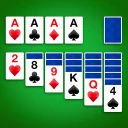
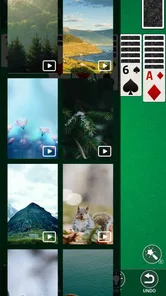
Now, I know what you’re thinking: “It’s just Solitaire, what’s new?” Well, Solitaire - Card Game introduces some exciting features that breathe new life into the classic. For starters, there are daily challenges that give you a reason to come back each day. Plus, there’s a hint feature to help you out when you’re stuck, and even customizable card backs and backgrounds to add a personal touch to your game.
The hint is most useful as a learning aid, not an automatic answer button. When I’m stuck, I’d use it to notice a move I overlooked, then pause and work out why that move helps before tapping again. That keeps the puzzle engaging instead of turning the session into a sequence of prompts. Daily challenges can add a gentle routine, but they may feel like a chore if you prefer to play only when you happen to have spare time.
Personalizing the cards and background is a small but practical touch: choose contrast that makes suits easy to distinguish rather than a look that only seems attractive in a menu. That trade-off matters most during longer sessions or on a smaller screen. The app is best when these options make the board easier and more pleasant to read, rather than becoming the main reason to play.
Making the small extras work for you
I’d treat the daily challenge as an invitation, not an obligation. If I have a regular lunch break, it can give that moment a simple routine; on a busy day, skipping it should not turn a relaxing game into another task to keep up with. That distinction is useful for anyone who tends to feel pressured by streaks or daily goals: the feature is most enjoyable when it fits your schedule rather than dictates it.
There is also a sensible way to use hints without losing the pleasure of figuring things out. I would first scan the columns and available moves myself, then ask for help only when I have genuinely run out of ideas. If I tap a hint immediately whenever the layout slows down, I may finish more quickly but learn less about how the cards can open up. For a beginner, using it sparingly can make the game feel supportive; for an experienced player, ignoring it preserves the challenge.
Custom card backs and backgrounds are not just cosmetic if they help the board feel comfortable to look at. I’d choose a design that keeps the card faces and suits easy to distinguish, then leave it alone rather than spending each session browsing appearance options. The practical payoff is a clearer play area, especially when I’m glancing down briefly between other tasks.
Play Anytime, Anywhere
One of the best things about this app is its offline mode. You don’t need an internet connection to enjoy your favorite card game, which is a huge plus for those moments when you’re off the grid. And for those who like to compete with friends, there are leaderboards and achievements to track your progress and see how you stack up against others.
Offline play is especially handy for a flight, a weak-signal train ride, or a waiting room where connectivity is unreliable. I would treat leaderboards and achievements as optional motivation rather than the point of the game: the strongest reason to open it is still the hands-on card puzzle. If you want a solo pastime that doesn’t depend on being online, this is a meaningful advantage over games that need a connection for their core loop.
A realistic use case and a practical trade-off
Imagine I’m waiting for a delayed train with a patchy signal and only a few minutes to spare. I can open the game, play at my own pace, and put it away when the train arrives without needing another person to be available. That is a better fit than a live multiplayer match, where interruptions can affect the experience. The trade-off is that a quiet solo hand won’t provide the social energy or changing opponents some players want.
For a short break, I’d keep the goal modest: play until the next natural pause, rather than trying to force a hand to a particular outcome. That makes it easier to stop without turning a quick distraction into a longer session. If I have more time, the daily challenge can give me a distinct reason to return; if I only want a single familiar puzzle, I can ignore that extra layer and play in the ordinary way.
What the current version tells me
The game was released on July 1, 2023, and its current version is 1.937. Those details establish its release history and present version, but they don’t by themselves explain which changes arrived in each update. I wouldn’t assume a particular new feature was recently added just because the version number has moved on; the daily challenges, hints, customization, and offline play are the features that matter in deciding whether it fits my routine.
For someone already playing, a newer version can be a reason to check that the app remains current on their device, but I’d judge the experience by whether the cards remain comfortable to read and the familiar routine still feels smooth. The game has over 500,000 installs, while its rating and review count offer a broad indication of reception rather than a promise that every player will like its pace.
What existing players should weigh
If I already had it installed, I would focus less on the version number and more on the everyday basics: can I read the cards comfortably, do I still enjoy the pace, and do the optional challenges make me want to return? Those are better measures of whether the current experience works for me than assuming that a later version automatically means a dramatic change in how the game plays.
For someone deciding whether to install, the practical checks are straightforward. The game is free to try, it is rated for Everyone, and it requires Android 9 or later. If you use a device below that Android requirement, this is not the right choice for that phone; if your device meets it and you want quiet solo card play, the low-commitment format makes it easy to test whether it suits you.
Comparing it with other card-game choices
Compared with a broad solitaire collection, this game makes more sense when you want one familiar activity rather than a menu of variants. A collection is the stronger pick if you regularly get bored with one layout or like switching between different card rules. Compared with multiplayer card games, this one is calmer and easier to pause, but it gives up the unpredictability of playing against another person.
There is no universal winner between those options. I’d choose this app for a quiet commute, a short waiting period, or a relaxed solo session; I’d choose a collection when variety is the priority, and a competitive game when interaction matters more than an easy stopping point. Knowing which kind of break you want is more useful than treating every card game as interchangeable.
Where it may not be the right fit
The classic format is also the main limitation. If you tire of repeating a familiar solo card puzzle, daily challenges and visual choices may not provide enough variety to change that. Likewise, anyone expecting a deep strategy game, a story, or regular social interaction should look elsewhere. I’d choose this when I want a low-pressure way to focus, not when I’m seeking novelty or a competitive match.
One practical question is whether it works without a connection: yes, the app supports offline play, which makes it a dependable option for disconnected moments. Another is whether it asks for payment: the game is free, so it is easy to try without an upfront purchase. It requires Android 9 or later; players on an older device should check compatibility before planning to install it. These points make it simpler to decide if it fits both your routine and your phone.
What to watch for as you decide
The most useful test is not whether the game has enough extras on paper, but whether the familiar card puzzle remains pleasant after the novelty wears off. I’d notice whether I reach for hints too quickly, whether the daily challenge feels inviting or demanding, and whether the visual choices make cards easier to scan. Those small habits will tell you more about fit than simply trying to complete a long session on day one.
I’d also be realistic about what a casual solitaire app can do. It can offer a focused pause and a way to pass time without relying on a live opponent, but it is not a replacement for social play or a source of endless new rules. If that boundary matches what you want, its simplicity is a strength; if not, a more varied or interactive alternative will likely keep your interest longer.
Wrapping Up: A Must-Have for Solitaire Fans
In conclusion, Solitaire - Card Game is more than just a rehash of the classic game. It’s a beautifully designed app that respects the original while adding features that enhance the overall experience. Whether you’re a long-time fan or new to the game, this app is definitely worth downloading. So, go ahead, give it a try, and let those cards fly!
My recommendation is strongest for anyone who wants familiar, unhurried solo play, particularly with offline access and small touches such as hints and daily challenges. If you’re deciding between this and a collection with several card games, choose the collection for variety; choose this one if a straightforward solitaire session is exactly what you want. I’d try it during a short break first and see whether its pace feels relaxing rather than repetitive.
Solitaire - Card Game 2026 Frequently Asked Questions
How much storage space should I have available before downloading Solitaire - Card Game 2025?
It is sensible to check that your device has room for a new game before installing Solitaire - Card Game 2025. The game is a card title from Standard Game, and its simple solitaire format is intended for mobile play. Keeping some free space available also helps your device manage app updates and other everyday tasks comfortably.
What devices can run Solitaire - Card Game 2025?
Solitaire - Card Game 2025 requires Android 9 or a later version, so check your device’s operating system before downloading. It is a mobile card game from Standard Game, and the current release is version 1.937. If your device meets the minimum OS requirement, you can consider whether its screen and controls suit the way you like to play solitaire.
What platforms is Solitaire - Card Game 2024 available on?
Solitaire - Card Game 2024 is available for both Android and iOS devices. You can download it from the Google Play Store for Android devices or the Apple App Store for iOS devices. The game is optimized for mobile play, ensuring a smooth experience across various devices and screen sizes.
Does Solitaire - Card Game 2024 require an internet connection to play?
No, Solitaire - Card Game 2024 does not require an internet connection to play. You can enjoy the game offline, making it perfect for situations when you're on the go or without internet access. However, certain features like leaderboards and updates might need connectivity.
Are there any in-app purchases in Solitaire - Card Game 2024?
Solitaire - Card Game 2025 is free to download. Whether optional purchases are offered is something to check on the download page and in the app before making a purchase. The game’s basic appeal is familiar solitaire card play, so consider your preferences and review any purchase prompts carefully, particularly if a child will be using the device.
Pros
- Intuitive user interface
- Variety of card designs
- Smooth animations
- Daily challenges
- Offline play available
Cons
- Contains ads
- Limited free features
- No multiplayer mode
- In-app purchases needed
- Battery consumption