

Piano Star: Rhythm Music Game
- 6.00
- 3.6
- Installs
- 5.00M
- Price
- Free

Screenshots
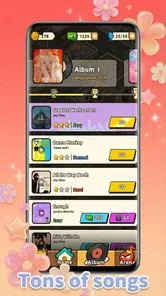
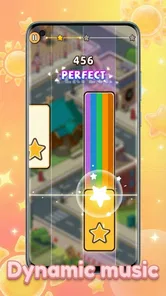
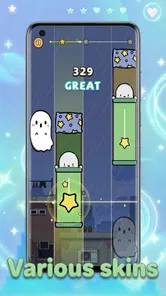
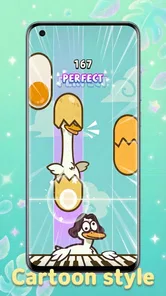
Analysis by Reviewed
I tend to enjoy rhythm games most when they give me a quick, clear challenge rather than asking me to learn a complicated system first. Piano Dance: beat music game looks aimed at that kind of player: its appeal is tapping along to music while trying to stay accurate as the pace picks up. I’d consider it for short bursts when I want something lively, though anyone expecting a deep music-making tool should look elsewhere.
What to consider before you play
The key question is whether you want a reflex game built around musical timing or a broader music experience. This is a music game from XGAME STUDIO, and its tile-tapping premise puts the emphasis on following a beat, not composing songs or practicing piano technique. That distinction matters: I’d recommend it to someone who likes chasing a better run, but not to someone looking for lessons or creative control over the music itself.
It is free to download, with optional in-app purchases ranging from $0.99 to $99.99 per item. I’d start without spending and see whether the basic rhythm loop holds my attention. The game is rated for Everyone, so it can suit a shared family device, although a child’s purchases should still be managed with the usual care. It has a 3.5 average from 352 ratings and more than 1 million installs, which suggests a sizable audience but is not a guarantee that its style will click with you.
Who is likely to enjoy this kind of challenge?
I’d put it on the shortlist for someone who enjoys music but doesn’t necessarily want to learn an instrument. The appeal is immediate: pay attention to a moving pattern, tap in time, and see whether your next run goes better. That makes it a reasonable choice for a player who likes quick rounds and a visible test of coordination, especially if more involved rhythm games feel like too much setup.
It is less suitable if you mainly want to relax by listening to songs, or if you want practice that transfers directly to playing piano. The game’s music theme may suggest an instrument experience, but tapping tiles is an arcade-style activity rather than a lesson. I’d make that distinction before downloading, particularly if the person using the device expects to build musical skills instead of chasing timing and accuracy.
First Impressions and Gameplay
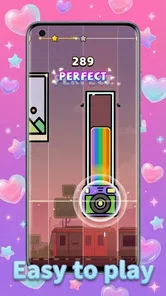
When I first downloaded Piano Dance: beat music game, I wasn't sure what to expect. Was it going to be just another piano tile game or something more? As soon as I launched it, I was greeted with a vibrant and colorful interface that immediately caught my attention. The game invites you to tap along to the beat, but not just any beat—these are high-energy dance tracks that really get your fingers moving.
The premise is simple: tap the black tiles as they slide down the screen in time with the music. However, don't let the simplicity fool you. As you progress, the speed increases, and the patterns become more complex, challenging even the most seasoned players. It's addictive, and before you know it, you've spent hours trying to beat your high score.
More From Our News Desk

 Instagram
Instagram’s Power Comes From Its Place in Your Phone
A close look at how Instagram turns Meta’s reach, recommendation systems and everyday camera habits into durable platform power—and what that costs users.

 Gmail
GmailGmail in a Busy Inbox: Who Benefits Most?
From first account to crowded workday, Gmail earns its place through dependable search and flexible sorting—but its best fit depends on how much inbox maintenance you can tolerate.

 Prime Video
Switching to Prime Video: What Changes in Your Viewing Routine
Prime Video can make a compelling second home for streaming, but switching means learning a different catalog, rental layer, and route from browsing to playback.

 Universal TV Remote Control
Universal TV Remote Control Works Best as a Reliable Backup
A phone remote earns its place through quick setup and reliable habits. Here is how to get more from Universal TV Remote Control—and where its limits show.

 Weather - By Xiaomi
Weather by Xiaomi Review: Clear at a Glance, Less Clear Up Close
Xiaomi’s weather app makes everyday forecasts quick to scan, but its calm surface can leave useful details and recovery paths harder to find than they should be.

 X
XX Under Pressure: Can It Recover When Posting Goes Wrong?
A resilience-focused review of X, examining setup, mistaken posts, interruptions, weak connections, and the gaps that matter when recovery needs to be dependable.
Latest News



Music Selection and Features
One of the standout features of this game is its music selection. It offers a wide variety of dance tracks that are not only fun to play but also great to listen to. If you're a fan of EDM, you're in for a treat. The tracks are well-chosen and perfectly synchronized with the gameplay, which makes each level feel like a mini dance party.
Another cool feature is the ability to customize your tiles. You can choose from different themes and colors, which adds a personal touch to your gaming experience. Plus, the game frequently updates its playlist, so there's always something new to tap along to.
Playing in everyday moments
I can picture using it during a short break: one round, a quick attempt to improve my timing, then back to whatever I was doing. That works better than treating it as background music, because the falling tiles need attention. If I’m somewhere noisy or don’t want to play audio aloud, I’d use headphones if available or choose another time; rhythm cues are central, and the experience is less satisfying when I can’t follow the track comfortably.
A practical tip is to begin with a relaxed pace and focus on consistency rather than chasing a high score immediately. When patterns get busier, watching the incoming tiles instead of reacting only at the last moment can help keep taps deliberate. I’d also try a different tile theme if the default colors make it hard to distinguish what is coming. Small visual choices matter in a game where a split-second glance guides each tap.
A realistic session, from first tap to stopping point
Imagine opening it while waiting for a friend at a café. I’d choose a seat where I can comfortably watch the screen, play a run or two, and stop when the wait is over. It is a better fit for that small gap than a game that asks me to remember a long quest or spend time setting up a session. The trade-off is that the tiles demand attention: if someone starts talking or I need to keep looking away, I’d pause rather than tap by guesswork.
For a shared device, I’d also agree on a simple routine: let each person try a run, then hand the phone over, instead of treating it as a game that needs a long uninterrupted turn. That makes the straightforward input useful for casual family play, while the Everyone age rating is reassuring context. I would still keep purchase controls in mind, since optional items are part of the game and a child can be curious about them.
Where it fits among rhythm games
Compared with music games built around elaborate note charts, instrument practice, or creating your own arrangements, Piano Dance keeps the interaction approachable: the core pleasure is matching taps to a moving pattern. That makes it easier to pick up casually, but it also means it may feel repetitive if you want deeper control, a long-term practice path, or a more involved challenge structure. A dedicated piano-learning app is a better match for technique; a composition tool is better for making music. I’d choose this one when I want a fast arcade-style rhythm test instead.
The same trade-off applies to its customization. Changing tile themes can make a session feel more personal and improve readability, but it doesn’t turn the game into a music editor. If you value variety in how you play more than a fresh visual look, compare it with rhythm games whose central appeal is a broader range of play styles rather than a familiar tap-and-react loop.
Choosing between a tap game and other music options
The usual alternatives serve different moods. A piano-learning app is the clearer choice when you want lessons, note reading, or a path toward playing an actual keyboard. A music-making app suits someone who wants to arrange or produce sound. Other rhythm games may offer a different style of challenge, so I’d compare the core interaction rather than assuming all music games feel alike. Here, the draw is the direct connection between the falling tiles and the beat.
That focus is also the main reason I wouldn’t call this an all-purpose music game. Its visual themes can personalize the screen, but they don’t replace a change in the underlying activity. If you know you get bored when one basic action is repeated, a title built around multiple modes or a broader set of mechanics is likely a better use of your time. If you want a simple timing test, the narrower design can be a benefit rather than a flaw.
Limits, version, and value
The simple controls are a strength for newcomers, yet rising speed can make mistakes feel abrupt, especially if your timing is still settling in. I wouldn’t recommend it to someone who dislikes retrying a short challenge or who wants a calm, passive listening session. It is also not the right choice if your main goal is to learn keyboard skills: tapping tiles may build quick reactions, but it is not the same as practicing notes on an instrument.
The current version is 1.2.4, and it runs on Android 6.0 or later. Before installing, I’d check that the device has enough room for another game and that its screen is comfortable for repeated tapping. If you switch phones or reinstall later, don’t assume your progress will carry over; I’d avoid spending on optional items until I know how the game handles the way I play and whether I expect to keep it installed.
What I would check before committing
Because the game is free to start, the sensible first step is to try the basic loop rather than deciding from its music theme alone. I’d ask myself after a few sessions whether I’m enjoying the timing challenge or only the novelty of the presentation. If I’m returning because I want another attempt at a cleaner run, that is a useful sign. If I keep wishing I could choose how the music is arranged or learn a song on keys, I’d switch to a tool designed for that goal.
I’d treat optional purchases as a separate decision, not as something required to prove whether the game is for me. The listed range runs from $0.99 to $99.99 per item, so I would check the cost shown in the purchase flow and make sure it fits my budget before confirming anything. A free download does not mean every extra is free, and a quick trial of the core play is the best way to decide whether any paid item would add value for my own use.
Overall Experience
Playing Piano Dance is more than just a way to pass the time. It's an exhilarating experience that tests your reflexes and rhythm skills while providing endless entertainment. The graphics are crisp, the controls are smooth, and the music is top-notch. It's perfect for a quick game session during a break or a long play session on a lazy afternoon.
Whether you're a casual player or a hardcore rhythm game enthusiast, this app has something to offer. It's easy to pick up but hard to master, which is exactly what makes it so engaging. So, if you're ready to tap to the beat and dance your way through an exciting musical journey, give this game a try. You won't be disappointed!
My recommendation
For me, this is best treated as an easy-to-start rhythm diversion, not a replacement for a piano tutor or a deep music game. The release date is June 2, 2024, and the title is currently at version 1.2.4; those details are useful context, but what matters most is whether its quick tapping loop feels rewarding after the novelty wears off. I’d give it a try if you like dance tracks and score-chasing, then decide for yourself before buying anything. Skip it if you need a structured learning path, a quiet listening app, or a game that changes its core interaction often.
Piano Star: Rhythm Music Game Frequently Asked Questions
What devices can run Piano Dance: Beat Music Game?
Piano Dance: Beat Music Game is a music game for Android devices running version 6.0 or later. Before downloading, check that your device meets this minimum requirement and has enough available storage for the game. It is free to download, so you can try its rhythm-focused play without an upfront purchase.
Is Piano Dance: Beat Music Game suitable for children?
The game has an Everyone content rating, making it suitable for a broad audience. Its central activity is tapping along with music, so it can appeal to players who enjoy simple rhythm challenges as well as those who want to improve their timing. Parents should also keep in mind that optional in-app purchases are available.
What is Piano Dance: Beat Music Game?
Piano Dance: Beat Music Game is an engaging rhythm game available on Android and iOS platforms. The game challenges players to tap on the screen in time with the music, combining the excitement of dance and piano tiles. With a variety of songs and increasing difficulty levels, it offers endless fun for music and rhythm game lovers.
How do I play Piano Dance: Beat Music Game?
To play Piano Dance: Beat Music Game, you need to tap on the correct tiles as they appear on the screen, in sync with the music. The more accurate your taps, the higher your score. The game features a variety of tracks, and as you progress, the speed and complexity increase, providing a challenging yet enjoyable experience.
Is Piano Dance: Beat Music Game free to play?
Yes, Piano Dance: Beat Music Game is free to download and play. However, it does offer in-app purchases, priced from $0.99 to $99.99 per item, that can enhance your gaming experience. These purchases might include unlocking additional songs, removing ads, or gaining extra lives, allowing you to enjoy the game without interruptions.
Pros
- Engaging rhythm gameplay.
- Wide variety of songs.
- Challenging levels available.
- Smooth animations and graphics.
- Regular updates with new content.
Cons
- In-app purchases can be costly.
- Ads may disrupt gameplay.
- Requires stable internet connection.
- Limited offline features.
- Can be addictive for some users.













