My Town : Beach Picnic
- 381.00
- 4.0
- Installs
- 500.00K
- Price
- $4.49

Screenshots
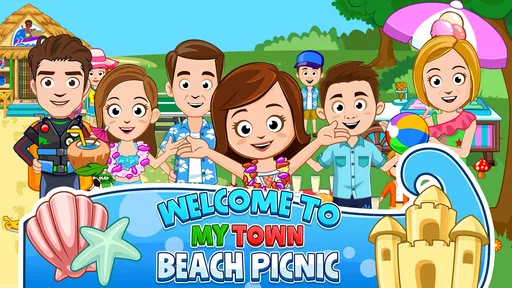



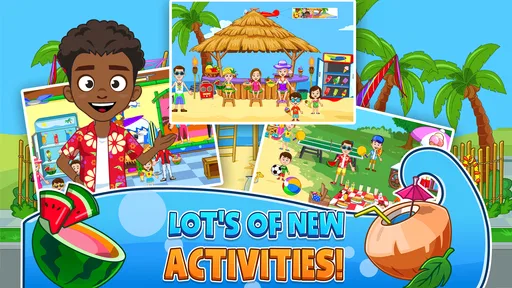


Analysis by Reviewed
I spent time with My Town : Beach Picnic as a relaxed, open-ended game for children, and its strongest quality became clear quickly: it gives imagination room to lead. Instead of pushing me through a demanding sequence of levels, it presents a beach setting where I can explore, move characters around, and create small stories at my own pace. That makes it a different kind of educational game from one built around spelling drills, timed answers, or fixed objectives.
My first impression was positive, but not because it feels packed with complex systems. The appeal is simpler. I could treat the beach as a stage, decide what the characters were doing, and turn a short play session into anything from a picnic story to a pretend family outing. For a child who enjoys role-play, that freedom can be more valuable than a conventional reward loop. For a parent, the important question is whether this style of play matches the child’s interests and attention span.
How the beach setting supports readable, open-ended play
The game’s educational value comes mainly through exploration and creative decision-making. I was not looking for one correct answer. I was arranging a scene, noticing available objects, and deciding how the characters should interact with the setting. That structure is approachable for children who may feel discouraged by games that constantly announce mistakes or demand fast reactions.
Navigation is easiest when the player understands the screen as a collection of places and objects to investigate. The beach theme gives the experience a clear visual identity, which is helpful for younger players: the setting itself communicates that this is a pretend outing rather than a lesson with formal instructions. I found that the lack of pressure made it natural to pause, look around, and try something without worrying about losing progress.
That freedom also creates a small learning opportunity for adults. Rather than taking over, I could ask a child to explain what was happening in the scene, choose where a character should go, or invent a reason for an object to be there. Those questions turn passive tapping into storytelling, sequencing, and vocabulary practice without making the session feel like homework.
One useful approach is to begin with a very small story. I might suggest that the characters are preparing for a picnic, then let the child decide what happens when someone arrives late or wants to explore. Keeping the first scenario short prevents the open setting from becoming overwhelming. Once the child knows how to move through the scene, the story can become more elaborate.
The interface is likely to feel more readable to children who already understand basic touch interaction, but it is not a substitute for a guided early-learning app. A child looking for letters, numbers, pronunciation practice, or clearly measured progress may find the experience too loose. I would describe it as an imagination game with educational benefits, not as a structured teaching tool.
More From Our News Desk

Weather by Xiaomi Review: Clear at a Glance, Less Clear Up Close

X Under Pressure: Can It Recover When Posting Goes Wrong?

Clash of Clans Is Won Between the Battles

Android Auto Makes the Case for Quieter Car Software

MobiOffice: Transforming Mobile Productivity with Seamless Integration

EA SPORTS FC™ Mobile Soccer: Redefining Mobile Sports Gaming
That distinction matters when comparing it with usual alternatives in the educational category. Drill-based apps normally tell children what to complete and provide a visible result. This game asks the child to supply the purpose. That can encourage creativity, but it also means the quality of the session depends more on the child’s curiosity, the available time, and sometimes an adult’s willingness to join in.
What I noticed about attention and direction
Open-ended play can work well for children who dislike being hurried. A child can spend a while arranging one part of the outing, then switch to another idea without being penalized. I see this as a genuine strength for imaginative players and for families who want a calmer screen activity.
The trade-off is that a child who needs explicit instructions may ask what to do next. In that situation, I would not present the game as completely self-explanatory. A parent can offer a simple prompt such as “Can you make a picnic for everyone?” and then step back. That gives the child a starting point while preserving the freedom that makes the game distinctive.
Because the play is story-led rather than score-led, success is also harder to measure. There is no obvious moment when the child has mastered a lesson. If your goal is to track a specific academic skill, another educational app will be a better fit. If your goal is to encourage pretend play, the absence of a rigid finish line is much less of a problem.
Motor and sensory considerations during play
From an interaction perspective, this is best suited to children who can comfortably use touch controls and recognize what they want to select. The central activity involves exploring and arranging a pretend scene, so the experience is more compatible with deliberate taps and short movements than with rapid, competitive input. That makes it calmer than many action games, although “calmer” does not mean accessible to every child.
Children with limited fine-motor control may still need help with precise selections or moving a character where they want it to go. I would test the game alongside the child rather than assuming that a relaxed theme removes all physical barriers. If a child tires quickly, shorter sessions with an adult handling difficult interactions can keep the creative part enjoyable.
For children who are sensitive to visual activity, the beach environment may be easier to approach than a crowded action game because the play is not built around constant danger or competition. Even so, individual sensory responses vary. I would watch for signs that the child is becoming distracted by the screen or frustrated by finding interactive elements. A quiet room, reduced surrounding distractions, and a clearly stated play idea can make the session more manageable.
Audio is another area where family context matters. I would not rely on the game alone to provide every instruction. When a child benefits from spoken guidance, I would explain the next idea myself and use the screen as the place where the child acts it out. This also supports children who process language better when it is delivered slowly and personally.
A practical routine is to let the child choose the story before opening the game. “We are going to make a beach picnic for two characters” is more focused than asking the child to explore everything at once. After a few minutes, I can offer a choice between continuing the picnic or inventing a new event. This approach reduces decision fatigue while keeping control with the child.
The most inclusive strength here is not a special setting; it is the absence of performance pressure. A child does not need to beat a timer or protect a score in order to participate in the imaginative activity. That can be encouraging for children who avoid competitive games. It does not solve every motor or sensory issue, but it changes the emotional cost of experimenting.
Different ways to use it with support
Shared play is especially useful when a child has difficulty navigating independently. One person can describe the story while the child chooses characters or actions. Another option is turn-taking: I can move one character, then invite the child to decide what happens next. This gives the child meaningful control without requiring them to manage every part of the interface immediately.
For siblings with different abilities, I would assign roles rather than expecting identical interaction. One child might invent dialogue, another might choose the setting, and a third might handle touch actions. The game’s open-ended format supports that kind of cooperation better than a quiz where only the fastest answer matters.
It can also work as a low-pressure conversation starter. After a short scene, I could ask what the characters packed, why they went to the beach, or what they should do next. Those prompts support expressive language and social imagination, but they come from the adult or child rather than from a formal lesson plan inside the game.
Situational access for families and everyday routines
The game fits best into short, flexible moments: a quiet period at home, a shared activity before dinner, or a calm option when a child wants screen time without a competitive challenge. I would not choose it when I need a child to work independently toward a clearly defined educational target. I would choose it when the child wants to make up stories and I have a few minutes to help them get started.
Imagine a rainy afternoon when outdoor plans have been cancelled. Instead of opening a fast-paced game, I could invite a child to create an indoor version of a beach outing through the game’s setting. We might decide who is attending, what the picnic is for, and how the story ends. The session could last only a short while, but it would still offer a shared activity with room for conversation.
It is also useful for a child who repeatedly asks for the same kind of pretend scenario. The beach theme gives that interest a consistent place to play out, while the child can change the roles and story from one session to another. I would encourage the child to narrate the scene aloud, since the imaginative benefit is stronger when the screen is used as a prompt rather than the entire activity.
Families should pay attention to the purchase model before handing the device over. The game costs $4.49, and optional in-app purchases are listed at $0.99 per item. That makes it important to decide in advance whether additional items fit the family’s budget and rules. I prefer discussing that before play begins, especially with younger children who may interpret an on-screen purchase prompt as part of the game.
The age rating is Everyone, which makes the theme broadly suitable for general audiences. I would still make the decision based on the individual child’s motor skills, attention, and response to open-ended play rather than treating the rating as a guarantee that every child will find it comfortable.
On Android, the listed minimum operating system is 8.0. The game comes from My Town Games Ltd, has been available since October 20, 2015, and its current version is 7.03.09. Those details matter when deciding whether an older device can run it and whether the family is comfortable installing a game that may require a reasonably compatible phone or tablet.
When another educational game is a better choice
I would steer a child toward a more structured alternative when the main goal is measurable practice. For example, a learner working on early reading, arithmetic, or language recognition will usually benefit more from an app that introduces one skill at a time, gives direct feedback, and records progress. This beach game is not designed around that kind of curriculum in my experience.
I would also choose a different option for a child who becomes frustrated without clear objectives. Some children enjoy knowing exactly what counts as success. Here, the child has to create the objective, which is liberating for one player and confusing for another.
On the other hand, a conventional lesson app is not automatically better for a child who needs emotional breathing room. If tests, scores, and repeated corrections make a child shut down, the freedom to invent a picnic story may be the more productive choice. The best option depends on whether the family is trying to teach a particular concept or nurture confidence in creative play.
Remaining barriers I would plan around
The biggest barrier is the same feature that gives the game its charm: there is no single obvious route through the experience. A child may explore happily, but another may need an adult to translate the open setting into a manageable task. I would prepare two or three prompts rather than expecting the game to supply a complete activity plan.
Another limitation is that imaginative freedom can become repetitive if the child does not enjoy role-play. A player who prefers puzzles, construction challenges, or clear missions may quickly lose interest. I would not buy it on the assumption that every child likes beach themes or pretend families simply because the content is aimed at Everyone.
There is also a practical difference between participating and navigating. A child may have excellent ideas but struggle to select the intended object. In that case, shared control is not a failure; it is a sensible adaptation. The adult can operate the screen while the child directs the story, then gradually hand over actions that feel comfortable.
Purchase prompts can create friction in family use, particularly when a child is exploring independently. Since optional items have a listed price, I would establish a clear rule about purchases and supervise the first sessions. That advice is less about the beach setting itself and more about making the app fit responsibly into a child’s device routine.
The game’s educational label should also be interpreted carefully. I saw opportunities for creativity, sequencing, communication, and social pretend play, but those benefits are indirect. A parent who wants a lesson with visible outcomes should not have to force this game into that role. It works better when the adult treats the play session as a conversation and storytelling activity.
Finally, device compatibility deserves a quick check before purchase. The minimum Android requirement is version 8.0, so very old hardware may not be an appropriate home for it. I would also consider screen size: a larger tablet can make shared play easier, while a small phone may be less comfortable when several people are looking at the scene together.
My inclusive verdict after using it
My Town : Beach Picnic is a good choice for children who enjoy inventing scenes, assigning roles, and turning simple objects into part of a story. I like that it does not make speed or correctness the price of admission. That gives children more space to experiment and lets adults support play without constantly correcting answers.
Its inclusive potential comes from flexibility and low pressure, not from a promise that every child can use it independently. Children with motor, sensory, attention, or communication differences may enjoy it with adjustments such as shorter sessions, adult narration, turn-taking, or shared control. Those approaches preserve the child’s decisions while reducing the burden of managing the whole interface.
The game has earned a 4.0 average from around 11K ratings and has passed 500K installs, so it is clearly reaching a substantial audience. I would treat that popularity as useful context rather than proof that it will suit a particular child. The real deciding factor is whether the child wants an imaginative beach stage instead of a lesson sequence or competitive challenge.
At $4.49, with optional $0.99 items, I see it as a purchase for a specific kind of play rather than an all-purpose educational solution. The value is strongest when the child returns to role-play, and when an adult is willing to turn the scene into conversation, storytelling, or cooperative play. If the child needs explicit teaching, independent navigation, or a clear progress record, another app will likely be more effective.
My recommendation is therefore fairly focused: choose it for a child who lights up when given freedom to make up what happens next. Try it with a simple story prompt, observe how comfortably the child finds and selects objects, and adapt the session instead of demanding independent control immediately. For imaginative play with room for different participation styles, this is a thoughtful option; for structured instruction, it is the wrong tool.
My Town : Beach Picnic Frequently Asked Questions
What age rating does My Town: Beach Picnic have?
My Town: Beach Picnic is rated Everyone, and its child-friendly style centers on pretend play and creativity. The game is an educational title, but parents should still decide whether its open-ended play is a good fit for their child. It is also worth checking the purchase settings on the device before handing it over, especially if a child can access the app store.
What is My Town: Beach Picnic?
My Town: Beach Picnic is a child-friendly digital play experience where players can create stories around a seaside picnic. You can explore the beach, interact with characters, move objects, choose outfits, and arrange different activities without following a fixed mission structure. It is designed mainly for imaginative, open-ended play rather than competition, scoring, or difficult puzzles, making it suitable for younger children who enjoy role-playing games.
How does the gameplay work in My Town: Beach Picnic?
The gameplay is based on exploration and pretend play. After entering the beach setting, you can tap and drag characters, food, accessories, and other interactive items to create your own picnic scenes. There is no single correct way to play, so children can invent conversations, family activities, games, and beach adventures. The simple controls are easy to understand, although younger users may still need help discovering every interactive object.
Is My Town: Beach Picnic suitable for children?
Yes, the app is primarily intended for children who enjoy creative role-playing and casual exploration. It does not focus on violence, complicated challenges, or competitive pressure, and its colorful presentation is generally easy for young players to follow. Parents should still review the app’s age rating, privacy details, advertisements, and in-app purchase information on the relevant store, because availability and policies can vary between Android and iOS versions.
Does My Town: Beach Picnic require an internet connection?
The main play experience may be available offline after the application has been installed, which is useful for travel or situations without reliable Wi-Fi. However, an internet connection can be required for the initial download, updates, store verification, advertisements, or optional purchases. Because requirements may differ depending on the device and version, it is a good idea to open the game once while connected before giving it to a child for offline use.
Pros
- Bright
- child-friendly visuals make the beach setting easy and fun to explore.
- Offline play is convenient for travel or areas with limited internet access.
- Open-ended scenes encourage imaginative storytelling without strict objectives.
- Multiple characters and objects offer plenty of role-play combinations.
- Simple touch controls are suitable for younger children to learn quickly.
Cons
- Some locations and items may require additional purchases to unlock.
- The game offers limited challenge for older children seeking structured gameplay.
- Repeated animations and interactions can become predictable after extended play.
- Performance may vary on older phones or tablets with limited memory.
- Lack of multiplayer features limits shared play on the same device.













