Classic Solitaire
- 5.84K
- 4.7
- Installs
- 10.00M
- Price
- Free
Screenshots

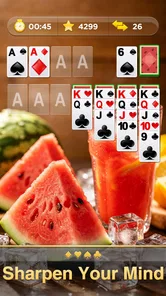
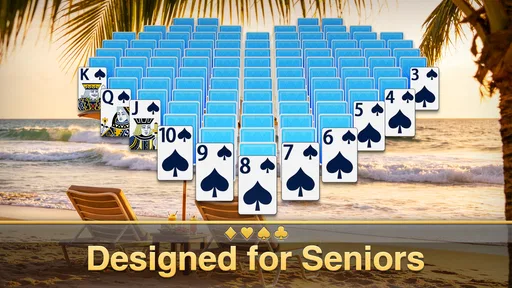
Analysis by Reviewed
My first impression of Classic Solitaire is that it keeps the familiar card puzzle front and center rather than trying to turn every round into a bigger event. That is exactly what I want when I have a few quiet minutes and would rather focus on one clear problem than learn a new game. It feels most rewarding when I treat a deal as a small exercise in observation: scan the cards, choose a move with a purpose, and see what the board reveals.
A simple routine for starting a deal
I begin by checking the face-up cards and looking for moves that uncover a hidden card or open a useful column. It is tempting to make the first legal move I notice, but that can use up a flexible card without improving the layout. When several moves are available, I try to preserve options and favor the move that gives me new information. That habit makes the game feel more deliberate without making it slow.
For a short break, I also decide in advance how long I want to play. A single deal can be a tidy pause while waiting for an appointment, or I can continue if I have more time. The compact goal makes it easy to stop without feeling that I have left a long story or team activity unfinished. I would not use it when I need a game that actively involves friends; the appeal here is having a quiet challenge entirely on my own.
Small choices that make play clearer
Before settling into repeated play, I would check the available card and background choices and pick a combination that is easy to read on my screen. Contrast matters more to me than decoration: if suits and values are clear at a glance, I spend less effort inspecting cards and more on planning. This is especially helpful when playing outdoors or on a smaller display, where a visually attractive theme may not be the most practical one.
I also separate relaxed rounds from speed-focused ones. If a timed option is available, I would choose it only when I want that extra pressure; otherwise, a slower pace gives me room to consider what a move will uncover. The hint and undo controls work best as occasional checks. I use a hint to spot an option I overlooked, then try to recognize that pattern myself next time. With undo, I reverse a specific experiment and compare the board, rather than treating every uncertain move as disposable.
One useful way to review a round is to notice where the board became less flexible. If I moved a card and later found that it blocked a more useful sequence, I can use undo to inspect the alternative and understand the trade-off. I do not need to reverse the whole game to learn from one decision. This turns the tool into a light practice aid instead of a shortcut that removes the puzzle.
Why the Hype?
For those who might not be familiar, Classic Solitaire is a card game that’s been a part of computer systems since, well, forever. It’s a single-player game, making it perfect for those moments when you just want to relax and zone out. The rules are straightforward: you start with a shuffled deck of cards and aim to sort them into their respective suits from Ace to King. Sounds simple, right? Well, that's where the challenge lies!
More From Our News Desk

Weather by Xiaomi Review: Clear at a Glance, Less Clear Up Close

X Under Pressure: Can It Recover When Posting Goes Wrong?

Clash of Clans Is Won Between the Battles

Android Auto Makes the Case for Quieter Car Software

MobiOffice: Transforming Mobile Productivity with Seamless Integration

EA SPORTS FC™ Mobile Soccer: Redefining Mobile Sports Gaming
Gameplay Experience
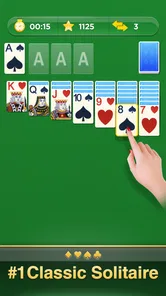
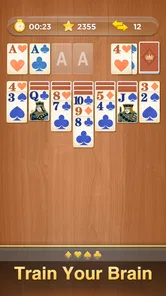
Opening the app feels like a warm hug from the past. The interface is clean, intuitive, and designed to mimic the classic look we all know and love. You’re greeted with the familiar green felt background and the satisfying sound of cards shuffling. The game offers a few customization options, such as different card designs and backgrounds, which is a nice touch for those wanting a bit of variety.
Playing Classic Solitaire on a touchscreen device feels surprisingly natural. The drag-and-drop functionality works seamlessly, and the app is responsive, ensuring smooth gameplay. Whether you're on a quick break or settling in for a longer session, the game adjusts perfectly to your pace.
A routine that suits short breaks
I find the best way to use a familiar solitaire game is to treat each deal as a small, self-contained pause rather than a commitment to keep playing until I win. On a bus ride or while waiting for a kettle, I can make a few considered moves, then leave the game when I need to. That works especially well here because the basic objective is easy to resume mentally: look for playable cards, open useful columns, and build toward the foundations without rushing.
For a more repeatable approach, I scan the face-up cards before moving anything and ask which move will reveal information, not merely which move is immediately available. A move that uncovers a hidden card can be more valuable than shifting a card between already-open piles. When two options appear equally useful, I prefer the one that keeps more sequences flexible. It is a small habit, but it makes casual play feel less like random tapping and more like a puzzle I am actually learning to read.
Features to Love
This app isn't just a carbon copy of the old desktop version. It comes with some modern-day enhancements that make it even more engaging. For instance, there’s the option to play timed games, which adds an exciting competitive edge. There’s also a hint system for when you’re stuck, and an undo button for those "oops" moments. Plus, with the daily challenges feature, there's always a new puzzle to solve, keeping the game fresh and exciting.
Another great addition is the ability to track your stats. You can see how many games you've played, your win percentage, and even your fastest times. It’s these little touches that make the game not just a trip down memory lane, but a fun and engaging experience in its own right.
Settings and habits worth checking
I would start with the card faces and background, choosing a combination that makes suits and values easy to distinguish at a glance. That is more useful than picking a theme purely for looks, especially on a smaller phone screen or in bright daylight. If the game offers a choice between timed and untimed play, I would keep untimed rounds as the default for relaxed sessions and use the clock only when I actively want a faster, more pressured puzzle.
The hint and undo tools are most valuable when used as learning aids, not automatic solutions. Before asking for a hint, I pause and check whether a move can expose a face-down card or open a column. If the suggestion points out a possibility I missed, I can remember that pattern for the next deal. Undo is helpful for testing a line of play, but repeatedly reversing every uncertain move can turn a simple card game into a series of guesses. I get more from it by undoing one experiment, comparing the board, and then choosing deliberately.
Where the familiar format has limits
Classic Solitaire is a strong fit when I want a quiet, solo card puzzle with no need to coordinate with other people. It is less suited to anyone looking for a social card table, a campaign with a story, or a large range of distinct game modes. Compared with multiplayer card games, its appeal is the control and calm of playing alone; compared with broader solitaire collections, a focused classic format can feel easier to return to, but it may offer less variety for someone who wants a new ruleset every session.
There is also a genuine trade-off in the tools that make play convenient. Hints can reduce the satisfaction of finding a route yourself, while a timer may reward speed over careful planning. Stats can make improvement visible, but I would not treat a win percentage or best time as a complete measure of skill: the order of cards affects how a deal unfolds, and a quick game is not automatically a better one. When I want a low-pressure break, I ignore the clock and use the undo button sparingly.
Perfect for All Ages
One of the best things about Classic Solitaire is its universal appeal. Whether you’re a young gamer or someone who remembers the early days of personal computers, this game has something for everyone. It’s simple enough for beginners to pick up quickly, yet challenging enough to keep seasoned players on their toes.
And let’s not forget the educational benefits. Playing solitaire can help improve your concentration and problem-solving skills. It's a game that requires patience and strategy, making it a great mental workout.
Who I would recommend it to
I would recommend this to someone who already enjoys turning a spare moment into a small, orderly puzzle, or to a new player who wants to learn the familiar foundations of solitaire without first mastering a complicated rulebook. A realistic use is opening a deal during a short wait, playing at a steady pace, and stopping when the call comes or the train arrives. The clear goal makes it easy to pick up, while the hint and undo options give beginners a way to recover from confusion without making every move for them.
I would steer away from it if your main reason for downloading a card game is competition with friends, frequent changes in rules, or a substantial progression system. A multiplayer title is a better fit for shared play, and a varied solitaire collection is a better choice if repeating one classic format quickly becomes stale. This game’s strength is also its boundary: it keeps the focus on a familiar solo challenge.
Practical details and my verdict
Big Cake Apps’ card game is free to download, with optional in-app purchases listed from $0.99 to $9.99 per item. It is rated for Everyone, and the current version is 2.12.0, with Android support starting at version 6.0. Its reach is reflected in more than 10 million installs; it has a 4.6 average from around 37,000 ratings, alongside roughly 5,300 written reviews. Those figures suggest broad interest, but what matters in daily use is whether this restrained, familiar format matches the kind of break you want.
If you are wondering whether it works for a complete beginner, I think the straightforward objective and optional hint make it approachable. If you want to play more thoughtfully, try scanning for moves that reveal hidden cards before moving cards that are already exposed. And if you are deciding between this and a more elaborate card game, ask whether you want a calm solo routine or more variety and interaction. That distinction is more useful than expecting one solitaire app to satisfy every mood.
In conclusion, Classic Solitaire is more than just a game; it's a nostalgic journey back to simpler times. Whether you're looking to kill some time or engage in a bit of friendly competition, this app delivers in spades (pun intended). So why not give it a go? You might just find yourself getting lost in the timeless allure of sorting cards and chasing that elusive win.
Classic Solitaire Frequently Asked Questions
How much storage space does Classic Solitaire need?
Classic Solitaire is a card game for mobile devices, but the amount of storage it uses can vary with the device and app version. Before downloading, check the available space on your phone or tablet and the app’s current store page. Keeping some free storage also helps leave room for other apps and routine updates.
Is Classic Solitaire suitable for children and families?
Classic Solitaire has an Everyone age rating, making it suitable for a broad audience, including family members who enjoy card games. Its familiar Solitaire format is approachable for people with different levels of experience, and hints can help newcomers learn as they play. Parents can still review the app and any optional purchase settings together with younger players.
What kind of game is Classic Solitaire, and who developed it?
Classic Solitaire is a card game built around the familiar Solitaire experience, presented as a mobile app by Big Cake Apps. Its straightforward premise makes it a natural choice for players looking for a traditional card game on a phone or tablet. The app is free to download, and its age rating is Everyone, so it is intended for a broad audience.
What devices and operating system versions can run Classic Solitaire?
Classic Solitaire is available for Android and iOS devices, including smartphones and tablets. For Android, the minimum supported operating system is Android 6.0, so it is worth checking your device’s software version before downloading. The game’s availability on both platforms gives players a choice of device, while the familiar card-game format works well for a quick session or a longer break.
What are the main features of Classic Solitaire?
Classic Solitaire offers a nostalgic card game experience with modern enhancements. The app includes various game modes, such as Draw 1 and Draw 3, and customizable themes and backgrounds to personalize your gameplay. Additionally, it offers hints and undo options to assist players, making it suitable for both beginners and experienced players alike.
Pros
- Simple interface for easy navigation.
- Daily challenges keep gameplay fresh.
- Customizable themes and card backs.
- Offline play available anytime.
- Battery-friendly with low power usage.
Cons
- Ads can interrupt gameplay.
- Limited features in free version.
- No multiplayer option available.
- Occasional in-app purchase prompts.
- No cloud save for game progress.