Classic Solitaire: Regal Card
- 2.07K
- 4.5
- Installs
- 1.00M
- Price
- Free
Screenshots
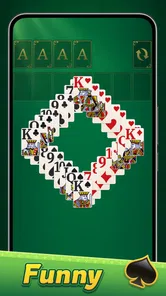
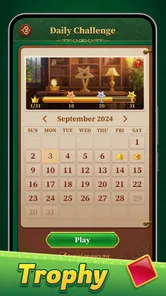
Analysis by Reviewed
My clearest reason to recommend Classic Solitaire: Regal Card is also its clearest boundary: it keeps the focus on a familiar solo card puzzle instead of trying to become a whole gaming hub. I find that refreshing when I want a quiet, self-contained break, though it will feel limited if I’m looking for multiplayer, lots of different modes, or a long progression system.
A good fit for short breaks, with a few practical trade-offs
On an ordinary day, I can imagine opening it while waiting for a delayed appointment or taking a breather between chores. A hand gives me something to concentrate on without needing to coordinate with anyone or remember a complicated set of rules. That makes it easier to pick up than a strategy game with a long tutorial, and less demanding than a competitive card app where other people set the pace.
There is a small but useful way to make those brief sessions more satisfying: decide before you start whether you want a relaxed hand or a deliberate puzzle. If I’m just passing a few minutes, I can play at a natural pace and stop when I need to. If I want to think, I can scan the tableau first and look for moves that uncover hidden cards or open a useful column, rather than making the first move that appears available. The same board can feel either casual or thoughtful, depending on how much attention I bring to it.
I’d skip this one if my idea of a card game depends on playing with friends, climbing a competitive ladder, or switching between several different rule sets. A physical deck is better for a shared game at the table, and a broader card collection is a better pick when variety matters more than a familiar solitaire routine. Here, the appeal is convenience and focus, not social play or breadth.
Small choices that can improve a session
The available appearance options are worth trying with a practical goal in mind, not just for style. I’d choose a background and card faces that make suit symbols easy for me to read, then keep that setup if I play in short bursts throughout the day. A bold theme may look striking, but a calmer, high-contrast combination can be more comfortable when I’m glancing at the screen quickly or playing in less-than-ideal light. It’s a personal adjustment, not a reason by itself to choose the app.
Hints are most useful when I’ve checked the obvious possibilities and still can’t see a sensible next move. I’d avoid tapping for help immediately, because working out whether a card can uncover another card or free a column is part of what makes solitaire engaging. On the other hand, if I’m using the game to unwind rather than test myself, there’s no need to treat hints as cheating; they can keep a stalled hand from turning into frustration.
The daily challenge offers a different kind of motivation from simply starting another hand: it gives me a ready-made reason to return without requiring a long session. That may suit someone who likes a small recurring goal, but it can feel like an obligation if daily streaks and routines are unwelcome. I’d use it when I want direction and ignore it when I’d rather play on my own terms.
More From Our News Desk

Weather by Xiaomi Review: Clear at a Glance, Less Clear Up Close

X Under Pressure: Can It Recover When Posting Goes Wrong?

Clash of Clans Is Won Between the Battles

Android Auto Makes the Case for Quieter Car Software

MobiOffice: Transforming Mobile Productivity with Seamless Integration

EA SPORTS FC™ Mobile Soccer: Redefining Mobile Sports Gaming
What to expect before installing
It is a free card game from Ulpha Deep Labs, rated for Everyone, so its straightforward format is easy to recommend across a broad age range. The game was released on September 20, 2024, and version 1.2.5 is the current release. It has a 4.6 average from around 17,000 ratings and more than 1 million installs. I see that as evidence of a sizeable audience, not a guarantee that its particular style will suit every player.
For someone new to solitaire, the familiar card layout makes this less intimidating than a game that introduces unusual rules from the outset. I’d start by taking moves slowly and using a hint only after checking the board; that helps reveal the logic rather than turning each hand into guesswork. Experienced players may appreciate the quick access and daily puzzle, but anyone who wants a new strategic system will likely find the classic format too familiar.
If I’m choosing between this and another solitaire app, I’d ask what I actually want to change. This one makes sense if a simple, focused game with appearance choices, hints, and daily challenges is enough. If the deciding factor is a deep collection of solitaire variants, social features, or a more elaborate campaign, I’d look for an app built around those priorities instead. Its strongest point is not that it does everything; it’s that it keeps the central activity easy to reach.
There is also a sensible stopping point to keep in mind. Solitaire can be a pleasant way to occupy a quiet moment, but a quick game is not automatically a meaningful mental-training routine. I’d enjoy the decisions for what they are: a little planning, pattern-spotting, and patience. That expectation feels fairer than expecting a card game to deliver a broad learning programme.
If I’m installing it for a family member, I’d describe it as a simple solo card game rather than a social game or a collection of puzzles. That sets expectations clearly: it can fill a pause, and the daily challenge can provide a small focus, but it won’t create a shared activity by itself. For children or anyone unfamiliar with solitaire, playing a few hands together with a real deck first can make the basic idea easier to follow; after that, the app’s direct controls keep the digital version approachable.
The practical question of whether to keep it comes down to repetition. If I enjoy returning to the same core rules and find that a different table look or a hint changes how comfortable a session feels, it has a reasonable place on my phone. If I start opening it only out of habit and no longer enjoy planning the moves, I’d move on without feeling that I’m missing a larger experience. Its value depends on liking this specific kind of quiet replay.
If there's one game that seems to have stood the test of time, it's got to be Classic Solitaire: Regal Card. I mean, who doesn’t remember those lazy afternoons playing solitaire on the old family computer? Well, the Classic Solitaire: Regal Card app is here to bring back those memories, but with a royal twist, right at your fingertips.
A familiar game for small pockets of time
That familiar appeal is also the clearest reason I’d choose this over a more involved mobile game. Solitaire asks for attention, but not a long commitment: I can start a hand while waiting for a kettle to boil, pause when something else needs me, and come back when I have another quiet moment. It suits people who want a calm, self-contained activity rather than a game built around competition, constant progression, or a social feed.
There is a useful little trade-off here. A physical deck gives you the tactile feel of handling cards and lets you play with someone else, while this phone version removes setup and cleanup. If I’m alone and want to begin immediately, the app is more convenient; if the point is sharing a table with another person, a real deck is the better choice. It also differs from busier card games by making the familiar solo puzzle the main event, rather than asking me to learn a new set of rules.
Why Go Digital?
First off, let's talk about why you'd want this app on your phone. Sure, you could dig out an actual deck of cards, but honestly, who has time for that? With this app, you can jump into a game anytime, anywhere. Whether you're waiting for your coffee to brew or trying to unwind after a long day, it's like having a portable deck of cards, minus the hassle of shuffling.
Features That Stand Out
One of the coolest features in this app is the daily challenges. Every day you get a new puzzle to solve, which keeps things interesting and gives you a reason to come back. There's also a hint system in case you get stuck, but where's the fun in that? Just kidding, I use it all the time!
For a more satisfying session, I’d treat a hint as a nudge rather than an automatic answer: first check whether a move opens a face-down card or clears space, then use help if I’m still unsure. That way the hint can interrupt a stuck moment without turning every hand into a sequence of prompted moves. Daily puzzles are a natural fit when I want a small goal; they are less appealing if I’d rather play without any sense of a daily routine.
Another thing I love is the customizability. You can change the background and card faces to suit your mood. Feeling a little fancy? Go for a regal theme. Want something simple? There's a minimalist option too. It's these little touches that make you feel like the app was made just for you.
Changing the table and card faces is more than decoration if you play for a while: a comfortable contrast can make the suits easier to distinguish and keep a long session from feeling visually tiring. I’d try a few combinations before settling on one, especially if I tend to play in different lighting. The practical value is personal, though; anyone who prefers a plain, unchanged card table may not care much about these choices.
Gameplay: Smooth and Intuitive
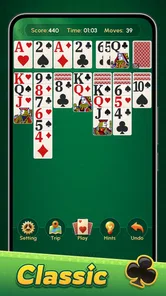
The gameplay is as smooth as butter. Seriously, the card animations are so fluid that it feels like you're playing on an actual table. The app has a clean interface, so you're not overwhelmed by a bunch of unnecessary buttons. Just tap, drag, and drop. It's that easy.
That simple control scheme is especially useful on a short break, when I don’t want to spend time navigating menus before making a move. I’d still recommend taking a moment to check the board before tapping quickly: in solitaire, a move that looks productive can use up a helpful card or close off a sequence. The app makes playing straightforward, but it cannot make the decisions for you, which is part of the appeal for anyone who enjoys thinking a few moves ahead.
And let's not forget about the sound effects. They're subtle yet satisfying, adding that extra layer of immersion. It’s like ASMR for card game enthusiasts!
Who will enjoy it, and who may want more
I’d point this toward someone who already likes classic solitaire, a newcomer who wants to learn through familiar card play, or anyone looking for a low-pressure way to fill a spare few minutes. It is less suited to players who need multiplayer, elaborate levels, a strong competitive loop, or a big variety of game modes to stay engaged. If those are the reasons you play card games, a broader card-game collection or a social option will probably be a better fit.
The game is free, and its Everyone age rating makes it an approachable choice for a wide household audience. Ulpha Deep Labs develops it; it arrived on September 20, 2024, and version 1.2.5 is the current release. It has a 4.6 average from around 17,000 ratings, with over 1 million installs. Those figures suggest that it has found an audience, but I’d still judge it by whether this particular, straightforward solitaire routine matches what I want from a card game.
Final Thoughts
So, is Classic Solitaire: Regal Card worth the download? In my humble opinion, absolutely. It's a great way to kill time and give your brain a little workout. Plus, it's free! You can't beat that, right? So go ahead, give it a try and let yourself be the king or queen of your own little card kingdom.
My recommendation comes with one reservation: the familiar format is also its limit. If you tire of solitary card puzzles or want a deeper challenge than a quick daily game, this may not hold your attention for long. But for an easy-to-start, relaxed session, I think the combination of a classic layout, adjustable look, and helpful hints makes it an appealing pick.
Whether you're a solitaire newbie or a seasoned pro, this app has something for everyone. It's like a little slice of nostalgia with a modern twist, and who doesn’t love that? So, what are you waiting for? Get downloading and start stacking those cards!
A final word on who should make room for it
I’d keep it installed if I wanted a dependable solo option for the gaps in a day, especially if the daily challenge gives me a pleasant point of focus and the adjustable card table makes repeated sessions comfortable. The case is less compelling for someone who expects every game to introduce new mechanics or reward extended play. This is best approached as a familiar pastime made convenient, not as a substitute for every kind of card entertainment.
My verdict is straightforward: I’d recommend it to anyone who likes classic solitaire and wants an uncomplicated way to play on a phone. Its small conveniences—the hints when a hand stalls, the choice of visual style, and the daily puzzle—give the basic format a little extra usefulness without changing what it is. If that simple rhythm sounds appealing, it is an easy game to try; if you need competition, variety, or a shared table, I’d choose something else.
Classic Solitaire: Regal Card Frequently Asked Questions
Is Classic Solitaire: Regal Card available for iPhone as well as Android?
Classic Solitaire: Regal Card is a mobile Solitaire game, but whether you can install it depends on the store and device you use. The Android version requires Android 5.0 or later. Before downloading, check that the game is available in your device’s app store and that your operating system meets its requirements.
What kind of game is Classic Solitaire: Regal Card, and who is it for?
Classic Solitaire: Regal Card is a card game built around the familiar Solitaire format. It may appeal to people who enjoy arranging cards, thinking through their next move, or playing a casual game in short sessions. Its simple premise is approachable for newcomers, while the traditional gameplay can also suit players who already enjoy Solitaire.
How much does Classic Solitaire: Regal Card cost, and what age rating does it have?
Classic Solitaire: Regal Card is free to download, and its content rating is Everyone. That makes the basic cost and age guidance straightforward for people considering the game. As with any free mobile game, it is sensible to check the app’s store page and device settings before installing, especially if you manage downloads for a child.
Does Classic Solitaire: Regal Card work on older Android devices?
Classic Solitaire: Regal Card is a card game for Android devices running Android 5.0 or later. If your device meets that requirement, you can consider downloading it and trying the familiar Solitaire format. Its focus is straightforward card play, so it may suit players looking for a casual game to pick up for a short session or return to whenever they have time.
Who makes Classic Solitaire: Regal Card, and is it popular?
Classic Solitaire: Regal Card is made by Ulpha Deep Labs. It has a 4.6 average from around 17 thousand ratings, and more than a million installs, giving prospective players a sense of its reach among mobile card-game fans. Those figures are only one part of deciding whether it suits you, but the classic Solitaire concept is easy to recognize before you install it.
Pros
- Intuitive and smooth gameplay
- Beautiful and elegant card designs
- Customizable backgrounds and themes
- Offline play supported
- Small app size
- saving device storage
Cons
- Ads can be intrusive
- Limited free features
- Basic graphics
- not very modern
- No multiplayer mode
- Occasional app crashes