Call of Duty: Mobile Season 10
- 798.37K
- 4.3
- Installs
- 100.00M
- Price
- Free

Screenshots




Analysis by Reviewed
Before you settle in for a match, it helps to know what kind of commitment this game asks for. Call of Duty: Mobile Season 10 is part of a free action shooter from Activision Publishing, Inc., but the initial price is only one part of the decision: in-app purchases range from $0.99 to $99.99 per item. I’d treat optional spending as something to set a limit for in advance, rather than something needed to enjoy a quick session.
Where players can get stuck
The most common friction is practical rather than tactical: a fast multiplayer match is less enjoyable when the controls, connection, or device setup are working against you. Touch aiming takes practice, and moving, aiming, and firing at once can feel awkward at first. I’d begin with a few low-pressure matches and adjust the controls before judging whether the game suits me. A setup that feels natural matters more here than copying another player’s layout.
There is also a difference between a short, casual round and a longer session. The pace and visual activity can make it hard to play comfortably when you are tired or trying to fit a match into a tiny break. If you want something quiet, story-led, or easy to pause at any moment, a mobile shooter may be the wrong fit. The Mature 17+ rating is another reason to check that the game is appropriate for the person who will be playing.
Checks that make the first sessions smoother
The game supports Android 5.0 and later, but meeting that minimum does not guarantee the same experience on every device. Before troubleshooting, I’d check that the operating system is current for the device, that the game is updated to version 1.0.48, and that there is enough free storage for the installation and any updates. Closing other demanding apps can also help if performance feels inconsistent.
For online play, I’d test the connection outside a match and try a more reliable network if the game starts lagging. A brief pause or a missed input can be especially costly in a firefight, so it is useful to distinguish network delay from unfamiliar controls. The game has a 4.3 average from around 16 million ratings and more than 100 million installs, but those broad figures cannot predict how it will run on your particular phone.
The Thrill of the New Season
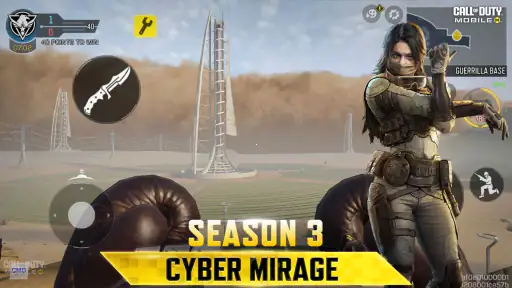
Every season, Call of Duty: Mobile seems to up its game, and Season 10 is no exception. This time around, the developers have introduced a slew of new features that are guaranteed to keep you on your toes. From new maps to fresh weapons, and captivating skins, it’s like Christmas came early for us gamers!
New Maps and Modes
One of the biggest highlights of Season 10 is the introduction of new maps. These aren’t just any maps; they are intricately designed to enhance both tactical gameplay and adrenaline-pumping action. Whether you’re a fan of close-quarter combat or prefer sniping from a distance, there’s something here for everyone.
More From Our News Desk

Weather by Xiaomi Review: Clear at a Glance, Less Clear Up Close

X Under Pressure: Can It Recover When Posting Goes Wrong?

Clash of Clans Is Won Between the Battles

Android Auto Makes the Case for Quieter Car Software

MobiOffice: Transforming Mobile Productivity with Seamless Integration

EA SPORTS FC™ Mobile Soccer: Redefining Mobile Sports Gaming
Additionally, the new game modes add a refreshing twist to your usual gameplay. They challenge you to rethink your strategies and adapt quickly to the ever-changing dynamics of the battlefield. Trust me, the thrill of outsmarting your opponents in these new modes is unparalleled!
For a useful first run on a new map, I wouldn’t try to memorize every route at once. I’d pick one landmark, learn the nearby sightlines, and notice where a close-range encounter turns into an exposed crossing. That small routine makes later matches easier to read without turning play into homework. If a mode feels chaotic, switching to a familiar one for a few rounds can help separate map-learning from the pressure of learning new rules.
Weaponry and Customization
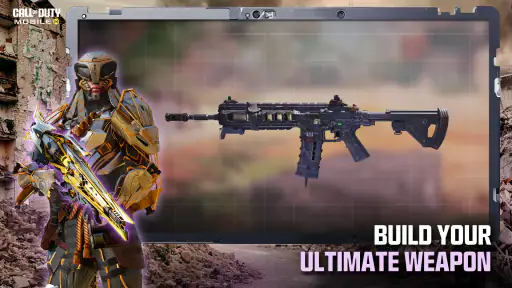
Let’s talk about the weapons, shall we? Season 10 introduces a range of new toys to play with. Each weapon comes with unique attributes, allowing you to customize your loadout to suit your playstyle. Whether you’re the type to go in guns blazing or prefer a more stealthy approach, the customization options are endless.
Moreover, the introduction of new skins means your arsenal not only packs a punch but looks good while doing so. There’s something incredibly satisfying about having the coolest-looking gear on the battlefield.
My practical tip is to change one loadout choice at a time. If you swap several things after a rough match, it becomes difficult to tell which change helped. Keep a familiar option for maps where you already know your routes, then experiment with another setup when you have time to learn it. Customization is most useful when it gives you a clear way to test your preferences, not when it becomes another task to manage.
Graphics and Gameplay
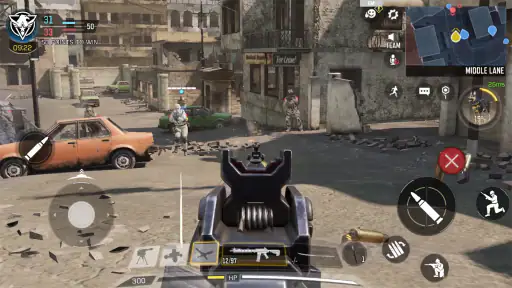
If you’re a stickler for graphics, you won’t be disappointed. The visuals in Season 10 are top-notch, providing a console-like experience on your mobile device. The developers have really gone all out to ensure that every explosion, gunshot, and movement feels immersive. Paired with smooth gameplay mechanics, it’s a feast for both your eyes and your thumbs.
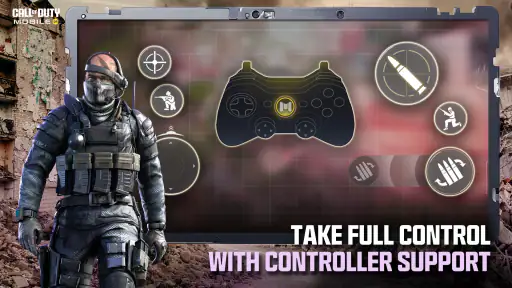
The intuitive controls are worth a mention too. Even if you’re new to the game, getting the hang of things is a breeze, making it accessible for both newbies and seasoned players alike.
Recovering a session without guessing
If a match freezes, inputs stop responding, or the game will not open, I’d avoid making several changes at once. First close and reopen the game, then check whether other apps can use the same connection. If the trouble began after an update, confirm that the game finished updating and that the device has room to run normally. Restarting the phone is a sensible next step before considering reinstalling, since reinstalling can mean repeating setup and downloading the game again.
If the issue appears only in one match, it may be a temporary connection or session problem rather than a broken installation. If it happens repeatedly across sessions, note when it occurs and whether it follows a network change or update; that makes any later support request more useful. I would not assume that a poor match proves the game itself is at fault, especially when other online activity is also unreliable.
Who will enjoy it—and who may prefer another game
This is a strong fit if you like short bursts of competitive shooting, enjoy adjusting a loadout, and want both close-quarters fights and longer-range play. It also suits friends who want a shared multiplayer activity, provided everyone is comfortable with a fast shooter and its age rating. The everyday use case I can picture is a few rounds after school or work: choose a familiar mode, play while you have a steady connection, and stop before a quick break becomes an unplanned long session.
Compared with a slower tactical shooter, this game puts more emphasis on quick reactions and rapid changes in the fight. Compared with a simple offline action game, its multiplayer focus makes the quality of your connection and the presence of other players more important. If you mostly want solo play that can be paused freely, a single-player game is likely a better choice; if you want thoughtful planning at a slower pace, a tactical alternative may suit you more. The free entry point makes it easy to try, but it does not remove the learning curve or purchase prompts.
Community and Engagement
One of the aspects I love about Call of Duty: Mobile Season 10 is the community engagement. There are regular events, challenges, and tournaments that keep the community buzzing. It’s not just about playing the game; it’s about being part of a larger community where you can make friends, join clans, and compete in global leaderboards. The sense of camaraderie and competition adds an extra layer of excitement to the game.
To wrap up, Call of Duty: Mobile Season 10 brings a fresh wave of content that’s bound to keep you entertained for hours on end. Whether you’re a die-hard fan or a newcomer, this season promises something for everyone. So gear up, jump into the action, and may your kill streaks be long and your respawn times short!
Choosing how to spend a session
One useful way to decide whether the game belongs in your routine is to give each session a small purpose. I might use one visit to learn a map, another to test a single loadout adjustment, and a later one simply to play a familiar mode with friends. That prevents the menu of options from turning every launch into a long planning session. It also makes it easier to tell whether I enjoy the actual matches or only the idea of having a lot to unlock and customize.
For a busy evening, I would avoid starting a match just before I need to leave or switch tasks. Online rounds are not as convenient as a puzzle that can be put down instantly, and stopping mid-session can be frustrating for you and the people playing with you. If I only have a few minutes, I would use that time to check settings or decide what to try next rather than assume I can finish a full match comfortably.
What to expect from the free starting point
The free download lowers the barrier to trying the core experience, but it is worth separating “free to start” from “no spending pressure.” The purchase range is broad, so I’d decide in advance whether I’m happy to play without buying anything and keep that boundary clear. Cosmetic appeal can make optional items tempting, especially when customization is part of the fun, but a skin is not the same thing as finding a control layout or weapon choice that suits how I play.
If you share a device or payment account with someone else, it is sensible to discuss purchases before handing over the game. That is a practical consideration rather than a reason to avoid it: the game can still be sampled without treating every offer as a necessary upgrade. I’d also judge value by whether I return for matches, not by how much time I spend browsing options between them.
When the problem may be outside the game
Not every rough session points to a fault in the installation. A crowded or unstable connection can make an otherwise responsive game feel inconsistent, while a device under heavy load may struggle more than it does during ordinary use. I’d compare the experience at another time or on a steadier network before changing several settings. If other online apps are also having trouble, that is a useful clue to address the connection first.
It helps to notice the pattern: does the game slow down from the start, become unreliable only after a while, or fail only when the network changes? A simple note about when the issue happens can keep troubleshooting focused. If a problem persists after reopening the game, checking storage, and restarting the phone, seeking help through the appropriate support route is more sensible than repeatedly reinstalling without a clear reason.
My practical verdict
I’d recommend giving it a try if mobile multiplayer action is what you’re after, while keeping expectations grounded: touch controls need a little adjustment, online performance depends on your setup, and optional purchases can add up if you do not keep an eye on them. With around 798,000 written reviews and a free download, it clearly has a large audience, but popularity alone is not a reason to keep playing if the pace or competitive feel is not for you. My advice is to start with a few matches, find a comfortable control arrangement, and decide based on how it feels on your own device.
Call of Duty: Mobile Season 10 Frequently Asked Questions
What should I check before downloading Call of Duty: Mobile Season 10?
Call of Duty: Mobile is a free action game built around online multiplayer and Battle Royale play. Before downloading, consider whether you want a competitive shooter, whether your device meets the operating-system requirements, and whether you have enough storage and a reliable internet connection. Its Mature 17+ rating is also important to review, particularly when choosing a game for someone else.
Is Call of Duty: Mobile Season 10 free, and can I play without spending money?
Call of Duty: Mobile is free to download and play, with optional in-app purchases available. You can try its core action experience without making a purchase; spending is not a requirement to download the game. If purchases are a concern, review the options and manage purchase settings on the device before playing, especially if younger people also use it.
What age rating does Call of Duty: Mobile have?
Call of Duty: Mobile is rated Mature 17+, so players and parents should consider that guidance before downloading. Its action-focused shooter gameplay and online competition may not be appropriate for every audience. If you are choosing it for a younger player, review the rating and discuss whether the game’s content and online play are a good fit.
Can I play Call of Duty: Mobile Season 10 offline?
Call of Duty: Mobile is centered on multiplayer and Battle Royale experiences, so an internet connection is important for accessing its online matches. It is not the best choice if you are looking for a game to play entirely offline. Before playing away from home, consider whether your connection is stable enough and whether you want to use mobile data.
Does Call of Duty: Mobile Season 10 support Android devices?
Yes, Call of Duty: Mobile is available for compatible Android devices. Before downloading, check that your device runs Android 5.0 or later, and make sure it has enough free storage for the game and its content. Meeting the operating-system requirement is a useful first check, but a stable connection is also helpful for installation and online play.
Pros
- Stunning graphics and realistic gameplay
- Wide variety of weapons and maps
- Regular updates with new content
- Cross-platform play with friends
- Intuitive controls for smooth gaming
Cons
- Requires a high-performance device
- Large file size needs ample storage
- In-app purchases can be expensive
- Occasional server connectivity issues
- Battery drains quickly during play
- Category
- Action
- Version
- 1.0.48