Block Blitz: Puzzle Adventure
- 2.79K
- 4.7
- Installs
- 1.00M
- Price
- Free
Screenshots
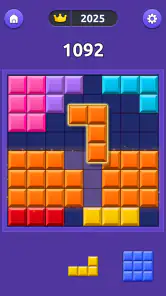
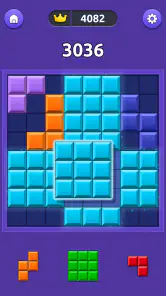
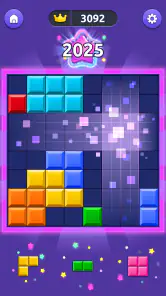
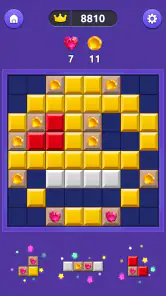
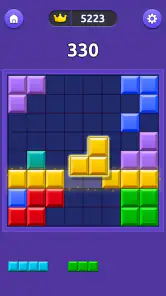
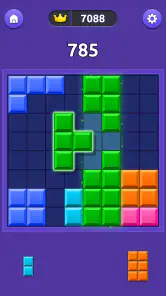
Analysis by Reviewed
I spent time with Block Blitz: Puzzle Adventure as a quick-play puzzle game, paying particular attention to how comfortably it works in different everyday situations. The basic idea is easy to understand: place and clear blocks, keep your attention on the board, and use short sessions when you want something more active than a passive break. That simplicity is a real strength, but it also means the quality of the experience depends heavily on how clearly the board communicates what is happening.
Developed by Bluetile, this free game sits in the puzzle category and is suitable for Everyone. It has reached over a million installs and holds a 4.7 average from around 118 thousand ratings, which suggests that the quick, approachable format has found a broad audience. I can see why: it starts without asking me to learn a complicated rule set, yet the pace gives each move enough consequence to keep the session from feeling completely automatic.
The current release is version 2.7.0, and the game runs on Android 7.0 or later. There are optional in-app purchases priced from $2.49 to $4.99 per item, while the main download is free. That combination makes it easy to try without a financial commitment, although anyone who prefers a completely interruption-free or purchase-free experience should pay attention to how the session is presented on their device.
How Block Blitz feels to use in real situations
I look at Block Blitz in terms of how its quick, visual decisions fit into ordinary routines, rather than treating it as a puzzle to settle into for an entire evening. The useful question is whether its pace still feels manageable when your attention is split or your phone is awkward to hold. That distinction helps clarify when the game is a handy break and when a slower option would suit you better.
Readability and navigation come before strategy
My first impression was that the game’s appeal comes from reducing the distance between opening it and making a move. A block puzzle should not require a tutorial marathon, and this one is most enjoyable when I can look at the board, understand the available pieces, and act immediately. That makes it a good fit for a short pause between tasks, especially when I want a game that rewards concentration without demanding a long story or a large set of menus.
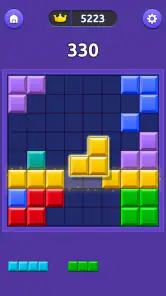
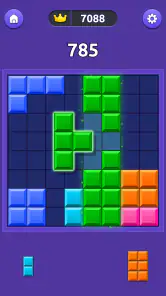
The board itself is the main source of information, so visual clarity matters more here than it would in a word game with generous written instructions. I found that I naturally needed to distinguish the pieces by their shape and position rather than relying on color alone. That is useful advice for anyone with color-vision differences: treat the geometry as the primary clue, and do not assume that two similar-looking colors are the only way to tell pieces apart.
Navigation is easiest when I stay focused on the active play area instead of moving through the game casually. The attraction is its directness, but that can also make a misplaced tap feel more significant than it would in a slower puzzle. Before starting a serious attempt, I would suggest taking a moment to identify where the board ends and where the controls begin. That small habit reduces accidental touches, particularly on a compact phone.
More From Our News Desk

Weather by Xiaomi Review: Clear at a Glance, Less Clear Up Close

X Under Pressure: Can It Recover When Posting Goes Wrong?

Clash of Clans Is Won Between the Battles

Android Auto Makes the Case for Quieter Car Software

MobiOffice: Transforming Mobile Productivity with Seamless Integration

EA SPORTS FC™ Mobile Soccer: Redefining Mobile Sports Gaming
For players who enlarge text or use system-level display changes, the important question is not simply whether labels become bigger. A block game communicates much of its meaning through compact visual elements, so increased display scaling may improve surrounding interface text while making the play area feel tighter. I would test the layout with the phone’s usual settings rather than changing accessibility preferences just for this game.
The strongest readability feature is the limited vocabulary of the puzzle itself. I do not have to interpret paragraphs of instructions while playing. The weakness is that a limited vocabulary leaves less room for ambiguity: if a piece preview, board boundary, or action cue is visually subtle, there may not be much written explanation to compensate. Players who need high-contrast presentation or very large visual targets should try a few moves before deciding whether the display is comfortable for longer sessions.
Motor control and sensory load
Block puzzles look calm from the outside, but fast decision-making can turn them into a motor challenge. The player has to select a piece, position it accurately, and do so before the board becomes difficult to manage. On a phone, this favors controlled taps and short, deliberate movements. I found that playing with both hands, when possible, gave me more stability than trying to operate everything with one thumb while walking or standing.
That matters for people with tremors, reduced dexterity, joint pain, or fatigue. The game can be enjoyable when I slow my physical movements even if my mental decisions remain quick, but a small accidental touch can disrupt the rhythm. Anyone affected by involuntary movement should use a stable surface and avoid playing while holding a drink, carrying a bag, or riding in a moving vehicle. This is not a criticism of the puzzle rules so much as a reminder that precision on a touchscreen is part of the challenge.
One practical technique is to separate planning from placement. I look at all available pieces first, decide which area of the board needs attention, and only then touch the screen. That reduces repeated corrections and can make the game feel less frantic for players who need extra time to position their fingers. It also improves play for people who are mentally tired, because fewer rushed gestures means fewer avoidable mistakes.
Sensory comfort is equally personal. A fast-paced puzzle can be stimulating without being loud or visually overwhelming, but the concentration required may still be tiring for someone sensitive to motion, bright colors, or repeated visual changes. I would begin with a short session in a quiet environment and judge the experience by eye strain and mental fatigue, not just by whether the first round was fun.
The game is a better match for players who like visual pattern recognition than for people who need every action expressed through text or audio. If you depend on spoken feedback, screen-reader descriptions, or nonvisual controls, the board may be difficult to use unless the device and the game happen to provide enough usable feedback together. I would not choose it as a primary puzzle option for a player whose access needs require a fully nonvisual interface.
Situational access: commuting, waiting, and winding down
My favorite use case is a short waiting period when I want something more engaging than scrolling. A few spare minutes at a desk, in a waiting room, or during a break are enough to make progress without committing to a campaign. The game’s quick format also makes it easier to stop when another task begins, although the desire to improve a run can tempt me to continue longer than planned.
For commuting, the answer depends on movement and posture. On a stable train seat, it can work well; while standing on a crowded bus, accurate placement becomes much less comfortable. Players with limited grip strength should consider a stand or a secure resting position. This is one of those cases where the same game can feel accessible at a table and impractical when the phone is constantly shifting.
It also works as a low-commitment evening activity, but I would not describe every session as relaxing. The puzzle may help me switch away from work because it narrows my attention to the board, yet the fast pace can become mentally activating when I am already tired. If I want gentle decompression, I play conservatively and stop after a small number of rounds rather than chasing a better result.
For children and families, the Everyone rating makes the game broadly approachable, and the simple premise is easier to explain than a complex strategy title. Still, younger players may need guidance about optional purchases, especially because the free entry point and short sessions make it easy to keep tapping through the experience. I would let a child try the puzzle first and discuss purchase controls separately rather than assuming that a simple game needs no supervision.
The game is also useful for adults who want a small mental exercise during a routine break. I would avoid presenting it as a formal training tool, but it does ask me to scan shapes, manage space, and make decisions under pressure. The benefit is strongest when I treat it as play with a little concentration, not as a guaranteed measure of memory, attention, or cognitive improvement.
Where the experience still creates barriers
The central barrier is that the game appears to depend on quick visual interpretation and accurate touch input. That combination excludes some players even when the rules themselves are simple. A person may understand exactly what to do but still struggle to distinguish a piece, reach the right area, or react within the available time.
Another limitation is the difference between a comfortable screen and a crowded one. Larger phones can give the board more breathing room, while smaller displays may make every control feel closer together. Display scaling, one-handed use, and the player’s preferred grip all change the practical experience. I would not judge compatibility from the minimum operating-system requirement alone; the physical size and responsiveness of the device matter just as much.
Short-session design can be a benefit, but it can also encourage repeated attempts. For someone managing attention, fatigue, or screen time, the loop may be harder to leave than expected because each attempt feels nearly finished. I recommend setting a timer or deciding on a stopping point before opening the game. That is especially helpful when the game is being used during work breaks or near bedtime.
Optional purchases are another point to consider. The available items range from $2.49 to $4.99, so the free download is not necessarily the whole financial context for every player. I would keep purchase authentication enabled and make sure children or anyone who shares the device understands that optional content can cost real money. Players who want a strictly no-spend environment may prefer a puzzle that has no paid extras at all.
The game may also be a poor choice for anyone looking for deep narrative, extensive customization, or a slow puzzle with unlimited time to examine each possibility. Its identity is built around immediacy. If I want to settle into a long, methodical logic problem, I would choose a traditional non-timed puzzle instead. If I want a tactile experience with physical pieces, a digital block board will naturally feel less satisfying than a tabletop alternative.
Small habits that make it more inclusive
I found three habits particularly useful. First, I plan the next placement before touching the screen. This reduces rushed gestures and helps players who need more motor control. Second, I use shape and empty-space patterns rather than color as my main information source. That makes the board easier to read when lighting is poor or color differences are not obvious. Third, I play from a stable surface whenever precision or fatigue is an issue, because posture changes the difficulty more than I initially expected.
A fourth habit is to separate testing from commitment. I open the game when I have enough time for a brief trial, check whether the board is readable with my normal display settings, and only then decide whether to continue. This is more useful than assuming that a game rated for Everyone will suit every ability equally. Age suitability describes the content; it does not guarantee comfort for every visual, motor, cognitive, or sensory need.
I also recommend choosing the environment deliberately. A quiet room with steady lighting is better for learning the visual rhythm, while a noisy or moving setting can make the same board feel unnecessarily difficult. If the player is using a device with touch sensitivity options, experimenting with the phone’s normal accessibility controls may help, but I would check that any adjustment does not make taps harder to register or the layout harder to understand.
For shared devices, each person should have a chance to test the game without pressure to match someone else’s speed. A child, an older relative, and an experienced puzzle player may all understand the rules but need different amounts of time. The most inclusive approach is to treat the pace as a personal preference rather than turning quick reactions into a measure of skill or intelligence.
How it compares with familiar puzzle alternatives
Compared with a classic falling-block game, this experience feels less like managing a continuously descending stack and more like making rapid choices from the pieces presented on the board. That can be easier for players who dislike constant motion, but it may be less appealing to someone who enjoys the physical rhythm and escalating pressure of traditional falling blocks.
Compared with a match-three puzzle, the focus shifts away from spotting color combinations and toward fitting shapes into available space. That is an advantage for players who prefer spatial planning, and it may be more comfortable for some people who find color matching tiring. On the other hand, anyone who relies heavily on color cues should pay closer attention to whether the shapes and boundaries remain clear on their screen.
Compared with a slow logic app, the main trade-off is time. Block Blitz is easier to pick up and more suitable for a quick break, while a slower alternative is usually better for someone who needs to inspect every possibility without pressure. I would choose this game for a compact burst of focus, not for a long, contemplative puzzle session.
Compared with a physical block puzzle, the phone version is more portable and requires no pieces to set up or pack away. The cost of that convenience is touchscreen precision and a smaller visual workspace. Players with strong tactile preferences, limited touch accuracy, or discomfort from phone screens may get more from a tabletop version, even if the digital game is more convenient.
My inclusive verdict
I enjoyed Block Blitz: Puzzle Adventure most when I treated it as a focused pocket activity rather than an all-purpose relaxation tool. Its straightforward puzzle format, free entry, and short-session design make it easy to recommend to people who want quick spatial challenges without learning a complicated system. Bluetile has a format that can fit naturally into waiting time, work breaks, and casual family play.
Its accessibility is practical but not universal. Players with good visual access and reliable touchscreen control will probably find the board approachable, while people who need nonvisual feedback, very large targets, slow pacing, or highly adjustable presentation should test it carefully or choose a different puzzle style. The Everyone rating makes the content broadly suitable, but it should not be confused with a promise that every player will find the interface equally comfortable.
The large audience and 4.7 average show that the game has broad appeal, and I understand that appeal after using it. I would recommend trying the free version on the device you actually plan to use, with your normal display settings and preferred grip. If the board remains readable after several rounds and your hands stay comfortable, it is a convenient little brain break. If the pace, touch accuracy, or visual demands become tiring, a slower logic game will be the kinder choice.
Overall, this is a good pick for quick, shape-based puzzle play, with clear strengths in immediacy and portability. Its main weakness is the same feature that gives it energy: the player must process the board and respond through a touchscreen without much room for hesitation. For the right user and the right setting, that creates satisfying focus. For everyone else, knowing that trade-off before installing is the most useful recommendation I can give.
Block Blitz: Puzzle Adventure Frequently Asked Questions
How much storage should I have available before installing Block Blitz: Puzzle Adventure?
Before downloading, make sure your device has enough free storage to install the game and leave room for its ongoing use. The space an app needs can vary by device and version, so checking the download screen and your device’s storage settings is a practical first step. Block Blitz: Puzzle Adventure is a puzzle game by Bluetile, built around quick sessions for a short break.
Is Block Blitz: Puzzle Adventure easy for a new player to learn?
Block Blitz: Puzzle Adventure is described as a fast-paced block puzzle designed for a quick blast of fun, with a focus on relaxing and training your brain. Its puzzle format is aimed at players looking for an approachable game experience. If you enjoy working out where pieces fit and making decisions as you play, the central idea should be easy to understand, while individual enjoyment depends on your taste in puzzles.
What devices can run Block Blitz: Puzzle Adventure?
Block Blitz: Puzzle Adventure is listed for devices running Android 7.0 or later. Before downloading, check your device’s operating system version and make sure there is enough available storage for the installation. The game is a puzzle title by Bluetile, designed around quick sessions, so it may suit players who want an easy-to-access game for a short break.
Who developed Block Blitz: Puzzle Adventure, and how popular is it?
Block Blitz: Puzzle Adventure is developed by Bluetile and has attracted a large audience of puzzle fans. It has more than one million installs and an average rating of 4.7 from around 118,000 ratings, alongside roughly 2,800 written reviews. Those figures suggest that many players have tried it, though individual enjoyment will still depend on whether its block-puzzle style suits you.
What is Block Blitz: Puzzle Adventure?
Block Blitz: Puzzle Adventure is a casual puzzle game centered on placing and matching blocks to clear the board and complete level-based challenges. Alongside the core block gameplay, it may include adventure-style progression, changing objectives, rewards, and increasingly difficult stages. It is designed for short play sessions, making it suitable for users who enjoy simple mechanics with gradual progression and a light, colorful presentation.
Pros
- Quick rounds make it easy to play during short breaks.
- Simple controls are easy for new players to understand.
- Increasing difficulty keeps later levels engaging.
- Colorful visuals give the game a cheerful
- polished look.
- Offline play is useful when you have no internet connection.
Cons
- Some levels may feel repetitive after extended play sessions.
- Later puzzles can depend heavily on trial and error.
- Hints or extra moves may be limited without optional purchases.
- Frequent rewards and prompts can interrupt the gameplay flow.
- Progress may feel slow for players who prefer faster unlocking.
- Category
- Puzzle
- Version
- 2.7.0