ZoiPer Pro - SIP Softphone
- 118.00
- 4.1
- Installs
- 10.00K
- Price
- $9.49
Screenshots



Analysis by Reviewed
Before deciding if ZoiPer Pro - SIP Softphone is worth paying for, I’d start with one practical question: do you already use a SIP phone service, or have access to one? This is a communications app for placing internet calls through configured accounts, not a general-purpose messenger that gives you a new calling network simply by installing it. That distinction is central to its value. If you need a softphone for an existing setup, it may be a useful tool; if you mainly want to call friends who use familiar messaging apps, it may be the wrong kind of purchase.
Getting Started with ZoiPer Pro
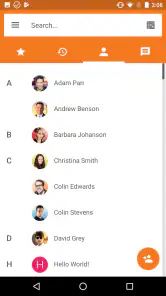
First things first, downloading and installing the app was a breeze. Available on both Android and iOS, it took just a few minutes to get everything set up. Once you launch the app, you're greeted with a sleek and intuitive interface. The design is minimalistic, yet functional, which is something I personally appreciate. No one likes an app that's cluttered with unnecessary features, right?
What the paid version is buying
The price is a clear part of the decision: the app is listed at $9.49, while in-app purchases are shown in a range from $0.99 to $9.49 per item. I would treat those as separate purchase details rather than assume every extra is necessary or included in a particular setup. The premium edition is positioned as including the advanced features found in Zoiper Gold, so the main question is whether those capabilities matter to the way you already make calls.
This isn’t a subscription-versus-free comparison I can reduce to a single winner. A free softphone may suit someone who only wants to test SIP calling, while a paid option can make more sense if you expect to rely on the app and want its premium feature set. Before buying, I’d check that your SIP provider’s account details work with the app and consider whether you need a dedicated softphone at all. The price buys an app, not a phone service or a new contact network.
Features That Stand Out
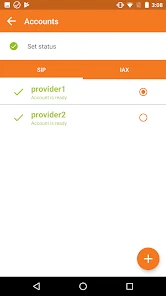
One of the features that immediately caught my attention was the app's ability to support various protocols like SIP, IAX, and XMPP. This versatility means you can configure ZoiPer Pro to work with a wide range of VoIP services. The app also supports multiple accounts, which is a lifesaver if you're someone who juggles between different numbers or service providers.
That account flexibility is most useful when it reflects a real routine, not just a theoretical option. For example, someone could keep a work account separate from a personal service and choose the appropriate one before placing a call. I’d label or organize accounts carefully during setup so I don’t have to guess which identity I’m using later. The trade-off is that more accounts mean more credentials and settings to maintain; anyone who only has one provider may never benefit from that flexibility.
Another noteworthy feature is the app's excellent call quality. Even in areas with less-than-stellar internet connectivity, the voice clarity was surprisingly good. This is thanks to the app's use of advanced codecs, which optimize the audio quality without gobbling up too much data. Plus, the app's echo cancellation feature ensures that your conversations remain crystal clear.
More From Our News Desk

Weather by Xiaomi Review: Clear at a Glance, Less Clear Up Close

X Under Pressure: Can It Recover When Posting Goes Wrong?

Clash of Clans Is Won Between the Battles

Android Auto Makes the Case for Quieter Car Software

MobiOffice: Transforming Mobile Productivity with Seamless Integration

EA SPORTS FC™ Mobile Soccer: Redefining Mobile Sports Gaming
Where it fits in a normal day
A realistic use case is a consultant who already has a SIP line for client calls and wants to make those calls from a phone while away from a desk. A softphone can keep that calling workflow on the same device as everyday communication, rather than requiring a separate handset. I’d still test a short, non-urgent call before relying on it for an important conversation: call quality depends on the connection and the account setup as well as the app, so a successful test is more useful than assuming it will behave identically on every network.
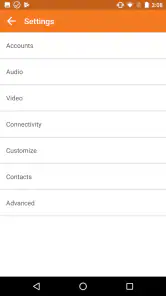
That also helps answer a common setup concern: this is most straightforward when you know your provider’s account information and can enter it accurately. If you’re unsure what credentials or server details to use, the bottleneck may be the phone service rather than the app interface. I’d keep the provider’s setup instructions handy and verify incoming as well as outgoing calling before treating the app as a replacement for another phone.
User Experience
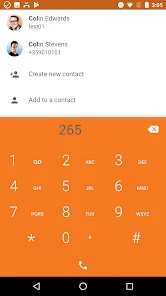
Using ZoiPer Pro is as straightforward as it gets. The app's user-friendly interface ensures that even those who are not tech-savvy can navigate it with ease. Setting up your SIP accounts is a simple process, guided by easy-to-follow instructions. Plus, the app provides a handy quick-dial feature, allowing you to reach your contacts without any hassle.
One of the things I particularly liked was the customizable interface. You can tweak the app's appearance to suit your personal style, which is a nice touch. Moreover, the app is ad-free, providing a seamless experience without any interruptions.
My practical tip is to set up the contacts and quick-dial choices you actually use, rather than trying to recreate an entire address book before making your first call. That makes the app easier to navigate when you’re in a hurry and reduces the chance of selecting the wrong account or contact. I’d also think about whether you want calls routed through a work or personal identity before using quick access, since convenience is only helpful when the chosen account is the right one.
Trade-offs and alternatives
Compared with ordinary messaging apps, a SIP softphone is more useful when you need to connect to a SIP service or maintain a dedicated calling identity. Messaging apps are usually simpler for reaching people who already use the same platform; they don’t ask you to configure a telephony account in the same way. A standard phone dialer is the easier choice for routine carrier calls. I’d choose this app when account-based internet calling is the actual need, not merely because it has more settings than a basic dialer.
There is also a learning curve hidden behind the simple interface: knowing how to add an account is different from knowing which service details to enter or how to troubleshoot a provider-side issue. If you expect an app to supply a number, handle the service for you, or work without configuration, this probably won’t meet that expectation. Its broad protocol support is valuable to people with compatible services, but not a reason by itself for everyone else to pay.
Is It Worth the Price?
Now, let's talk about the pricing. ZoiPer Pro isn't free, but considering the features it offers, I believe it's worth the investment. You're paying for a premium experience, complete with excellent customer support and regular updates that keep the app running smoothly.
For context, Securax EOOD is the developer, and the app has a 4.1 average from around 1,800 ratings, with over 10,000 installs. It was released on November 17, 2016, and version 2.25.10 requires Android 6.0 or later. It is rated Everyone. Those details give a sense of its established presence, but they don’t tell me whether it will work with a particular provider; checking compatibility and testing your own account still matter more for that decision.
Of course, there are free alternatives available, but they often come with limitations or pesky ads. If you're serious about having a reliable SIP softphone on your device, investing in ZoiPer Pro is a decision you won't regret.
Who should buy it, and who should pass
I’d consider it a good fit for someone who already has SIP credentials, makes calls through a compatible service, and values keeping more than one account in reach. It is also worth considering if you specifically want the premium Zoiper experience rather than a basic free client. Before committing, I’d confirm the account details, make a test call, and check which features you’ll actually use; that’s a more grounded way to judge the paid value than buying on the strength of a feature list alone.
I’d skip it if you rarely make internet calls, don’t have a SIP provider, or mainly need a simple way to reach contacts on mainstream messaging services. In those cases, the usual alternatives are more convenient and avoid paying for capabilities you may not use. My verdict is positive but conditional: when a SIP softphone is already part of your communication needs, this app offers a focused, flexible option; when it isn’t, the price and setup are hard to justify.
In conclusion, ZoiPer Pro - SIP Softphone is a fantastic choice for anyone looking to enhance their mobile communication capabilities. With its robust feature set, user-friendly interface, and exceptional call quality, it truly stands out in the crowded marketplace of VoIP apps. Whether you're a business professional or just someone who loves staying connected, this app is definitely worth checking out.
ZoiPer Pro - SIP Softphone Frequently Asked Questions
How much does ZoiPer Pro cost, and are there additional purchases?
ZoiPer Pro is a paid communication app from Securax EOOD, priced at $9.49. In-app purchases are also listed, ranging from $0.99 to $9.49 per item, so check the purchase details on your platform before downloading. Its premium positioning is reflected in the store summary: it includes the advanced features found in Zoiper Gold.
What should I know about the app’s age rating, release, and current version?
ZoiPer Pro is rated Everyone and was released on November 17, 2016. Its current version is 2.25.10, and it requires Android 6.0 or later. The app has an average rating of 4.1 from around 1,800 ratings, with 118 written reviews and over 10,000 installs. These details can help you judge whether it suits your device and expectations.
What is ZoiPer Pro - SIP Softphone and how does it work?
ZoiPer Pro is a SIP-based softphone application designed for both Android and iOS devices. It allows users to make and receive VoIP calls over the internet using their smartphone or tablet. Once you set up a SIP account, ZoiPer Pro connects to your VoIP service provider, enabling high-quality voice and video calls without the need for traditional phone lines.
Is ZoiPer Pro compatible with all VoIP providers?
ZoiPer Pro is compatible with most VoIP providers as it supports SIP and IAX protocols, which are widely used in the industry. Before downloading, it's advisable to check with your VoIP provider to ensure compatibility. The app also allows configuration with various codecs, enhancing its adaptability with different network conditions and provider requirements.
What are the main features of ZoiPer Pro?
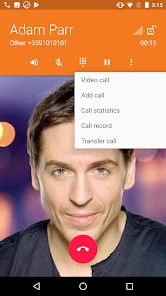
ZoiPer Pro offers a range of features including high-definition audio and video calls, call encryption for added security, integration with phone contacts, and support for multiple accounts. It also provides functionalities like call forwarding, call recording, and an intuitive user interface. These features make it a robust choice for both personal and professional communication needs.
Pros
- High-quality voice calls
- Supports multiple protocols
- User-friendly interface
- Secure communication
- Low battery consumption
Cons
- Requires purchase
- Complex setup for beginners
- Limited free features
- Occasional connectivity issues
- No video call support
- Category
- Communication
- Version
- 2.25.10