

Ziptale -Movies & Dramas
- 22.00
- 1.1
- Installs
- 50.00K
- Price
- Free

Screenshots

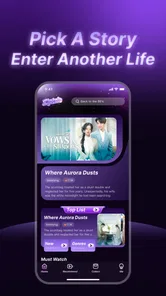
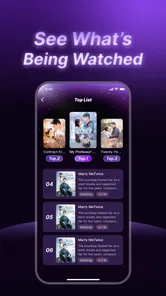
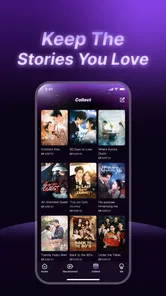

Analysis by Reviewed
I approached Ziptale as a quick entertainment app for short drama viewing, not as a full replacement for a broad streaming service. Its basic idea is easy to understand: browse short dramas through categories and rankings, then choose something that fits the few minutes you have available. That makes it appealing for a commute, a short break, or the end of a busy day when I want a story without committing to a long film.
The important qualification is that the experience can feel less polished than the concept suggests. The app comes from Healthy Life Tools, is free to install, and is rated for Everyone, but its current public reception is very weak, with an average rating of about 1.1 from roughly 90 ratings. I would not treat that score as a complete description of every viewing session, yet it is a clear reason to approach the app carefully rather than assuming a smooth, mature streaming experience.
Getting past the first points of friction
The first place I would expect users to get stuck is not the idea of short dramas itself, but the path from opening the app to actually watching something. A category-based entertainment app needs to make three things obvious: where the catalogue is, how rankings work, and what happens when a title is selected. If any of those steps feels unclear, the app can seem broken even when the problem is simply an awkward first-run flow.
I recommend opening Ziptale when you have a stable connection and a few uninterrupted minutes for initial testing. Start by checking whether the main screen loads completely before tapping repeatedly. Fast repeated taps can make any content app appear unresponsive, especially when a page is still fetching images or video information. Give each screen a moment, then use one deliberate tap at a time.
Because the app is free to download but lists in-app purchases ranging from about five dollars to nearly three hundred dollars per item, I would pay close attention to every purchase screen. Free installation does not mean every part of the viewing experience is necessarily free. Before confirming anything, read the wording on the screen, check whether the action is a purchase rather than ordinary playback, and leave the page if the offer is not clear enough for you.
This is also where the age rating matters. Ziptale is marked Everyone, which makes it easier to consider for a shared household, but an age label should not replace a parent’s own judgment about individual dramas. Short-form catalogues can vary in tone from one title to another. If a child is using the app, I would browse together first instead of assuming that the rating answers every content question.
Simple checks before blaming the app
If the home screen is blank, I would first switch between Wi-Fi and mobile data, then reopen the app. A weak connection can affect artwork, categories, ranking pages, and playback differently, so one part of the interface may appear available while another refuses to load. This is a useful distinction: if menus open but a selected drama does not start, the issue may be the connection or the individual content request rather than the whole application.
More From Our News Desk

 Gmail
GmailGmail in a Busy Inbox: Who Benefits Most?
From first account to crowded workday, Gmail earns its place through dependable search and flexible sorting—but its best fit depends on how much inbox maintenance you can tolerate.

 Prime Video
Switching to Prime Video: What Changes in Your Viewing Routine
Prime Video can make a compelling second home for streaming, but switching means learning a different catalog, rental layer, and route from browsing to playback.

 Universal TV Remote Control
Universal TV Remote Control Works Best as a Reliable Backup
A phone remote earns its place through quick setup and reliable habits. Here is how to get more from Universal TV Remote Control—and where its limits show.

 Weather - By Xiaomi
Weather by Xiaomi Review: Clear at a Glance, Less Clear Up Close
Xiaomi’s weather app makes everyday forecasts quick to scan, but its calm surface can leave useful details and recovery paths harder to find than they should be.

 X
XX Under Pressure: Can It Recover When Posting Goes Wrong?
A resilience-focused review of X, examining setup, mistaken posts, interruptions, weak connections, and the gaps that matter when recovery needs to be dependable.

 Clash of Clans
Clash of Clans Is Won Between the Battles
Its raids are quick; its community is a long-term project of coordination, teaching, rivalry, and shared responsibility—with all the friction that entails.
Latest News



I would also confirm that the device meets the stated minimum of Android 5.0 or later. That requirement is old enough to cover many phones, but compatibility does not guarantee a similar experience on every device. On an older handset, free storage, background activity, and the age of the operating system can have more impact than the app’s simple description suggests.
Another practical check is to close other video-heavy apps before trying again. This will not fix every problem, but it removes an easy source of competition for memory and network bandwidth. If the app works after that, the lesson is useful: the failure may have been caused by the phone’s current workload rather than by the catalogue itself.
For Android users, I would make sure the app has finished updating to version 1.1.2 if that version is offered on the device. Updating is worthwhile when a viewing problem appears after installation, although I would not promise that an update resolves every complaint. If the app was installed recently, a complete close and relaunch is a better first step than immediately deleting it, because it is quick and does not remove any local setup.
A viewing routine that reduces confusion
My preferred way to test Ziptale is to begin with one category rather than jumping between rankings, search-like browsing, and multiple titles. Choose a drama, let its page settle, and see whether playback starts normally. Then return to the catalogue and test a second title. This two-title check helps separate a general loading issue from a problem limited to one item.
Rankings are useful when I do not know what to watch, but I would not treat them as a guarantee of quality. A ranked list can help narrow the choice, while categories are better when I already know the mood I want. For example, I might use a ranking during a short break, then switch to a category later when I want something more specific. That small change in workflow prevents the app from becoming an endless scroll through whatever happens to be most visible.
A less obvious advantage of short dramas is that they are easier to fit around real interruptions. I can watch during a lunch break without starting a two-hour film, and I can stop after a small story beat without feeling that I have abandoned a complicated series. The trade-off is that the short format may provide less room for character development or a slow, carefully built plot. I would choose Ziptale for quick narrative entertainment, not for the depth I expect from a premium television platform.
If playback stops, I would avoid tapping the play control again and again. Instead, return to the title page, wait briefly, and try once more. If that fails, test another drama. When one title plays and another does not, that pattern gives you a practical clue and avoids wasting time changing settings that may not be relevant.
Recovering from a failed session
When the app opens but does not behave normally, I would use a gradual recovery process. First close and reopen it. Next test the connection and another title. Then restart the phone if other apps are also acting slowly. Only after those steps would I consider reinstalling, because removing and installing an app again can take time and may not help if the underlying problem is network-related.
I would be especially careful before clearing app data or storage. That action can remove local preferences or session information, and it is not a harmless button to press just because a screen is stuck. A simple restart is safer. If you do reinstall, remember that any purchase decision should be reviewed carefully afterward; do not assume that reinstalling changes the terms shown on a payment screen.
There is another useful recovery habit: write down what happened in plain language before trying to fix it. “The catalogue loaded, but one drama would not start” is more informative than “the app is broken.” “The app closed after switching networks” points to a different line of investigation. This makes it easier to decide whether to keep troubleshooting or move to another entertainment option.
The low public rating also changes how much patience I would invest. I am willing to try ordinary fixes, but I would not spend an entire evening repeatedly reinstalling an app that still cannot provide reliable playback. A free app can be worth testing, yet my time has value too. If the same failure returns after a clean restart, a connection check, and a second title test, I would move on rather than treating persistence as a requirement.
When the phone or connection is really responsible
It is easy to blame Ziptale when video pauses, but streaming problems often come from the environment around the app. A crowded home network, weak mobile signal, battery-saving restrictions, or an older phone under heavy load can all create symptoms that look like app defects. The simplest way to separate these causes is to compare conditions: try the same title on a different connection, then compare its behavior with another video app.
If other video services also buffer, the network is the stronger suspect. If Ziptale alone struggles while other apps play normally, the app deserves more of the blame. If only one drama fails, the issue may be limited to that item or its current delivery path. None of these tests guarantees a diagnosis, but they prevent random changes and give you a sensible stopping point.
Storage is another overlooked factor. A phone that is nearly full can become unreliable when handling images, temporary files, or updates. I would check available space before concluding that the app itself is unusable. I would also avoid testing while the phone is extremely hot or running many demanding tasks, since performance can change under those conditions.
For families, the practical question is not only whether the app opens, but whether the viewing experience is easy to supervise. The Everyone rating is reassuring as a general classification, yet I would still preview the catalogue and keep purchase decisions under adult control. The wide range of possible in-app purchase amounts makes that especially important on a shared device.
How it compares with familiar entertainment choices
Compared with a conventional streaming service, Ziptale is more focused on quick discovery through categories and rankings. That focus can be a strength when I want a short drama immediately and do not want to search through a huge library. A larger service is usually the better choice when I care about established series, long films, extensive account features, or a predictable premium viewing experience.
Compared with watching short clips through a general video platform, the appeal here is the drama-oriented browsing idea. I would expect a more direct path toward story-based content instead of mixing sketches, tutorials, music, news, and unrelated clips. The trade-off is that general platforms often feel more familiar and may offer stronger discovery tools, creator variety, and playback reliability depending on the user’s region and device.
Ziptale also differs from social short-video apps because its value is not simply rapid scrolling. I would use it when I want a sequence of dramatic stories rather than an unpredictable stream of disconnected clips. However, anyone who prefers constant novelty, social interaction, or highly personalized feeds may find the category-and-ranking approach too limited.
The developer, Healthy Life Tools, gives the app a distinctive identity, but the name alone does not tell me much about the viewing experience. I judge this product by whether it gets me from a category to a playable drama without unnecessary friction. At present, the combination of a very low average rating and the possibility of paid items means I would keep expectations modest until the app proves dependable on my own device.
Who should try it, and who should skip it
I think Ziptale is most suitable for someone who enjoys compact dramas and wants a free starting point for browsing. It may work well for a viewer who likes choosing by mood, checking a ranking for inspiration, and watching in short sessions rather than maintaining a long queue of full-length shows. It is also reasonable for a curious user who is comfortable performing a few basic connection and playback checks.
I would be more cautious if you need a highly polished service for daily viewing. People who dislike troubleshooting, want guaranteed consistency, or are uncomfortable seeing in-app purchase offers should probably choose a more established alternative. The same applies to anyone seeking deep catalogue organization, long-form storytelling, or a service whose main strength is reliability rather than quick discovery.
My realistic everyday scenario is a ten-minute break between errands. I would open the app on a stable connection, choose a category instead of browsing aimlessly, test one drama, and stop if playback required repeated retries. If the session worked, I would return later to the same browsing path. If it failed, I would not keep pressing buttons; I would switch to another service and try Ziptale again only after checking whether the problem was my connection.
That approach captures the app’s main trade-off. Its concept is convenient, but convenience disappears when the first session becomes a technical puzzle. The free entry point makes experimentation easy, while the purchase range means I would stay alert and never confirm a payment casually. For me, the app earns a trial, not automatic trust.
In practical terms, I would install it only if short dramas are specifically what I want. I would check the operating system, use a stable connection, test more than one title, and keep an eye on payment prompts. Those steps answer the questions that matter most: whether it starts on my phone, whether playback is consistent, whether the problem is local, and whether the catalogue suits my habits.
My final recommendation is cautious rather than enthusiastic. Ziptale has a clear entertainment purpose and a useful short-session format, but the very low average rating, possible viewing friction, and broad in-app purchase range make it difficult to recommend as a primary streaming app. I would treat it as a free experiment for fans of short dramas, with a simple rule: keep it only if it plays smoothly and feels understandable from the first few sessions.
Released on May 6, 2026, and currently at version 1.1.2, it is still a product I would evaluate through direct use rather than assumptions. Its reported install base is over fifty thousand, so it has attracted real curiosity, but popularity alone does not settle the reliability question. If you want lightweight drama discovery and are willing to leave quickly when the basics fail, it may be worth a test. If you want dependable, polished entertainment with no friction, I would choose the usual established alternatives instead.
Ziptale -Movies & Dramas Frequently Asked Questions
What should I know about Ziptale’s age rating and device compatibility?
Ziptale is an entertainment app with an Everyone content rating, and it requires Android 5.0 or later. Check that your device meets this operating-system requirement before downloading. The age rating may help families make an initial decision, but it is still sensible to review the app’s content and privacy details and supervise children’s use of entertainment apps.
What is Ziptale - Movies & Dramas?
Ziptale - Movies & Dramas is an entertainment app designed for users who enjoy watching movie and drama-related content on a mobile device. Its store summary describes discovering and watching trending short dramas by category and rank. Before downloading, check the current app description, supported languages, content categories, and whether the shows you want to watch are available in your country.
Is Ziptale - Movies & Dramas free to download and use?
The application is free to install, but it offers in-app purchases ranging from $4.99 to $299.99 per item. Some features or content may require a purchase, account registration, or advertising support. Pricing and access conditions may change over time, so review the official store listing carefully before signing up. Also check whether a trial automatically converts into a paid subscription and how cancellation works.
What kind of movies and dramas can I watch on Ziptale?
Ziptale focuses on movie and drama entertainment, with its store summary highlighting trending short dramas organized by category and rank. The exact selection depends on its current licensing agreements and your location. You may find different genres, series, clips, or localized content depending on the region. Because catalogs can change, it is best to browse the official listing or preview the app after installation to confirm that it offers the titles and languages you expect.
Does Ziptale support offline viewing and multiple devices?
Offline downloads, casting, subtitle choices, and multi-device access are not guaranteed for every title or account type. These options can also depend on the operating system and the version of the app installed. If these features are important to you, check the app’s latest description and permissions, then look for download or account-sync settings after signing in.
Pros
- Clean interface makes browsing movies and dramas straightforward.
- Useful genre categories help narrow down viewing choices quickly.
- Titles load smoothly on most modern Android and iOS devices.
- Personalized recommendations can make discovering new content easier.
- Supports convenient access to entertainment from a mobile device.
Cons
- Content availability may vary depending on your country or region.
- Some titles may require registration or additional access permissions.
- Streaming quality depends heavily on your internet connection.
- The catalog may not include the newest popular releases.
- Ads or promotional interruptions can affect the viewing experience.












