

zeta: AI Chat, Story, Play
- 8.49K
- 4.5
- Installs
- 5.00M
- Price
- Free

Screenshots



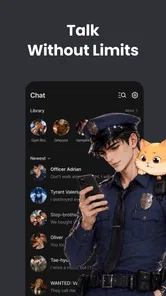



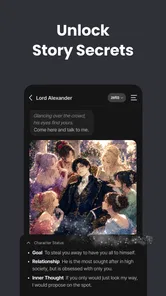
Analysis by Reviewed
Before I decide whether to keep a chat app around, I ask a simple question: does it give me something I want to come back to, or does it only feel novel the first few times? zeta: AI Chat, Story, Play is built around fictional conversations that can grow into improvised scenes. Its strongest appeal is the chance to shape a story in my own words; its long-term value depends on whether I find a character or premise worth revisiting.
I would approach it as a flexible form of entertainment, not as a substitute for a friend, a finished book, or a tightly designed game. That distinction matters because open-ended chat can feel personal and spontaneous, but it also asks me to guide the experience. If I am in the mood to contribute ideas, that can be part of the fun. If I only want to sit back and follow a polished plot, the format may feel like work.
What a useful first session looks like
Rather than sampling a long string of chats, I would give one promising premise a fair try. I might decide what kind of scene I want, what tone suits me, and how much time I have, then steer my replies accordingly. This makes it easier to tell whether the appeal is the character, the story idea, or simply the novelty of talking to an AI. A few intentional exchanges teach me more than opening the app without a plan and hoping something clicks.
A realistic use case is a short break when I have a few quiet minutes but do not want another social feed. I can pick up a fictional exchange and add one small turn to it, then return to my day. If the scene catches my interest, I can continue another time; if it does not, I have still had a small creative diversion without committing to a long game session. I would avoid starting a complicated storyline when I know I will need to leave almost immediately, since an open conversation can invite one more reply.
One practical question is whether I need to be a strong writer to enjoy it. I do not think so: a simple reaction or a clear suggestion can move a scene along. But the experience is more satisfying when I give the chat something to work with. If I am not in the mood to invent details, a scripted story with authored choices is likely a better fit. That difference is useful to understand before expecting the app to supply all the momentum on its own.
Another helpful habit is to treat each conversation as a small experiment. I can vary one thing—tone, setting, or the kind of role I want to play—rather than changing everything at once. That makes it easier to notice what actually improves the exchange. If a scene loses direction, I can briefly restate what matters to me instead of sending increasingly long corrections. Clear, compact steering is less tiring and often keeps the interaction focused.
From first chats to a repeatable routine
I’d use the first few visits to learn what kind of conversation actually draws me in, then turn that discovery into a simple routine: return to one promising scene instead of browsing endlessly for a better one. That shift helps separate lasting enjoyment from the quick novelty of trying something new. It also makes the next question clearer: what can keep those chats rewarding from month to month?
More From Our News Desk

 Gmail
GmailGmail in a Busy Inbox: Who Benefits Most?
From first account to crowded workday, Gmail earns its place through dependable search and flexible sorting—but its best fit depends on how much inbox maintenance you can tolerate.

 Prime Video
Switching to Prime Video: What Changes in Your Viewing Routine
Prime Video can make a compelling second home for streaming, but switching means learning a different catalog, rental layer, and route from browsing to playback.

 Universal TV Remote Control
Universal TV Remote Control Works Best as a Reliable Backup
A phone remote earns its place through quick setup and reliable habits. Here is how to get more from Universal TV Remote Control—and where its limits show.

 Weather - By Xiaomi
Weather by Xiaomi Review: Clear at a Glance, Less Clear Up Close
Xiaomi’s weather app makes everyday forecasts quick to scan, but its calm surface can leave useful details and recovery paths harder to find than they should be.

 X
XX Under Pressure: Can It Recover When Posting Goes Wrong?
A resilience-focused review of X, examining setup, mistaken posts, interruptions, weak connections, and the gaps that matter when recovery needs to be dependable.

 Clash of Clans
Clash of Clans Is Won Between the Battles
Its raids are quick; its community is a long-term project of coordination, teaching, rivalry, and shared responsibility—with all the friction that entails.
Latest News



Why the opening sessions feel inviting
Starting a conversation is a low-effort way to get into a story. I do not need to learn a complicated control scheme or plan a long session before beginning. I can respond in my own words and see the scene continue, which gives the interaction a more personal feel than choosing among a few preset dialogue options. That flexibility is a real strength for anyone who likes to improvise, even if the result is best approached as collaborative play rather than carefully edited writing.
A practical way to try it is to give a character a clear direction early. If I want a light exchange, I can keep my replies playful; if I want a tense or dramatic scene, I can establish that tone instead of waiting for the conversation to discover it on its own. This small habit helps make the session feel more intentional. It also gives me a better basis for judging whether the character and premise are a fit, rather than blaming the whole app after one unfocused chat.
The app is free to install and sits in the entertainment category, so it is easy to test without treating it as a serious commitment. It has a 4.5 average from around 204,000 ratings, with more than 5 million installs. Those figures suggest that the chat-and-story format has broad appeal, but popularity does not guarantee that every conversation will land for every reader. I would use the first few sessions to find out whether I enjoy guiding fiction through dialogue, not as proof that I need to keep using it.
What gives it value after the novelty
For longer-term use, the strongest value is the ability to return to an ongoing fictional mood. A short exchange can work as a small creative break: I might pick up a scene during a commute, continue it later when I have more time, or use a character prompt to get past the blank-page feeling when I want to imagine a story but do not want to write one from scratch. The app is more rewarding when I bring a little intention to those visits instead of treating every opening as a search for instant entertainment.
One useful approach is to keep a mental note of the premise and tone that made a conversation enjoyable. When I return, I can steer the next replies toward that same thread instead of repeatedly restarting with unrelated ideas. This is especially helpful if a chat begins to drift: a concise reminder in my next message can re-establish the setting or relationship I want to explore. It is a simple workflow, but it makes a conversation feel more coherent and reduces the temptation to abandon it at the first uneven response.
Compared with ordinary social networks, zeta is less about keeping up with people I know and more about entering a fictional exchange. Compared with a conventional interactive story, it gives me more freedom to phrase replies, but that freedom also means the pacing and quality can feel less controlled. If I want a tightly authored plot with dependable structure, a narrative game is likely the better choice. If I want to actively shape a loose scene, chat can feel more immediate and open-ended.
Keeping the experience manageable
The maintenance burden is modest in one sense: this is not an app that asks me to organize a complicated collection or learn a deep system before I can enjoy it. The main upkeep is attention. A continuing story is easier to enjoy when I remember what I wanted from it, and frequent switching between characters can make the experience feel scattered. I get more out of a few deliberate sessions than from opening the app repeatedly without a particular mood or idea in mind.
It is also worth deciding in advance how much time I want to give a conversation. Open-ended chat can make a quick check-in stretch longer than expected because each reply invites another. I find it helps to enter with a small purpose—continue one scene, try a new premise, or simply enjoy a brief exchange—and stop when that purpose is met. That is not a feature of the app so much as a practical way to keep a flexible entertainment format from turning into unplanned screen time.
The current version is 3.50.29, and the app is listed for Android 7.0 and later. It is free, but in-app purchases range from $1.99 to $139.99 per item. That spread makes it sensible to explore the free experience before spending. I would only consider a purchase after I had found a repeatable reason to return, and after checking the item and price shown at the point of purchase. A large menu of possible spending is not itself evidence that payment will improve a particular person’s experience.
Where fatigue can set in
The same openness that makes the chat appealing can also wear thin. A conversation may not maintain the exact voice, pacing, or direction I hoped for, and free-form replies require more patience than tapping through a finished script. If I want dependable plot beats, consistent prose, or a clear ending, I may find myself doing too much steering. In that situation, a book, a scripted visual story, or a traditional game can offer a more satisfying use of the same free time.
Another possible source of fatigue is novelty chasing. Sampling character after character can feel exciting at first, but it may leave me with many beginnings and no memorable arc. I get a better sense of the app’s lasting value when I stay with a promising conversation long enough to see whether the premise continues to interest me. Conversely, there is no need to force a story that has stopped working; moving on is reasonable, especially when the experience is meant to be casual entertainment.
The age rating is Mature 17+, so I would not treat the app as suitable for younger users simply because its interface is conversational. Adults should also be comfortable with mature-oriented entertainment before choosing it. That rating is a meaningful part of the decision, not a detail to overlook when sharing a device or recommending the app to someone else.
Who should keep it installed?
I can see zeta earning lasting space for someone who likes character chat, enjoys shaping scenes through their own words, and wants an entertainment option that can fit into short or flexible sessions. It may also suit people who like creative prompts but do not always want the effort of drafting a full story themselves. The best routine is likely personal: a few purposeful returns to a story or character that genuinely holds attention, rather than a daily obligation to check in.
I would skip it if I primarily want a conventional game with clear goals, a finished narrative, or reliable progress through a designed sequence. I would also avoid expecting it to function like a real social network; its appeal is fictional interaction, not keeping in touch with people in my life. And if I am easily pulled into open-ended chats or uncomfortable with mature-rated entertainment, another form of leisure may be a better fit.
A long-term verdict based on habit, not hype
My verdict is that zeta can remain worthwhile after its initial novelty, but only for the right kind of user. Its recurring value comes from the pleasure of continuing or reshaping a conversation, not from a promise that every chat will become compelling. I would install it for an easy way to play with character-led fiction, give it time to prove that a few stories hold my interest, and keep spending optional until that pattern is clear.
That makes it a good fit for curious adults who enjoy improvisation and a weaker fit for readers who want a carefully controlled plot or players who need defined objectives. The app is free to start, while optional purchases make a cautious trial especially sensible. If I were recommending it to a friend, I would say: try a clear premise, guide the exchange toward the tone you enjoy, and judge it by whether you genuinely want to return a week later. If that urge is there, it has earned a place in your entertainment rotation; if not, the format may simply be a fun first-week experiment.
A sensible way to decide whether it stays
After the initial trial, I would judge the app by one concrete signal: whether I can name a scene I want to continue. That is more useful than counting how often I open it, because frequent visits can come from curiosity alone. If I have a thread I care about, a character I enjoy responding to, or a premise that reliably sparks ideas, the app is doing something distinctive for me. If I keep browsing without finding a reason to return, I would let it go rather than turn entertainment into another chore.
For someone comparing options, the choice is less about which format is universally better and more about how much control they want. A book or a scripted visual story supplies a prepared sequence; a standard game adds goals and defined progress. zeta instead leaves more room for me to shape the exchange, while asking me to tolerate less predictable pacing. That trade-off is its identity, not a flaw that can be fixed by expecting it to behave like a novel.
Scatter Lab, Inc. has made a free-to-start entertainment app with a large audience, but the scale of that audience should not decide whether it belongs on my phone. I would recommend trying it to adults who enjoy improvising, especially if they want a creative diversion that does not require a long setup. I would steer younger users elsewhere because of the Mature 17+ rating, and point readers seeking a complete, carefully edited story toward a more authored format. For me, its lasting place depends on returning to a conversation because I want to—not because I feel obliged to maintain a streak or keep up with a feed.
zeta: AI Chat, Story, Play Frequently Asked Questions
What is Zeta: AI Chat, Story, Play?
Zeta: AI Chat, Story, Play is an entertainment app centered on conversations with AI characters. Depending on the characters and features available in your version, you can chat, explore interactive stories, and take part in role-play scenarios. The experience is designed for creative, casual use rather than as a source of verified information, professional advice, or communication with real people.
Is Zeta: AI Chat, Story, Play free to download and use?
The app may be available to download without an upfront charge, but access to particular features can depend on the current version, account options, or in-app purchases or subscriptions. Check the app-store listing and the payment details shown in the app before confirming a purchase. Pricing, free allowances, and included features can change, so do not assume every chat or story option is unlimited.
Do I need an account or an internet connection to use Zeta?
Account requirements and available sign-in methods can vary by platform and app version, so review the setup screen and privacy information when you install it. AI conversations generally require an internet connection because requests are processed online; offline use may be limited or unavailable. A stable connection can also help conversations load and respond more reliably.
Are conversations on Zeta private, and what should I avoid sharing?
Before chatting, read Zeta’s privacy policy and the data disclosures in the relevant app store to understand what information may be collected, retained, or processed. As with other online AI services, avoid entering passwords, payment details, precise location, or sensitive personal information. AI characters are not real people, and a conversation should not be treated as confidential professional support.
Is Zeta: AI Chat, Story, Play appropriate for children?
Suitability depends on the content available in the app, its age rating, and any current parental controls or content settings. Interactive character chats and role-play can sometimes touch on mature or unexpected themes, so parents and guardians should check the store rating, review settings, and supervise younger users. Do not rely on an age rating alone to determine whether the app is appropriate for a particular child.
Pros
- Offers several AI experiences
- including chat
- storytelling
- and role-play.
- Supports creative prompts for exploring different characters and scenarios.
- Can provide an interactive alternative to passive reading.
- Useful for brainstorming story ideas and dialogue.
- Combines multiple types of AI interaction in one app.
Cons
- AI replies may be inaccurate
- inconsistent
- or repetitive.
- Role-play conversations can lose track of earlier details.
- Some features or usage may require payment or in-app purchases.
- Requires an internet connection for AI responses.
- Avoid sharing personal or sensitive information in chats.











