Zaxbys
- 4.30K
- 3.0
- Installs
- 1.00M
- Price
- Free

Screenshots

Analysis by Reviewed
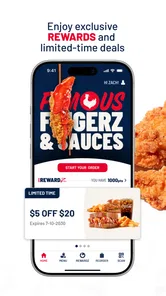
I judge a restaurant app by whether it makes a real meal easier to plan, not just whether its menu looks inviting. Zaxbys is a free Food & Drink app from Zaxby's Franchising, LLC, and its central appeal is straightforward: place an order, earn rewards, and redeem them. I find it most useful when I already know I want Zaxby’s and would rather decide what to eat before I reach the counter.
Start with the meal, then choose the location
A useful first step is to treat the app as a way to prepare a specific Zaxby’s visit, rather than as a place to browse aimlessly. I’d decide whether I’m ordering for myself or a group, check the menu, and then settle on the restaurant where I plan to pick up. That order of decisions matters: building a basket before knowing where you’ll be can create extra work if your plans change or another location is more convenient.
For a family meal or a shared lunch, I’d review every item in the basket individually before submitting it. Small preferences can be easy to miss when several people are ordering, and a familiar meal may not suit everyone. Having the menu on screen gives me a moment to check sides, sauces, and other choices without trying to remember them while standing at a busy counter. It is a modest advantage, but one that can make a group order feel less rushed.
Build a repeatable ordering habit
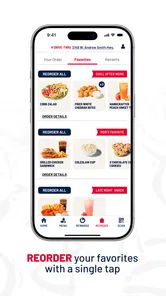
If I visit regularly, the best habit is not simply repeating the same order; it is using a past choice as a draft. I’d start from the familiar meal, review its details, and adjust it for the day. That keeps the convenience of a known order without treating yesterday’s preferences as automatic instructions. It is especially useful when ordering for someone else, when a side needs changing, or when I’m trying to keep the meal aligned with a particular preference.
I’d also separate browsing from committing. Looking through the menu and nutrition information can help me decide, but I’d wait to submit until I’ve confirmed the restaurant and pickup plan. This is a sensible workflow for any restaurant-specific ordering app, and it is particularly helpful when lunch plans are still being discussed. The app can organize the decision; it cannot make an undecided group agree on where to eat.
Ordering Made Easy
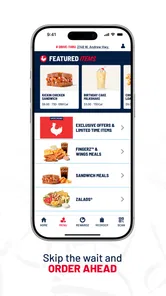
First things first, the user interface of the Zaxby's app is as smooth as their famous Zax Sauce. Navigating through the menu is a breeze, with everything neatly categorized. From their classic Chicken Fingerz to the zesty Zalads, it's all there at your fingertips. The app even remembers your previous orders, which is perfect if you’re like me and tend to gravitate towards your usual favorites.
Customization Galore
One of the standout features of the app is the level of customization it offers. Want extra sauce or prefer your chicken tossed in a different flavor? No problem! The app allows you to tweak your order just the way you like it. Plus, for those who are watching their calories, it provides nutritional information right there on the screen, which I found extremely helpful.
More From Our News Desk

Weather by Xiaomi Review: Clear at a Glance, Less Clear Up Close

X Under Pressure: Can It Recover When Posting Goes Wrong?

Clash of Clans Is Won Between the Battles

Android Auto Makes the Case for Quieter Car Software

MobiOffice: Transforming Mobile Productivity with Seamless Integration

EA SPORTS FC™ Mobile Soccer: Redefining Mobile Sports Gaming
Oh, and let's not forget about the special offers! The app frequently updates with promotions and discounts, so make sure to keep an eye out for some sweet deals. It’s like finding an extra chicken finger in your box – unexpected, but oh so welcome!
Make the Order Fit Your Routine
For a repeat visit, I’d treat a previous order as a convenient starting point, then check each choice before placing it. A remembered meal saves re-entry, but it can also carry forward a sauce or side that no longer suits today’s plans. Reviewing the basket is a small habit that helps avoid that easy mistake, especially when ordering for more than one person.
A practical weekday use is deciding on lunch during a break, while there is still time to compare the menu and customize the meal. I’d check the selected location and pickup details before confirming, then use the order as a plan rather than assuming that every restaurant visit will work the same way. If timing matters, allow room for the handoff: ordering ahead can cut down on counter decisions, but it does not remove the need to collect the food at the chosen restaurant.
Settings and Rewards Worth Checking
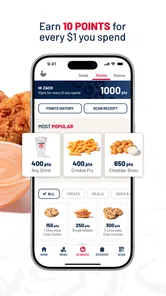
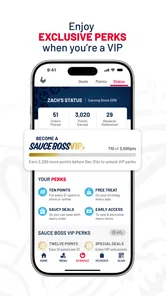
The most useful “settings” here are the choices you make deliberately while building an order: location, meal adjustments, and how you want to use rewards. I’d look at the rewards area before paying instead of waiting until after the meal. That makes it easier to notice whether there is a relevant offer and decide whether redeeming something fits this visit. Offers can change, so I wouldn’t build a routine around a particular discount being available every time.
One practical trade-off is deciding whether to redeem a reward now or save it for a later visit. I’d compare what is available with what I already planned to order, rather than changing the meal just to use an offer. A reward is only helpful when it fits the occasion; if it nudges me toward extra food I didn’t want, the apparent saving may not be worth it. Checking before checkout gives me a chance to make that call calmly.
Who gets the most from it
The app suits people who return to Zaxby’s often enough to value saved choices and rewards. If you’re trying it for the first time, browsing the menu and nutrition information can help you compare options before ordering. If you rarely eat there, though, installing a restaurant-specific app may add little; a normal in-person order or a general food-ordering service may be more convenient for comparing several restaurants in one place.
It is also a good fit for someone who knows the chain’s menu but wants time to make adjustments without holding up a queue. A person who is new to Zaxby’s may appreciate being able to look through the choices at their own pace, although the app is not a substitute for asking restaurant staff about a particular concern. If I need help that requires a conversation, I would choose the counter rather than assume an app menu can answer every question.
Speedy Service
One of the things that impressed me the most was how quick the service was. I placed my order through the app and chose the "Skip the Line" option for pickup. By the time I arrived at the restaurant, my food was hot and ready to go. Talk about efficiency!
For a smoother pickup, I’d make the final basket check before leaving wherever I am, not while walking into the restaurant. I’d confirm the location, the order details, and the pickup plan in one pass. This gives me fewer things to sort out on arrival and makes it easier to spot a mismatch while I can still review the order. It’s a small routine, but it is more dependable than relying on memory after placing a meal in a hurry.
For those who prefer dining in, the app also offers a location finder to help you locate the nearest Zaxby's. It's incredibly handy, especially when you're in unfamiliar territory and those chicken cravings strike.
Where the Convenience Has Limits
For me, the app’s strongest advantage over a typical restaurant menu is the ability to customize before arriving and connect ordering with rewards. Its trade-off is that it is focused on one chain: it won’t help much if your group is still choosing between different restaurants, or if you want to compare delivery options across several places. In those situations, a general-purpose ordering app or simply checking nearby restaurants is the better first step.
Compared with ordering directly at a counter, the app gives me more time to read the menu and make choices privately, but it adds a step: I need to keep track of the selected restaurant and then collect the order there. Compared with a broad delivery service, it is more focused on Zaxby’s and its reward system, while a multi-restaurant service is more useful for weighing different cuisines or providers. I’d choose based on the decision I’m actually making, not assume one method is always faster or better.
I’d also keep expectations practical around pickup. The app can make ordering more organized, but the actual experience still depends on choosing the right location and collecting the order there. When plans are uncertain, I would wait until I know where I’m going before building the basket. That avoids spending time on an order tied to the wrong restaurant.
Everyday Use and Who Should Skip It
Imagine a quick lunch stop on a busy day: I can browse the menu beforehand, check nutritional information, adjust sauces or sides, and arrive knowing what I want. For a regular customer, repeating a familiar order and checking rewards are useful habits; for an occasional visitor, the app is still handy when a specific Zaxby’s meal is the plan. It is less compelling if you prefer deciding face-to-face, need to weigh several eateries at once, or don’t expect to return often.
For someone with a packed schedule, I’d use it when the destination and meal are settled, rather than treating it as a guarantee that lunch will take no time. I can make choices before arriving, but I still need to leave room to get to the selected restaurant and pick up the food. If I’m already nearby and have no preference about what to eat, ordering in person may be just as simple and avoids planning ahead.
Another reasonable question is whether the app makes sense for a one-off visit. I’d say yes if I want to check the menu, make a specific adjustment, or use a relevant reward; otherwise, a quick counter order may be less effort than installing and learning a chain-specific app. For a customer who expects to return, saved orders and reward checking make a stronger case for keeping it available. The value depends more on my pattern of visits than on the app itself.
Compatibility and expectations
The app is rated for Everyone, has been available since December 15, 2016, and its current version is 12.7.0, with Android 7.0 as the minimum operating system requirement. It has more than a million installs, while its average rating is 2.9 from around seven thousand ratings. I take that modest score as a reason to keep expectations measured: the idea is useful, but the experience may not feel equally smooth for every customer. I’d make sure the app is up to date and check the order carefully rather than assuming every step will be friction-free.
That rating is worth considering, but I wouldn’t use it as the only test of whether the app suits me. My own decision would be practical: does my phone meet the listed Android requirement, do I expect to order from this chain, and do the menu and rewards features fit how I like to plan meals? If the answer is no to the last two, a restaurant-specific app is unlikely to become part of my routine. If the answer is yes, I’d try it with a straightforward order first and see whether the process works well for my usual location.
Final Thoughts
All in all, the Zaxby's app is a must-have for any fried chicken lover. It's user-friendly, efficient, and offers some great customization options. Whether you're a regular at Zaxby's or a first-timer, this app will enhance your dining experience significantly. So go ahead, give it a try. Your taste buds will thank you!
My more measured recommendation is to use it when a Zaxby’s visit is already part of your plan. The combination of menu browsing, order customization, saved choices, and rewards can make repeat visits easier, while the location finder helps when you’re somewhere unfamiliar. I wouldn’t install it expecting a universal food-ordering solution, but for customers who return to the chain, it can turn a familiar meal into a more organized pickup.
A repeatable routine, not a universal shortcut
My preferred routine is simple: decide that Zaxby’s is the right stop, select the restaurant, review the menu and any nutrition details I need, then build and check the basket. Before placing the order, I’d look at rewards and offers without letting them dictate what I eat. On a repeat visit, I’d use a remembered meal as a starting point, not a final answer. Those steps keep the app useful while avoiding the most likely sources of avoidable friction: stale choices, the wrong pickup location, or an offer that doesn’t suit the meal.
That is why I see this as a helpful companion for returning customers rather than an essential download for everyone. It can make a familiar Zaxby’s order feel more deliberate and organized, especially when I want to customize in advance. If my priority is comparing restaurants, resolving a question face-to-face, or choosing spontaneously, I’d use another route. When the chain is already the plan, though, the app gives me a practical way to prepare the order and decide whether its rewards are worth using.
Zaxbys Frequently Asked Questions
What devices can run the Zaxby's app?
Zaxby's is a Food & Drink app for Android and iOS. The current version is 12.7.0, and Android devices need version 7.0 or later to use it. It is rated for Everyone, so the age rating is not a barrier for general audiences. Before downloading, check that your device meets the operating-system requirement and has enough space for the app.
Who makes the Zaxby's app, and what is its reputation among users?
The app is developed by Zaxby's Franchising, LLC and has been available since December 15, 2016. It has an average rating of 2.9 from around 7,000 ratings, alongside roughly 3,900 written reviews. Those figures offer a mixed picture: the app has a substantial audience, but user experiences vary, so it is sensible to consider whether its ordering and rewards features fit your needs.
What is Zaxby's app and what does it offer?
Zaxby's app is a convenient mobile application designed for both Android and iOS users, offering a seamless way to browse the menu, place orders, and find the nearest Zaxby's locations. Users can customize their orders, save favorite items, and even receive exclusive offers and promotions directly through the app. It is a must-have for Zaxby's fans who want to enhance their dining experience. Its store summary captures the main purpose simply: order, earn, and redeem rewards.
How can I place an order through the Zaxby's app?
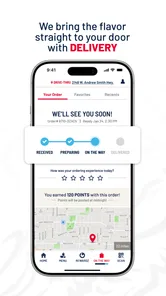
Placing an order through the Zaxby's app is straightforward. First, download the app and create an account. Browse the menu to select your favorite items, customize them if needed, and add them to your cart. Once ready, proceed to checkout by selecting a payment method and choosing between pickup or delivery options. The app ensures a fast and easy ordering process. As with any order, review your selections and the checkout details before submitting.
Are there any rewards or benefits for using the Zaxby's app?
Yes, Zaxby's app offers a rewards program where users can earn points for every purchase made through the app. These points can be redeemed for free menu items or discounts on future orders. Additionally, app users receive exclusive offers, birthday surprises, and early access to new menu items, enhancing their overall Zaxby's experience. The app's focus on earning and redeeming rewards makes it especially appealing to customers who order regularly.
Pros
- Intuitive user interface
- Wide range of menu options
- Fast and reliable service
- User-friendly navigation
- Regular updates enhance UX
Cons
- Limited vegetarian options
- Occasional app crashes
- Push notifications can be excessive
- Requires constant internet connection
- Limited payment methods supported











