

Xumo Play
- 128.00
- 3.6
- Installs
- 5.00M
- Price
- Free

Screenshots
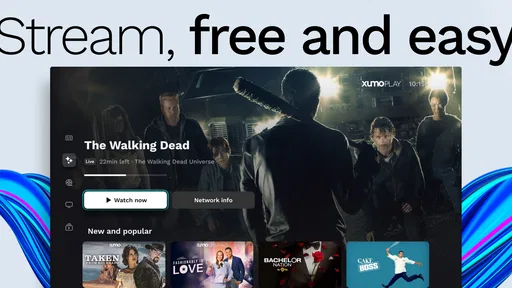
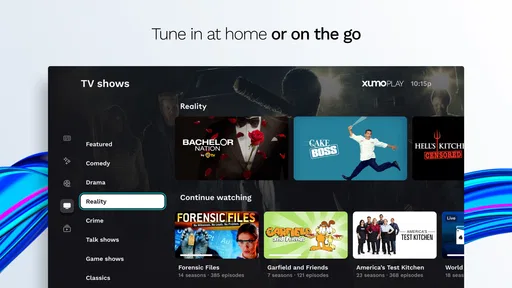
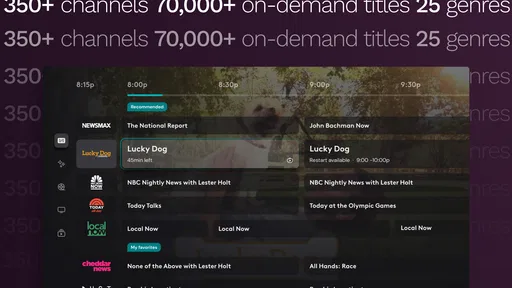
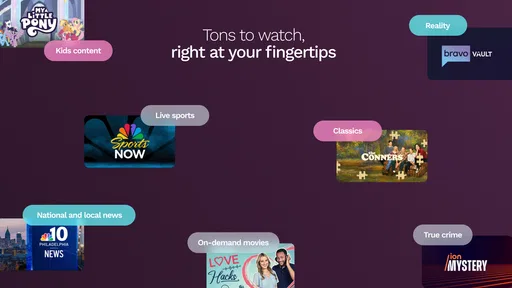
Analysis by Reviewed
I tend to keep a streaming app around for those moments when I want something on without spending ten minutes choosing a title. Xumo Play is aimed at exactly that kind of viewing: it brings live channels together with films and complete TV series available to watch on demand. I see it less as a replacement for every service in my rotation and more as a useful free option when I want to browse and settle on something quickly.
How the free price shapes the choice
Xumo Play is a free entertainment app from XUMO LLC. That makes the cost easy to understand: you can try it without paying an access fee. Free access is a real advantage if you want another source of TV and films, though it does not mean the experience will suit everyone or remove the usual trade-offs of a free streaming service.
The app has a 3.7 average from around 1,500 ratings, and it has been installed over five million times. It is rated for Everyone, runs on Android 5.0 or later, and its current version is 4.8.143. Those details help set expectations, but I would put more weight on whether its mix of live viewing and on-demand browsing matches your habits.
What free viewing is worth in practice
I think the best way to judge the value is to compare it with what you would actually use instead. If you are already paying for several subscriptions, another paid service needs to earn a regular place in your budget. This app asks for no access fee, so it can serve as a supplementary option rather than another monthly commitment. That is most useful when you want casual viewing, not when you are trying to replace a service that carries a specific show you follow.
Free access also changes how I would approach trying it. I would browse with a particular mood in mind—news, a film, or something easy to leave on—then see whether the available selection fits. If it does, the app has earned a spot on the home screen; if it does not, there is no subscription decision to unwind. The trade is mainly about your time and tolerance for the way free streaming works, rather than a paid plan to evaluate.
Discovering Xumo Play’s Unique Charm
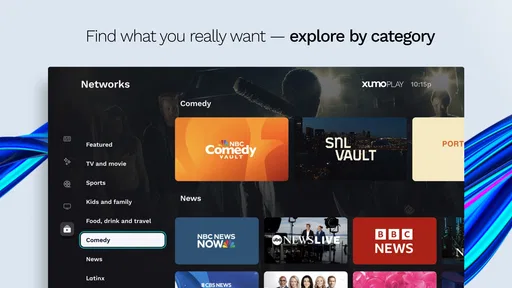
From the moment I launched Xumo Play, I was greeted with a user-friendly interface that screams simplicity. No need for a degree in tech to navigate this app! What caught my eye first was the vast array of channels offering everything from news to entertainment, sports, and lifestyle.
One of the coolest features is the ability to watch live TV. Yes, you heard that right! In a world dominated by on-demand content, live TV on a free platform is a breath of fresh air. Whether you’re in the mood for a classic movie night or want to catch up on the latest news, Xumo Play has got you covered.
More From Our News Desk

 Gmail
Gmail in a Busy Inbox: Who Benefits Most?
From first account to crowded workday, Gmail earns its place through dependable search and flexible sorting—but its best fit depends on how much inbox maintenance you can tolerate.

 Prime Video
Switching to Prime Video: What Changes in Your Viewing Routine
Prime Video can make a compelling second home for streaming, but switching means learning a different catalog, rental layer, and route from browsing to playback.

 Universal TV Remote Control
 Works Best as a Reliable Backup
A phone remote earns its place through quick setup and reliable habits. Here is how to get more from Universal TV Remote Control—and where its limits show.

 Weather - By Xiaomi
Weather by Xiaomi Review: Clear at a Glance, Less Clear Up Close
Xiaomi’s weather app makes everyday forecasts quick to scan, but its calm surface can leave useful details and recovery paths harder to find than they should be.

 X
X Under Pressure: Can It Recover When Posting Goes Wrong?
A resilience-focused review of X, examining setup, mistaken posts, interruptions, weak connections, and the gaps that matter when recovery needs to be dependable.

 Clash of Clans
 Is Won Between the Battles
Its raids are quick; its community is a long-term project of coordination, teaching, rivalry, and shared responsibility—with all the friction that entails.
Latest News



Content variety, with a browsing trade-off
If variety is the spice of life, then Xumo Play is the ultimate spice rack. The app hosts numerous channels with diverse genres. I found myself diving into everything from gripping documentaries to feel-good comedies. What’s more, the app updates its content regularly, so there’s always something new to discover.
Another aspect worth mentioning is the minimal ads. Unlike other free streaming platforms where ads pop up every few minutes, Xumo Play keeps them at bay, allowing for a more enjoyable viewing experience.
The range is a strength when I am open to suggestions, but it can also make a quick decision harder. I would not treat the channel count as a promise that every genre will have the exact program I want at the moment I want it. Instead, I use the app’s mix as a reason to explore: pick a broad mood, scan a little, and stop browsing once something good enough turns up. That small rule keeps a casual session from becoming another long search through menus.
Making the channel mix work for you
With so many channels, the useful trick is to treat the app like a place to browse, not a library where every title has to be tracked down. When I have only a short break, I’d start with live TV and let a channel make the choice for me. For a planned evening, on-demand films and full series make more sense: I can browse first, then commit to a longer watch instead of leaving a live channel running.
That difference also matters when comparing Xumo Play with subscription services. A paid platform may be a better fit if you want a particular exclusive show or a carefully maintained watchlist. Xumo Play’s appeal is breadth and low commitment: it gives me another way to fill an idle moment without adding a subscription. I wouldn’t choose it as my only option if I had a specific new release in mind.
Compared with a conventional on-demand service, the live channels make this feel less like opening a shelf of titles and more like turning on television. That is a genuine distinction, not a universal advantage. If I already know precisely what episode I want, searching a focused library is usually the more direct route. If I am undecided and happy to let a channel guide the session, Xumo Play’s live side can be the more relaxing choice.
Using it on a phone without losing the plot
On a mobile device, the two viewing modes serve different situations. A live channel is a simple choice for a brief pause or a task where I only need to listen and glance at the screen now and then. On-demand viewing is better when I can give a film or episode my attention. Separating those intentions before I start helps me avoid drifting through channels when I actually wanted to watch something specific.
I would also think about the setting before starting a long session. A phone is convenient for a solo break, but video can become a distraction if I leave a live stream running while doing something that needs focus. At home, a shared screen may make the broad channel mix more useful because everyone can suggest a general mood; it may be less satisfying if each person expects a personalized queue. Those are not problems with the app so much as a reminder that its casual, browse-first approach works best when expectations are shared.
User experience and what to check first
Now, let’s talk about the user experience. The app runs smoothly across both Android and iOS devices, which means you can enjoy your favorite shows on the go. The layout is intuitive, with clearly labeled categories that make finding content a breeze.
Moreover, the streaming quality is top-notch. I tested it on various networks, and whether I was on Wi-Fi or mobile data, the playback was seamless, with no annoying buffering. That’s a major win in my book!
Before settling in, I would check that the app is available for the device I plan to use and that the Android device meets its minimum operating-system requirement. The listed minimum for Android is version 5.0, and the current app version is 4.8.143. This is a practical check if you are setting up an older phone or tablet; it is better to confirm compatibility before planning a movie night around it.
If a stream does not feel right in a particular moment, I would first distinguish between a connection issue and a content-choice issue. Switching from live browsing to an on-demand title, or choosing something shorter, can make a session feel more deliberate. I would not assume that one good experience on one network guarantees identical playback everywhere, so for a longer watch I prefer a stable connection and a comfortable screen rather than treating mobile viewing as automatically effortless.
A practical way to use it day to day
A realistic use for me is putting on a live channel while making dinner: I can catch a news segment or background entertainment without first choosing an episode. If I have a longer stretch later, I can switch to on-demand viewing. This makes the app especially handy for households where people want different kinds of casual viewing, though it won’t replace a service built around a specific person’s carefully curated queue.
If you’re watching on mobile data, I’d be deliberate about how long you leave video playing, especially when a live channel is simply in the background. On a shared screen, it also helps to decide whether you want passive channel surfing or a specific series before opening the app; those are different moods, and the large channel selection can make browsing feel less focused if you go in without a plan.
For a more intentional evening, I would use a simple two-step approach: decide whether I want to browse live TV or choose on demand, then give myself a short search window. If I have not found a fit, I can switch to another service rather than continuing to scroll out of habit. This is a useful way to enjoy a free app without mistaking a large selection for a guarantee that it will contain the exact title I had in mind.
Who is likely to get the most value?
I’d recommend Xumo Play to someone who wants free, low-effort entertainment, enjoys channel surfing, or likes having a live option alongside on-demand films and series. It can also be a useful backup for a household that already pays for another service but wants something to put on between planned shows.
I’d skip it if you mainly watch a particular show that is only available elsewhere, prefer a tightly organized personal library, or want every viewing choice to be ad-free. The free price is the clearest part of its value; whether the content mix is right for you depends on your tastes and how much control you want over what plays next.
It is also a sensible fit for someone who wants to explore without making a spending decision first. For example, a person moving into a new routine might use it for background viewing while cooking or winding down, then keep only the channels or titles that genuinely suit that habit. By contrast, someone who watches one ongoing drama closely, values episode-by-episode continuity, or wants their viewing organized around a personal list will probably get more practical use from a service designed around that kind of library.
For families, the Everyone content rating is a helpful starting point, but I would still make choices based on the people watching and the particular program. A broad rating does not tell me whether every title will suit every household’s preferences. I would browse together at first, especially if the app is being introduced as a shared living-room option, rather than assuming that a general age label settles every viewing decision.
My buy-or-skip verdict
In conclusion, Xumo Play is like a breath of fresh air in the overcrowded market of streaming apps. It offers an exceptional range of content without the pressure of subscription fees. The combination of live TV, minimal ads, and a smooth user experience makes it a must-try for any TV enthusiast.
So, if you’re ready to ditch the endless subscription fees and dive into a world of free entertainment, give Xumo Play a shot. You might just find your next favorite show!
My recommendation is more measured than “replace every service”: try it when you want a no-cost way to browse live channels or sample on-demand viewing, and judge it by whether it fits your real routine. If you need a particular release, a more controlled catalog, or viewing with no advertising, another option may suit you better. If you want an easy fallback for an undecided evening, the free access makes Xumo Play worth considering.
Xumo Play Frequently Asked Questions
Does Xumo Play require an account before I can start watching?
Xumo Play is designed as a free streaming option, and viewers can enjoy its channels and on-demand programs without signing up or entering payment information. That makes getting started straightforward: install the app, open it, and explore what is available. Keep in mind that the service is supported by advertisements, which appear during viewing rather than being replaced by a subscription.
What is Xumo Play and how does it work?
Xumo Play is a free streaming app that offers a wide variety of live and on-demand TV channels. It works by providing users access to content across different genres, such as news, sports, movies, and entertainment, without the need for a subscription. The app is ad-supported, meaning users will encounter advertisements during their viewing experience. This app is available on multiple platforms, making it a versatile choice for cord-cutters looking for free streaming options.
Is Xumo Play really free to use?
Yes, Xumo Play is completely free to use. There are no subscription fees or hidden charges. The app generates revenue through advertisements that are shown during the streaming of content. Users can enjoy a wide range of channels and on-demand shows without the need to sign up or provide any payment information, making it an attractive option for budget-conscious viewers.
What kind of content can I expect on Xumo Play?
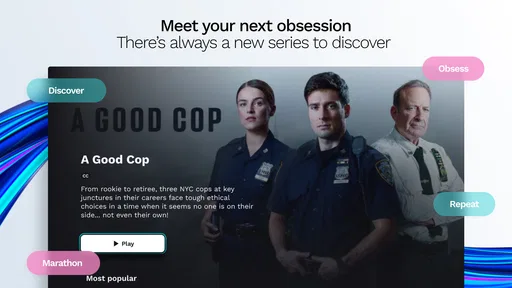
Xumo Play offers a diverse range of content including live TV channels and on-demand shows. Users can access news, sports, lifestyle, entertainment, and kids’ programming. The app’s lineup includes over 350 networks, plus movies and full TV series available on demand. With categories such as movies, comedy, and music, Xumo Play aims to cater to a broad audience with varying preferences.
How much storage space does the Xumo Play app need?
The app is compatible with Android devices running version 5.0 or later, which can help you check whether your phone or tablet meets its basic software requirement before installing. The amount of storage needed can vary with the device and app version, so it is sensible to check the available space shown during installation. Once installed, you can use Xumo Play to explore its free streaming options.
Pros
- User-friendly interface with intuitive navigation.
- Offers a wide range of free content.
- No subscription required for streaming.
- Supports multiple device compatibility.
- Regularly updated with new shows and movies.
Cons
- Limited content compared to premium services.
- Some ads are present during streaming.
- Requires internet connection for streaming.
- Lacks offline download feature.
- Occasional buffering on slower networks.












