

Wizz App - chat now
- 10.91K
- 3.2
- Installs
- 5.00M
- Price
- Free

Screenshots

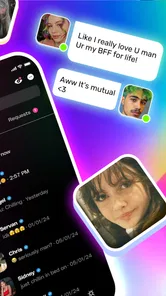


Analysis by Reviewed
I find the most useful way to think about Wizz App is as a discovery tool: swiping helps you find people to talk to, while the conversation itself decides whether a connection goes anywhere. That makes it different from opening a messaging app where you already know who you want to contact. If you enjoy the first step of meeting someone new, the format can feel lively; if you want a quiet place for existing friends, it may feel like the wrong starting point.
Why the swipe-first approach matters
Wizz is a social app from Wizz, and its main idea is to put browsing potential connections ahead of messaging. Rather than searching through a familiar contact list, you look at profiles and choose whether to move toward a conversation. I like that this gives a new user an immediate activity, but it also means the experience depends on being comfortable making quick choices from limited impressions.
The app is free to download, with optional in-app purchases priced from $0.99 to $49.99 per item. Its average rating is 3.8 from around 58,000 ratings, alongside around 9,800 written reviews, and it has passed one million installs. Those figures suggest a sizable audience, not a guarantee that every interaction will suit you. It is rated Teen, so I would still approach conversations thoughtfully and avoid sharing private information with people I have just met.
Making a first conversation less awkward
In practice, I’d treat the profile as a conversation starter rather than a polished personal brand. A clear photo and a few genuine interests give someone something specific to respond to; a vague profile makes the swipe feel like a coin toss. One useful habit is to open with a question tied to a shared interest instead of sending a bare greeting. It gives the other person an easy way into the conversation and helps you see quickly whether you have anything to talk about.
For example, if I had a spare stretch after school or work and wanted to meet people who also like a particular game, I could browse, connect, and see whether a chat develops naturally. Voice messages or a video call can make an exchange feel more personal than text, but I’d use those only after I felt comfortable. You don’t have to turn a new match into a call; keeping the pace at text is a perfectly reasonable choice.
Where it fits among social apps
Compared with a standard messaging app, Wizz is built around finding new people rather than keeping up with contacts I already have. Compared with a broad social network, the swipe-led flow makes the discovery step more direct, though it can also encourage snap judgments. If I want ongoing updates from friends, a familiar social feed is likely a better fit. If I want to meet people beyond my current circle and am happy to start conversations, Wizz has a clearer purpose.
The app’s version 7.12.0 runs on Android 8.0 or later. That makes the operating-system requirement worth checking before downloading, especially if you use an older phone. Since the app is free to start, I’d try the basic experience before considering any paid items; spending is not a substitute for finding people whose interests and conversation style match yours.
More From Our News Desk

 Gmail
GmailGmail in a Busy Inbox: Who Benefits Most?
From first account to crowded workday, Gmail earns its place through dependable search and flexible sorting—but its best fit depends on how much inbox maintenance you can tolerate.

 Prime Video
Switching to Prime Video: What Changes in Your Viewing Routine
Prime Video can make a compelling second home for streaming, but switching means learning a different catalog, rental layer, and route from browsing to playback.

 Universal TV Remote Control
Universal TV Remote Control Works Best as a Reliable Backup
A phone remote earns its place through quick setup and reliable habits. Here is how to get more from Universal TV Remote Control—and where its limits show.

 Weather - By Xiaomi
Weather by Xiaomi Review: Clear at a Glance, Less Clear Up Close
Xiaomi’s weather app makes everyday forecasts quick to scan, but its calm surface can leave useful details and recovery paths harder to find than they should be.

 X
XX Under Pressure: Can It Recover When Posting Goes Wrong?
A resilience-focused review of X, examining setup, mistaken posts, interruptions, weak connections, and the gaps that matter when recovery needs to be dependable.

 Clash of Clans
Clash of Clans Is Won Between the Battles
Its raids are quick; its community is a long-term project of coordination, teaching, rivalry, and shared responsibility—with all the friction that entails.
Latest News



A World of Connections
The Wizz App opens the door to a world of new friendships. Literally! Once you dive in, you’re greeted with a vibrant interface that makes finding new buddies super easy. You can swipe through profiles from all over the globe and start chatting with just a tap. It’s like having a passport to a world of conversations right in your pocket.
Easy Peasy Setup
Getting started on Wizz is a breeze. You sign up using your email or social media accounts, which is quite standard these days. But what’s cool is how quickly you can customize your profile. Add a picture, throw in some interests, and before you know it, you’re ready to mingle. It’s all set up to get you chatting without any unnecessary fuss.
Once your profile is polished, you can start exploring. The app uses a swipe mechanism, much like a few dating apps out there, but with the focus purely on friendships. Swipe right if you’re keen to chat or left if you’re not feeling it. Simple, intuitive, and kind of addictive!
Chatting Features Galore
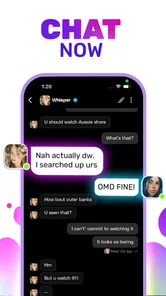
What really sets the Wizz App apart are its chatting features. You’re not limited to texts; you can send voice messages, share images, and even video call. It makes the whole experience feel more personal and engaging. Plus, the app’s notifications ensure you never miss a message, so you can keep the conversation going without a hitch.
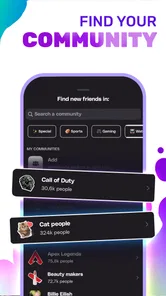
One thing I found particularly cool is the ability to join groups based on interests. Whether you’re into gaming, books, or even niche hobbies, there’s likely a group for you. It’s a fantastic way to dive deeper into conversations that you actually care about.
Safety and sensible boundaries
Safety is a big deal when it comes to online interactions, and Wizz has got you covered. The app provides options to report inappropriate behavior and block users if needed. It’s reassuring to know that the developers are keen on keeping the platform safe for everyone.
Moreover, they have guidelines to promote respectful interactions, which makes it a friendly place for all ages. Just remember to keep your personal info secure, as with any online platform.
I’d make those safeguards part of how I use the app, rather than something to think about only after a problem appears. Keep early conversations on the app, avoid sharing details that identify where you live or spend your day, and don’t let a friendly tone rush you into sending images or moving to a call. If somebody pressures you, ends the conversation abruptly when you set a boundary, or asks for information you would not share with a new acquaintance in person, blocking and reporting are reasonable responses. A good interaction should not require you to ignore your instincts.
What a realistic session looks like
Imagine having a quiet half-hour after classes or work and wanting to meet people who share an interest, but not wanting to commit to a formal group or event. I’d use Wizz in short bursts: make the profile clear enough to give others a useful opening, browse with that interest in mind, and start only the chats I can genuinely follow up on. If a conversation gets going, I can respond when I have time rather than treating a new contact as an obligation to be constantly available.
That approach also helps with the app’s central tradeoff. Swiping is quick, but quick decisions can make people feel interchangeable if I do it without a purpose. Choosing a topic before opening the app gives me a better filter than simply swiping until something catches my eye. It turns discovery into a search for a conversation I might enjoy, rather than a tally of profiles viewed.
Keeping chats comfortable and manageable
One practical question is how to move from a match to an actual conversation without making the exchange feel forced. I’d refer to a visible interest or ask an open, specific question, then give the other person room to answer. If their response is short, I would not assume there is a hidden meaning or keep sending messages to revive the chat. A natural exchange needs effort from both sides, and a quiet thread is a useful cue to move on.
Another useful choice is matching the communication style to the level of trust. Text is an easy first step because it gives both people time to think. A voice message can add warmth once there is a reason to continue, while a video call is a more personal step that I would leave until both people are comfortable. Having those options does not mean every conversation needs to use them; the best feature is the ability to choose a pace that feels right.
How it compares with other ways to meet people
Wizz sits between the open-ended browsing of a social network and the direct utility of a messaging app. A social feed is often better for following people or topics over time, while a group built around a hobby can give newcomers a shared activity before they ever speak one-to-one. A contacts-based messenger is the obvious choice for keeping in touch with people already in your life. Wizz is more appealing when the missing piece is a way to discover someone new and take the first step toward chatting.
The swipe format is convenient, but it is not automatically better than a community organized around an interest. If I want sustained discussion about a specific subject, a focused group can provide more context and less pressure to make a rapid personal impression. If I want a direct, lightweight route to meeting new conversation partners, Wizz’s browsing flow may feel easier. The right alternative depends on whether I want a new contact, a recurring community, or a place to maintain existing friendships.
Final Thoughts
So, is the Wizz App worth your time? I’d say yes if you’re looking to expand your social circle beyond geographic boundaries. It’s a fun, easy-to-use platform with all the bells and whistles you’d expect from a top-notch chatting app. Whether you want to make a new friend in your city or across the ocean, Wizz offers an exciting way to do just that. So, what are you waiting for? Go ahead and give it a whirl!
Getting more from a short session
I wouldn’t treat swiping as something to do endlessly. A more useful routine is to set aside a little time, look for profiles that give you a genuine point of connection, and then focus on a small number of conversations. That keeps the app from becoming a blur of faces and makes it easier to remember what you actually wanted to ask. If a chat feels one-sided, I’d move on rather than trying to force momentum.
Groups can also be a lower-pressure route into the experience than contacting someone cold. When a shared topic is already on the table, you can contribute naturally and see who responds in a way you enjoy. I’d use that as a way to find conversation, not as proof that every member is a close match. The practical benefit is having something to discuss before deciding whether to continue one-to-one.
When I’d choose something else
Wizz makes the most sense for people who are curious, comfortable with brief introductions, and willing to let some conversations fade. It is less suited to anyone who wants a carefully curated professional network, a dependable way to coordinate with existing friends, or a social space that does not revolve around meeting strangers. For those needs, a messaging service or a community organized around a specific interest may be more useful than a swipe-based app.
I’d also keep expectations grounded: a match is an invitation to talk, not a promise of friendship. Online conversations can be uneven, and a profile cannot tell you everything about a person. Take time before sharing personal details, and use the available block and report options if an interaction crosses a line. The Teen content rating is a reminder that younger users may be part of the audience, so respectful boundaries matter on both sides.
Who is likely to enjoy it
If you have recently moved, want to widen your social circle, or simply enjoy meeting people outside your usual routine, the swipe-and-chat structure can make starting easier. It is especially handy when you have a specific interest you can put on your profile or use to open a conversation. I would recommend it to someone who sees discovery as part of the fun, rather than expecting every new contact to turn into a lasting connection.
My overall view is that Wizz has a clear role: it gives people a direct way to discover and approach new conversation partners, with chat options that can carry an exchange beyond a quick hello. The tradeoff is that you need patience, good judgment, and a willingness to skip conversations that do not click. If that sounds appealing, try it at your own pace; if you prefer predictable interactions with people you already know, another kind of social app will probably serve you better.
Wizz App - chat now Frequently Asked Questions
Is Wizz App easy to set up for a first-time user?
Wizz is a social app built around meeting and chatting with new people. Getting started means creating a profile and using the app to connect with others; the store summary describes the experience as “Swipe, Meet & Chat Real People.” If you prefer a social app focused on discovering new conversations rather than only keeping up with people you already know, that approach may suit you.
What should I consider before creating a profile on Wizz App?
Think about what you are comfortable sharing with people you have not met before. A profile helps other users discover and connect with you, so keep personal information limited and choose carefully what you include in conversations. Wizz is intended for social interaction with new people, which can be enjoyable, but setting clear boundaries before you begin makes it easier to use the app thoughtfully.
Is Wizz App suitable for teenagers?
Wizz App is rated Teen, so it is intended for a teenage audience as well as adults. Because it connects users with new people, families should consider whether chatting with strangers is appropriate for the teen using it. Encourage them to avoid sharing personal details, use blocking and reporting tools when needed, and talk to a trusted adult about any uncomfortable interaction.
Does Wizz App require payment to download or use its main features?
Wizz App is free to download, and its basic features are available without a subscription. In-app purchases are offered, ranging from $0.99 to $49.99 per item, so paid options may appear while using the app. You can start with the free experience and decide for yourself whether any optional purchases are worthwhile; check purchase prompts carefully before confirming them.
What is Wizz App and how does it work?
Wizz App is a social networking platform designed to connect users with new people worldwide. It allows you to chat instantly with others by matching you based on your interests and preferences. The app encourages spontaneous and engaging conversations, making it easy to meet friends or potential partners. Simply create a profile, set your preferences, and start chatting with users who match your criteria.
Pros
- User-friendly interface
- Fast connection speeds
- Wide range of chat options
- Secure messaging features
- Frequent app updates
Cons
- Limited free features
- Occasional connectivity issues
- Ads in free version
- Not available in all regions
- Lacks customization options











