Wingstop
- 31.91K
- 4.8
- Installs
- 5.00M
- Price
- Free

Screenshots
Analysis by Reviewed
For a shared dinner, I find a restaurant app most useful when it turns scattered preferences into one order without making anyone feel rushed. Wingstop can serve that role when the group has already settled on wings: one person can bring the menu up, gather choices, and check the basket before checkout. It is less helpful as a place to decide among lots of restaurants, so I would choose it after the group has picked Wingstop rather than use it to start the search.
Start with the group, not the basket
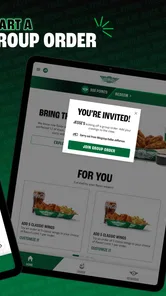
In a household, the tricky part of ordering is often not finding food but keeping track of who wanted which flavor, side, or drink. I’d ask everyone for their choices first, then enter them in one sitting. That simple workflow makes customization more useful and reduces the chance of mixing up selections when a phone is passed around.
It also helps to agree on a cutoff before the order is placed. If someone is still deciding, the organizer can check whether the group wants to wait or proceed without that item. This is a small but practical distinction: the app collects the order, while the household still needs a clear way to make the decision together.
One order, several preferences
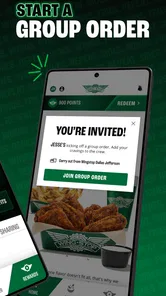
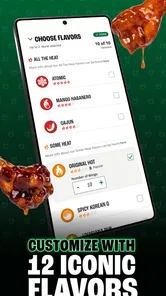
For a household with different tastes, customization can help each person settle on a choice rather than asking the whole group to settle on one flavor. I’d collect everyone’s selections before checkout, then review the basket together. That small pause is worthwhile: it helps catch a missed side or a choice entered for the wrong person before the order is sent.
The app is free and comes from Wingstop Restaurants, Incorporated. It is a dedicated Food & Drink app, not a general restaurant directory, so it makes the most sense when Wingstop is already the place your group wants. If you are still comparing several restaurants, a broader food-ordering service may be more convenient for browsing different cuisines in one session.
Keep the account and checkout in mind
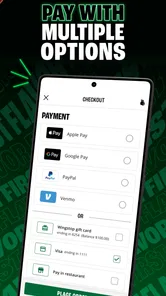
A shared phone can make browsing together easy, but I would treat account access and checkout as the organizer’s responsibility. Before placing an order, the person paying should check the selections and payment details on screen; handing a device around is not the same as setting up separate household profiles. If several people take turns ordering, agree on who is using the account and who is confirming the purchase.
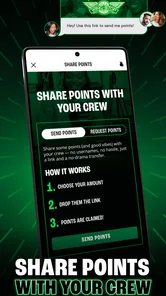
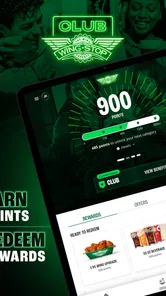
That approach also helps with rewards. The original review notes that the app tracks points, so a household that orders through one account may find it simpler to keep those rewards in one place. The trade-off is that the account holder becomes the person who needs to keep track of the balance and order history. I would not assume that every family member has an independent rewards record just because they use the same device.
More From Our News Desk

Weather by Xiaomi Review: Clear at a Glance, Less Clear Up Close

X Under Pressure: Can It Recover When Posting Goes Wrong?

Clash of Clans Is Won Between the Battles

Android Auto Makes the Case for Quieter Car Software

MobiOffice: Transforming Mobile Productivity with Seamless Integration

EA SPORTS FC™ Mobile Soccer: Redefining Mobile Sports Gaming
Coordinate delivery and carryout realistically
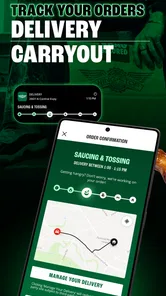
A useful household routine is to decide not only what to order but who will receive or collect it. If everyone is home, one person can keep an eye on the delivery while another handles plates and drinks. If somebody is already near a Wingstop, carryout may fit the evening better. Neither option removes the need to confirm the address or collection plan before checkout.
I would also avoid treating an app’s order flow as a guarantee about timing. Delivery can be convenient when nobody wants to leave home, but a meal tied to a strict schedule is better planned with some flexibility. For a shared-device household, sending a quick message with the final order and expected plan is often more useful than assuming everybody has watched the checkout screen.
Useful when Wingstop is already the plan
The app suits people who know they want Wingstop and value placing a tailored order without calling or deciding everything at the counter. Its average rating is 4.8 from around 172,000 ratings, and it has over 5 million installs. Those figures suggest it has found a substantial audience, but they do not guarantee that every order or delivery will go smoothly in every situation.
For a group deciding between Wingstop and several nearby restaurants, I would compare menus and delivery choices before committing rather than opening this app expecting it to act as a marketplace. For a repeat order, by contrast, keeping the process in one restaurant’s app can feel more direct. A practical tip is to settle the group’s flavor and side choices before browsing; it makes customization useful instead of letting the menu turn dinner planning into a drawn-out discussion.
Easy Navigation and User-Friendly Design
First off, let me say that the app’s interface is as smooth as a perfectly cooked chicken wing. The design is clean and straightforward, making it super easy to find exactly what you’re craving. Whether you’re a tech guru or someone who still calls their grandkids to figure out how to download an app, you’ll find navigating this app a breeze.
Ordering Made Simple
Ordering through the app is a piece of cake—or more aptly, a piece of chicken. The menu is neatly organized, allowing you to filter through different flavors, sides, and drinks. I particularly loved the customization options. Want your wings extra crispy or drenched in sauce? No problem. The app makes it simple to tailor your order to your exact taste.
Deals and Rewards
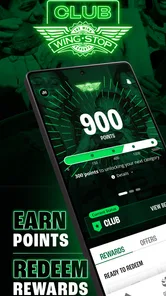
Now, who doesn’t love a good deal? The Wingstop app offers exclusive deals and rewards that you won’t find if you just walk into a store. I was able to snag a pretty sweet deal on a combo meal, and let me tell you, my wallet was just as happy as my taste buds. The rewards program also keeps track of your points, making it easy to earn free food. Who doesn’t want free wings, am I right?
Quick and Reliable Delivery
When it comes to delivery, the app shines here too. I placed my order, and before I knew it, there was a knock at my door. The delivery was not only quick but my food arrived piping hot. It’s nice to know that when you’re hit with a wing craving, you don’t have to wait long to satisfy it.
Customer Service at Your Fingertips
If you ever run into any issues, the app has a built-in customer service feature that’s really handy. I had a minor hiccup with an order, and resolving it was as easy as tapping a few buttons. The response was quick, and the service was friendly—just what you need when you’re hangry and waiting for your wings.
Age, trust, and a realistic delivery check
The app is rated for Everyone, but I’d still have an adult handle the account and final checkout when children are helping choose dinner. That is a sensible household boundary, not a special family-control feature. Wingstop’s current version is 2025.11.0 and it requires Android 6.0 or later on Android devices; the app is also available for iOS. I’d check the order details and delivery address before confirming, especially when ordering for a shared home or sending food to someone else.
A realistic use is a busy evening when one person gets home later than the rest: the organizer can gather preferences, place the order for delivery or carryout, and let everyone know what was chosen. Carryout is the better fit if someone is already passing a Wingstop location or the group wants to avoid waiting at home for a courier. Delivery is convenient, but the experience depends on the individual order and circumstances, so I would not plan a tight schedule around an assumed arrival time.
The app was released on November 11, 2011, and remains a focused way to order from the restaurant rather than a tool for comparing every meal option nearby. That narrow focus is its main trade-off: it is handy when Wingstop is the decision, but less useful when the household has not chosen a restaurant. The app’s 31,000 reviews add context to its audience, yet I’d still judge it by whether its ordering flow suits my own routine.
Where a different option makes more sense
If I were ordering for someone with a strict dietary requirement, I would slow down and verify each item in the menu rather than relying on a quick group consensus. A customization screen can make preferences easier to express, but it does not replace careful checking of ingredients or preparation details. When that information is central to the decision, contacting the restaurant directly or choosing an option with information that answers the person’s needs more clearly may be the wiser route.
Likewise, a restaurant-specific app is not automatically the best choice for every order. A general delivery service can be more convenient when the household wants to compare restaurants, while ordering directly here makes sense when Wingstop is already the choice. Someone who rarely orders from the chain may not get much value from maintaining another account just to browse once in a while; they can decide whether the direct ordering workflow is worth it for their own routine.
Small checks that prevent avoidable mistakes
Before confirming, I’d read the basket from top to bottom and match each item to the person who requested it. For a larger shared order, this is more reliable than trying to remember everyone’s choices from conversation. I’d also check the pickup or delivery plan with the person who will handle it, especially if the organizer and recipient are not the same person.
The app’s focus can be an advantage for a familiar order, but it also means the organizer has to do the comparison work elsewhere when the group is undecided. I would settle the restaurant first, then use the app to build and review the order. That keeps the household conversation focused and avoids treating a single-brand menu as though it were a full local dining guide.
A sensible household fit
Wingstop is most useful in a home where someone is happy to organize the order and the rest of the group can communicate their preferences clearly. It is a practical fit for a casual shared meal, a repeat craving, or an evening when nobody wants to call in an order. It is less compelling for people who mainly want a broad restaurant comparison, need a firm arrival time, or do not want one person responsible for the final account and checkout steps.
For children who are helping choose dinner, I’d let them browse and suggest items while keeping payment and the final confirmation with an adult. That gives them a voice without confusing shared access to a device with separate accounts or household controls. The app’s Everyone age rating is useful context, but responsible ordering still comes down to the adults managing the purchase.
So, if you’re a fan of mouth-watering wings and want an app that makes the whole experience easy and enjoyable, give the Wingstop app a try. With easy navigation, exclusive deals, and quick delivery, it’s definitely worth a download. Happy munching!
Wingstop Frequently Asked Questions
Who develops the Wingstop app, and what is it for?
Wingstop is a Food & Drink app developed by Wingstop Restaurants, Incorporated. Its central purpose is to let customers order wings for delivery or carryout from a mobile device. You can use it to explore ordering options and put together a meal, making it a practical choice if you prefer handling a Wingstop order through an app rather than starting in person.
What age group is the Wingstop app suitable for?
The app is listed as suitable for everyone, so its content rating does not restrict it to adults. It is focused on food ordering, and the main reason to install it is to browse and order Wingstop food. Anyone placing an order should still make sure the details, selected items, and payment are appropriate before completing a purchase.
Is the Wingstop app free to download?
Yes, Wingstop is free to download and is listed for everyone. It is a Food & Drink app from Wingstop Restaurants, Incorporated, designed for ordering wings for delivery or carryout. The app itself does not cost anything to install, though any food purchase you place through it is separate from the download.
What is Wingstop and what can I do with the app?
Wingstop is a popular app for ordering delicious chicken wings, fries, and sides right from your mobile device. With the app, you can browse the menu, customize your order, and choose your preferred flavors and dips. Additionally, the app allows you to find nearby Wingstop locations, track your order status, and enjoy exclusive app-only deals and offers.
Is Wingstop app available for both Android and iOS devices?
Yes, the Wingstop app is available for download on both Android and iOS devices. You can easily find the app on the Google Play Store for Android users and on the Apple App Store for iOS users. The app is designed to offer a seamless experience across both platforms, ensuring that users can enjoy their favorite Wingstop meals with ease.
Pros
- User-friendly interface for easy navigation
- Wide variety of flavors to choose from
- Convenient ordering and delivery options
- Loyalty rewards for frequent customers
- Real-time updates on order status
Cons
- Limited customization options for orders
- Occasional app crashes reported by users
- No option for pre-scheduling orders
- High delivery fees in some areas
- Inconsistent quality of service reported











