

Wing - Drone delivery
- 828.00
- 4.8
- Installs
- 100.00K
- Price
- Free

Screenshots

Analysis by Reviewed
Ordering something from the sky sounds like a novelty until it solves a very ordinary problem: you need a few items, but leaving home is inconvenient. Wing is a shopping app from Wing Aviation LLC built around that moment. Instead of treating delivery as a long wait for a vehicle, it presents drone delivery as a quick way to bring selected goods to your home. I found the idea genuinely useful when the order is small, the delivery area supports it, and speed matters more than having the widest possible choice.
The app is free, aimed at Everyone, and sits in the shopping category rather than entertainment or travel. It has been available since June 9, 2021, and its reception is strong, with a 4.8 average from around 3.7 thousand ratings. More than 100 thousand people have installed it, which makes it feel established enough for a curious first try rather than an experimental download with no user history behind it.
What to expect before placing a drone order
The most important thing to understand is that Wing is not a general supermarket replacement. I would approach it as a focused delivery option for eligible homes and suitable items. The experience depends on whether your address falls inside an active service area and whether the products you want are available for aerial delivery. That makes the first check more important than browsing for a long time.
When the service works for your location, the appeal is easy to see. A small order can move from a nearby retail source to your home without asking you to drive, wait for a conventional courier route, or add a larger grocery trip to your day. I especially like the fit for forgotten breakfast ingredients, a quick snack, basic household needs, or something you need while working from home and cannot easily leave to collect.
There is also a different mindset involved. With ordinary shopping apps, I usually begin by searching a huge catalog and comparing prices, brands, pack sizes, and delivery windows. With Wing, I would first ask, “What can arrive usefully and quickly here?” That change prevents disappointment. The app is strongest when convenience and immediacy outweigh the need for a complete weekly shop.
My practical advice is to treat the first session as an availability check, not as a commitment to buy. Confirm that your home can receive deliveries, look through the available selection, and only then decide whether the service fits your routine. This takes the pressure out of the novelty and gives you a realistic picture of what the app can do for you personally.
Who benefits most from this format
I can see Wing being particularly useful for people who live close to participating stores but do not want to make a short trip for one or two items. Parents may appreciate avoiding an unnecessary outing, especially when a child is napping or the weather is unpleasant. Someone working remotely can use the delivery window to solve a small need without abandoning a meeting-heavy day.
More From Our News Desk

 Instagram
Instagram’s Power Comes From Its Place in Your Phone
A close look at how Instagram turns Meta’s reach, recommendation systems and everyday camera habits into durable platform power—and what that costs users.

 Gmail
GmailGmail in a Busy Inbox: Who Benefits Most?
From first account to crowded workday, Gmail earns its place through dependable search and flexible sorting—but its best fit depends on how much inbox maintenance you can tolerate.

 Prime Video
Switching to Prime Video: What Changes in Your Viewing Routine
Prime Video can make a compelling second home for streaming, but switching means learning a different catalog, rental layer, and route from browsing to playback.

 Universal TV Remote Control
Universal TV Remote Control Works Best as a Reliable Backup
A phone remote earns its place through quick setup and reliable habits. Here is how to get more from Universal TV Remote Control—and where its limits show.

 Weather - By Xiaomi
Weather by Xiaomi Review: Clear at a Glance, Less Clear Up Close
Xiaomi’s weather app makes everyday forecasts quick to scan, but its calm surface can leave useful details and recovery paths harder to find than they should be.

 X
XX Under Pressure: Can It Recover When Posting Goes Wrong?
A resilience-focused review of X, examining setup, mistaken posts, interruptions, weak connections, and the gaps that matter when recovery needs to be dependable.
Latest News



It can also help when transport is difficult. A person without a car, someone temporarily unable to drive, or anyone managing a busy household may value a delivery method that does not depend on fitting a store visit into the schedule. The benefit is not simply speed; it is the removal of friction around a small errand.
On the other hand, I would skip Wing for a full household stock-up, a carefully planned meal requiring many ingredients, or any purchase where substitutions and detailed product comparison matter more than convenience. A traditional grocery service or a store visit remains better for those jobs. The drone concept is impressive, but it does not automatically make every shopping task more efficient.
Getting set up without guessing
The first setup should be approached in a calm order. Install the free app, open it, and begin with your delivery location. The address is central to the whole experience because drone service is tied to a defined operating area, not simply to the existence of a nearby store. If your home is eligible, the app can show you what is possible. If it is not, there is no value in trying to plan an order around an unavailable service.
When entering your address, be precise rather than relying on a vague neighborhood description. A drone needs a practical destination, and an apartment, townhouse, or house may involve different delivery considerations. I would take a moment to check that the selected location represents the place where you can safely receive the order, especially if your phone remembers an old address or suggests a nearby location automatically.
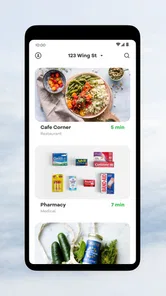
After that, browse before building a basket. This is one of the less obvious ways to save time with Wing: learn the shape of the available catalog first. You may find that the app is excellent for certain everyday categories but less suitable for a specific brand, size, or specialized item. Knowing that early helps you decide whether to continue in Wing or switch immediately to a conventional shopping app.
The developer is Wing Aviation LLC, and the product feels centered on connecting the shopping decision with the delivery operation rather than offering a broad marketplace. That focus is useful because the interface does not need to behave like a giant department store. For a first-time user, the goal should be simple: identify an eligible item, confirm the destination, and understand how the handoff will work.
What I would check before paying
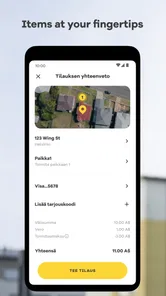
Before confirming an order, I would review the item, quantity, destination, and the expected delivery information shown in the app. Small mistakes are more important with a fast delivery service because the convenience comes from reducing the time between selection and arrival. If you order the wrong flavor, size, or quantity, the speed will not compensate for the inconvenience.
I would also think about where the delivery can be received. Do not assume that the most convenient-looking outdoor space is automatically the right place. Look for a clear, sensible area that you can access and monitor. If your home has a complicated entrance, shared outdoor space, or limited visibility from inside, the experience may require more planning than a standard courier dropping a parcel at a door.
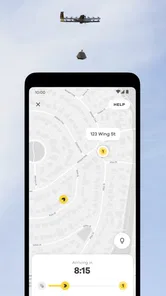
Another useful habit is to keep your phone available after ordering. The app is not just a catalog; it is part of the delivery communication. A first order is easier when you can respond to any instruction or check the order status instead of treating the process like a conventional parcel that can be ignored until evening.
Making the first successful order feel simple
For a first attempt, I would choose a familiar, modest purchase rather than something urgent or expensive. Pick an item you already know you want, place the order when you can pay attention, and use the experience to learn the handoff. This is a better introduction than testing the service during a stressful situation where every minute matters.
Imagine a weekday afternoon at home. You realize you are missing a snack and a drink before starting a long work session. A normal option might mean walking or driving to a store, ordering from a broader delivery service, or simply going without. With Wing, the meaningful success is not merely seeing a drone; it is completing that small task while staying at home and returning to work quickly.
Once the order is accepted, follow the app’s delivery guidance rather than improvising. The exact handoff deserves your attention because this is not the same as receiving a bag from a person at the front door. Keep the destination area accessible, watch for the arrival, and collect the order promptly when the app indicates that it is ready. That routine makes the second order feel much less unusual.
My first-order strategy would be:
Confirm that the address is eligible before choosing products.
Select one or two familiar items that are easy to check when they arrive.
Review the destination and order details carefully.
Stay alert to the app while the delivery is in progress.
Use the completed order to decide whether the service suits your home and schedule.
This approach also reveals whether the service fits your surroundings. A person with an easy-to-access home location may find the process remarkably smooth, while someone in a dense building or a shared complex may discover that the practical handoff is the limiting factor. That is not a flaw in the shopping idea so much as an important part of deciding whether drone delivery works for your particular address.
Why the small order is the best test
A small first order exposes the useful parts of Wing without creating too many variables. You can judge how clear the app is, how comfortable you feel with the arrival process, and whether the delivery location is convenient. If you begin with a large or complicated basket, it becomes harder to tell whether a problem came from the product selection, the address, or the handoff.
There is a trade-off here. A conventional delivery service may let you combine many goods into one order, while Wing’s strength is the quick, focused errand. I would compare the total effort rather than only the delivery method: how long would it take to shop normally, how much choice do you need, and is the item worth ordering immediately? Wing wins when the answer favors speed and simplicity.
Common points of confusion during use
The biggest possible misunderstanding is assuming that the app promises universal coverage. It does not make sense to install it and expect the same experience in every town. Eligibility is part of the product. If your address is outside the operating area, the app cannot turn a nearby drone concept into a local service, so checking location early is essential.
Another confusion concerns the word “delivery.” People often imagine a drone placing an order exactly like a courier handing over a bag. The actual process is more specialized, so read the in-app instructions and pay attention to where and when you are expected to collect the goods. A user who ignores that guidance may think the service is inconvenient when the real issue is an unprepared destination.
Product availability can also surprise new users. The app is not necessarily the best place to search for every brand or a complete list of household supplies. If you need a particular ingredient for a recipe, check the available products before deciding on the meal. For flexible needs, Wing is more comfortable: “something for breakfast” or “a quick drink” is a better match than a rigid list with no acceptable alternatives.
The app’s high average rating suggests that many users enjoy the experience, but I would not read that as a guarantee that every delivery will fit every home. Ratings reflect overall satisfaction, while your own result depends on location, item choice, timing, and how easy it is to receive the order. The right question is not whether everyone should use it, but whether your everyday errands resemble the situations where drone delivery has a clear advantage.
Where another shopping option is better
For planned weekly groceries, I would normally choose a supermarket app, a conventional courier, or in-person shopping. Those alternatives are better when I need a broad catalog, multiple substitutions, larger quantities, or a delivery arrangement that does not require me to watch the arrival closely. Their familiar format is also easier for people who prefer a parcel left at a door without a specialized collection routine.
For a single urgent item, however, Wing can be more appealing than driving. It may also be a better fit than a broad delivery marketplace when the available selection already covers what I need and the aerial handoff saves meaningful time. The decision comes down to the shape of the errand, not to whether drone technology is more exciting.
I would also avoid relying on it for a situation where failure would cause a serious problem. If you need a particular medicine, a precise cooking ingredient, or supplies for an event with no backup plan, use an option with a wider selection or a more predictable alternative. Wing is best used as a convenient tool, not as the only possible route to an essential purchase.
Turning a successful first order into a useful habit
After the first delivery, I would make a short mental list of the occasions when Wing genuinely saved effort. Perhaps it worked well for forgotten lunch items, a late-afternoon snack, or a small household refill. That list is more valuable than simply deciding that the technology is “cool,” because it tells you when opening the app is actually the sensible choice.
A good habit is to browse before you are in a rush. If you already know which kinds of items are available and how your delivery location works, a future order becomes much faster. You can also avoid the common mistake of waiting until the last moment for something that would have been easy to obtain through a normal store visit.
Keep the app for situations where its specific advantage is clear. The free price makes trying it low-risk, but your time still matters. If browsing takes longer than a short trip, or if the item list does not match your needs, close Wing and use the better tool. A useful app earns its place by reducing work, not by making every purchase feel futuristic.
Wing is a strong choice for a first-time user who wants to test drone delivery through a small, practical shopping task. I like its focused purpose, its potential to remove an unnecessary trip, and the way a successful order can turn an unusual idea into a normal convenience. I would not recommend it as a replacement for every grocery or delivery service, particularly for large, detailed, or highly specific orders.
Still, if your address is eligible and your needs suit quick, modest purchases, I think it is worth trying. Start with a familiar item, check the destination carefully, stay available during the handoff, and judge the app by the errands it makes easier. That is where Wing makes the strongest case for itself: not as a gimmick, but as a practical shortcut when a small shopping problem does not deserve a full outing.
Wing - Drone delivery Frequently Asked Questions
Is Wing – Drone Delivery free to download, and what devices can use it?
Wing – Drone Delivery is free to download and is listed for everyone. It is a shopping app from Wing Aviation LLC, designed for people who want to browse local delivery options and place orders from a mobile device. Before installing, check that your device’s app store offers it and that your phone can run the current version. You will also need an eligible delivery address to use the service.
Is Wing – Drone Delivery available on Android and iOS?
Wing – Drone Delivery is a mobile app, so availability depends on the app store and device you use. Look for Wing in your Android or iOS app store and check the developer name, Wing Aviation LLC, before installing. The app is free to download, but access to ordering depends on whether Wing serves your address. Having the app installed does not necessarily mean drone delivery is available in your neighborhood.
What is Wing – Drone Delivery, and how does it work?
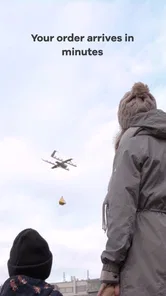
Wing – Drone Delivery is a service that lets you order selected products through a mobile app and receive them by autonomous drone. After choosing an available item, entering your delivery details, and completing payment, the order is prepared at a nearby partner location. A Wing drone then carries the package and lowers it carefully to an approved delivery area, rather than landing directly on your property.
Where is Wing drone delivery available?
Wing is not available everywhere, so coverage is one of the first things to check before downloading or placing an order. Service operates only in selected cities, neighborhoods, and delivery zones where Wing has local approval and participating retailers. Availability can also depend on weather, operating hours, and the exact address entered in the app. The app normally confirms whether your location is eligible.
What products can I order through Wing?
The product selection depends on the retailers and restaurants participating in your local Wing service area. Common options may include snacks, groceries, convenience items, pharmacy products, meals, and other lightweight essentials. Not every store or product is eligible for drone delivery, and size, weight, packaging, and safety restrictions can limit what appears in the app. The available catalog may change regularly.
Pros
- Real-time order tracking shows the drone’s progress clearly.
- Contactless delivery reduces direct interaction during drop-off.
- The service can reach locations with limited road access.
- Delivery times may be faster for eligible nearby orders.
- The app provides a modern
- convenient ordering experience.
Cons
- Drone availability is limited to selected service areas.
- Weather conditions can delay or cancel scheduled deliveries.
- Payload limits restrict the size and weight of available orders.
- Suitable landing space may be required at the delivery address.
- Operating hours and product selection vary by location.











