

Win Plus
- 6.00
- 3.2
- Installs
- 50.00K
- Price
- Free

Screenshots




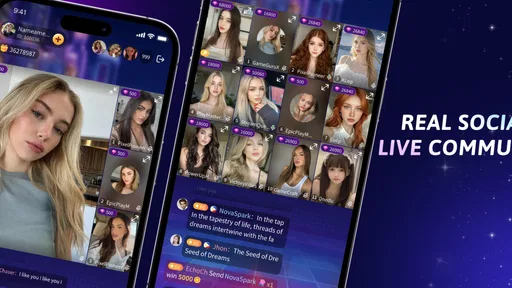


Analysis by Reviewed
Win Plus is an entertainment app from SETIA built around live chat and party games. I approached it as something to open when I wanted a quick social break rather than a serious gaming platform, and that distinction matters. Its appeal depends less on long-term progression and more on whether you enjoy meeting people, joining a conversation, and turning a few spare minutes into a shared activity.
The app is free to install, carries an Everyone 10+ content rating, and supports devices running Android 8.0 or later. Its current version is 2.6.0. Those details make it accessible to a fairly broad audience, although the social nature of the experience means younger users should still use sensible privacy habits and avoid sharing personal information in public conversations.
How Win Plus feels in everyday use
My basic workflow with Win Plus is simple: open it when I have enough time to participate, look for an active social space, and decide whether I want to chat or join a party-game session. That sounds obvious, but it is the key to enjoying the app. This is not the sort of entertainment I would use passively while expecting a polished single-player campaign to carry the experience. The value comes from the people present and from how quickly a group can settle into a fun rhythm.
A realistic use case is a quiet evening when friends are online but nobody wants to arrange a complicated multiplayer match. Win Plus can fit that gap because conversation and play sit close together. I can treat it as a casual hangout first and a game second, which lowers the pressure to perform. If a particular activity is not holding my attention, the social side gives me a reason to stay for another moment instead of closing the app immediately.
That flexibility is also its first limitation. A live community changes from session to session, so the experience is not equally strong every time I open it. When the room is active and welcoming, the app feels lively. When there is little conversation or the group does not match my mood, the same interface can feel less rewarding than a conventional game with a clear objective.
I would describe Win Plus as a lightweight social entertainment option rather than a replacement for dedicated messaging apps, voice platforms, or established multiplayer games. A messaging app is usually better when I already know exactly who I want to contact. A traditional party game is often better when my group wants rules, structure, and a predictable match. Win Plus makes more sense in the middle: I want interaction, but I am open to discovering the activity and the people as I go.
The app’s store presence shows a modest but real audience, with more than fifty thousand installs and an average rating of 3.2 from around two hundred ratings. I read that as a reason to keep expectations measured. There is enough interest to make the concept worth trying, but the rating also suggests that the experience will not satisfy everyone equally. In my view, the social design is its strongest opportunity and its biggest variable.
More From Our News Desk

 Gmail
GmailGmail in a Busy Inbox: Who Benefits Most?
From first account to crowded workday, Gmail earns its place through dependable search and flexible sorting—but its best fit depends on how much inbox maintenance you can tolerate.

 Prime Video
Switching to Prime Video: What Changes in Your Viewing Routine
Prime Video can make a compelling second home for streaming, but switching means learning a different catalog, rental layer, and route from browsing to playback.

 Universal TV Remote Control
Universal TV Remote Control Works Best as a Reliable Backup
A phone remote earns its place through quick setup and reliable habits. Here is how to get more from Universal TV Remote Control—and where its limits show.

 Weather - By Xiaomi
Weather by Xiaomi Review: Clear at a Glance, Less Clear Up Close
Xiaomi’s weather app makes everyday forecasts quick to scan, but its calm surface can leave useful details and recovery paths harder to find than they should be.

 X
XX Under Pressure: Can It Recover When Posting Goes Wrong?
A resilience-focused review of X, examining setup, mistaken posts, interruptions, weak connections, and the gaps that matter when recovery needs to be dependable.

 Clash of Clans
Clash of Clans Is Won Between the Battles
Its raids are quick; its community is a long-term project of coordination, teaching, rivalry, and shared responsibility—with all the friction that entails.
Latest News



Start with a repeatable routine instead of tapping randomly
New users can waste time by jumping between available areas without deciding what they actually want. I get better results by choosing one intention before opening the app: casual conversation, a short party-game session, or a way to fill a longer break with other people. That small decision makes the interface easier to read because I am judging each option against a purpose instead of treating every button as equally important.
For a short session, I prefer to stay long enough to understand the tone of a room before leaving. Social apps can feel quiet during the first few seconds, and leaving too quickly may create the impression that nothing is happening. On the other hand, I do not force myself to remain in a conversation that feels uncomfortable or uninteresting. The useful habit is to give a promising space a fair chance, then move on deliberately.
I also recommend keeping the first interactions light. A nickname or general interest is enough to begin. I would not share a phone number, location, school details, workplace information, or other identifying details simply because a conversation feels friendly. That is not a criticism unique to Win Plus; it is basic discipline for any app that combines live chat with people I may not know.
Settings and account choices worth checking early
Before settling into regular use, I would examine every visible setting related to notifications, profile presentation, chat behavior, and purchases. I do not treat default settings as a finished personal setup. Live entertainment apps can become distracting when every activity demands attention, so I prefer notifications that support planned use rather than pulling me back throughout the day.
Profile choices deserve similar care. The best profile for this type of app is recognizable enough to encourage conversation but restrained enough to protect privacy. I would avoid using the same identifying image or username that I use across every other service. That makes it easier to keep Win Plus as a separate entertainment space instead of connecting it unnecessarily to my wider online identity.
Because the app includes optional in-app purchases ranging from $0.49 to $84.99 per item, I would check the purchase flow before spending anything. The free entry point is useful for testing whether the social atmosphere suits me, and I would not buy an item simply because it appears during an energetic session. I prefer to use the app several times, understand what I am paying for, and set a device-level spending safeguard if the phone is shared with a child or family member.
That price range is an important trade-off. A low-cost item may feel harmless in isolation, while the top end represents a much more serious purchase. The practical question is not whether any individual item looks affordable; it is whether the purchase improves the part of Win Plus I actually enjoy. If my main reason for opening the app is conversation, spending on optional items may add little. If the social play depends on them in a way I dislike, that is a sign to remain with the free experience or choose a different app.
I would also check the app’s notification behavior after the first day rather than assuming the initial arrangement is ideal. If alerts interrupt work, meals, or sleep, I would reduce them immediately. Win Plus works better for me when I decide when to visit it. The app should fit around my routine, not quietly become the routine.
Faster patterns for short sessions and group use
Experienced use is less about finding a secret feature and more about repeating a workflow that avoids wasted effort. I keep a simple rule: enter with a time window in mind, choose a social direction quickly, and leave when the session has naturally ended. That prevents a five-minute break from turning into aimless scrolling through rooms or conversations.
When I am using Win Plus with friends, I would agree on the purpose before everyone opens the app. For example, we might decide that the first few minutes are for catching up and the rest is for party games. This removes the awkward pause where nobody knows whether to chat, wait, or start something. It also makes the app feel more like a shared activity and less like several people staring at separate screens.
Another useful habit is to treat the chat as part of the game rather than as a separate task. A quick comment about the current activity can help a quiet group become more engaged, while a long unrelated conversation can make the game feel secondary. I find that short, specific prompts work better than generic greetings: asking which activity people prefer or inviting someone to join the next round gives the room something concrete to respond to.
For solo users, I would use the same principle differently. Instead of trying to become part of every conversation, I would look for one interaction that feels comfortable and build from there. The app is more enjoyable when I participate rather than merely observe, but participation does not require constant talking. A brief response, a reaction, or joining the activity can be enough to establish a place in the group.
These habits also help with the app’s unpredictable social rhythm. I cannot control who is available or how welcoming a group will be, but I can control how much time I give a session and how clearly I enter it. That is a meaningful advantage for people who want casual entertainment without committing to a long match.
Where the casual design reaches its limits
Win Plus is not the right choice for every kind of player. If I want deep strategy, a carefully balanced competitive ladder, a substantial campaign, or a dependable group of existing friends, I would look elsewhere. The app’s live social character makes it flexible, but flexibility can also mean less consistency than a dedicated game or a private group chat.
It may also disappoint users who expect every session to feel equally busy. Live chat depends on participation, and party games are more enjoyable when other people are willing to engage. If I open the app at an inconvenient moment or enter a room whose tone does not suit me, there may be no immediate solution beyond trying another space or returning later.
Privacy is another area where I would be cautious. The combination of live conversation and casual games can make interactions feel harmless very quickly. I would still avoid moving a conversation to another service just because someone asks, and I would leave or report behavior that becomes aggressive, manipulative, or intrusive. The app can provide a social setting, but it cannot guarantee that every participant is a good match for me.
The content rating of Everyone 10+ is useful context for families, but it should not replace supervision. A rating describes the intended age suitability of the app, while live interaction introduces a separate social consideration. I would explain privacy boundaries to a younger user, review spending controls, and make sure they know that ending a conversation is always acceptable.
There is also a practical comparison with ordinary alternatives. If my friends already use a messaging app, that may be the smoother place to arrange a private chat. If we want a polished party experience with known rules, a dedicated multiplayer title may offer stronger structure. Win Plus earns its place when we want an informal mixture of meeting, talking, and playing without preparing a full game night.
I would not judge it solely by the number of available activities. For this kind of app, the quality of the session depends on pacing, social comfort, and how quickly people find common ground. A smaller selection can be perfectly adequate if it gets a group interacting. Conversely, a broad menu would not solve a quiet or uncomfortable room. That is why I value the repeatable habits more than constant feature hunting.
Who should try it and who should skip it
I think Win Plus is best suited to people who enjoy spontaneous social entertainment and do not need every session to produce a clear achievement. It can work for someone with a short break, a friend group looking for an easy shared activity, or a curious user who likes live conversation but wants more structure than a plain chat room.
I would recommend trying the free version first and making a decision based on several different sessions rather than one visit. A single quiet room does not define the app, but neither does one unusually lively conversation. If the basic chat-and-game loop feels natural without spending money, that is a good sign that the app matches your habits.
I would skip it if I dislike talking with unfamiliar people, need dependable activity every time I open a game, or prefer entertainment that works completely offline. I would also choose another option if my priority is private communication with close friends, because a conventional messenger is usually more direct for that purpose.
SETIA’s app has a clear identity, but it is not trying to solve every entertainment need. Its strengths are immediacy, informality, and the possibility of turning a small amount of free time into a social moment. Its weaknesses are the same qualities viewed from another angle: the experience depends on participation, the atmosphere can vary, and the casual format may feel thin to players seeking depth.
My final view after using it with realistic expectations
Win Plus is worth a careful try if you see live chat and party games as complementary rather than competing features. I like the idea of entering for a short social break, joining an activity without a complicated setup, and leaving when the moment is over. The app feels most convincing when I use it intentionally, with notifications controlled, privacy boundaries in place, and no assumption that every session must become a long visit.
The free starting point lowers the risk of testing that fit, while the optional purchase range means I would keep spending firmly under control. I would not recommend buying anything until the regular experience already feels enjoyable. If the social side works for you, optional extras can remain a personal choice; if it does not, purchases will not fix the underlying mismatch.
My verdict is cautiously positive for casual users, especially those who want an informal bridge between messaging and party gaming. I would recommend Win Plus to a friend who enjoys meeting people through light activities and can accept an unpredictable community. I would point a competitive player, a privacy-focused user seeking private chat, or someone wanting a deep standalone game toward a more specialized alternative.
In short, Win Plus is most enjoyable when treated as a flexible social stop rather than a complete gaming destination. Start with the free experience, shape the settings around your routine, use a simple session plan, and judge the app by the conversations and activities you actually find—not by the promise of endless entertainment. That approach gives it a fair chance while keeping its limitations in view.
Win Plus Frequently Asked Questions
Who develops Win Plus, and what age group is it intended for?
Win Plus is an entertainment app developed by SETIA. Its content rating is Everyone 10+, so it is intended for users aged 10 and older. Parents and guardians may still want to review the app’s features and any interactive elements before a child uses it. As with any app, consider your household’s rules for online communication and in-app spending.
What is Win Plus, and what can I do with the app?
Win Plus is an entertainment-focused mobile application designed to give users access to its available games, activities, or promotional features from a smartphone. Its short description is “Win Plus,” while its store summary highlights live chat and party games. After installing it, you can explore the interface, review the available options, and manage your account from one place. The exact content and functions may vary by region, device, and version, so check the official description before downloading.
Is Win Plus free to download and use?
Win Plus is free to download, but free installation does not necessarily mean that every feature is completely free. The app offers in-app purchases, with prices ranging from $0.49 to $84.99 per item. Before using a paid option, carefully read the displayed terms and pricing information, and make sure you understand what you are buying. Set purchase controls on your device if you want to avoid accidental spending.
Is Win Plus safe and legitimate to install?
The safest way to install Win Plus is through an official app store or a verified distribution source. Before installing, review the developer name, ratings, recent user feedback, requested permissions, privacy policy, and update history. Avoid unofficial modified APK files, since they can contain malware or alter the app’s behavior. Also remember that no app can guarantee financial results or rewards.
What permissions and personal information does Win Plus require?
During setup, Win Plus may request permissions needed for functions such as notifications, internet access, device storage, or account verification. The exact requests depend on your operating system and the app version. It is worth checking the privacy policy before creating an account and granting only permissions that seem relevant. Do not provide sensitive information unless the purpose and security measures are clearly explained.
Pros
- Simple interface makes the main features easy to find.
- Lightweight design works well on many Android devices.
- Quick access to account and service-related options.
- Useful notifications can help users stay updated.
- Free to download with no upfront purchase required.
Cons
- Some features may require registration or personal information.
- Performance can vary depending on device and connection quality.
- Notifications may become excessive if not adjusted in settings.
- The app’s usefulness depends on available regional services.
- Privacy details should be reviewed before creating an account.











