

WildGirl-Feel the Unexpected
- 716.00
- 4.7
- Installs
- 100.00K
- Price
- Free

Screenshots






Analysis by Reviewed
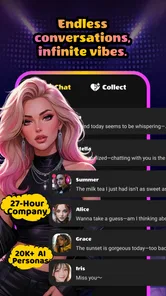
I approached WildGirl-Feel the Unexpected as an entertainment app for people who enjoy experimenting with AI characters and different styles of conversation. Its basic idea is easy to understand: create a character, start chatting, and see how the exchange develops. That simplicity is appealing, but the real question is how comfortable and usable the experience feels for different people, devices, and everyday situations.
In my experience, the app is most interesting when I treat it as an open-ended conversation space rather than a conventional messaging service. I can shape the kind of character I want to interact with and use the conversation for entertainment, improvisation, or a little creative escape. The Mature 17+ rating matters here, because this is not an app I would casually hand to a younger user or recommend without considering the type of conversations they may want.
The app comes from Auction Point and is free to install, with optional purchases ranging from $3.49 to $54.99 per item. It has attracted over 100 thousand installs and holds a 4.7 average from around 5.5 thousand ratings, which suggests that the central concept works well for many users. Still, a strong rating does not automatically mean that every person will find the interface, pacing, or conversational style comfortable.
How clearly the app supports reading and navigation
I look at reading and navigation as more than whether the first chat is easy to start: the useful test is whether I can keep track of a character’s role and my own purpose as an exchange grows. In this section, I focus on the small choices that can make a text-led session easier to follow, then turn to the physical and sensory demands that may shape everyday use.
A simple concept with a potentially demanding interaction
The clearest strength is that the purpose of the app is immediately understandable. I am not required to learn a complicated game system or manage a large collection of tools before getting started. The path from choosing or creating an AI character to beginning a conversation feels natural for this kind of entertainment product.
That straightforward structure can help people who prefer a focused experience. Someone who finds busy entertainment apps tiring may appreciate having the conversation itself as the main activity. There is less pressure to understand a map, a score system, or a crowded set of menus. For a short break, I can open the app with a specific intention and move directly toward a character interaction.
However, conversational apps create a different kind of reading demand. A user has to follow a continuing exchange, remember the character’s tone, and decide what to write next. That can be more mentally involving than scrolling through short videos or browsing a standard entertainment feed. If I am tired, distracted, or trying to use the app in a noisy place, the open-ended nature of the chat may become less relaxing.
More From Our News Desk

 Gmail
GmailGmail in a Busy Inbox: Who Benefits Most?
From first account to crowded workday, Gmail earns its place through dependable search and flexible sorting—but its best fit depends on how much inbox maintenance you can tolerate.

 Prime Video
Switching to Prime Video: What Changes in Your Viewing Routine
Prime Video can make a compelling second home for streaming, but switching means learning a different catalog, rental layer, and route from browsing to playback.

 Universal TV Remote Control
Universal TV Remote Control Works Best as a Reliable Backup
A phone remote earns its place through quick setup and reliable habits. Here is how to get more from Universal TV Remote Control—and where its limits show.

 Weather - By Xiaomi
Weather by Xiaomi Review: Clear at a Glance, Less Clear Up Close
Xiaomi’s weather app makes everyday forecasts quick to scan, but its calm surface can leave useful details and recovery paths harder to find than they should be.

 X
XX Under Pressure: Can It Recover When Posting Goes Wrong?
A resilience-focused review of X, examining setup, mistaken posts, interruptions, weak connections, and the gaps that matter when recovery needs to be dependable.

 Clash of Clans
Clash of Clans Is Won Between the Battles
Its raids are quick; its community is a long-term project of coordination, teaching, rivalry, and shared responsibility—with all the friction that entails.
Latest News



Why character setup deserves attention
Creating an AI character is more than a cosmetic choice. It gives the user a way to establish the mood and direction of the conversation before the chat becomes extensive. I find this useful because it is easier to enjoy an open-ended exchange when I know whether I want something playful, dramatic, imaginative, or simply casual.
A practical approach is to begin with a narrow purpose instead of trying to design a perfect character immediately. For example, I might create a character for brainstorming a fictional scene, practicing a difficult conversation, or passing time with light role-play. This reduces the mental effort of deciding what to do once the chat begins. It also makes it easier to notice whether the character is actually serving the intended use.
The trade-off is that people who prefer predictable, tightly edited content may feel that the experience asks too much of them. Traditional entertainment apps usually present finished videos, music, or articles. Here, the user contributes to the experience through prompts and replies. That is a strength for creative users, but it can feel like work when someone wants passive entertainment.
Reading comfort and conversational pacing
Text-based interaction can be useful for people who prefer reading over listening or watching. I can take a moment before replying, reread the previous exchange, and move at my own pace instead of keeping up with a fixed video or audio track. That makes the format appealing during quiet personal time.
At the same time, long conversations can become visually tiring. The more a user relies on extended exchanges, the more important it becomes to take breaks and keep prompts focused. I would not treat the app as an ideal choice for someone who experiences discomfort with sustained screen reading. A conventional audio entertainment option may be easier in that situation, especially when the user wants to rest their eyes.
One useful habit is to separate conversations by purpose rather than letting every idea flow into one endless thread. A short character session for creative writing should have a different goal from a casual chat. This makes the experience easier to follow and helps me judge whether the responses remain relevant. It is a small workflow change, but it prevents the open-ended format from turning into a confusing stream of unrelated messages.
Who may find the interface easier or harder
People who already use chat apps will probably understand the basic interaction quickly. Familiarity with typing, reading message exchanges, and expressing a request in plain language lowers the entry barrier. Users who are less comfortable with conversational technology may need more time to discover how specific their instructions should be.
The app is less suitable for someone looking for a fully structured, step-by-step entertainment experience. It does not replace a story-driven game with fixed choices, a streaming service with curated programming, or a social platform built around real people. Its appeal depends on the user being willing to guide the exchange.
I also recommend remembering that AI conversation is not the same as a human conversation. The character may respond in an engaging way, but I would still keep personal boundaries in mind and avoid treating the interaction as a substitute for trusted human support. That distinction is especially important for users who are lonely, emotionally vulnerable, or hoping for dependable advice.
Motor, sensory, and everyday access considerations
I consider access in practical terms: how much typing a session asks of me, how sustained reading feels, and whether the app’s Mature 17+ audience suits the setting. The next section weighs those day-to-day considerations without assuming that one device setup or interaction style works for everyone.
Typing is both the main strength and the main demand
The app’s conversational format can suit users who prefer composing messages rather than navigating complex controls. There is no need to master fast reactions or precise timing as I would in an action game. I can pause, think, and send a response when ready. For people who find rapid interactive entertainment difficult, that slower rhythm may be welcome.
Typing can also create a barrier. Users with limited hand movement, pain, tremors, or fatigue may find repeated text entry demanding, particularly during longer sessions. In that case, the practical experience may depend heavily on the device’s own input tools and keyboard settings. I would test a short conversation first rather than assuming that an apparently simple chat will be physically effortless.
A helpful strategy is to write more intentional prompts instead of many tiny replies. One clear message can establish the scene, desired tone, and next step at once. This reduces repeated tapping and gives the character more direction. It is also a better way to evaluate the app fairly, because vague one-line messages can produce a less satisfying exchange than a concise but well-framed request.
Sensory load is likely to come from the screen and the subject matter
For many users, the most relevant sensory issue will be sustained visual attention. Reading a conversation requires looking at the display repeatedly, and the experience may be less comfortable for someone sensitive to screen brightness, dense text, or prolonged focus. I would use the device’s normal display adjustments and take regular pauses, especially during longer character sessions.
The Mature 17+ rating is another part of sensory and emotional suitability. The app is intended for adults, and the kind of character interaction a user chooses may influence how intense, suggestive, or emotionally charged the experience feels. I would not recommend opening it in front of children, using it as shared family entertainment, or assuming that every conversation will have the tone of a general-audience app.
That rating also affects where I would use it. A private setting is more appropriate than a workplace, classroom, public waiting room, or shared family device. Even if I begin with an innocent creative idea, the conversation format is personal enough that privacy and social context deserve attention.
Voice, hearing, and input expectations
I would approach the app primarily as a text interaction rather than assuming that it provides a voice-first experience. That makes it potentially more comfortable for someone who prefers silent use or cannot rely on audio. It also means that users who need spoken output, captions, or a hands-free method should check how well the app fits their device setup before committing to extended use.
For a person with hearing-related access needs, a text conversation can be more practical than entertainment centered on sound. For a person with low vision, however, the value of the app may depend on how effectively the device’s own reading and magnification tools work with the interface. I would not promise a particular accessibility behavior without testing it on the user’s phone or tablet.
This is one area where personal testing matters more than the headline concept. Two users can have very different experiences because of display size, keyboard layout, text scaling, and preferred input method. The app’s core idea is flexible, but the physical comfort of using it is shaped by the device as much as by the conversation itself.
Three practical workflows that improve access
First, I would decide the purpose of a session before opening a chat. “I want a ten-minute creative prompt” is easier to manage than entering without a goal and continuing until the conversation becomes tiring. Second, I would use one character for one type of activity instead of constantly changing the role and tone. This reduces decision fatigue and makes the exchange easier to understand.
Third, I would keep sensitive or emotionally intense topics separate from casual entertainment. If a conversation starts to feel uncomfortable, confusing, or too personal, ending it is a better choice than trying to force the character back into a pleasant mood. These habits are not advertised features; they are user strategies that make an open-ended AI app more manageable.
Where the app fits in real life
Imagine having a short break after work and wanting something more active than watching a video but less demanding than playing a competitive game. I might open the app, use a character designed for light improvisation, and ask for a fictional scenario with a clear ending. The ability to guide the exchange gives me more involvement than passive entertainment, while the lack of time pressure keeps it calmer than many games.
Another realistic use is creative preparation. I could use a character to test dialogue ideas, explore how a fictional personality might react, or rehearse wording before writing a scene. I would treat the responses as prompts rather than authoritative creative advice. The value comes from generating possibilities quickly, not from expecting every answer to be polished or consistent.
For someone who wants a private conversation companion during a lonely evening, the app may feel engaging for a while. I would still keep expectations realistic. An AI character can imitate conversational warmth, but it does not offer the accountability, understanding, or real-world care of a person who knows me. Users seeking emotional support may be better served by a trusted contact or an appropriate professional resource.
Costs, boundaries, and barriers that remain
The free entry point makes it easy to try the basic idea without paying first. That is important for an app whose appeal is personal: some people will enjoy creating characters immediately, while others will discover that open-ended chat is simply not their preferred form of entertainment.
Optional purchases can change how carefully I approach the app. The listed in-app items range from $3.49 to $54.99, so I would pay attention before confirming any purchase and decide in advance what, if anything, I am comfortable spending. A free download does not mean that every part of the experience will necessarily feel equally satisfying without optional spending, so I would judge the unpaid experience on its own before buying anything.
The current version is 1.8.6, and it supports devices running Android 7.0 or later. That broad compatibility is helpful for people who keep an older Android device, although compatibility alone does not guarantee a comfortable experience on a small or slower phone. A user with limited storage, an aging battery, or a cramped keyboard should consider whether extended text interaction will be pleasant on that particular device.
Privacy is another reason to be deliberate. I would avoid entering passwords, financial details, identifying documents, or information about another person into an AI conversation. Even when a prompt feels casual, it is good practice to keep it general. This is especially important when experimenting with mature themes or emotionally personal scenarios.
The app is also not a strong match for children, family viewing, or users who want tightly controlled content. The age rating alone is enough for me to keep it away from younger users. Someone looking for a predictable, all-ages entertainment option should choose a different category rather than trying to reshape this one.
Compared with streaming apps, this experience is more interactive but less polished as a finished product. Compared with social networks, it avoids the need to manage real contacts, but it does not provide genuine human connection. Compared with story games, it offers more freedom and fewer fixed outcomes, while giving up some of the authorial control and consistency that make a crafted narrative satisfying.
That comparison explains the central trade-off: the user gets flexibility in exchange for responsibility. I have to provide direction, notice when the conversation drifts, and decide when the session has reached a useful stopping point. People who enjoy shaping an experience will see that as creative control. People who want the app to entertain them without effort may find it frustrating.
My inclusive verdict on WildGirl
I see WildGirl-Feel the Unexpected as a worthwhile experiment for adults who enjoy character creation and flexible AI conversation. Its strongest quality is not a particular fixed feature but the way it lets me turn a simple chat into different kinds of entertainment: improvisation, fictional dialogue, creative prompting, or a brief mental change of pace.
From an access perspective, the text-led format may work well for users who prefer silent, self-paced interaction and do not want rapid game controls. It can be easier to pause and think than a video or action game. On the other hand, sustained reading and typing may be difficult for people with visual fatigue, hand discomfort, or limited access to comfortable input tools. The best experience depends on the user’s device and personal setup.
I would recommend starting with a short, clearly defined session. Create a character with one purpose, give it a focused prompt, and see whether the exchange feels readable, physically comfortable, and emotionally appropriate. That test answers more than a rating can, especially because the app’s open-ended design will appeal strongly to some users and barely at all to others.
The app’s 4.7 average and more than 700 written reviews show that it has built a positive response among its audience, but I would not use popularity as a substitute for fit. The Mature 17+ audience, optional spending, and need for active participation make the decision personal. I would skip it if I wanted real human companionship, a fully structured story, passive viewing, or a guaranteed all-ages environment.
For the right adult user, though, the free starting point makes trying it reasonable. My final view is positive but measured: WildGirl is best when approached as a creative conversation tool, not as a replacement for people, professional guidance, or carefully produced entertainment. If you enjoy steering characters and are willing to manage your own boundaries, it can provide an engaging change from the usual scroll-and-watch routine.
WildGirl-Feel the Unexpected Frequently Asked Questions
What devices can run WildGirl – Feel the Unexpected?
WildGirl – Feel the Unexpected is an entertainment app for Android devices running version 7.0 or later. Before downloading, check your device’s operating system and make sure you have enough available storage for the app and its updates. Keeping your system and the app current can also help with compatibility and everyday performance.
What can I do in WildGirl – Feel the Unexpected?
The app centers on creating AI characters, chatting with them, and exploring varied conversation styles. That makes it a fit for people looking for an interactive entertainment experience rather than a conventional game with a stated campaign or challenge structure. If you enjoy experimenting with character-based conversations, these are the main activities to consider before installing.
What is WildGirl – Feel the Unexpected?
WildGirl – Feel the Unexpected is an entertainment-focused mobile app built around discovering unpredictable content and interacting with a distinctive visual experience. Its store summary describes creating AI characters, chatting, and exploring varied conversation styles. Before downloading, users should check the current store description because the exact features, available sections, and supported devices may change with updates. The app’s appeal is mainly aimed at people who enjoy casual exploration and unusual, surprise-driven content.
Is WildGirl – Feel the Unexpected free to download and use?
WildGirl – Feel the Unexpected is free to download, but users should not assume that every feature is included without charge. In-app purchases range from $3.49 to $54.99 per item, so check the purchase details before confirming a transaction. Review the Google Play or App Store listing carefully for pricing, trial conditions, renewal details, and payment requirements before installing or providing billing information.
Is WildGirl – Feel the Unexpected safe for children?
Parents should review the official age rating and the app’s privacy information before allowing a child to use WildGirl – Feel the Unexpected. The app is rated Mature 17+, so it is intended for adults and is not suitable for younger children. Its character chats and unexpected content may not be appropriate for every audience. Parental controls and supervised use are recommended when appropriate.
Pros
- Surprising story events keep each playthrough feeling unpredictable.
- Distinct character personalities make interactions more engaging.
- Simple controls are easy to learn
- even for casual players.
- Short sessions work well for playing on mobile devices.
- The visual style gives the game a memorable
- playful identity.
Cons
- Some scenes may feel repetitive after several playthroughs.
- Progress can depend heavily on personal choices and experimentation.
- The pacing is occasionally uneven between major story moments.
- Limited customization may disappoint players seeking deeper personalization.
- Certain content may not appeal to younger or more sensitive players.











