Whataburger
- 13.59K
- 3.3
- Installs
- 5.00M
- Price
- Free

Screenshots
Analysis by Reviewed
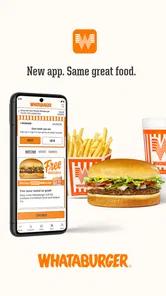
When I’m hungry and already know I want Whataburger, the question is less about browsing every nearby restaurant and more about getting the order right without slowing down the rest of my day. That is where Whataburger can be useful: it is a free Food & Drink app from Whataburger, built around ordering from the chain rather than comparing a wide range of restaurants.
A useful fit for a familiar routine
I’d consider it most helpful if I return to the same Whataburger location, have a usual order, or want to make specific changes before food is prepared. It is less compelling if I am choosing between several places, since a general delivery or restaurant-discovery app is better suited to that decision. The app has an Everyone age rating, and its 3.4 average across around 29,000 ratings suggests experiences are mixed, so I would treat it as a practical option rather than assume every visit will be seamless.
For a realistic weekday use, imagine leaving work with a short break and a clear idea of what you want. I can use the ordering flow to make choices before arriving, then plan the pickup around the trip instead of deciding at the counter. That can reduce the pressure of ordering while people wait behind me. I would still check the order details carefully: a saved habit is convenient, but it is easy to carry an old customization into a meal when I meant to change it.
Before placing an order, decide what matters
I find a dedicated restaurant app most useful when the decision is already made: I want this chain, I know roughly what I want to eat, and I need to coordinate the order with a route or a break. Starting with those basics helps me avoid treating the menu like a browsing feed. If I am undecided, a broader restaurant app or a quick look at nearby options is a better first step; once Whataburger is the choice, its own app is the more focused place to build the meal.
That distinction also helps set expectations. The app can organize an order, but it cannot make a distant location convenient or turn a rushed schedule into a forgiving one. Before I begin, I think about where I will be when the food is ready and whether I can collect it without a detour. A few seconds spent on that decision can matter more than tapping through the menu quickly.
Simplifying Your Burger Cravings
First things first, let’s talk about the app’s interface. The clean and intuitive design makes it a breeze to navigate. Whether you’re a tech wizard or someone who struggles to find the power button on your phone, Whataburger has got you covered. The menu is laid out in a straightforward manner, ensuring you find your favorite meal without any hassle.
Customizing Your Order
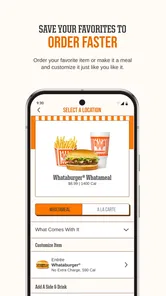
This app is not just about convenience; it’s about personalization. You can easily customize your order to your heart's content. Want extra pickles or no onions? Done and done. It’s like having your own personal chef who knows exactly how you like your burger.
More From Our News Desk

Weather by Xiaomi Review: Clear at a Glance, Less Clear Up Close

X Under Pressure: Can It Recover When Posting Goes Wrong?

Clash of Clans Is Won Between the Battles

Android Auto Makes the Case for Quieter Car Software

MobiOffice: Transforming Mobile Productivity with Seamless Integration

EA SPORTS FC™ Mobile Soccer: Redefining Mobile Sports Gaming
Build the meal with a deliberate check
Customization is where ordering on a phone can be genuinely useful, but also where I slow down. I treat each change as a separate decision rather than assuming the app will remember what I usually want. For a repeat order, I check the current item and its options from top to bottom before moving on. For a first-time order, I make only the changes I care about; adding several tweaks at once makes it harder to spot which one I may have missed.
When ordering for more than one person, I would finish one person’s choices before starting the next. That simple workflow makes it easier to keep a plain order distinct from a customized one, and it gives me a chance to review the basket as a whole. If someone has a strong preference, I would confirm it with them before submitting instead of relying on memory. The phone screen is a helpful checklist, not a guarantee that I have interpreted another person’s request correctly.
Why Wait in Line?
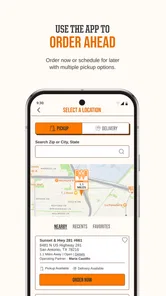
Nobody likes waiting in line, especially when hunger strikes. With the app’s order-ahead feature, you can place your order and have it ready for pickup or delivery. It’s perfect for those times when you’re in a rush or just too comfy at home to venture out. Plus, the real-time order updates keep you in the loop, so you know exactly when your meal will be ready.
Timing the order around the day
I would not treat an order-ahead option as permission to cut every timing margin close. If I am heading to a meeting, catching a ride, or trying to fit lunch into a short break, I leave room for the trip to the restaurant and the handoff. The app makes it possible to start the process before I arrive, but the useful outcome is still a meal that fits my schedule, not just an order placed quickly.
For a pickup run, I’d place the order when I have a realistic sense of my arrival rather than while I am still far away and uncertain about the route. If plans change, I reassess instead of assuming the original timing will remain convenient. That is a small but important trade-off: pre-ordering can reduce counter time, yet it makes location and timing choices matter earlier.
Making the pickup handoff smoother
Ordering ahead only helps if the final handoff fits your plans. I’d choose pickup when I can pass a participating location on my route, and leave enough slack that a small delay does not derail a tight schedule. For delivery, the convenience is different: it avoids the trip, but adds another handoff between the restaurant and me. I would check the available option for the location I intend to use before building the meal around it.
A useful habit is to review the basket once more before submitting: confirm the item, its changes, and the intended location. That quick check matters most when ordering for someone else, since a topping preference or side choice can be easy to overlook. If the order is for a group, I’d place everyone’s choices together only after confirming each person’s requests; it is easier to catch a mismatch on screen than at pickup.
What happens after tapping submit
Once the order is placed, I shift from choosing food to managing the handoff. I keep an eye on the order updates and use them as a guide for when to leave, rather than heading out immediately just because I have finished ordering. At the restaurant, I check that I am collecting the order associated with the location I selected. These steps sound ordinary, but they are the difference between a smoother visit and discovering that I planned around the wrong stop.
If I am picking up for coworkers or family, I make sure the person carrying the order knows what to check: the number of items and any easy-to-confuse customizations. I would not ask someone else to infer what is inside each package. The app can help me assemble a group order in one place, but the final exchange still depends on clear communication between the person who placed it and the person who collects it.
Rewards That Sizzle
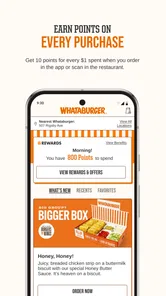
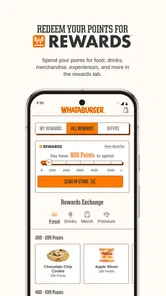
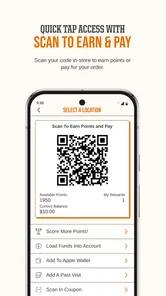
Who doesn’t love earning rewards for eating? With every purchase, you’re racking up points that can be redeemed for free food. It’s a win-win situation: satisfy your cravings and earn rewards while you’re at it.
Use rewards without letting them steer the meal
The practical way I’d approach rewards is to check them while I am already planning a meal, then decide whether using them makes sense for that visit. That keeps the decision grounded in what I actually want to eat. If I am choosing a restaurant only because I want to accumulate points, I have let a small extra benefit take over the larger question of whether the meal suits me.
For someone who orders occasionally, rewards may be a pleasant extra rather than a reason to install a dedicated app. For a regular customer, the value is easier to notice because the app can bring ordering and reward management into the same routine. I would still compare the meal I planned with the one I would choose without rewards; if the only reason to add something is to chase a benefit, I would pause.
Where the dedicated app beats broader options
Compared with ordering at the counter, the app gives me time to review customizations privately and place an order before reaching the restaurant. Compared with broad food-delivery services, its appeal is narrower: it centers on Whataburger, while those services are more useful when I want to compare restaurants or cuisines. For a regular customer, that focus can mean a simpler decision; for an occasional visitor, it may not justify keeping a dedicated app.
There is also a useful middle ground: I can use the app when I have settled on Whataburger, but return to a general delivery service or restaurant search when I want to compare alternatives. Those tools answer different questions. The dedicated app is about carrying out a specific restaurant choice; a broad service is better at helping me make that choice in the first place. Neither approach is automatically best for every meal.
Who will get the most from it
I’d recommend giving it a try if Whataburger is already one of your regular stops, you often want to adjust an order, or you like arranging a pickup before reaching the counter. It also suits someone coordinating a meal for a few people who would rather review choices on a screen than collect everyone’s requests while standing in line. The value comes from fitting the ordering step into habits you already have, not from creating a new reason to eat out.
I would skip it if I visit the chain only rarely, prefer to decide after seeing a wider range of restaurants, or do not want another restaurant-specific app on my phone. It may also be the wrong choice when I cannot confidently select a location or when the timing of a handoff is too uncertain. In those cases, ordering directly at the restaurant or using a broader service can be the simpler route.
Where the flow can stumble
The biggest trade-off is that ordering ahead does not remove every point of friction. I still need to choose the right location, make sure pickup or delivery suits the trip, and check the finished order when it arrives. If a location is not convenient or I need certainty before setting off, calling or ordering in person may be the more comfortable choice. I would also avoid relying on the app as a shortcut when I have not yet decided what I want; browsing a wider restaurant selection is better for that.
Another weak point is the assumption that a digital order automatically means a hands-off experience. I still have to notice whether my plans have shifted, review what I submitted, and make sure the collection arrangement makes sense. When I am in a hurry, I can be tempted to tap through the customization screen too quickly; that is precisely when a final basket review is worth the small pause. Convenience is real, but it depends on the choices I make before submitting.
The app has a 3.4 average rating, with around 13,000 written reviews, so I would not assume that every user’s experience is identical to mine. I see that as a reason to keep expectations practical: use it for the parts it can help with, such as planning an order and checking its progress, while leaving enough time for the restaurant visit itself. If an app-based handoff does not suit a particular day, the counter remains a straightforward alternative.
Whataburger has been available since 2016, and version 6.0.12 is the current version. It has more than five million installs, but those figures do not change the basic question I would ask myself: do I order from this chain often enough to benefit from a dedicated ordering and rewards experience? If yes, the app is worth trying. If not, the counter or a broader food app may fit better.
My verdict for a real meal break
As an app, it is free to use and aimed at a simple job: helping me place a Whataburger order rather than explore the entire food scene. I like that focus when I already know where I want to eat. The main payoff is having a little more control over the choices and timing before I arrive; the main limitation is that I still have to manage the location, schedule, and final handoff myself.
Final Thoughts
All in all, the Whataburger app is a must-have for anyone who loves a good burger without the fuss. It’s streamlined, user-friendly, and packed with features that make it more than just an app—it’s your new best friend in the fast-food world. So, next time you’re craving a burger, skip the line and fire up the app. Your taste buds will thank you!
Whataburger Frequently Asked Questions
Who develops the Whataburger app, and what is it designed for?
Whataburger is a Food & Drink app developed by Whataburger. Its store summary describes it as a rewarding way to get Whataburger just like you like it, making it a handy option for people who want to browse the menu, personalize orders, and use app-based ordering. The app is free to download, so you can install it and explore its features before deciding whether it suits your routine.
What do the app’s rating and user activity suggest before I download it?
The Whataburger app has an average rating of 3.4 from around 29 thousand ratings, alongside roughly 13 thousand written reviews. Those figures offer a broad snapshot of user feedback, but individual experiences can vary depending on a person’s device, ordering needs, and expectations. Reading recent comments in your device’s app store can help you judge whether other users’ experiences match what you are looking for.
Is the Whataburger app free, and what devices can run it?
The Whataburger app is free to download and is rated for Everyone. It is available for Android and iOS, so you can use it on a compatible phone or tablet. On Android, the listed minimum operating system is version 10. Before downloading, check your device’s software version and make sure you have enough space for the app.
What features does the Whataburger app offer?
The Whataburger app offers a range of features designed to enhance your dining experience. You can easily browse the full menu, customize your orders, and place them for pickup or delivery. The app also allows you to save your favorite orders for quick reordering. Additionally, it provides a rewards program where you earn points with every purchase, which you can redeem for free food and other exclusive offers. The app also notifies you about special promotions and discounts, ensuring you never miss a deal.
How does the rewards program work in the Whataburger app?
The rewards program in the Whataburger app is straightforward and user-friendly. Every time you make a purchase through the app, you earn points. These points accumulate and can be redeemed for various rewards, such as free food items or exclusive discounts. The app keeps track of your point balance and available rewards, making it easy for you to know when you're eligible for a treat. Keep an eye on special promotions that might offer double points or unique rewards to maximize your benefits.
Pros
- User-friendly interface
- Extensive menu options
- Customizable orders
- Easy location finder
- Reward program benefits
Cons
- Limited delivery areas
- Occasional app crashes
- Inconsistent order updates
- Payment issues at times
- No offline access











