WGAL News 8 and Weather
- 766.00
- 4.5
- Installs
- 100.00K
- Price
- Free

Screenshots
Analysis by Reviewed
I started using WGAL News 8 as the kind of app I could open quickly when something might affect the household: a developing local story, a change in weather, or a question about what was happening nearby. It is a free News & Magazines app from HTVMA Solutions, Inc., built around access to WGAL News 8 coverage rather than around a broad collection of unrelated national headlines. That focus is its clearest identity, and it is also the reason I would recommend it selectively.
In my experience, the app makes the most sense when several people in a home need the same local reference point but do not necessarily want to sit together and watch a full broadcast. One person can check the latest information before leaving for work, another can look at the weather before taking children to school, and someone else can use it to follow a local story during the day. It is not a family-management tool, and I would not treat it as one, but it can become a useful shared source for everyday decisions.
How WGAL News 8 Fits Into a Shared Household
I find a shared household routine works best when the app is a common reference, not a stream everyone has to follow. Agreeing on who checks developing stories and who needs weather updates can keep useful information from becoming background noise. That small distinction makes local coverage easier to act on, especially when different people have different schedules.
A practical local-news routine
A realistic example is a weekday morning when the weather looks uncertain. I would open the app before deciding whether to drive, walk, postpone an errand, or allow extra time for the trip. Later, another household member might check a breaking-news update from a different phone. The value is not that everyone sees a completely different experience; it is that the same local outlet can help people coordinate without sending a long chain of messages asking what is happening.
That shared-use benefit is strongest for households in the WGAL viewing area or for people who have a continuing interest in its local reporting. If your main concern is a national political story, international news, business analysis, or a wide range of specialist subjects, this app will feel narrow compared with a large national news reader. Its local emphasis is an advantage when location matters and a limitation when it does not.
I also like the fact that the app is free. That lowers the barrier for a household where not everyone wants to subscribe to another service. The trade-off is that free news apps commonly compete for attention with notifications and advertising, so I would use it with a clear purpose rather than leave every possible alert active. The best household setup is usually the one that keeps useful local information available without turning every phone into a constant interruption.
What I would use it for first
My first uses would be local breaking news and weather. Those are time-sensitive subjects where a regional outlet can be more relevant than a general news app. A national weather service may tell you about a broad system, but local reporting can give the situation more immediate context. Likewise, a social-media post may appear sooner, yet it can be difficult to judge whether the information is current or reliable. I would rather use this app as a deliberate check than rely on an unverified post passed around a group chat.
More From Our News Desk

Weather by Xiaomi Review: Clear at a Glance, Less Clear Up Close

X Under Pressure: Can It Recover When Posting Goes Wrong?

Clash of Clans Is Won Between the Battles

Android Auto Makes the Case for Quieter Car Software

MobiOffice: Transforming Mobile Productivity with Seamless Integration

EA SPORTS FC™ Mobile Soccer: Redefining Mobile Sports Gaming
There is a useful distinction between checking information and treating the app as an emergency system. I would not make a single news application the only source for urgent instructions. During a serious event, I would also follow official local authorities and any direct emergency alerts available on the phone. WGAL News 8 can help me understand what is developing, but news coverage and official instructions do not always serve the same purpose.
Keeping the household conversation organized
One small but valuable habit is to include the time and context when sharing something from the app. Instead of telling someone, “There is a problem on the road,” I would say what the report concerns and when I saw it. Breaking stories can change quickly, and a headline that was useful in the morning may need a fresh check later. This is especially important when several people are looking at the same story from different devices.
The app can support coordination, but it does not replace judgment. If one person sees a weather update and another is planning a trip several hours later, both should check again close to departure. That is a practical limitation of any real-time news product: it is a window into current reporting, not a permanent forecast or a guarantee that conditions will remain unchanged.
Setup boundaries on a shared device
When an app is used by more than one person, I prefer to decide in advance who will receive notifications and who will simply open the app when needed. That matters here because breaking news and weather updates can be useful to one person but distracting to another. On a shared phone or tablet, I would keep the app available for everyone while being careful about which device is treated as the main alert device.
I would also avoid assuming that one person’s preferences should automatically apply to the whole household. A commuter may want frequent weather awareness, while someone else may only want major local stories. If the app’s available settings allow personal choices, each person should adjust their own device where possible. If the household uses one shared device, a simple agreement about when to check it can prevent arguments over repeated interruptions.
Another boundary is account separation. I would not assume that a shared device means everyone has a shared identity inside the app. If the application presents any sign-in or personalization choices, I would keep personal information attached to the appropriate person rather than casually combining everyone’s preferences. The important point is to avoid treating a household phone as proof that every user wants the same news experience.
For a child who occasionally uses the device, I would open the app together at first and explain that headlines are summaries, not complete instructions. The age rating is Everyone, which makes the app broadly suitable in age terms, but that does not mean every news story will be emotionally comfortable for every child. A parent or guardian still needs to decide how much breaking coverage is appropriate and whether a child understands the difference between a developing report and a confirmed conclusion.
Sharing information without creating confusion
One of the app’s more useful household roles is giving people a common starting point. If a family member asks whether the weather could affect an appointment, I can check the local coverage and then discuss the practical decision. That is more efficient than searching several unrelated sites and comparing headlines that may describe different regions.
At the same time, I would not forward every alarming headline immediately. My workflow would be to read beyond the first line, check whether the story is still developing, and then tell the other person why it matters to them. This is a non-obvious advantage of using a focused local app: it encourages a more relevant conversation, but only if the reader resists the urge to react to a headline alone.
For shared planning, weather information is most useful when paired with a specific decision. “Should we leave earlier?” is a better question than simply watching the forecast indefinitely. “Do we need a backup plan for the outdoor event?” gives the report a purpose. I find that this makes the app less of a passive scrolling destination and more of a quick household reference.
Age, trust, and reading local reports
The Everyone content rating is reassuring for general access, but I would still use age judgment rather than relying on the label alone. News can include accidents, crime, severe weather, and other subjects that may upset younger readers. If a child wants to know what is happening, I would look at the report first and explain it in plain language instead of handing over an unrestricted stream of headlines.
Trust also requires recognizing how local news develops. Early reports may be incomplete, and later updates may add important details. When I see a story that could affect the household, I try to distinguish between what is confirmed, what is being investigated, and what is simply being reported as a possibility. That reading habit is more important than any single app feature.
I would also explain to younger users that a weather report is not a promise. Conditions can change, and a local news update may be written for a broad area rather than one exact street. For an adult, that distinction is obvious; for a child, it may not be. A short conversation about uncertainty makes the app safer and more useful without turning ordinary news checking into a complicated lesson.
How it compares with familiar alternatives
Compared with a general news aggregator, WGAL News 8 feels more focused. An aggregator is better when I want many publishers, national coverage, or a single feed covering several interests. This app is better when I want local relevance and do not want to sort through a large amount of unrelated material. The choice comes down to whether breadth or regional context matters more at that moment.
Compared with social media, I find a dedicated local news app easier to use when I want a source with a clear editorial identity. Social platforms can surface eyewitness information quickly, but they also mix rumor, opinion, old posts, and content from far outside the area. I would still look at public posts during a fast-moving event, but I would use the app as a more grounded place to check the broader report.
Compared with a weather-only application, WGAL News 8 offers a wider local-news purpose. A specialized weather app may be preferable if I need detailed forecasting tools, maps, or information designed specifically for outdoor planning. This app is more suitable when weather is one part of the local picture and I also want news coverage in the same place.
Compared with watching a television newscast, the app is more convenient for on-demand checking. I do not have to wait for a scheduled segment or be in front of a television. The compromise is that a broadcast can provide a more guided overview, while an app may require me to choose which story to open and decide how much context I need.
Where the experience can be less convenient
The focused nature of the app can feel restrictive if my interests are broad. Someone who wants technology reporting, international analysis, science coverage, or a large selection of opinion pieces may quickly need another app. I would not install this as my only news source unless local coverage is my main priority.
There is also a difference between quick access and deep research. I can use the app to learn what is happening and identify the local angle, but I would not expect it to replace primary documents, official notices, or specialist publications when a decision has legal, financial, medical, or safety consequences. That is not a criticism of local news; it is a reminder to match the source to the question.
On a shared device, notification habits can become the main source of friction. One person may appreciate immediate updates while another considers them disruptive. I would solve that socially first, by agreeing on which device should be alert-enabled, rather than expecting the app to manage the household for us. The app can provide information, but it cannot decide whose attention should take priority.
Who should install it
I would recommend it to people who live in the WGAL News 8 coverage area, follow local developments, or want a free way to keep regional news and weather close at hand. It is particularly practical for commuters, parents planning around changing conditions, older relatives who prefer a familiar local source, and households that want a shared reference without paying for a separate news subscription.
I would be more cautious about recommending it to someone who rarely reads local news or wants a highly customizable, worldwide news dashboard. That user may get more value from a broader aggregator or a specialist weather service. I would also skip it as a sole emergency resource, because responsible preparation should include official alerts and local authorities as appropriate.
My household verdict
After using it as a local check-in tool, I see WGAL News 8 as most valuable when it stays close to real household decisions: whether travel may be affected, whether a local event is changing, or whether a developing story deserves attention. Its free price makes trying it easy, and its Everyone rating makes it broadly accessible, while adult guidance remains sensible for upsetting news.
The app has built a solid audience, with an average rating of 4.5 from around 3.3 thousand ratings and more than 100 thousand installs. Those figures suggest that its straightforward local purpose resonates with many users, though they do not remove the need to decide whether its regional focus matches your own routine.
HTVMA Solutions, Inc. has kept the concept clear: open the app when you want WGAL News 8 coverage rather than an endless, generic feed. I appreciate that clarity. My final recommendation is to install it on the device used for local awareness, keep notification choices intentional, and use it alongside—not instead of—official sources when a situation is urgent. For a household that values timely regional context, that is a useful and sensible role.
WGAL News 8 and Weather Frequently Asked Questions
Who is WGAL News 8 and Weather intended for?
WGAL News 8 and Weather is intended for people who want regional news and weather updates from WGAL in one app. It is listed for everyone, so its general audience includes users looking for local coverage as well as breaking stories and forecasts. If you primarily want updates for a different region, the app’s local focus may be less relevant to your daily news routine.
What is WGAL News 8 and Weather?
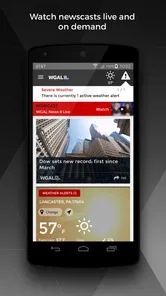
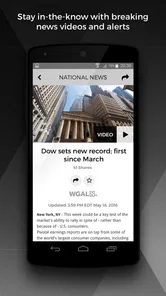
WGAL News 8 and Weather is a local news and weather app focused on central Pennsylvania. It provides access to breaking news, live coverage, video reports, weather forecasts, radar maps, severe weather alerts, and school or event closings. The app is designed for users who want quick regional updates from WGAL’s newsroom in one place.
What weather information does the WGAL News 8 and Weather app provide?
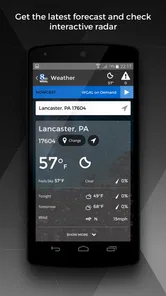
The app offers current conditions, hourly forecasts, extended forecasts, interactive radar, and weather updates for selected locations. Depending on your area and device settings, it may also provide severe weather warnings, storm tracking, and forecast videos. Users should allow location access or manually choose a city to receive more relevant local weather information.
Can I receive breaking news and severe weather alerts?
Yes, the app can send push notifications for important local news, weather warnings, and other urgent updates. During setup, you can usually choose whether to allow notifications and may be able to manage alert categories later in the settings. Keep in mind that notification timing and availability can vary depending on your location, network connection, and newsroom coverage.
Does WGAL News 8 and Weather offer live streaming?
The app may provide live news coverage, special reports, or streaming video when WGAL is broadcasting an event or when live content is available. Access can depend on the program, your location, internet connection, and licensing restrictions. Video streaming may use a significant amount of mobile data, so a Wi-Fi connection is recommended when watching for extended periods.
Pros
- Live local news updates focused on the Susquehanna Valley
- Weather forecasts include radar
- alerts
- and hourly details
- Breaking-news notifications help users stay informed quickly
- Video reports make major stories easy to follow
- Clean layout provides quick access to news and weather tools
Cons
- Some alerts may feel frequent or repetitive
- Video playback can use significant mobile data
- Coverage is mainly useful for viewers in the WGAL region
- Certain features may require location access
- Occasional ads can interrupt browsing and video viewing













