KOCO 5 News and Weather
- 940.00
- 4.6
- Installs
- 100.00K
- Price
- Free

Screenshots
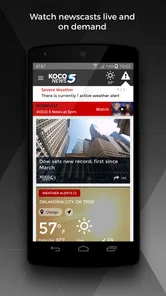

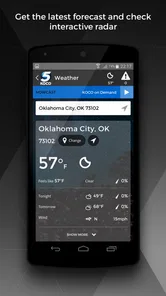
Analysis by Reviewed
I started using KOCO 5 News and Weather as a quick way to keep up with local developments without opening several separate apps. It is a free News & Magazines app from HTVMA Solutions, Inc., built around KOCO 5 News coverage, breaking updates, local reporting, and weather information. My first impression was that it makes the most sense as a practical household news tool: one person can check what is happening, then pass along the useful details to everyone else.
That shared-use angle matters more than it may seem. A local news app is not only something I open when a major story appears. It can become part of the morning routine, a quick check before leaving for work, or a source of information when weather conditions might affect school, errands, or travel. KOCO 5 News and Weather is aimed at people who want that local focus rather than a broad national feed filled with stories from places they do not live.
How it fits into a shared household routine
In my experience, the app works best when several people in a home use it for the same basic purpose but do not expect identical preferences. One person may care most about severe weather, another about local headlines, and someone else may only open it when a developing event affects the commute. Because the app combines news and weather in one place, it can serve as a common reference point without requiring everyone to install a collection of separate services.
A realistic example is a busy weekday morning. I can check the latest local headlines while getting ready, look at the weather before deciding what to wear, and then mention anything important to the rest of the household. If conditions change later, another family member can open the app independently instead of relying on a message that may already be outdated. That makes the app useful for coordination, even though it should not be treated as a replacement for direct conversation when timing or safety is critical.
The local emphasis is the main reason I would choose this app over a general news reader. National aggregators are better when I want a wide range of viewpoints or stories from many regions, but they can bury nearby information under a large volume of unrelated content. KOCO 5 News and Weather feels more focused. Its value comes from reducing the distance between the news feed and the place where I actually live.
That focus also creates a clear trade-off. If I want international coverage, financial reporting, specialist technology news, or a broad selection of publishers, I would use a different app alongside it. This is not the kind of tool I would install as my only source for every subject. I see it as a local layer that complements, rather than replaces, a wider news routine.
What I would check before installing it
The app is free, carries an Everyone age rating, and has been available since May 15, 2012. Those details make it easy to consider for a household device used by people of different ages. The age rating does not mean every news story will suit every child emotionally, however. Breaking news can involve accidents, storms, crime, or other unsettling subjects, so I would still use ordinary parental judgment rather than handing over unrestricted access and assuming the rating answers every question.
More From Our News Desk

Weather by Xiaomi Review: Clear at a Glance, Less Clear Up Close

X Under Pressure: Can It Recover When Posting Goes Wrong?

Clash of Clans Is Won Between the Battles

Android Auto Makes the Case for Quieter Car Software

MobiOffice: Transforming Mobile Productivity with Seamless Integration

EA SPORTS FC™ Mobile Soccer: Redefining Mobile Sports Gaming
I also appreciate that a shared device does not automatically require the app to become a shared identity. I would install it on a family tablet or phone for convenient access, but I would avoid assuming that every person using that device has the same interests, location needs, or tolerance for alerts. The practical boundary is simple: use the app as a common information window, while keeping personal decisions about what to follow and when to check it separate.
That distinction is important because local news can be highly relevant to one member of a household and unnecessary to another. Someone working from home may want frequent weather awareness, while another person may prefer to check headlines once in the evening. If everyone shares one device, agreeing on a quiet routine can prevent the app from becoming a source of interruptions. I would use it deliberately instead of leaving every possible notification active.
News and weather are useful together, but not identical
The combination of news and weather is more useful than simply placing two unrelated sections in the same app. Weather often explains why a local story matters right now. A forecast can affect a trip, while a breaking report can change how seriously I take a developing weather situation. Having both types of information available encourages a more complete check before I make plans.
Still, I would not treat a news app as a precision instrument for every weather decision. For immediate safety concerns, I would compare the information with official emergency guidance and any alerts relevant to my location. The app is convenient for awareness and context, but the consequences of a serious weather event are too important to depend on a single source. That is one of the most important boundaries I would explain to other people sharing the device.
Another useful habit is checking the app at two different moments instead of assuming the first visit tells the whole story. I might look once before leaving home and again before heading back. Local situations develop, and a morning headline may not reflect what has changed by afternoon. This is a small workflow, but it makes the app more valuable than a single passive glance at the feed.
Keeping household coordination practical
KOCO 5 News and Weather can help a household coordinate, but it does not remove the need for a clear plan. If I see information that affects everyone, I would share the specific action rather than merely saying that there is “an update.” For example, I might tell someone to allow extra travel time, postpone an errand, or check the latest information themselves. That approach avoids turning one person’s interpretation into the household’s only source of truth.
On a shared tablet, I would place the app where it is easy to reach but not make it the only communication tool. A family member who does not regularly read news may miss an important item, and someone who is away from the device may not see it at all. The app is strongest as a starting point for a conversation: I find the local information, then make sure the people affected actually receive it.
There is also a privacy and account-boundary consideration. I would not assume that a shared installation means every user should have access to another person’s device settings or personal notification choices. If the app offers settings that affect the whole device, I would discuss them before changing the routine for everyone. Keeping expectations simple is often better than pretending one shared screen can perfectly represent several people.
For a household with older relatives, the local focus may be especially approachable. A person who does not want to navigate a large national news service can open a familiar local source and look for information connected to the surrounding area. On the other hand, anyone who needs accessibility options, highly customized feeds, or a specific presentation style should test the app personally before making it the household’s main news screen. Convenience depends heavily on how comfortable each user is with the layout and pace of updates.
Trust, age, and the way I would use the app with children
The Everyone rating makes KOCO 5 News and Weather broadly suitable for general audiences, but local news is still real news. I would be comfortable letting an older child look at weather information with guidance, especially when the goal is learning how conditions affect daily plans. I would be more cautious about leaving a younger child alone with a breaking-news feed, because the subject matter can change quickly and may include difficult events.
My approach would be to teach children how to read the app rather than simply telling them to trust every headline. I would explain the difference between a developing report and a confirmed instruction, show them why the time of an update matters, and make clear that serious weather decisions should involve an adult and official safety directions. Those lessons are useful whether the app is open on a personal phone or a device shared by the whole family.
Trust also applies to adults. A strong local source can be valuable, but I would still compare major claims when the stakes are high. If an item could affect evacuation, travel safety, school plans, or medical decisions, I would look for the relevant official guidance as well. The app helps me notice what deserves attention; it should not encourage me to stop checking the source that has authority over the actual instruction.
For everyday headlines, I find the local concentration more helpful than a feed designed to maximize variety. For sensitive topics, however, I prefer to read carefully and avoid forwarding a partial impression. A shared household can easily amplify worry when someone passes along a headline without context. My tip is to open the full report first, understand whether it is still developing, and then share only what is useful and accurate.
How the app compares with familiar alternatives
Compared with a national news aggregator, KOCO 5 News and Weather offers a narrower but more relevant experience. An aggregator wins when I want multiple publishers, national context, or a personalized mix of subjects. The local app wins when I want to know what is happening nearby without sorting through a large general feed.
Compared with a dedicated weather app, it has a broader role. A weather-only service may be preferable for detailed forecasting tools or a weather-first workflow, while KOCO 5 News and Weather adds local reporting that can explain the impact of conditions. I would choose the dedicated option when weather is my sole priority, but I would choose this app when I want weather and local news in the same routine.
Compared with visiting a news website in a browser, the app is more convenient for repeated checks. I do not need to remember which page to open every time I want a local update. The compromise is that an app can feel more interruptive if I allow it to demand attention too often. I prefer using it intentionally, checking it at sensible points in the day, and avoiding the habit of refreshing constantly.
Its long availability also suggests that it is designed for an established local-news audience rather than a temporary experiment. The app is listed at a 4.6 average from around 4.2 thousand ratings, with over 100 thousand installs and around 941 written reviews. Those figures indicate a meaningful user base, but I would still judge it by my own routine: a popular local app is not automatically the best fit for someone who wants a highly customized national news experience.
Small habits that make it more useful
My first tip is to separate “awareness” from “action.” I use the app to learn that something is developing, then decide whether I need to change a plan or consult an official source. This prevents a headline from becoming an automatic instruction. It is particularly helpful when several people share a device and one person may interpret a story differently from another.
My second tip is to make the app part of a two-check routine on days when plans are sensitive to weather. A morning visit helps with preparation, while a later visit catches changes before the return trip. This is more reliable than assuming a forecast or headline stays equally useful throughout the day.
My third tip is to use the local angle to filter attention. Instead of opening the app whenever I feel bored, I ask whether I need a nearby update, weather context, or information for a specific plan. That keeps the app from turning into background noise and makes the important items easier to notice when they appear.
A fourth practical insight is to agree on household language. If someone says “the app says it is dangerous,” that may be too vague to help. I would encourage people to mention what the report concerns, when it was published, and what decision it might affect. This simple habit improves coordination without requiring special family features or complicated account arrangements.
Where I think it falls short
The app’s local specialization can feel limiting when my interests move beyond the region. I would not recommend it to someone who primarily follows international events, national politics, specialist subjects, or several localities at once. That person will probably be happier with a broader news reader and perhaps a separate weather service.
There is also a natural tension between speed and context. Breaking information is useful because it arrives quickly, but early reports can be incomplete. I would avoid making firm plans based on a first alert alone, especially when the story involves safety. The app is most valuable when I return for updates and read carefully rather than treating every notification as a finished account.
Shared-device use introduces another limitation: one person’s ideal setup may annoy everyone else. Frequent alerts, different reading habits, or a preference for constant updates can create friction. I would establish who manages the device’s notification choices and make sure the rest of the household knows how to check the app manually. That keeps the common device useful without letting it dictate the rhythm of the home.
My household verdict
I recommend KOCO 5 News and Weather for people who want a straightforward local news companion with weather information close at hand. Its strongest quality is focus: it helps me pay attention to the area around me instead of making me wade through a national feed to find something relevant. As a free app from HTVMA Solutions, Inc. with an Everyone rating, it is also easy to consider for a shared household device.
I would install it for a family that wants a common place to check local headlines and weather before making everyday plans. I would not present it as the only source for serious safety decisions, nor would I choose it alone for someone who needs broad, multi-topic coverage. The best arrangement is to use it for local awareness, confirm high-stakes information through the appropriate official channels, and communicate important updates directly to the people affected.
After using it in that way, my opinion is positive but specific. This is not a universal news replacement, and its value depends on living in the area it serves and caring about nearby developments. For that audience, the most useful feature is the combination of local context and weather awareness in one familiar routine. If that matches how your household gets information, KOCO 5 News and Weather is a sensible app to keep within easy reach.
KOCO 5 News and Weather Frequently Asked Questions
Is KOCO 5 News and Weather suitable for someone who only wants local news?
Yes. The app focuses on breaking and local news from KOCO 5, so it can be useful if you want regional headlines without relying only on national coverage. It also brings weather information into the same app, but you can use it primarily to follow local stories and updates. Its news and magazine category and Everyone age rating make it a general-audience option.
Who develops KOCO 5 News and Weather?
KOCO 5 News and Weather is developed by HTVMA Solutions, Inc. The app is centered on providing access to KOCO 5 local and weather coverage. If you are comparing news apps before downloading, the developer name is a useful way to identify the app and distinguish it from similarly named services. Its concise store description is “KOCO 5 News.”
What is KOCO 5 News and Weather?
KOCO 5 News and Weather is a local news and weather app focused on Oklahoma City and surrounding communities. It provides access to breaking news, live updates, video reports, weather forecasts, radar imagery, severe-weather alerts, and other regional coverage. The app is designed for users who want convenient access to KOCO 5 content while traveling, at home, or away from a television.
What news and weather features does the app offer?
The app typically combines local headlines with weather tools in one place. Users can browse articles and videos, follow developing stories, view current conditions and hourly or extended forecasts, check interactive radar, and receive notifications for important updates. During severe weather, alerts and live coverage can be especially useful, although the exact features and availability may vary depending on location, device settings, and the latest version of the app.
Does KOCO 5 News and Weather provide severe-weather alerts?
Yes, the app is intended to help users follow severe weather affecting the Oklahoma City viewing area. After enabling notifications and location permissions, you may receive warnings or other urgent updates from the station. However, the app should not be your only source of emergency information. Always pay attention to official alerts, local authorities, outdoor warning systems, and instructions from emergency-management agencies, particularly during tornadoes, floods, or other dangerous conditions.
Pros
- Fast access to breaking news across Oklahoma City and nearby areas.
- Live newscasts help users follow developing stories in real time.
- Weather forecasts include radar
- alerts
- and severe-weather updates.
- Local reporting covers community events often missed by national apps.
- Video clips make important stories quick and convenient to catch up on.
Cons
- Frequent severe-weather alerts may feel excessive during active storm periods.
- Some video reports can take time to load on slower connections.
- Coverage is mainly regional and offers limited value outside Oklahoma.
- Advertising may interrupt browsing and reduce the app’s visual simplicity.
- Some features may require location access to provide accurate local updates.













