Wegmans Meals 2GO
- 1.04K
- 4.7
- Installs
- 500.00K
- Price
- Free

Screenshots


Analysis by Reviewed
After the first few orders, I’d judge Wegmans Meals 2GO less by how quickly I can place one and more by whether it solves a recurring problem: getting a meal on the table when cooking or a restaurant stop does not fit the day. That is where its lasting appeal lies. It is not a universal replacement for meal planning or every delivery app, but it can be a useful shortcut if Wegmans food is already part of your routine.
When a quick order becomes a real habit
A first order is easiest to appreciate when the need is immediate: dinner is approaching, nobody wants to cook, and a separate restaurant trip sounds like extra work. The more useful test comes later, when I ask whether I would open the app again for a planned meal, a shared order, or catering. Those are different situations, and the app’s value depends on whether its choices fit more than one of them.
For a household, I’d use a quiet moment to settle on the meal before opening checkout. One person can narrow down what sounds good, then the group can agree on the actual order without debating while hungry. That small change turns the app from a last-minute rescue into a practical planning tool. It also gives me a chance to check the order and service choice before the meal depends on it.
Good fit for some routines, not every appetite
I can see this working particularly well for people who already shop at Wegmans, want prepared food from that familiar source, or need an alternative to cooking on a busy evening. It may also make sense when planning food for a group, since catering is part of the app’s purpose. For those users, opening one focused app can be simpler than searching across unrelated restaurants.
On the other hand, I would not keep it as my main food-ordering tool if I rarely choose Wegmans meals or mainly want to compare independent restaurants. A broad delivery service is better for that kind of discovery. If I have time and want to control the ingredients closely, cooking at home is a more suitable choice; if I want a specific restaurant, its own ordering option may be more direct. The best option changes with the occasion, rather than with a general claim that one app is always more convenient.
Useful planning habits beyond the first order
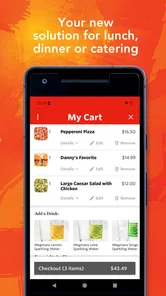
One non-obvious advantage of ordering ahead is that it creates a pause between deciding and paying. I can look over the meal choices before the household is ready to eat, make a more considered selection, and avoid treating the first appealing item as the only option. That is especially useful when ordering for several people, because a quick second look at the basket can catch a missed item or an unintended choice before the order is submitted.
I would also decide on pickup or delivery based on the route I already expect to take. Pickup can be a sensible fit if I am passing by anyway; delivery can be more convenient when another trip would disrupt the evening. Neither choice is automatically better. Availability for the particular order and location matters, so I’d confirm the option in the app before promising anyone a specific arrangement.
More From Our News Desk

Weather by Xiaomi Review: Clear at a Glance, Less Clear Up Close

X Under Pressure: Can It Recover When Posting Goes Wrong?

Clash of Clans Is Won Between the Battles

Android Auto Makes the Case for Quieter Car Software

MobiOffice: Transforming Mobile Productivity with Seamless Integration

EA SPORTS FC™ Mobile Soccer: Redefining Mobile Sports Gaming
Questions worth answering before relying on it
Can I count on the same service every time? I would not plan around an assumed option without checking the order screen for the current location and occasion. Can I use a menu description alone to judge an allergy concern? No: I’d verify any information that matters to a strict dietary requirement rather than infer safety from a brief description. Does having the app mean I can avoid planning? Not entirely. It makes ordering easier, but deciding what the group wants and reviewing the final selection still take a little attention.
Those checks are not burdensome, but they matter when timing or dietary needs are important. For a casual meal, the straightforward browse-and-order approach is likely enough. For a time-sensitive gathering or a meal with strict requirements, I’d take the extra moment to confirm the details rather than assume that convenience removes the need to plan.
Have you ever found yourself in the middle of a busy day, craving a delicious meal but with no time to cook or dine out? Well, let me introduce you to Wegmans Meals 2GO, an app that has been a real game-changer for me. It’s like having a personal chef right at your fingertips, ready to whip up your favorite dishes whenever hunger strikes.
Why the first week feels easy
My first impression was that the app makes a familiar task feel simple: browse, choose a meal, and decide how to get it. That low effort is useful when I’m hungry and short on time, but the lasting value depends on whether the choices suit my routine. It is most appealing to people who already shop at Wegmans or want restaurant-style food without making a separate trip to a restaurant.
A practical way to try it is to place an order before a busy evening rather than waiting until everyone is hungry. For example, I could check the menu while planning the trip home, choose pickup if I’m already passing by, or select delivery when leaving again would be inconvenient. The important trade-off is that convenience depends on the available service for the order and location, so I would check those details before counting on a particular plan.
Food Experience On-the-Go
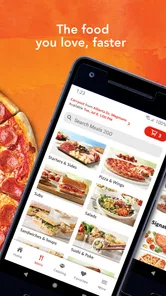
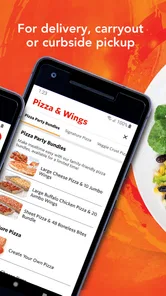
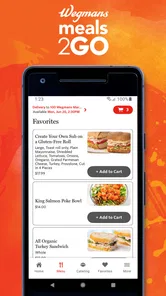
With Wegmans Meals 2GO, you’re just a few taps away from a mouth-watering meal. Whether you’re in the mood for sushi, pizza, or a hearty salad, this app has got you covered. I was genuinely impressed by the variety of cuisines available. It’s like having a mini food court in your pocket! The app is super user-friendly, allowing you to easily browse through the menu and customize your order to your liking. Plus, I love that they offer both pickup and delivery options, so you can decide what works best for your schedule.
Easy Navigation and Ordering
One of the standout features of this app is its intuitive design. Even if you’re not tech-savvy, you’ll find it a breeze to navigate. The categories are clearly laid out, and the search function is both fast and reliable. Once you’ve made your choice, the checkout process is straightforward, ensuring you’re not left fumbling with multiple screens or complicated steps. I appreciate how the app makes ordering food as stress-free as possible.
Making the order fit your routine
For repeat use, I’d treat browsing as part of meal planning rather than an emergency button. Looking at the options before deciding what the household wants can help avoid the familiar last-minute debate, and choosing pickup can make sense when I’m already out. If I’m comparing it with a general restaurant-delivery app, the key distinction is that this experience centers on Wegmans meals and catering rather than presenting a broad range of unrelated restaurants. That focus is a strength when I want this food; it is less useful when I want to compare many independent eateries in one place.
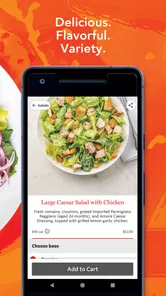
It is also worth separating menu choice from dietary certainty. A visible dish description can help me decide what sounds good, but I would not treat a quick browse as a substitute for checking details that matter to a specific allergy or dietary need. For a straightforward meal choice, the app’s ordering flow is handy; for a strict requirement, I’d verify the relevant information before placing the order.
Freshness and Quality
Now, let’s talk about the quality of the food. This isn’t your typical takeout. Wegmans is known for its fresh ingredients and high standards, and they certainly deliver on that promise with this app. From my experience, every meal has arrived fresh, well-packaged, and bursting with flavor. It feels like a home-cooked meal, without the hassle of cooking it yourself. And for those who are health-conscious, there are plenty of healthy options to choose from, which is always a plus in my book.
What keeps it useful—or makes it tiring
After the novelty fades, the app earns a place on my phone only if its menu matches the occasions when I actually want prepared food. It can be a reliable option for a workday dinner, a shared meal, or catering when cooking is impractical, but it will not replace grocery shopping or home cooking for someone who wants full control over ingredients and cost. Nor is it the best fit for someone who rarely chooses Wegmans food or whose preferred alternatives are elsewhere.
There is a small maintenance habit that helps: before relying on an order for a timed meal, review the selected items and pickup or delivery choice carefully. That extra check matters more than repeatedly browsing the menu, especially when ordering for other people. The main source of fatigue is not learning the interface; it is simply returning to the same range of food when your tastes change or you want a wider restaurant comparison.
Who should keep it installed
Wegmans Meals 2GO is a free Food & Drink app from Wegmans Food Markets, Inc. It is rated for Everyone, has a 4.7 average from around 7,600 ratings, and has passed 500,000 installs. It first appeared on January 16, 2019, and version 2.34.84 supports Android 8.0 and later. Those details make it easy to assess compatibility, but the more useful question is whether Wegmans meals recur naturally in your week.
If they do, I can see this becoming a practical shortcut rather than a novelty: the app keeps ordering in one place and offers choices beyond a single type of meal. If they do not, a general delivery service, a restaurant’s own ordering option, or cooking at home may serve you better. I would also check that the specific pickup or delivery option I need is available before building plans around it, then judge the app by whether it saves effort more than once.
In conclusion, Wegmans Meals 2GO has quickly become my go-to app for convenient, high-quality meals. It’s perfect for those days when you need something delicious but don’t have the time to prepare it yourself. With its easy navigation, diverse menu, and commitment to quality, it’s an app I’d recommend to anyone looking to elevate their meal game. So next time your stomach starts rumbling, give it a try—I promise you won’t be disappointed!
Wegmans Meals 2GO Frequently Asked Questions
Is Wegmans Meals 2GO free to download, and which devices can run it?
Wegmans Meals 2GO is free to download, so you can install it and explore its food-ordering options without paying for the app itself. It is a Food & Drink app from Wegmans Food Markets, Inc, and it requires Android 8.0 or later. The app is rated for Everyone, making it suitable for a broad audience.
What is Wegmans Meals 2GO?
Wegmans Meals 2GO is a convenient app that allows users to order meals, groceries, and other items from Wegmans stores directly from their smartphone. The app offers a wide variety of options, including prepared foods, sushi, pizza, and more, making it easy to enjoy Wegmans' quality offerings without leaving your home or office. Its overall appeal is reflected in a 4.7 average rating from around 7,600 ratings.
How does the ordering process work on Wegmans Meals 2GO?
Ordering through Wegmans Meals 2GO is simple and user-friendly. After creating an account, users can browse the menu, select their desired items, and choose a pickup or delivery option. The app provides real-time updates on the order status, ensuring that users know exactly when their food will be ready for pickup or arrive at their doorstep. The service also offers curbside and carryout options.
Are there any delivery fees associated with Wegmans Meals 2GO?
Yes, there are delivery fees when using the Wegmans Meals 2GO app. The fee varies based on the delivery location and the total order amount. However, Wegmans often provides promotions and discounts that can help reduce or eliminate these fees, ensuring that customers can enjoy their meals at a great value. Review the charges shown during checkout before placing an order so you can see the cost for your selected delivery.
What payment methods are accepted on Wegmans Meals 2GO?
Wegmans Meals 2GO accepts a variety of payment methods for convenience. Users can pay using major credit and debit cards, as well as digital wallets like Apple Pay and Google Pay. This flexibility ensures that customers can easily complete their transactions using their preferred payment method.
Pros
- User-friendly interface makes ordering easy
- Wide variety of meals and cuisines available
- Real-time order tracking for convenience
- Option for curbside pickup or home delivery
- Customizable meal options to suit dietary needs
Cons
- Limited delivery radius may restrict some users
- Occasional app crashes reported by users
- Delivery fees can be relatively high
- Inconsistent delivery times during peak hours
- Limited payment options
- no PayPal support











