Weargram
- 13.00
- 3.5
- Installs
- 10.00K
- Price
- $3.49

Screenshots

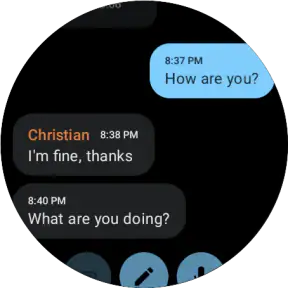

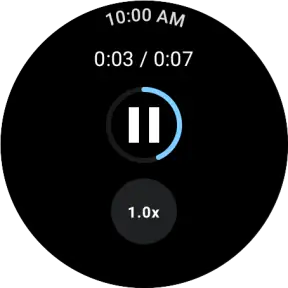


Analysis by Reviewed
I find a wrist-sized Telegram client most useful when it handles a small, immediate task without turning a watch into a tiny phone. That is the idea behind Weargram, an unofficial Telegram client for Wear OS from developer Fra078. It is aimed at people who already use Telegram and want a way to keep up from their watch, rather than anyone looking for a general-purpose messaging hub.
What to expect from a Telegram client on your wrist
The key distinction is that this is built around Telegram, not a bridge for WhatsApp, SMS, and several other services. If Telegram is where your conversations already happen, a watch client can make a quick check or reply feel less disruptive than pulling out your phone. If your contacts are spread across different messaging apps, Weargram will not replace the single inbox you may wish you had.
I would treat the watch as a convenient second screen, not as the best place to manage long conversations. Short replies and a quick glance suit the format; catching up on a busy group chat or composing a careful message is still more comfortable on a phone. That trade-off is normal for watch communication, but it matters when deciding whether a separate paid app is worthwhile.
Who gets the most from wrist access
This setup makes the most sense if Telegram is already part of your daily routine and your watch is somewhere you can comfortably glance at it. Someone who walks, commutes, cooks, or works with their hands may value the ability to decide whether a message needs attention before reaching for a phone. It is less compelling if you usually keep your phone in hand or only receive the occasional Telegram message.
There is also a useful distinction between being reachable and being constantly available. I would not use a watch client as a reason to answer every notification immediately. The stronger case is selective: glance at a message when the phone is inconvenient, handle a simple response if it is genuinely time-sensitive, and leave anything demanding for later. That keeps the watch from turning small interruptions into a stream of tiny tasks.
Your Messaging Companion
Alright, let's dive into what makes Weargram stand out. Imagine having the power of seamless communication right on your wrist. Yes, you heard that right! This app is designed specifically for wearables, making it a perfect fit for those of us who are always on the move. Whether you're out for a jog, stuck in a meeting, or just too lazy to pick up your phone, Weargram ensures you stay connected.
Features That Make a Difference
So, what can you do with Weargram? For starters, it lets you send and receive messages directly from your smartwatch. The interface is sleek and intuitive, ensuring that even the least tech-savvy among us can navigate it with ease. Plus, the notifications are timely, and the haptic feedback is just the cherry on top. I was genuinely impressed by how responsive it was, and the fact that it supports voice-to-text is a game-changer. No more fumbling with tiny screens!
More From Our News Desk

Weather by Xiaomi Review: Clear at a Glance, Less Clear Up Close

X Under Pressure: Can It Recover When Posting Goes Wrong?

Clash of Clans Is Won Between the Battles

Android Auto Makes the Case for Quieter Car Software

MobiOffice: Transforming Mobile Productivity with Seamless Integration

EA SPORTS FC™ Mobile Soccer: Redefining Mobile Sports Gaming
Another feature worth mentioning is its compatibility. Weargram integrates effortlessly with multiple messaging platforms. Whether you're a fan of WhatsApp, Telegram, or the good old SMS, this app has got you covered. It's like having a universal remote for all your messaging needs.
First setup and a useful first reply
Before paying, check that your watch runs Wear OS and that your phone and watch are ready to install the app. Weargram is a paid download at $3.49, so it makes sense to confirm the platform fit first. Its minimum OS requirement is 8.0, and the current release is version 1.4.1. The age rating is Everyone.
For a reassuring first test, start with a familiar Telegram conversation and send a short, low-stakes reply from the watch. That lets you see whether the connection and on-watch controls fit your routine before relying on them for an important message. Voice-to-text is especially handy when your hands are occupied, but I would still glance over a dictated reply before sending: names and brief phrases can be easy to misrecognize, and a watch screen leaves less room to catch an awkward correction.
A practical habit is to use the watch for the decision, not the whole conversation: check who wrote, decide whether it needs an answer now, then send a concise response or pick up the phone. During a walk, for example, I might confirm a meeting time from my wrist and leave the longer details for later. That keeps the watch useful without making tiny-screen typing the default.
Common confusion and trade-offs
One point worth keeping clear is the difference between Weargram and Telegram itself. Weargram is an unofficial client for Wear OS; it is not a replacement for Telegram on a phone, nor a way to bring unrelated messaging services into one place. If you mostly depend on the notification replies already available through your watch and phone, compare that familiar route with a dedicated client before buying. The built-in approach may be enough for occasional replies, while a separate app makes more sense if you specifically want Telegram access on the watch.
Also consider where a wrist reply is comfortable and where it becomes a nuisance. A short answer while carrying groceries is a sensible use; reviewing a stream of messages, editing a long voice transcription, or trying to handle a complicated group discussion is better done on a larger screen. Watch notifications can also interrupt at inconvenient moments, so keeping alerts selective is a more useful strategy than expecting any client to make every conversation urgent.
Weargram has an average rating of 3.5 from 151 ratings, with 13 written reviews and over 10K installs. That gives a prospective buyer some context, but ratings cannot tell you whether the app fits your particular watch and messaging habits. I would weigh the modest one-time price against how often I expect to answer Telegram without reaching for my phone; if that is only once in a while, the standard notification workflow may be the better choice.
Making a watch reply work in real life
Picture a familiar moment: I am carrying groceries and a Telegram message asks whether I can meet later. I can glance at the watch, decide the question is simple, and send a brief answer without putting the bags down. If the message instead contains several plans or a location that needs checking, the better move is to leave it for the phone. This is not a shortcoming unique to this app; it is a useful boundary for any wrist-based client.
For a first week, I would keep the trial deliberately narrow. Use it for one or two conversations where quick acknowledgments are genuinely helpful, then notice whether reaching for the watch feels easier than using the phone. That small test is more informative than trying to migrate all messaging habits at once. It also helps reveal whether the watch’s screen and input style suit your own hands and routine.
Voice-to-text is best treated as a shortcut for short, ordinary wording rather than a guarantee of perfect transcription. I would avoid dictating private or sensitive details in a setting where speaking aloud feels uncomfortable, and I would check names, times, and negations before sending. A message such as “I can’t make it” is worth verifying because a tiny transcription error can change its meaning. For anything delicate, the phone gives more space to review and edit.
Choosing between a client and notifications
The usual alternative is not necessarily another watch app; it may be the notification and quick-reply tools already available through your phone and watch. Those are attractive if all you need is to answer an incoming alert now and then. A dedicated Telegram client is more relevant when you want to open Telegram from the wrist and make watch-based access a regular part of how you communicate. The choice is about workflow, not simply about having more features.
That difference matters when deciding whether the $3.49 price is sensible for you. If you expect to use wrist access several times during a typical day, avoiding repeated phone checks may justify the cost. If your watch is mostly for timekeeping or fitness and Telegram is quiet, built-in notifications are likely the more proportionate option. I would also think about how often I need to browse or compose, rather than counting every notification as a reason to install a separate client.
Weargram is a focused choice for one messaging service, which can be a strength if Telegram is where your important conversations live. It is not the right pick for someone who wants one watch inbox for different services, or who needs to do extended message management away from a phone. In those cases, using each service’s existing notifications or handling the conversation on the phone is simpler and less likely to create duplicate habits.
Settling into a useful routine
Once the first reply works, I would make the watch part of a small, predictable routine: glance, assess urgency, answer briefly when it is easy, and switch to the phone when context matters. That keeps a watch client from competing with the phone as the main place for Telegram. It also gives the app a clear job instead of asking it to solve every communication problem.
A helpful personal rule is to reserve wrist replies for messages that can be answered in one thought. Confirming arrival, acknowledging a simple request, or saying that I will respond later are good candidates. A discussion that needs a few back-and-forth messages is usually a signal to move to the phone, where reading the full context and correcting a draft are less cramped. This rule reduces the chance of sending a rushed answer just because the watch makes one possible.
It is worth keeping expectations grounded around the unofficial status, too. I would treat the client as a convenient companion to Telegram rather than as the definitive way to use the service. If a message is important, I would check that it has gone through before assuming the conversation is settled. For everyday, low-stakes exchanges, the watch can be a handy shortcut; for anything where timing or exact wording matters, the phone remains the safer place to finish the task.
The Experience
Using Weargram was a breeze. Setting it up was straightforward, and the app guided me through each step without any hiccups. Once it was up and running, it felt like an extension of my smartwatch. The design is minimalistic, which I love because it doesn’t distract from the primary function – messaging!
One thing that really stood out to me was the battery efficiency. I've used similar apps before, and they tend to drain the battery like there's no tomorrow. But with Weargram, I barely noticed any dip in my smartwatch’s battery life. It's optimized to ensure you get the best performance without compromising on power.
Final Thoughts
In a world where staying connected is more important than ever, having an app like Weargram is a blessing. It merges the convenience of wearable technology with the necessity of communication, creating a harmonious balance. If you're someone who values efficiency and staying in touch without the hassle, I can't recommend Weargram enough.
So, next time you're looking to enhance your wearable experience, give Weargram a shot. It's more than just an app; it's your messaging companion on the go.
Weargram Frequently Asked Questions
Who develops Weargram, and is it an official Telegram app?
Weargram is a communication app developed by Fra078. It is an unofficial Telegram client for Wear OS, so it is intended to provide a way to use Telegram-related messaging on a compatible wearable rather than being Telegram’s official app. If you prefer to use only official clients, keep that distinction in mind before downloading and decide whether an independent app suits your needs.
What version of Weargram is available, and what does it need to run?
The current version is 1.4.1, and Weargram requires Android 8.0 or later. Since it is designed for Wear OS, check that your smartwatch and its connected setup meet the app’s requirements before installing. The app is rated for Everyone, so its age classification is suitable for a general audience. Checking device compatibility first can help avoid installing an app that will not fit your setup.
What is Weargram and how does it work with smartwatches?
Weargram is an innovative app designed for smartwatch users who want to seamlessly integrate messaging capabilities directly onto their wearable devices. It offers a user-friendly interface that syncs with your smartphone to show notifications, messages, and allow quick replies without needing to access your phone. This enhances connectivity and convenience for users on the go. It is specifically described as an unofficial Telegram client for Wear OS, so its focus is Telegram use from a compatible wearable.
Is Weargram compatible with all smartwatch brands and models?
Weargram is compatible with a wide range of smartwatch brands, including popular models from Apple, Samsung, and Fitbit. However, it’s essential to check the app store description for specific compatibility details related to your device model to ensure seamless integration and performance. Because Weargram is described as a Telegram client for Wear OS, make sure your watch runs a compatible Wear OS setup rather than assuming every smartwatch platform is supported.
Does Weargram require a constant internet connection to function?
While Weargram does require an internet connection to sync messages and notifications from your smartphone, it can still display previously synced data offline. However, for real-time updates and responses, maintaining an active internet connection via Wi-Fi or mobile data is necessary. This means the app is most useful when your phone or watch has connectivity available, while offline access is limited to information that has already synced.
Pros
- User-friendly interface design
- Seamless integration with wearables
- Fast notifications sync
- Customizable watch faces
- Low battery consumption
Cons
- Limited third-party app support
- Occasional connectivity issues
- No offline mode available
- Some features are paid
- Needs frequent updates
- Category
- Communication
- Version
- 1.4.1











