WCVB Newscenter 5 - Boston
- 965.00
- 4.7
- Installs
- 100.00K
- Price
- Free

Screenshots
Analysis by Reviewed
When I want Boston news without sorting through a national feed first, I find WCVB Newscenter 5 most useful as a focused local-news companion. It is a free Android and iOS app from HTVMA Solutions, Inc., built around breaking stories, live newscasts, weather information, and coverage that stays close to the Boston area. That narrow focus is its main reason to exist, and also the key question for anyone deciding whether to install it: do you want a local station’s view of the day, or a broad news app that collects everything?
I approached it as an everyday news reader rather than something to open only during a major emergency. The experience makes the most sense when I want a quick look at what is happening nearby, a live broadcast when a story is developing, or weather information before leaving home. It is listed in News & Magazines, carries an Everyone age rating, and costs nothing to download. Those details make it easy to try, but the real value comes from how well its local emphasis fits your routine.
How the current app fits into a Boston news routine
The app’s strongest quality is its sense of place. A national news service may give me more international context, opinion, business coverage, and personalization, but it can also push local information down the page. This app starts from the opposite direction. Its purpose is to keep Boston-area reporting, local developments, weather, and station coverage within easy reach.
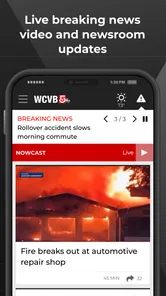
That makes it particularly practical at three moments. In the morning, I can use it for a fast local check before opening a larger news service. During a developing event, the live-newscast element gives me a way to follow the station’s coverage instead of relying only on short written updates. Later, weather information can help me decide whether a commute, school run, or evening plan needs adjusting.
I would not treat it as my only source for every subject. A local television news app is naturally more useful for regional events than for deep reporting on international affairs or specialist topics. If I want a complete picture of a national story, I still prefer to compare it with a wider outlet. The app works best as the local layer of my news setup, not necessarily the whole setup.
The audience is clear. Boston residents, commuters, students, families, visitors, and people who have moved away but still follow the area can all find a reason to keep it installed. Someone who rarely cares about Massachusetts news, however, may get little from its focused approach. The app is not trying to replace every magazine, newspaper, or national broadcaster on a phone.
What I use first
My first stop is the current local coverage rather than browsing aimlessly. I look for the most relevant developing story, then move to weather if I am planning the day. This simple order avoids one common problem with news apps: spending several minutes scrolling without finding the information that actually affects me.
More From Our News Desk

Weather by Xiaomi Review: Clear at a Glance, Less Clear Up Close

X Under Pressure: Can It Recover When Posting Goes Wrong?

Clash of Clans Is Won Between the Battles

Android Auto Makes the Case for Quieter Car Software

MobiOffice: Transforming Mobile Productivity with Seamless Integration

EA SPORTS FC™ Mobile Soccer: Redefining Mobile Sports Gaming
For a realistic example, imagine checking the phone before commuting across the Boston area. I would scan the latest local headlines, look at the weather outlook, and open the live coverage if a major event is unfolding. That workflow is more useful than opening a general news app, reading several national headlines, and only afterward searching for Boston conditions.
A less obvious benefit is that the app can reduce the mental work involved in local monitoring. Rather than remembering which station page to visit or searching the web repeatedly, I have one dedicated place for the station’s local output. That does not guarantee that every story will be equally important to me, but it creates a dependable starting point.
Live coverage is valuable, with a trade-off
The live-newscast option is the feature I would reach for when written headlines are not enough. Watching coverage can provide a clearer sense of timing and context, especially when an event is changing quickly. It is also useful when I am already doing something else and want to follow the broadcast rather than repeatedly refresh a story page.
The trade-off is that live viewing asks more from me than reading a short update. It may not suit a quiet workplace, a crowded train, or a situation where I only have a few seconds. In those moments, a headline-based news source can be faster. I see the live stream as a complement to quick updates, not a replacement for them.
I also recommend treating live coverage as a starting point for understanding an event, not as the final word on every detail. Broadcast reporting is designed to move with a story, so early information can develop. When something has serious consequences, I prefer to check later updates and compare the account with other reliable sources.
Weather is more useful when attached to local news
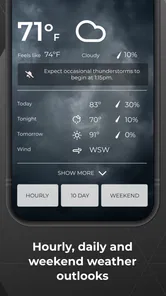
Weather information can sound like a standard feature, but its placement beside local coverage changes how I use it. I am not opening a separate weather service and then switching back to news; I can connect the forecast with the local situation that may explain why conditions matter. That is helpful on stormy days, during travel disruptions, or when a local event is affected by changing conditions.
Still, dedicated weather apps may be better for people who need highly detailed forecasting tools, specialized maps, or constant monitoring. My recommendation is simple: use this app for a convenient local weather check, but keep a specialist service in mind if weather is central to your work, travel, or outdoor plans.
What has changed, what remains, and what I would watch
The app has been available since May 15, 2012, so it is not a new experiment. Its long presence suggests a product that has had time to settle into the role of a station companion. The current identity remains straightforward: local reporting, live broadcasts, and weather in one place. I appreciate that clarity because I do not need to learn a complicated system before getting to the news.
At the same time, a long-running app has to keep pace with how people consume information now. Readers expect quick movement between headlines, video, live coverage, and weather. They also expect an experience that remains comfortable whether they are checking one story for ten seconds or following a developing situation for longer. The app’s future quality will depend less on adding endless sections and more on making those core paths feel consistent.
There is encouraging evidence that users find the app worthwhile: it holds a 4.7 average from around 3.8 thousand ratings and has passed 100 thousand installs. I read those figures as signs of a solid audience response, not as proof that every user will have the same experience. A station-focused app can be highly satisfying for local readers while feeling limited to someone seeking broader coverage.
The developer, HTVMA Solutions, Inc., has a clear opportunity here. The best evolution would preserve the direct local focus while making the important actions easier to reach. I would rather see careful improvements to headline clarity, live coverage access, weather usefulness, and reading flow than a crowded collection of unrelated features.
The effect on returning users
For an existing user, the main advantage is continuity. Once the app becomes part of a morning or evening routine, its value comes from reducing friction: open it, identify what matters locally, and move on. That is especially useful for people who do not want to build a custom list of local sources or follow several social accounts to find the same information.
Returning users should also keep their expectations realistic. A local news app can make the first check of the day easier, but it cannot remove the need for judgment. Headlines are useful for orientation; major decisions deserve fuller reading and, when appropriate, confirmation from more than one source. I consider that a healthy way to use any news product, including this one.
Another practical point is attention. Because the app combines urgent stories, regular local reporting, weather, and live material, I would avoid opening it every few minutes unless I am actively following an event. A planned check in the morning and another later can provide the benefits without turning the news cycle into a constant interruption.
For families, the Everyone rating makes the app broadly approachable, but that label should not be confused with a guarantee that every news story will feel comfortable for every child. Breaking news can include upsetting subjects. I would use my own judgment about when younger readers should browse it and whether an adult should explain difficult coverage.
Where it may fall short
The most important limitation is scope. If I want a single app for Boston, national politics, international events, technology, culture, and long-form analysis, this is not the most efficient choice. A broad news aggregator or a newspaper app may give me more variety and stronger tools for following topics beyond the local area.
There is also a difference between station coverage and a fully personalized news system. People who want fine-grained topic controls, extensive reading lists, or a carefully tuned mix of sources may prefer an aggregator. This app’s strength is its editorial focus, so its usefulness depends on whether that focus matches my interests.
Live video can create its own friction. It is more demanding than a short article, and it may not be the right format when I am in a noisy place, using limited attention, or trying to conserve battery and data. I would choose written updates for quick checks and save live coverage for moments when seeing the broadcast adds real context.
Finally, the app should not be judged only by its install count or rating. Those numbers show that many people have chosen it and rated it positively, but they do not answer personal questions such as whether the local reporting mix suits me, whether I prefer video or text, or whether I need specialist weather tools. My own routine is the better test.
Who should install it
I recommend it to anyone who wants Boston news close at hand and prefers a station-centered experience over an endless general feed. It is especially well suited to commuters, local households, people tracking regional developments, and former residents who want a simple connection to the area.
I would also suggest it to someone who currently searches the web for local updates one story at a time. The dedicated app can make that habit more efficient by bringing the station’s coverage, live broadcasts, and weather together. The useful insight is not that it replaces every source; it is that it can become a reliable first check before I decide whether a story needs deeper research.
I would skip it if my main goal is international reporting, specialist weather analysis, or a highly customized multi-source reading list. In those cases, a broader news platform will probably serve me better, with this app added only if Boston coverage still matters.
My recommendation after using it
WCVB Newscenter 5 succeeds because it understands a specific job and stays close to it. I can open it for Boston-area headlines, follow a live newscast when a story is moving, and check local weather without beginning with a national news feed. That focus feels more useful than a long feature list when I need nearby information quickly.
Its limitations are equally clear: it is not a complete replacement for broad news coverage, and live content will not suit every situation. I would pair it with a wider source for national and international context, and with a dedicated weather service if forecasting is a serious need.
My bottom line is that this is a practical free local-news app for Boston readers, not an all-purpose news universe. Its Everyone rating makes it easy to consider for a household, while its strong user response and established history make it a credible option for a regular local-news habit. If Boston is the place you live, work, study, or still care about, I think it is worth trying; if Boston is only an occasional interest, a broader alternative may be the better home screen choice.
WCVB Newscenter 5 - Boston Frequently Asked Questions
Who develops WCVB NewsCenter 5, and is it intended for Boston-area readers?
WCVB NewsCenter 5 is a news and magazines app developed by HTVMA Solutions, Inc. Its focus is Boston and nearby New England communities, making it a relevant choice for readers who want local reporting alongside broader news. The app’s coverage includes breaking news, weather updates, live newscasts, and local stories, so its appeal is strongest for people who follow the Boston area.
What is WCVB NewsCenter 5 – Boston?
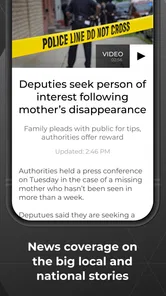
WCVB NewsCenter 5 is the official mobile news app for Boston and the surrounding New England communities. It provides local headlines, breaking news alerts, weather forecasts, live newscasts, traffic updates, investigative reports, sports coverage, and video clips. The app is especially useful for users who want quick access to Massachusetts news while traveling or away from a television.
Can I watch live news and access video content in the app?
Yes, the app includes video reports and may provide live streaming of WCVB newscasts or special coverage when available. The exact availability can depend on your location, broadcast rights, and the station’s programming schedule. A stable internet connection is recommended, particularly for live video, because streaming can use a significant amount of mobile data.
Does WCVB NewsCenter 5 provide weather and emergency alerts?
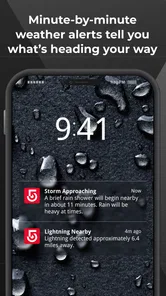
The app offers local weather information, including current conditions, forecasts, radar imagery, and severe-weather updates for Boston and nearby areas. Users can generally enable notifications for breaking news and important weather events. Before relying on alerts, review the app’s notification and location permissions so warnings are relevant to your area and arrive without being blocked.
Is WCVB NewsCenter 5 free to download and use?
WCVB NewsCenter 5 is free to download, and it has a 4.7 average from around 3.8 thousand ratings. Most news articles, forecasts, videos, and alerts can be accessed without a paid subscription, although mobile data charges may apply when using cellular networks. Content, advertising, and available features can change over time, so check the current store listing for the latest conditions.
Pros
- Fast access to breaking Boston-area news and alerts.
- Live newscasts help users follow major stories as they develop.
- Detailed weather forecasts support daily planning and travel.
- Local traffic updates are useful for commuters.
- Video reports add context beyond short written headlines.
Cons
- Some alerts may feel frequent or repetitive.
- Live video can use substantial mobile data.
- Coverage is mainly focused on the Boston and New England region.
- Advertising may interrupt browsing or video playback.
- Certain features may require a stable internet connection.













