Wawa
- 17.45K
- 3.4
- Installs
- 5.00M
- Price
- Free

Screenshots
Analysis by Reviewed
I think the clearest reason to try Wawa is the way it brings ordering and paying together with rewards. That matters most when I already know what I want and would rather sort out the order before reaching the counter. It is a Food & Drink app from Wawa, Inc, and its appeal is practical: less back-and-forth at a busy stop, with a way to keep track of offers and purchases in the same place.
When ordering ahead changes the routine
Picture a weekday morning when I have a short break and want coffee and something to eat before heading out. I can use the app to browse, shape an order, and arrange pickup instead of making every choice at the counter. The benefit is not that it makes the food arrive instantly; it is that I can make decisions before I am in a hurry. I would still leave enough time to collect the order, especially if the store is busy.
That workflow is useful for repeat visits, too. If I tend to choose the same breakfast or lunch, saving a favorite can reduce the number of steps next time. I would check the order details before submitting rather than assuming a saved choice still suits the moment. A small change in appetite or schedule can make a familiar order the wrong one, and reviewing it is easier than trying to fix a mistake after checkout.
How it compares with a counter order
Compared with walking in and ordering in person, Wawa’s app gives me more room to consider options before I commit. That can be a real help when I am deciding between a customized meal and a quick drink, or when I do not want to hold up a line while thinking. The counter remains the simpler choice if I have a question that needs a conversation, want to make a last-minute decision, or am not sure what is available at a particular location.
It also differs from a general food-delivery app: the experience is centered on Wawa rather than on comparing multiple restaurants. I would choose it when I already want Wawa and plan to collect the order myself. If I am looking for delivery choices from several places, a broader service is more appropriate. In that sense, the app is a focused shortcut, not a replacement for every way of getting a meal.
Rewards take a little attention
The rewards can add value if I visit often enough to make them part of my normal routine. I would check the app before ordering so I know what offers are available and whether one fits what I actually want. It is better to treat a deal as a bonus than as a reason to buy something I would not otherwise choose. That keeps the savings useful instead of turning the app into another source of impulse purchases.
At the same time, rewards are not the main reason everyone should install it. Occasional visitors may find that ordering convenience matters more than collecting points, while people who rarely choose Wawa may not get much from a loyalty feature tied to regular visits. The app is free, rated for Everyone, and has an average rating of 3.5 from around 38,000 ratings; those figures suggest a widely used tool that still will not suit every routine.
More From Our News Desk

Weather by Xiaomi Review: Clear at a Glance, Less Clear Up Close

X Under Pressure: Can It Recover When Posting Goes Wrong?

Clash of Clans Is Won Between the Battles

Android Auto Makes the Case for Quieter Car Software

MobiOffice: Transforming Mobile Productivity with Seamless Integration

EA SPORTS FC™ Mobile Soccer: Redefining Mobile Sports Gaming
Getting Started with Wawa
First things first, let's talk about downloading and setting up the Wawa app. Available on both Android and iOS, it’s super easy to find and install. Once you're in, the registration process is pretty straightforward. You just need to create an account or log in if you're already a member of the Wawa family.
Exploring the Features
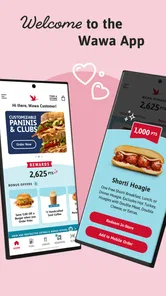
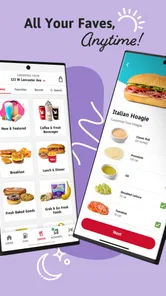
Now, here's where the fun begins. The app's interface is as smooth as your favorite iced coffee from Wawa. It's user-friendly and intuitive, allowing you to navigate through its features without a hitch. Whether you're looking to browse the menu, place an order, or find the nearest Wawa location, everything is just a tap away.
One of my favorite features is the ability to customize your orders. Craving a hoagie with extra cheese or a smoothie with a shot of protein? No problem! The app lets you tailor your meals to your liking, ensuring that you get exactly what you want every single time. Plus, you can save your favorite orders for those days when you're in a rush and need your Wawa fix ASAP.
Rewards and Deals
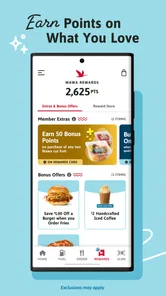
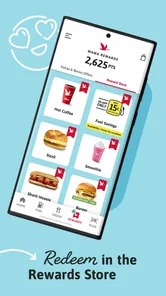
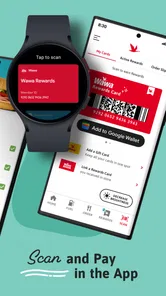
Who doesn't love a good deal, right? The Wawa app is packed with rewards and special offers that make each visit even more rewarding. Every purchase earns you points that can be redeemed for free items. It's like a little "thank you" from Wawa for being such a loyal customer. Just keep an eye on the app for any limited-time offers that can make your day a little brighter.
Convenience at Your Fingertips
For those of us who are always on the go, the Wawa app is a game-changer. You can place an order ahead of time and pick it up without waiting in line. This feature is a lifesaver during those hectic mornings or lunch breaks when time is of the essence. Plus, the app's location finder ensures that you're never too far from your next Wawa adventure.
And let's not forget about payment options. The app supports various payment methods, including credit cards and Apple Pay, making the checkout process quick and seamless. It's all about making your life a little easier, one hoagie at a time.
Using it where it fits
I would install it if Wawa is already part of my regular commute, lunch break, or travel routine. The location finder helps me plan around a nearby stop, while ordering ahead can shift menu decisions out of the queue. For a new user, a sensible first try is to browse the menu without rushing, choose a familiar item, and then decide whether saving it would genuinely help on a later visit. That is a better test than placing a complicated order while distracted.
There is a trade-off in putting the whole process on a phone: a screen can make customization clearer, but it can also tempt me to tap through without checking each choice. I’d confirm the pickup location and order contents before paying, particularly if I am traveling or changing my usual routine. And if I need to discuss a substitution or have a specific question, speaking with someone in person may be less frustrating than trying to make the app fit an unusual request.
What to expect from the app
Wawa has been available since June 21, 2017, and version 10.3.0 requires Android 8.0 or later. It has over 5 million installs and around 16,000 written reviews, so it is an established option rather than a niche ordering tool. I would still judge it by whether it works with my own habits: the app is most useful when I want Wawa, know roughly what I want, and can pick up the order myself.
If I only visit occasionally, I can still use it to browse and place an order, but I would not expect rewards to transform that pattern. Someone who prefers spontaneous counter service, wants to compare restaurants in one place, or needs a conversation to settle meal details may be happier with another approach. The main question is simple: does ordering ahead save me enough effort on the visits I already make?
Making the pickup part work smoothly
For me, the useful habit is to treat the app as a planning tool rather than a promise that every stop will be friction-free. I would choose the pickup location before building a detailed order, then pause at the review step to make sure the destination still matches where I am going. This matters on a commute when there may be more than one Wawa along a route: a carefully customized meal is no help if I have selected the wrong stop.
I would also keep the order simple on a first visit through the app. One familiar drink or meal gives me a low-pressure way to understand the flow, see how customization is presented, and decide whether advance ordering suits me. Once that feels comfortable, saving a repeat choice can help. For an unusual request, though, I would ask in person instead of assuming every preference can be communicated perfectly through menu controls.
A practical choice for a regular stop
Imagine I have a short lunch break between errands and already know I want a Wawa hoagie and a drink. I can make those decisions before reaching the store, check the pickup location, and use the saved order if it still matches what I want. That can make the visit feel more organized than joining a line while I work out the details. It does not remove the need to travel to the store or allow extra time if the location is busy, so I would not plan a pickup with no margin at all.
This is where the app has a clearer advantage over a general restaurant app: it is useful when the destination is already decided. A multi-restaurant service is better for comparing nearby menus or arranging delivery, while ordering at the counter is better for spontaneous choices and questions. Wawa’s app sits between those options, helping me prepare a Wawa purchase without turning the experience into a broad search for somewhere to eat.
Who benefits, and who may not
The strongest fit is someone who visits Wawa regularly, knows the kind of food or drink they want, and values making decisions before arriving. A commuter can set up a familiar morning order; someone heading out for lunch can review choices without holding up a queue; and a customer who likes rewards can check for an offer before deciding what to buy. In each case, the benefit comes from connecting the app to a visit that was already likely to happen.
I would skip it if I rarely go to Wawa, prefer to make every choice face-to-face, or mainly need a service that compares restaurants and delivers meals. It is also not my first choice when the order depends on a detailed conversation or a last-minute change. The app is most convincing as a focused companion to a regular Wawa stop, not as a substitute for every food-ordering option.
Small checks that prevent avoidable hassle
Before confirming an order, I would review the selected location, the customizations, and the payment step rather than tapping through on autopilot. Those checks are especially worthwhile when I am using a saved favorite, because a previous order can be convenient without being right for today. I would also look at rewards before checkout, but only after deciding what I actually want; an offer should influence the choice only when it fits naturally.
One question people often have is whether the app makes a visit worthwhile even if they do not care about rewards. In my view, yes, if ordering ahead and customizing a familiar purchase save enough effort. Another is whether it replaces talking to staff: I would not count on that for an unusual request, because a conversation is still the more direct route when details need explaining. These are good reasons to use the app selectively instead of expecting it to handle every kind of visit.
Final Thoughts
In conclusion, the Wawa app is a must-have for anyone who loves convenience, customization, and a little bit of everything in between. It's more than just an app; it's your personal gateway to a world of tasty possibilities. Whether you're a Wawa regular or new to the scene, this app is sure to enhance your experience.
So, what are you waiting for? Go ahead and give the Wawa app a try. Trust me, once you start using it, you'll wonder how you ever got by without it. Happy ordering, everyone!
Wawa Frequently Asked Questions
Is Wawa suitable for someone who only wants to place an order?
Wawa is a Food & Drink app from Wawa, Inc., and its central appeal is convenience. The app’s summary focuses on ordering, paying, and earning rewards, so it may be useful if you want to handle those activities through your phone. Whether it fits your routine depends on how you prefer to order and pay, but its stated purpose is straightforward.
Who makes Wawa, and what kind of app is it?
Wawa is a Food & Drink app developed by Wawa, Inc. It is designed to bring ordering, payment, and rewards together in a mobile experience. That combination may appeal to people who already use Wawa and want a convenient way to interact with its services. Before downloading, consider whether those functions match what you want from a food and drink app.
What devices can I use to run Wawa?
Wawa is a Food & Drink app from Wawa, Inc. It runs on Android devices with Android 8.0 or later, making it worth checking your device’s operating system before downloading. The app is free, and its Everyone age rating means it is intended for a broad audience. Its core purpose is to make ordering, paying, and earning rewards more convenient.
What is Wawa and what does it offer?
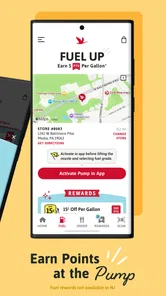
Wawa is a versatile mobile application designed to enhance your convenience by providing a wide range of services, including navigation, fuel price comparisons, and rewards programs. It offers users an easy-to-use interface to locate the nearest Wawa stores, check real-time fuel prices, and access exclusive deals and promotions. This all-in-one app is tailored to make your daily commutes and road trips more efficient and rewarding.
How can I benefit from the Wawa rewards program?
The Wawa rewards program offers numerous benefits to its users, such as earning points on every purchase made at Wawa stores. These points can be redeemed for discounts, free items, or special offers. To participate, simply download the app, create an account, and start purchasing through the app or by scanning your rewards card at checkout. Keep an eye out for limited-time promotions to maximize your rewards.
Pros
- User-friendly interface with intuitive navigation.
- Comprehensive selection of local products.
- Fast and reliable delivery services.
- Secure payment options and data protection.
- Responsive customer support team.
Cons
- Limited availability in certain regions.
- Occasional app crashes and bugs.
- Product descriptions lack detail.
- No integration with third-party services.
- Limited customization options for users.











