Washington Post: Live News
- 23.98K
- 4.4
- Installs
- 1.00M
- Price
- Free

Screenshots




Analysis by Reviewed
I tend to read news in two different modes: a quick check when something is unfolding and a slower read when I want to understand the background. The Washington Post app is built around both, giving me a direct way to follow the paper’s reporting rather than blending headlines from a long list of publishers. I find it most useful when I want to spend time with that coverage, not when I’m simply trying to scan every outlet at once.
Who will get the most from it
If you already turn to The Washington Post for politics, national affairs, or reported features, the app makes a convenient companion to that habit. It suits readers who like to check the day’s headlines and then open a few stories in depth. It can also work well for someone building a more intentional routine: choose a couple of topics, read a longer piece during a break, and leave the rest for later rather than refreshing a general feed all day.
It is less likely to be the right first download if your main goal is a neutral-looking bundle of headlines from many publishers. Aggregators are usually better for comparing how several outlets cover the same event in one place. This app has a different emphasis: it gives you access to one newsroom’s selection and presentation. I would pair it with other sources when a story calls for a broader range of perspectives, rather than expecting one newspaper app to answer every question.
A realistic way to fit it into the day
Imagine checking the news before work, noticing a developing story, and not having time to read beyond the alert. I would use that notification as a bookmark in my mind, then return at lunch to read the full report. If the afternoon includes a stretch without dependable reception, I would choose a few articles while online and save them for later. That small bit of planning is more reliable than assuming every page will load quickly wherever I happen to be.
This workflow also helps keep news from taking over the day. I can decide when to look, use a brief headline check for orientation, and reserve a longer session for reporting that deserves attention. The trade-off is that it takes a little self-management: alerts can interrupt, and a personalized feed can keep serving familiar interests. I would treat both as aids, not as a substitute for choosing what I want to follow.
How I would use the feed and formats
A useful way to approach the personalized feed is to notice what it keeps putting in front of you. If the same subject dominates because you have read several related stories, that may be helpful for following a continuing issue, but it can also narrow a casual browsing session. I would occasionally leave the feed and scan the wider selection when I want a better sense of what else is being covered. That simple habit makes personalization more useful without letting it define the whole news agenda.
The mix of articles, video, podcasts, and interactive graphics gives me options, but it also asks me to match the format to the moment. A graphic can make relationships in a complex story easier to follow; a podcast needs enough time and a setting where listening is practical. For a short queue or a text-first reading habit, I would prioritize articles and use multimedia selectively. Choosing one substantial piece instead of opening every format is a better way to judge whether the app fits than sampling everything at once.
More From Our News Desk

Weather by Xiaomi Review: Clear at a Glance, Less Clear Up Close

X Under Pressure: Can It Recover When Posting Goes Wrong?

Clash of Clans Is Won Between the Battles

Android Auto Makes the Case for Quieter Car Software

MobiOffice: Transforming Mobile Productivity with Seamless Integration

EA SPORTS FC™ Mobile Soccer: Redefining Mobile Sports Gaming
Reading, alerts, and everyday performance
The app comes from The Washington Post, and its News & Magazines focus is clear in the balance between current coverage and deeper reporting. It is free to install, rated Everyone 10+, and has a 4.4 average from around 90,000 ratings. It has passed over one million installs, which suggests a broad readership, though popularity alone does not tell me whether its editorial approach fits yours.
What to expect from the reading experience
For speed, I would separate the time it takes to open and move around the app from the pace of the journalism itself. Headlines and alerts are useful when I need a quick orientation; a reported story is better when I want context. The current version is 6.98.0 (2429), and it supports Android 5.0 or later. Those details help set compatibility expectations, but they do not guarantee the same responsiveness on every device or connection.
The first thing that caught my eye was the app's layout. It’s sleek, intuitive, and just plain easy to navigate. You’re not bombarded with ads, which is a breath of fresh air. Instead, you’re greeted with a clean interface that lets the news take center stage. The Washington Post app ensures you get the highlights at a glance, but if you’re like me and love a deep dive, there’s plenty to explore.
Personalized News Feed
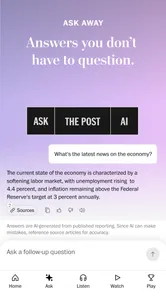
One of the coolest features is the personalized news feed. Based on your reading habits, the app curates articles that align with your interests. It’s like having a personal news assistant who knows exactly what you want to read. Whether it’s politics, tech, or lifestyle, the app keeps you in the loop.
That personalization is most useful when I treat it as a shortcut, not a complete picture of the day. A feed shaped by what I already read can make catching up feel efficient, but I would still check the broader headlines when I want to see beyond my usual interests. If you mainly want a rapid, all-source overview, a news aggregator may be a better first stop; this app makes more sense when you want to spend time with the Post’s own coverage.
Multimedia Content
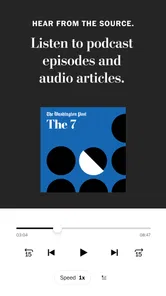
Another feature worth mentioning is the multimedia content. The app isn’t just about reading; it’s about experiencing the news. With videos, podcasts, and interactive graphics, you get a richer understanding of the stories. I found myself getting lost in the immersive content, which makes the experience all the more engaging.
These formats also change what “quick reading” means. A short article may fit into a brief break, while a podcast or interactive presentation asks for more attention and a suitable moment. I would save the longer experience for a commute with headphones or a quiet evening rather than opening it between errands. If you prefer a text-only feed, the extra formats may feel like clutter; if a visual explanation helps you follow a complicated story, they offer a useful alternative to another block of prose.
Breaking News Alerts
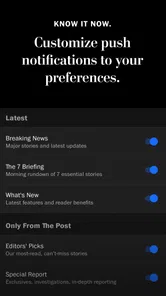
We live in fast-paced times, and the breaking news alerts feature ensures you’re always up to date. These alerts are timely and cover both global headlines and local news. It’s perfect for those moments when you need to know what’s happening right now.
Alerts are most helpful when I use them as prompts to check a developing story, not as the whole story. For example, if I see a notification during a busy morning, I can read the headline for orientation and return to the full report at lunch. Too many interruptions can make any news app tiring, so I’d keep notifications limited to the kinds of developments I genuinely want surfaced. Readers who prefer to choose their own check-in times may be happier opening the app deliberately instead of relying on breaking updates.
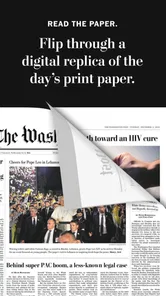
Additionally, the offline reading feature is a lifesaver. When you’re on the go and don’t have a reliable internet connection, you can still catch up on the latest news. Just download articles when you’re connected, and read them later at your convenience.
A practical routine is to pick a few pieces before leaving home, while the connection is steady, then use the saved reading for a train ride or a waiting room. That separates the decision about what matters from the distraction of a weak signal. It also makes offline access a deliberate preparation step rather than something to rely on at the last minute.
Reliability and device limits
In terms of performance, the app runs smoothly without any glitches or crashes. It’s available on both Android and iOS, and I found the user experience to be consistent across platforms.
In heavier use—moving between live updates, longer articles, and media—I would expect the experience to depend partly on the phone, available connection, and how much time the content needs to load. If a page seems slow on a crowded network, switching to a saved article is a sensible fallback; if the app becomes unresponsive, closing and reopening it is a reasonable first recovery step. I would not choose a device at the Android minimum solely because it meets the requirement: older hardware can feel less comfortable with media-rich reading than a newer phone, even when both are compatible.
Cost and the commitment question
The app is free to download, but in-app purchases range from $9.99 to $169.99 per item, so I’d check the purchase details before committing to paid access. That matters if you are looking for a completely free, unlimited newspaper experience. The app’s strongest case is for readers who value this publication’s reporting enough to consider its paid options; someone who only wants occasional headlines may be better served by free news sources or a broad aggregator.
For someone deciding whether to install it, the practical question is not just whether the download costs anything; it is whether the reading habit is likely to last. I would start by using the free app for the kinds of stories I already seek out, then review any purchase screen carefully before choosing an option. If I only open it when a major headline appears, paying for more access may not make sense. If I return regularly for the Post’s reporting, the purchase choices may be worth considering, but the app itself does not make that decision for me.
Performance verdict
In conclusion, the Washington Post app is a must-have for anyone who values staying informed. It combines the credibility of a renowned newspaper with the convenience of modern technology. Whether you’re a casual reader or a news aficionado, this app caters to all. So, if you haven’t already, give it a try. It might just become your go-to source for news, just like it has for me.
My more measured recommendation is to try it if you want a direct relationship with the Post’s reporting, especially for a daily routine that alternates between quick headline checks and longer reads. It is less compelling if your priority is comparing coverage from many publishers in one place, avoiding paid options entirely, or receiving no interruptions. Used selectively—alerts for genuinely urgent topics, saved articles for offline stretches, and the feed as a starting point—it can be a practical part of a news habit without needing to become your only source.
Washington Post: Live News Frequently Asked Questions
Does the Washington Post app send breaking-news alerts, and can I control them?
The app is built around news coverage, including breaking news and politics, and it offers customizable alerts for breaking stories. You can adjust alerts to suit your preferences, which can help you stay informed without receiving every notification. If you prefer a quieter experience, review the app’s notification settings after installing it and choose the updates you want to receive.
Can I read articles without an internet connection?
The Washington Post app includes offline reading for articles, which can be useful when you expect to be away from a reliable connection. This feature lets you prepare reading for later rather than relying on a live connection each time you open an article. Availability and behavior can depend on the content and your app settings, so check what is accessible offline before travelling.
Does the app offer different ways to make reading more comfortable?
Yes. The app supports dark mode, which can make reading more comfortable in low-light conditions, and it also provides personalized recommendations based on your reading history. These options make it easier to shape the app around your habits, whether you prefer a darker screen at night or want suggestions related to the stories you read.
Is the Washington Post app free to download, and what may require payment?
The Washington Post app is free to download, so you can install it and explore its interface before deciding whether it suits your reading routine. Access to much of the journalism requires a subscription, and the app includes in-app purchase options. The listed purchase amounts range from $9.99 to $169.99 per item, so check the available options in the app before making a purchase.
What is the Washington Post app?
The Washington Post app is a digital platform that allows users to access news and updates from one of the leading newspapers in the United States. With the app, you can read articles on a wide range of topics, including politics, world events, technology, and lifestyle. It offers a seamless way to stay informed with high-quality journalism right at your fingertips.
Pros
- High-quality journalism
- In-depth analysis
- User-friendly interface
- Daily updates
- Wide coverage of topics
Cons
- Subscription required for full access
- Ads in free version
- Some articles are opinionated
- Limited offline access
- App can be slow at times












