

VIZIO | WatchFree+
- 38.68K
- 4.2
- Installs
- 10.00M
- Price
- Free

Screenshots
Analysis by Reviewed
I’d start with one practical question: am I looking for a particular programme, or do I want something easy to put on without choosing another subscription? That distinction matters with VIZIO | WatchFree+. It is an entertainment app from VIZIO, and its appeal is the chance to browse live television and on-demand-style entertainment without adding a paid subscription. I see it as a convenient extra viewing option, rather than a replacement for every service or a guaranteed way to find a specific title.
Choose it for browsing, not a must-watch title
The app makes the most sense when I’m happy to explore channels and see what catches my attention. For example, after dinner I might open it for background television, scan what is available, and settle on a film or programme without first planning a watchlist. That casual, lean-back use is where a channel-led service can feel easier than searching across several subscription libraries.
It is less compelling if I already know exactly what I want to watch and expect it to be there. In that situation, a service built around a specific programme or a paid library with a defined catalogue may be a better fit. I would treat WatchFree+ as another place to check, not as the only destination for a favourite series or a dependable source for any particular genre.
Useful habits for finding something to watch
When I have only a few minutes to choose, I’d use the channel browsing as a starting point instead of searching title by title. If something I enjoy appears, adding the channel or programme to favorites can make the next visit quicker. Favorites are most useful when I keep them selective: a short list of reliable choices is easier to scan than saving every interesting item I pass.
That small habit also helps when the app is being used by more than one person. A household can keep a few shared go-to channels close at hand, while still browsing for something different when tastes diverge. It is not the same as separate profiles or personalized recommendations, so I would not assume each viewer gets a fully individualized home screen; the practical benefit is simply faster access to chosen items.
What the free model does and does not solve
Not paying a subscription is a real advantage if I want casual viewing without another recurring bill. The trade-off is that free access does not automatically mean every show, film, or live event I might want is available. I’d use the app to fill gaps in an evening’s viewing, while keeping a paid service or another source for exclusive releases and specific programmes that matter to me.
It is also worth separating “free to use” from “works well in every situation.” Streaming still depends on a suitable internet connection, and picture smoothness can vary with the connection and device. If a programme stutters, I’d first check whether other streaming apps are also having trouble before deciding the app itself is the cause. That simple comparison can save time and avoid blaming the wrong part of the setup.
More From Our News Desk

 Gmail
Gmail in a Busy Inbox: Who Benefits Most?
From first account to crowded workday, Gmail earns its place through dependable search and flexible sorting—but its best fit depends on how much inbox maintenance you can tolerate.

 Prime Video
Switching to Prime Video: What Changes in Your Viewing Routine
Prime Video can make a compelling second home for streaming, but switching means learning a different catalog, rental layer, and route from browsing to playback.

 Universal TV Remote Control
 Works Best as a Reliable Backup
A phone remote earns its place through quick setup and reliable habits. Here is how to get more from Universal TV Remote Control—and where its limits show.

 Weather - By Xiaomi
Weather by Xiaomi Review: Clear at a Glance, Less Clear Up Close
Xiaomi’s weather app makes everyday forecasts quick to scan, but its calm surface can leave useful details and recovery paths harder to find than they should be.

 X
X Under Pressure: Can It Recover When Posting Goes Wrong?
A resilience-focused review of X, examining setup, mistaken posts, interruptions, weak connections, and the gaps that matter when recovery needs to be dependable.

 Clash of Clans
 Is Won Between the Battles
Its raids are quick; its community is a long-term project of coordination, teaching, rivalry, and shared responsibility—with all the friction that entails.
Latest News



Fit, compatibility, and expectations
WatchFree+ is rated for Everyone, costs nothing to download, and has an average rating of 4.4 from around 85,000 ratings; it has also passed 10 million installs. Those figures suggest a broadly used app, but they do not guarantee that every viewer will like its channel mix or have the same experience. It runs on Android 10 or later, so checking the phone’s operating system before installing is a sensible first step.
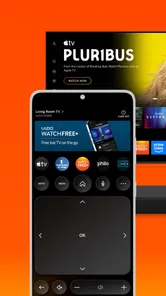
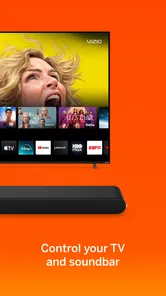
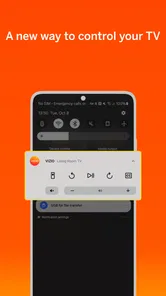
The app’s current version is 4.10.0.rc-1.20250919.16.release, and it was first released on March 21, 2016. I’d keep it updated through the usual app store process, particularly if browsing or playback behaves unexpectedly. Its stated role includes device control as well as entertainment discovery and live TV, which may be useful to someone already using VIZIO devices; I would not choose it solely as a universal remote without checking that it suits my particular setup.
Compared with subscription streaming apps, WatchFree+ is better approached as a no-cost option for spontaneous viewing than as a carefully curated library. Compared with ordinary channel guides, it puts watching and discovery together in an app, but it may not satisfy someone who wants a particular channel lineup or a precise programme schedule. The better choice depends on whether browsing freely or finding a named show is your priority.
As an app in the entertainment category, it has a substantial audience, and VIZIO is the developer. The 36,000 reviews alongside its 4.4 average give me a useful sense of its reach, though I would still judge it by how it works on my own phone and connection. I’d recommend trying it if you want a free place to browse live channels and keep a few favorites handy; I’d skip it if you need a specific catalogue, dislike channel-style discovery, or want a single app to replace all your existing viewing services.
A realistic place in a daily viewing routine
One useful way to decide whether it belongs on my phone is to picture a normal evening rather than a special occasion. I might have twenty minutes before heading out, or want something on while I cook, but not want to spend that time comparing subscription apps. In that moment, a live channel can remove the decision of choosing a precise episode. If nothing appeals, I can move on quickly; if a channel suits the mood, the app has done its job without becoming the centre of the evening.
That makes it particularly suitable for people who treat television as occasional company: someone eating lunch at home, a household member looking for a shared background option, or a viewer who wants to browse instead of maintaining another watchlist. It is less suited to a planned movie night where everyone has agreed on a particular title. For that, I would check the service that actually carries the title first, rather than assume a free channel-based app will have it available.
Making discovery less hit-or-miss
A small workflow can make browsing feel more intentional. I’d first decide whether I want something live or simply something to watch, then browse the relevant options rather than jumping between every category. When a channel repeatedly works for a certain mood—news while getting ready, or light entertainment during chores—I’d save only that dependable choice. This turns favorites into a practical shortcut, not a second, cluttered catalogue that takes as long to browse as the main screen.
I would also use discovery with a time limit. If I have only a short break, I’d give myself a quick scan and choose from what is already available instead of repeatedly searching for an exact title. The trade-off is that this approach rewards flexibility: it can surface something unexpected, but it cannot promise a particular programme will appear at the right time. Viewers who dislike that uncertainty will probably be happier opening a service with a known title in mind.
How it compares with other ways to watch
Against paid streaming libraries, the main difference is the viewing mindset. A subscription catalogue is usually where I would go to continue a specific series or browse a collection with a clear plan; WatchFree+ is more useful when I want to dip in without adding a subscription. Those roles can complement each other. I would not cancel a service I rely on for particular shows simply because this app offers another place to browse.
Against free video platforms, the distinction is also about how I want to choose. A platform built around individual clips or creator channels can be better when I want a particular person, topic, or short video. A channel-led experience is more comfortable when I would rather let a programme run than choose each item myself. Neither approach is automatically better; the useful question is whether I want control over each selection or the ease of tuning into something already underway.
For people who mainly watch through a television, the phone app’s device-control role may be an additional reason to explore it, especially in a VIZIO household. I would check how it works with my actual equipment before depending on it for everyday control. If my priority is simply a reliable remote for a mixed collection of devices, a dedicated control option that clearly supports that setup could be a safer choice. The app’s entertainment value should stand on its own, rather than relying on an assumption that every device will be controllable.
Questions worth settling before installing
Can I use it without paying? Yes, it is free, which makes it easy to try as a supplementary viewing option. Does that mean every programme is included? No: I would not treat free access as a promise of a complete catalogue. If a particular film, series, or event is the reason for downloading, I’d verify that it is available through the app before building plans around it.
Will it suit an older Android phone? The minimum operating system is Android 10, so I’d check the version in the phone’s settings before trying to install it. Is it appropriate for a family device? Its content rating is Everyone, but that general rating is not a substitute for deciding what is suitable for a particular child or household. For shared viewing, I’d still preview the choices and use the app together as needed.
Does it replace a television guide or every streaming app? I would say no to both. It can make browsing and watching available options convenient, but someone who depends on a specific lineup, scheduled programme details, or a particular paid catalogue should keep using the service that meets that need. A sensible setup is to use WatchFree+ for casual discovery and keep other apps for their distinct strengths.
Who I’d recommend it to
I’d try it if I wanted another no-cost option for live-style browsing, watched casually, and was comfortable choosing from what turns up rather than insisting on a particular title. Its 4.4 average and more than 10 million installs show that many people have given it a look, but those figures are context, not a guarantee that its content mix will match mine. A few sessions are a better test: notice whether browsing leads to something I genuinely want to watch, and whether the app fits naturally into my routine.
I would skip it as a main viewing service if I need a tightly defined library, personalized household profiles, or certainty that a named programme will be available. I’d also avoid relying on its device-control function until I know it works with my own setup. For everyone else, the best expectation is modest and useful: an extra place to find something to put on, not a universal answer to every entertainment need.
Hey there! Ever stumbled upon an app that makes you question how you lived without it? Well, allow me to introduce you to VIZIO | WatchFree+. It's like finding the remote control that's been missing for weeks—life-changing! This app, available on both Android and iOS, serves up a buffet of entertainment without the burden of subscriptions. Let’s dive into what makes this app a must-have in your entertainment arsenal.
The Treasure Trove of Content
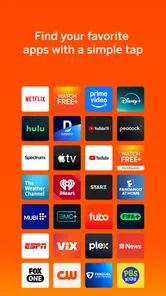
Imagine a place where you can watch movies, TV shows, and live channels without shelling out a dime. That's the magic of VIZIO | WatchFree+. The app offers a plethora of channels catering to different tastes: from action-packed thrillers to heartwarming rom-coms, and not to forget, the ever-so-necessary news channels to keep you in the loop. What’s more, the app doesn’t skimp on the quality of content. The streaming experience is as smooth as butter, ensuring you don’t miss a single plot twist or punchline.
Easy Navigation and User Interface
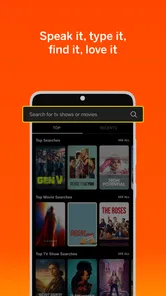
One of the first things you'll notice about the app is its user-friendly interface. It's like the app developers took a peek into our minds and designed it just how we’d like it. The layout is intuitive, making it easy to navigate through the various genres and channels. Whether you’re a tech-savvy millennial or someone less familiar with digital platforms, you’ll find the app straightforward and easy to use. Plus, the search functionality is pretty robust, allowing you to locate your favorite shows or discover new ones with ease.
Why It’s a Game Changer
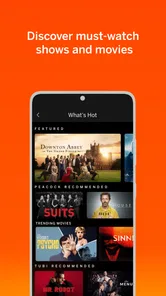
You might be wondering, "What makes this app stand out from the crowd?" Well, apart from the fact that it's free, the diversity of content is a huge draw. It’s perfect for those indecisive nights when you’re not sure what to watch. Simply fire up the app, scroll through the options, and you're bound to find something that piques your interest. The app also regularly updates its content, ensuring there’s always something new to watch. It's like having a cinema in your pocket, without the sticky floors!
Another nifty feature is the ability to customize your viewing experience. You can create a list of favorite channels or programs, so you’re always just a tap away from your top picks. It’s these little touches that elevate the app from being just another streaming service to a personalized entertainment hub.
Final Thoughts
In a world where every other service is vying for a spot in your monthly budget, WatchFree+ comes as a breath of fresh air. It’s an app that delivers quality content without the financial commitment. Whether you’re a movie buff, a TV show enthusiast, or someone who just enjoys having options, this app is worth a download. So go ahead, give it a shot and let it redefine your streaming experience. You might just find yourself wondering how you ever got by without it!
VIZIO | WatchFree+ Frequently Asked Questions
Does VIZIO | WatchFree+ work on a tablet as well as a phone?
The Android app requires Android 10 or newer, but the WatchFree+ service is designed for VIZIO SmartCast TVs. A phone or tablet download may therefore not provide the same viewing experience as using a compatible VIZIO TV. Before installing, consider whether you want the app’s entertainment discovery and device-control features or are specifically looking to watch the service’s TV content.
Do I need an account or subscription to get started with WatchFree+?
The WatchFree+ service is described as working without subscription fees or logins, so viewers can start exploring its programming without signing up for a paid plan. It is supported by advertising, which helps keep access free. The app is centered on VIZIO products and services, so how you use it depends on whether you have a compatible VIZIO SmartCast TV.
Can I use VIZIO | WatchFree+ to control my television?
Device control is one of the app’s main areas, alongside live TV and entertainment discovery. This makes it potentially useful to VIZIO users who want to interact with their devices as well as explore viewing options. The experience is centered on VIZIO products, so consider your device and the features you want before downloading rather than expecting a universal TV-control app.
Is WatchFree+ mainly a live-TV app or an entertainment guide?
It combines live TV with entertainment discovery and device control, rather than focusing on just one of those roles. Viewers can use the service to browse programming, while VIZIO users can also explore entertainment options and interact with their devices. Its overall usefulness will depend on whether you want a source of viewing content, a way to discover entertainment, or both.
Can I install VIZIO WatchFree+ on an Android or iOS device?
VIZIO WatchFree+ is listed as an entertainment app, but the service described in its existing overview is designed for VIZIO SmartCast TVs rather than as a standalone option for other devices. If you are considering a phone or tablet download, check that the app is compatible with your device and that it provides the access you need. The app requires Android 10 or newer.
Pros
- No subscription required
- Wide variety of channels
- User-friendly interface
- High-quality streaming
- Regularly updated content
Cons
- Ads during streaming
- Limited on-demand content
- Requires stable internet
- Device compatibility issues
- No offline viewing option











