

Vidzy-Well Organized
- 33.00
- 4.5
- Installs
- 100.00K
- Price
- Free

Screenshots
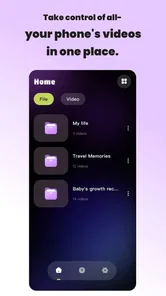
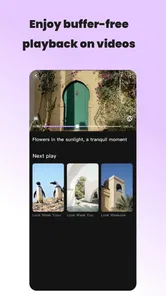
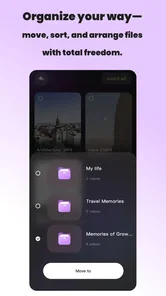
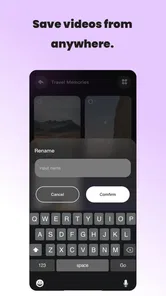
Analysis by Reviewed
When I try an entertainment app, I want to reach what I came for without wrestling with a crowded screen. Vidzy-Well Organized, developed by Aether Pulse, takes that simple expectation as its starting point. Its focus is arranging access more intelligently, with smart sorting and one-click entry at the center of the experience. That makes it appealing if your digital entertainment habits have become messy and you would rather spend time watching than searching.
I found the app most interesting as a practical organizer rather than as a destination that replaces every other entertainment service. It is free, rated for Everyone, and available for devices running Android 7.0 or later. The current release is version 1.3.1, and its presence on the platform has already reached over one hundred thousand installs. Those details make it easy to try, but they do not automatically make it right for every viewer. The real question is whether its approach fits the way you already find and use entertainment.
How Vidzy-Well Organized feels in everyday use
I find Vidzy-Well Organized most useful when I treat it as a small part of my routine, not as a place to browse indefinitely. This section looks at how its focus on arranging access can fit between the entertainment apps I already use, and why a tidy setup should follow real habits rather than look perfect. That distinction also leads to a closer look at the choices that matter when deciding whether to rely on an organizer.
A quick route instead of another complicated media hub
The clearest strength is the reduction of small decisions. Rather than making me repeatedly scan through an unstructured collection, the app is built around sorting and direct access. That sounds modest, but it matters during ordinary moments: choosing something before leaving home, finding a familiar option during a short break, or getting back to a program after a busy day.
I would describe the experience as convenience-first. The app is not trying to turn entertainment discovery into a long browsing session. Its value comes from making the route to an existing choice feel shorter. If you already know what you like, or if you keep returning to a manageable group of destinations, that approach can feel more useful than a large catalog filled with recommendations you did not request.
The store summary points to smart sorting and one-click access, and those two ideas work best together. Sorting on its own can still leave the user with several steps. A direct route on its own can become confusing when many items accumulate. Combining organization with quick entry gives the app a clearer purpose: arrange the things you use so they are easier to reach later.
What the app is good at, and what it is not
My recommendation depends on your habits. Vidzy-Well Organized is a strong candidate for people who dislike clutter, revisit the same entertainment sources, and want a lightweight layer between themselves and a scattered collection. It may also suit a shared household where people need a more understandable starting point instead of remembering where every favorite item is located.
More From Our News Desk

 Gmail
GmailGmail in a Busy Inbox: Who Benefits Most?
From first account to crowded workday, Gmail earns its place through dependable search and flexible sorting—but its best fit depends on how much inbox maintenance you can tolerate.

 Prime Video
Switching to Prime Video: What Changes in Your Viewing Routine
Prime Video can make a compelling second home for streaming, but switching means learning a different catalog, rental layer, and route from browsing to playback.

 Universal TV Remote Control
Universal TV Remote Control Works Best as a Reliable Backup
A phone remote earns its place through quick setup and reliable habits. Here is how to get more from Universal TV Remote Control—and where its limits show.

 Weather - By Xiaomi
Weather by Xiaomi Review: Clear at a Glance, Less Clear Up Close
Xiaomi’s weather app makes everyday forecasts quick to scan, but its calm surface can leave useful details and recovery paths harder to find than they should be.

 X
XX Under Pressure: Can It Recover When Posting Goes Wrong?
A resilience-focused review of X, examining setup, mistaken posts, interruptions, weak connections, and the gaps that matter when recovery needs to be dependable.

 Clash of Clans
Clash of Clans Is Won Between the Battles
Its raids are quick; its community is a long-term project of coordination, teaching, rivalry, and shared responsibility—with all the friction that entails.
Latest News



I would be more cautious if your main pleasure comes from exploring a huge catalog, reading detailed editorial recommendations, or having one service handle every part of discovery and playback. An organizer can make access cleaner, but it does not automatically provide the depth of a full streaming platform. Someone who wants rich search, extensive filters, personalized editorial lists, or advanced playback controls may prefer a dedicated entertainment service instead.
That distinction is important because the app’s name suggests order, not limitless content. I would install it to improve access to entertainment I already use, not because I expect it to replace the services where that entertainment actually lives. Thinking of it as a control layer leads to more realistic expectations and a better first experience.
Speed expectations without exaggerated promises
For this kind of tool, perceived speed is less about demanding visual effects and more about how quickly the interface gets out of the way. The one-click approach should feel most valuable in short interactions. If I open the app with a particular destination in mind, I do not want to repeat the same navigation routine every time. The design goal is clearly to reduce that friction.
There is also a useful difference between fast opening and fast decision-making. An app can launch quickly but still make the user think too hard about where to go. Vidzy-Well Organized addresses the second problem by emphasizing structure. That can make it feel efficient even when the task itself is simple, because the next action is easier to recognize.
I would avoid judging it only by how rapidly a screen appears. The more meaningful test is whether the app saves effort across repeated visits. A single use may seem ordinary; the benefit becomes clearer after the same destinations have been organized and accessed several times. In my view, this is a tool whose performance is measured in repeated convenience rather than dramatic speed.
Heavy-use moments reveal the practical trade-offs
The most revealing scenario is not a long uninterrupted session. It is a sequence of small visits. Imagine coming home, opening the app, choosing one familiar entertainment option, leaving it, and returning later to select something else. In that pattern, organization can prevent the tiny delays that accumulate across a week. The app earns its place by making those transitions less annoying.
A second scenario is a device with a growing collection of choices. At first, sorting may feel unnecessary because there are only a few items to remember. As the collection expands, a consistent arrangement becomes more valuable. The trade-off is that organization requires an initial investment of attention. I would expect the best results after taking a little time to arrange things sensibly, rather than judging the app before that structure is in place.
There is a practical tip here: organize around behavior, not around an abstract idea of perfection. Put the destinations you use during quick breaks together, keep regular evening choices easy to reach, and separate occasional options from daily ones. That kind of arrangement makes one-click access meaningful. A visually tidy setup that does not match your routine may look neat but still slow you down.
Another useful habit is to review the arrangement after your routine changes. Entertainment habits drift, and an old order can become less helpful. The app’s central promise works best when the organization reflects current use rather than a setup created once and forgotten. This is a small maintenance task, but it is also where the app’s practical value is decided.
Stability and recovery in a real routine
Stability matters more here than flashy functionality. An organizer becomes frustrating if it makes me repeat setup work or leaves me unsure whether a choice was recognized. I look for a calm, predictable flow: open the app, identify the intended item, make the selection, and continue. Vidzy-Well Organized is most convincing when it keeps that sequence uncomplicated.
Recovery is equally important. People interrupt entertainment constantly: a call arrives, a commute ends, the battery runs low, or attention moves elsewhere. A useful organizer should make returning to the same routine feel natural rather than forcing the user to reconstruct the path from memory. The app’s direct-access concept is well suited to that kind of interruption because it keeps the route visible and understandable.
Still, organization is not the same as recovery from every possible problem. If the destination itself has an account issue, connection problem, or playback failure, a sorting app cannot solve the underlying service. I would treat Vidzy-Well Organized as a way to recover your navigation path, not as a universal fix for problems inside other entertainment products. That boundary prevents disappointment and clarifies where troubleshooting should happen.
My advice is to keep the arrangement simple enough that you can understand it at a glance. Over-organizing can create its own failure point. If every item has a complicated place or depends on a system only you remember, returning after a few days may be slower than using a conventional home screen. The app works best when its structure remains obvious even when you are tired or distracted.
Resource demands and device constraints
Vidzy-Well Organized supports Android 7.0 and above, which gives it a broad compatibility range for Android users. That is useful if you keep an older phone or tablet in regular service. It also means the app can be considered for households where not every device is current, rather than being limited to the newest hardware.
I would not assume that compatibility alone tells me how it will behave on every device. Older hardware can differ in memory, storage condition, background activity, and system customization. A sensible approach is to test it during the moments that matter to you: opening it after a long day, switching between several organized choices, and returning after another app has been used. That gives a better impression than relying on the age of the phone alone.
The app’s purpose suggests a relatively focused workload, but I would still avoid filling the arrangement with unnecessary entries. A smaller, deliberate collection is easier to scan and easier to maintain. It also reduces the chance that the interface becomes another crowded layer on top of the entertainment services it is meant to simplify.
For someone using a recent phone, the main constraint is probably not raw capability but attention. The app has to remain quicker to understand than the alternatives. For someone using an older device, the practical test is whether the organizational benefit outweighs any extra step introduced by opening another app first. If your existing home screen is already clean, Vidzy-Well Organized may offer only a small improvement.
How it compares with usual alternatives
The most obvious alternative is the standard phone home screen. That option is familiar, direct, and requires no new organizing layer. If you have only a few entertainment apps and can reach them immediately, the conventional approach may be better. It has fewer moving parts and no learning period.
Another alternative is using folders. Folders are effective for broad grouping, but they can become a second level of searching: open the folder, scan the icons, then choose the destination. Vidzy-Well Organized is more attractive when the goal is not merely to group items but to make the preferred route more deliberate. The difference is subtle, so I would choose it only if repeated access is genuinely inconvenient with folders.
Dedicated streaming and media apps remain better for discovery, playback, recommendations, and service-specific controls. They know their own catalogs and are designed around content consumption. Vidzy-Well Organized has a narrower role, and that is not a weakness if you need organization. It becomes a weakness if you expect it to provide the same depth as a full entertainment platform.
There is also a trade-off between control and simplicity. A basic home screen gives you complete freedom but leaves all the sorting decisions to you. A more structured organizer can reduce those decisions but asks you to accept its way of arranging access. I would choose Vidzy-Well Organized when the second exchange sounds worthwhile, especially if clutter is the problem you are actively trying to solve.
Who should install it first
I would recommend trying it if you regularly lose time looking for entertainment options that you already use. It is also worth considering if your phone contains a mixture of services, shortcuts, and saved destinations that no longer feel coherent. The app’s free price removes the financial barrier to testing that workflow, and its Everyone age rating makes it approachable for a broad household audience.
It may be particularly useful for someone who shares a tablet with family members. A clear arrangement can make the device less dependent on one person remembering where everything is. The important condition is agreement about the structure. If each person reorganizes it differently, the convenience can disappear, so a shared device benefits from a simple layout and a small number of obvious groupings.
I would skip it if your entertainment use is already limited to one or two apps placed on the first screen. In that case, adding an organizer may create more steps instead of removing them. I would also skip it if you want a single app to supply content, recommendations, and playback. This product’s appeal is practical access, not a promise to become the entire entertainment experience.
What the current reception suggests
The app holds a 4.3 average from around one hundred seventy ratings, with just over twenty written reviews. That is a useful sign that people are finding enough value to rate it, while the written feedback remains a relatively small window into varied experiences. I would read that reception as encouraging rather than conclusive.
Its reach of over one hundred thousand installs also gives it more real-world presence than an obscure experiment, but popularity does not remove the need to test the workflow against your own habits. Organization tools are unusually personal. A layout that feels obvious to one user can feel restrictive to another, especially when their entertainment routines differ.
The developer, Aether Pulse, has positioned this release around a focused problem rather than an overloaded feature list. That focus is helpful because I can tell quickly whether the app belongs on my device: if finding and arranging entertainment access is a recurring annoyance, it has a clear job; if it is not, the app may feel unnecessary.
My performance verdict
After looking at the way its sorting and one-click approach fit repeated use, I see Vidzy-Well Organized as a focused convenience app with a sensible performance profile for its purpose. Its perceived speed comes from reducing decisions, its heavy-use value appears during repeated short visits, and its recovery benefit comes from making familiar routes easier to reconstruct. Those are modest gains, but they can become meaningful when the same friction appears every day.
The app is not the right choice for every entertainment user. It cannot replace a rich content platform, and it may be redundant when a phone’s home screen is already perfectly organized. It also asks for some setup and occasional maintenance, which means the benefit depends on how carefully the arrangement matches your routine.
My final advice is to judge it over several ordinary days rather than during one quick launch. Start with the entertainment destinations you use most, arrange them around real situations, and notice whether returning to them feels easier. If it removes repeated searching without becoming another thing to manage, the free download is easy to justify. For me, that makes Vidzy-Well Organized a worthwhile choice for users who want less navigation and more direct access, provided they understand that its strength is organization rather than content discovery.
Vidzy-Well Organized Frequently Asked Questions
Who develops Vidzy-Well Organized, and what kind of app is it?
Vidzy-Well Organized is an entertainment app developed by Aether Pulse. Its short description is simply “Vidzy-Well Organized,” while its store summary highlights smart sorting and one-click access. That makes the app’s organization-focused purpose the main point to consider before downloading: check whether that approach fits how you want to arrange and reach your video-related content.
What do users think of Vidzy-Well Organized?
Vidzy-Well Organized has an average rating of 4.3 from 174 ratings, alongside 23 written reviews. Those figures offer a general snapshot of user feedback, but individual experiences can still differ depending on a person’s device and expectations. Reading recent reviews before downloading can help you understand what people appreciate and whether any comments raise concerns relevant to the way you plan to use the app.
What is Vidzy-Well Organized, and what can I use it for?
Vidzy-Well Organized is designed to help users manage and organize video-related content in a more structured way. Depending on how you use it, it can make it easier to browse, categorize, save, or access videos without relying on a disorganized collection of links or files. Before downloading, users should check the current app description to confirm which organization and playback features are available on their device.
Is Vidzy-Well Organized free to download and use?
Vidzy-Well Organized is free to download. The exact pricing model can vary by platform and version, and some features could require in-app purchases, a subscription, or separate access depending on the developer’s current offering. I recommend checking the Google Play Store or Apple App Store listing before installing, especially if you want to avoid unexpected charges or understand what is included in the free version.
Does Vidzy-Well Organized work on both Android and iOS devices?
Compatibility depends on the versions published by the developer. Before downloading, users should visit the official store page for their device and verify the required operating system, supported models, and latest update date. The Android version requires Android 7.0 or later. Performance can also differ between older and newer phones or tablets. Checking these details first helps prevent installation problems and ensures that the app’s organization features work as expected.
Pros
- Clean layout makes browsing and managing videos feel straightforward.
- Organized categories help users find saved content faster.
- Lightweight design offers a responsive experience on many devices.
- Useful sorting options can reduce clutter in large video collections.
- Simple interface is approachable for users with limited technical experience.
Cons
- Advanced editing or playback tools may be limited.
- Some features could require extra permissions to work properly.
- Large libraries may still need manual organization and tagging.
- The app may feel too basic for power users seeking customization.
- Compatibility and performance can vary across older devices.











