

Vibra Live: Go Live
- 28.00
- 3.9
- Installs
- 500.00K
- Price
- Free

Screenshots


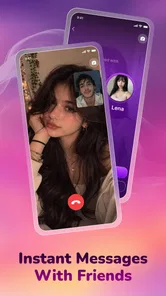
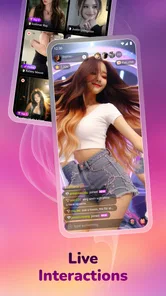

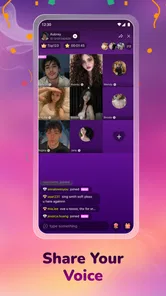
Analysis by Reviewed
On a weekday evening, I might have a few minutes before dinner and want a little company without arranging a call with someone I already know. Another day, I may want to meet a conversation with more energy than a text thread can offer. Vibra Live: Go Live is aimed at that open-ended kind of socializing, bringing live broadcasts, video chat, and short-form clips into one place. Its appeal is the chance to move from watching to talking without turning every interaction into a carefully composed post.
That shift can be refreshing, but it changes how attention gets spent. Live conversations happen on their own schedule, and a stream can invite you to stay longer than you intended. I see this as an app for people who enjoy spontaneous social contact and are willing to be present for it, rather than a quiet, utility-first messenger. If you prefer predictable, private conversations that can wait until you have time, the format may feel demanding.
When a conversation needs to feel more immediate
As a social app, Vibra Live addresses a familiar gap: text is convenient, but it can feel flat when you want company, a face-to-face exchange, or a sense of what people are doing right now. Live streaming and video chat offer more immediacy, while short videos give the experience a lighter, browseable side. That combination makes it easier to choose between watching and joining in, depending on your mood.
For example, if I have a few minutes between errands, I might browse short clips rather than commit to a live conversation. When I have more time and want interaction, a live stream or video chat is a more natural fit. The useful distinction is not simply between video formats; it is between low-commitment viewing and real-time participation. Choosing deliberately helps keep a casual visit from turning into an unexpectedly long session.
Vibra Live is free to install, with optional in-app purchases priced from $0.99 to $14.99 per item. That makes it easy to try the basic social experience before deciding whether any paid extras are worthwhile. I would treat those purchases as optional rather than assume they are necessary for ordinary use, and check the purchase details in context before spending. The app is rated Teen, a relevant consideration for families deciding which social spaces are appropriate.
Vitality AI is the developer, and the app’s overall reception is mixed but broadly established: it has a 3.9 average from around 1,800 ratings, with 28 written reviews and over 500,000 installs. Those figures suggest that it has reached a substantial audience, but they do not tell me whether a particular live room will suit my interests or conversational style. For a social app, the quality of the experience depends heavily on who is active when you open it and whether you enjoy meeting people in an open setting.
How the mix of live, chat, and clips shapes a visit
The formats support different rhythms. A short video is easy to sample and leave; a live stream unfolds in real time; a video chat asks for more direct attention. I find that distinction useful when deciding how to use the app rather than tapping around without a plan. If I only want a brief distraction, clips make more sense. If I want an exchange rather than passive scrolling, live interaction is the stronger reason to open it.
More From Our News Desk

 Gmail
GmailGmail in a Busy Inbox: Who Benefits Most?
From first account to crowded workday, Gmail earns its place through dependable search and flexible sorting—but its best fit depends on how much inbox maintenance you can tolerate.

 Prime Video
Switching to Prime Video: What Changes in Your Viewing Routine
Prime Video can make a compelling second home for streaming, but switching means learning a different catalog, rental layer, and route from browsing to playback.

 Universal TV Remote Control
Universal TV Remote Control Works Best as a Reliable Backup
A phone remote earns its place through quick setup and reliable habits. Here is how to get more from Universal TV Remote Control—and where its limits show.

 Weather - By Xiaomi
Weather by Xiaomi Review: Clear at a Glance, Less Clear Up Close
Xiaomi’s weather app makes everyday forecasts quick to scan, but its calm surface can leave useful details and recovery paths harder to find than they should be.

 X
XX Under Pressure: Can It Recover When Posting Goes Wrong?
A resilience-focused review of X, examining setup, mistaken posts, interruptions, weak connections, and the gaps that matter when recovery needs to be dependable.

 Clash of Clans
Clash of Clans Is Won Between the Battles
Its raids are quick; its community is a long-term project of coordination, teaching, rivalry, and shared responsibility—with all the friction that entails.
Latest News



A practical approach is to decide what kind of visit you are making before you start. For instance, I might set aside a short window to browse, then leave rather than drift into a stream simply because it is already playing. If I am going into a video chat, I would choose a moment when I can give the other person my attention. This is not a special feature; it is a small habit that makes a real-time social app easier to fit around ordinary life.
It also helps to pick a stopping point before opening the app. I might decide to watch a couple of clips while waiting for a kettle to boil, or to give a live conversation my attention until I need to leave for an appointment. The point is not to turn social time into a strict schedule; it is to keep an enjoyable pause from quietly replacing the task that follows it. If I keep reaching for the app without knowing whether I want to watch or talk, that is a useful sign to take a break rather than keep browsing.
The combination also means that Vibra Live is not quite the same proposition as a conventional messaging app. A messenger is usually strongest when you already know whom you want to contact and need a clear, direct exchange. Vibra Live is more appealing when the social setting itself is part of the point: seeing what is happening, encountering people, and deciding whether to join. If your priority is reliable coordination with friends or a searchable record of practical details, a familiar messaging service will usually be the clearer choice.
Compared with a short-video platform focused mainly on an endless feed, the live and video-chat side gives Vibra Live a more participatory identity. That can make a conversation feel less polished and more human, but it also asks more of you. Watching a clip does not require you to respond; joining a real-time exchange does. I would choose the app for that possibility, not expect every visit to produce a meaningful conversation.
The attention cost of real-time socializing
Live formats reward being present. Unlike a message that can sit unread until later, a stream or video conversation unfolds while you are there. That immediacy is the draw, yet it is also the main attention cost. If you open the app while working, studying, or trying to wind down, the jump from a quick look to an absorbing interaction can interrupt whatever you were doing.
I would avoid treating the app as a background companion during tasks that need concentration. The more useful routine is to open it when I have a genuine pause, decide whether I want to watch or participate, and close it when that purpose is met. For someone who tends to lose track of time while browsing, starting with a specific intention is more realistic than expecting a live environment to remain a brief check-in.
There is also a difference between social contact and social clarity. A live exchange can feel immediate without necessarily being focused or useful. If I need to explain a plan, share a detail that someone must remember, or make an arrangement with a friend, text is often better because it leaves a clear written trail. Vibra Live makes more sense for presence, spontaneity, and conversation than for information that needs to be precise later.
That trade-off matters for people who are already overloaded by notifications and feeds. Adding another place to check can fragment attention, particularly if you move between clips and real-time activity without knowing what you came for. I would keep it as an intentional social destination rather than a default app to open whenever there is an idle moment. If you want quiet, asynchronous contact, a standard chat app is likely to fit your day with less pressure.
For a realistic routine, picture getting home after a busy day and wanting a change of pace before starting dinner. A few clips can offer a low-pressure way to see what catches your interest, while a live exchange makes more sense if you can stay focused and are comfortable speaking then and there. If someone else needs your attention, or you are trying to finish dinner preparation, the live format is a poor match for that moment. I would save it for a pause that can actually remain a pause.
Keeping interaction comfortable and intentional
Open social interaction works best when I make choices about how much of myself I want to bring into it. Before starting a video conversation or joining a live setting, it is sensible to consider whether I have the time and comfort for a real-time exchange. If I only have a moment, browsing a clip is a more honest expectation than beginning a conversation I may need to abandon abruptly.
A useful boundary is to keep the first interaction light and avoid treating an easy conversation as proof that someone should quickly become a trusted contact. I would be cautious about sharing personal details in a spontaneous social exchange, especially if I have not yet decided whether the setting feels comfortable. That advice matters more in live video than in a text exchange because speaking can make a meeting feel familiar very quickly, even when the relationship is still new.
For everyday use, I would also separate casual discovery from conversations that involve personal or sensitive details. A live social space is not automatically the right setting for anything private, and a spontaneous interaction does not need to become a close connection. Keeping the conversation light until I know whether it feels comfortable is a practical boundary, not a reason to avoid the app altogether.
Families should take the Teen content rating seriously and discuss what kinds of interaction are acceptable before younger users spend time in a social environment built around video and live contact. The rating is a useful starting point, not a substitute for a household’s own expectations. Adults who share devices or use the app in busy spaces may also prefer headphones and a little privacy when speaking, simply to avoid turning a casual chat into a conversation everyone nearby can hear.
Version 1.0.13 is available for devices running Android 7.0 or later. That gives the app a broad compatibility range, though the quality of any video-based experience will still depend on the device and connection being used. I would try a brief session first, paying attention to whether video interaction feels comfortable and whether the app fits the way I want to spend social time. That small test is more useful than committing to a routine based on the idea of live socializing alone.
Who will enjoy it—and who should choose something else
I would recommend Vibra Live to someone who likes meeting people through video, enjoys watching live activity, and is comfortable with conversations that happen in the moment. It may suit a person looking for a more expressive break from text-heavy feeds, or someone who wants several kinds of video-based social interaction in one app. Its strongest case is variety of pace: a quick clip when time is short, or a live exchange when there is room to engage.
It is particularly suited to people who enjoy the possibility of an unplanned conversation and do not need every social visit to lead somewhere definite. Someone who mainly wants to watch rather than speak can stay with clips or streams, while a person craving direct interaction can choose a more engaged format. The trade-off is that this flexibility does not guarantee a lively or personally relevant encounter each time; the appeal is the chance to find one, not certainty about what a session will bring.
I would be more cautious if you want a tightly controlled social circle, dependable one-to-one messaging, or a way to keep conversations organized for later. Those needs are better served by messaging apps designed around known contacts and written exchanges. Likewise, if live video makes you uncomfortable or you do not want another feed competing for your attention, Vibra Live is unlikely to solve that problem; it may intensify it.
People deciding whether to try it may wonder if they have to pay to take part. The app is free to install, and purchases are optional; I would look at what an individual purchase offers before deciding whether it matters to my use. If the main goal is simply to see whether live socializing feels comfortable, I would start with a modest session and avoid spending until I know the experience suits me.
My practical advice is to use it with a clear reason in mind: browse for a few minutes, look for a live interaction, or make time for a video chat. That simple distinction helps you choose the right format and leave when you are done. I would not judge the app solely by whether every session leads to a memorable encounter. Its value is in offering a more immediate route to social contact, with the understanding that spontaneity can be uneven and attention has a cost.
Overall, Vibra Live: Go Live is a worthwhile option for people who want social interaction to feel present rather than purely asynchronous. I like the way clips, streams, and video conversations can serve different moods, while the same variety asks users to manage their time and boundaries. It is not my first pick for private, practical communication, but for a deliberate dose of live social energy, it has a clear purpose. Try it if that sounds appealing; skip it if what you need most is quiet, structure, or a conversation that can wait.
Vibra Live: Go Live Frequently Asked Questions
What is Vibra Live: Go Live?
Vibra Live: Go Live is presented as a live-streaming and social app for people who want to broadcast, watch live video, and interact with other users. Its specific features and community options may vary by app version and region, so check the app’s current store listing before installing. If you plan to stream, review the available privacy controls and community guidelines first.
Is Vibra Live: Go Live free to download and use?
The app may be available to download without an upfront charge, but that does not necessarily mean every feature is free. Live-streaming platforms commonly offer optional purchases, subscriptions, or virtual items, and the exact pricing can change. Before spending money, check the store listing for in-app purchase details and review any payment prompts carefully. You can also check your device’s purchase settings to help prevent accidental charges.
Do I need an account to use Vibra Live: Go Live?
Some features in social and live-streaming apps may be accessible without signing in, while broadcasting, chatting, or following creators may require an account. The sign-up options and information requested can differ across versions. When creating an account, use a strong, unique password and avoid sharing personal details publicly. Review the app’s privacy information to understand what account data it collects and how it may be used.
Is Vibra Live: Go Live safe and suitable for children?
A live-streaming environment can include user-generated content and real-time conversations, which may not be suitable for every age group. Do not assume that all broadcasts or interactions are moderated consistently. Parents and guardians should check the app’s age rating, safety tools, reporting and blocking options, and privacy settings before allowing a child to use it. Avoid sharing an address, school, phone number, or other sensitive information during a stream.
What should I check before downloading Vibra Live: Go Live?
Confirm that you are downloading the intended app from an official app store, and check its developer, recent update history, device compatibility, permissions, and user reviews. Live video can use substantial mobile data and battery, so a stable Wi-Fi connection may be preferable for watching or streaming. Also review the current privacy policy and purchase information, since availability, features, and requirements can vary by device and region.
Pros
- Quick setup makes it easy to start a live broadcast.
- Live chat helps hosts interact with viewers in real time.
- A discovery feed can help users find new broadcasters.
- Supports social connections through follows and audience engagement.
- Free to download
- so you can explore before spending money.
Cons
- Live streaming can use a lot of mobile data.
- Broadcast quality depends heavily on your internet connection.
- A small audience may make it harder for new hosts to gain traction.
- Live chat may expose users to unwanted or inappropriate messages.
- Some features or perks may require in-app purchases.











