

Vibe Chat - Pillow Talk
- 29.00
- 4.2
- Installs
- 50.00K
- Price
- Free

Screenshots

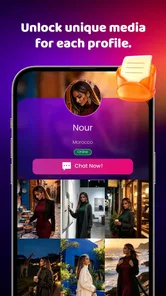

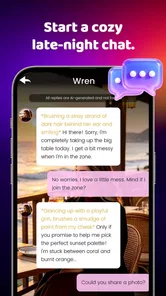

Analysis by Reviewed
I approached Vibe Chat - Pillow Talk as an entertainment app for moments when ordinary scrolling feels too impersonal. Its basic idea is easy to understand: it helps you find a curated digital partner that suits your mood. That makes it sound simple, but the real question is whether the experience feels comfortable, readable, and useful across different situations and abilities. After spending time with it, I see its strongest appeal in low-pressure personal use rather than as a replacement for a full social network or a practical messaging tool.
The app is free, belongs to the entertainment category, and comes from ASDA TREASURER. It is marked for mature users aged seventeen and over, which is an important part of deciding whether it fits your household. The current release is version 1.0.1 and works on devices running Android 8.0 or later. Its store summary presents it as a mood-based digital companion, while the shorter store label is simply “Vibe Chat.”
How the experience feels to read and navigate
The first strength is conceptual clarity. I never had to guess what kind of app I was opening: this is built around conversation and atmosphere, not productivity, news, or public posting. That narrow purpose can be reassuring for someone who wants a contained entertainment experience. Instead of entering a large feed filled with unfamiliar accounts, you approach the app with a particular emotional tone in mind.
That kind of design can also help people who find busy social platforms tiring. A conventional network asks you to process profiles, posts, reactions, notifications, and recommendations all at once. A mood-focused chat experience has a smaller mental frame. I found it easier to decide what I wanted from a session: a little company, a playful exchange, or a quieter conversation. The difference is subtle, but it matters when attention is limited.
Readability is not only about font size. It is also about whether the purpose of each screen is obvious and whether the conversation remains easy to follow. Here, the central chat concept gives the interface a natural order: choose or encounter a suitable digital partner, then respond. That is less intimidating than an app that makes you learn several social layers before anything meaningful happens.
Still, people who depend on very large text, strong contrast, screen magnification, or a particular screen reader setup should test the app on their own device before committing to regular use. Android accessibility tools can vary by phone, display settings, and operating-system version. I would not treat the app’s simple concept as proof that every visual or assistive-technology need is covered.
One practical habit improved my experience: I decided on the mood I wanted before opening a conversation. Without that small pause, it is easy to judge a digital partner too quickly because the exchange does not match your immediate expectations. With a clear intention, the app feels more like a chosen form of entertainment and less like an endless search for the perfect response.
More From Our News Desk

 Gmail
GmailGmail in a Busy Inbox: Who Benefits Most?
From first account to crowded workday, Gmail earns its place through dependable search and flexible sorting—but its best fit depends on how much inbox maintenance you can tolerate.

 Prime Video
Switching to Prime Video: What Changes in Your Viewing Routine
Prime Video can make a compelling second home for streaming, but switching means learning a different catalog, rental layer, and route from browsing to playback.

 Universal TV Remote Control
Universal TV Remote Control Works Best as a Reliable Backup
A phone remote earns its place through quick setup and reliable habits. Here is how to get more from Universal TV Remote Control—and where its limits show.

 Weather - By Xiaomi
Weather by Xiaomi Review: Clear at a Glance, Less Clear Up Close
Xiaomi’s weather app makes everyday forecasts quick to scan, but its calm surface can leave useful details and recovery paths harder to find than they should be.

 X
XX Under Pressure: Can It Recover When Posting Goes Wrong?
A resilience-focused review of X, examining setup, mistaken posts, interruptions, weak connections, and the gaps that matter when recovery needs to be dependable.

 Clash of Clans
Clash of Clans Is Won Between the Battles
Its raids are quick; its community is a long-term project of coordination, teaching, rivalry, and shared responsibility—with all the friction that entails.
Latest News



Why the focused format helps some users
The focused format is particularly useful for people who dislike public interaction. You do not need to prepare a profile for an audience, write a polished post, or worry about how a group will interpret a message. That makes it suitable for a short private break, especially when you want interaction without the social obligations attached to real-time conversations with friends.
I can imagine using it after work, when I wanted something more responsive than a video but did not have the energy for a serious conversation. In that situation, a mood-led chat offers a middle ground. It gives the mind something to react to while avoiding the commitment of arranging a call or joining a live community.
The trade-off is that a focused interface may feel too narrow for users who want discovery, community, or a broad range of media. If your usual entertainment is built around watching creators, playing a game with defined goals, or exchanging messages with people you know, this app may feel lightweight. Its value depends on whether the conversational mood itself is enough to keep you engaged.
Motor, sensory, and cognitive considerations
From a motor perspective, chat is usually less demanding than entertainment that depends on rapid taps, gestures, or precise timing. That makes the basic interaction potentially comfortable for users who prefer slower input. You can think about a reply instead of reacting under pressure, and the experience is not built around winning a reflex test.
That does not mean every user will find typing easy. Anyone with hand fatigue, tremors, limited reach, or pain may still find repeated text entry tiring. Voice input, switch access, predictive text, and external keyboards may help, but their usefulness depends on the phone and Android configuration rather than on something I can promise about the app itself. For longer sessions, I would keep replies brief and use the input method that causes the least strain.
Sensory comfort is another matter. A conversational app can be calmer than a video feed, but chat still requires sustained visual attention. If you are sensitive to bright screens, animated changes, or a dense stream of text, adjust the phone’s display settings before you begin. A darker room can make a bright screen feel harsher, while a noisy environment can make it harder to concentrate on the tone of a conversation.
I also found that the app’s mood-centered premise creates a cognitive benefit when used deliberately. Rather than asking me to make many choices, it encouraged a single question: what kind of interaction suits me right now? That can be useful for someone who becomes overwhelmed by open-ended entertainment menus. The limitation is that mood is not always easy to label, and forcing yourself into a category can make the experience feel less natural.
The most useful accessibility-minded approach is to reduce the session’s demands before they become tiring. Lower screen brightness if needed, enlarge the system text when that remains comfortable, use a keyboard or voice input that you already trust, and stop when the exchange begins to feel like work. These steps do not add hidden functions to the app; they simply make its conversational format easier to fit around individual needs.
A realistic everyday scenario
Imagine someone commuting home with limited energy and a few minutes to spare. They do not want a loud video, a competitive game, or a public discussion. They open the app, choose the kind of digital company that matches their mood, and exchange a few messages while waiting. If typing on a moving bus is uncomfortable, short replies make more sense than trying to sustain a deep conversation. This is where the app’s low-pressure character can work well.
Now change the situation to a shared room, a workplace break, or a place where headphones and focused reading are inconvenient. The same experience becomes less attractive. Even without sound, a private conversation may require more concentration than the setting allows. In that context, a podcast, a saved article, or a simple offline game could be a better choice because they demand less active response.
Access in different situations and for different expectations
One reason I would recommend trying this app is that it occupies a space between passive and social entertainment. Streaming content asks you to watch. Social networks ask you to manage other people’s reactions. A mood-based digital partner asks you to participate, but in a more controlled way. That can suit people who want a sense of interaction without exposing themselves to a public audience.
It may also suit users who are experimenting with conversational entertainment for the first time. The app’s free price lowers the practical risk of trying it, although free does not automatically mean it will be valuable for everyone. I would still approach it with a short test session rather than assuming the concept will become part of your daily routine.
The mature seventeen-plus rating deserves attention before installation on a shared family device. Parents and guardians should not interpret the conversational format as automatically suitable for younger users. The age label is part of the app’s identity, so I would keep that boundary in mind and avoid presenting it as a general-audience companion.
Its audience appears to be growing, with more than ten thousand installs and an average rating of 4.3 from roughly three hundred ratings. Those figures suggest that the concept has found interested users, but they should not replace personal judgment. A rating can tell me that many people enjoyed the experience; it cannot tell me whether the text size, pace, tone, or interaction style will suit my particular needs.
When I compare it with ordinary alternatives, the distinction becomes clearer. A messaging app is better when the priority is contacting a real person, sharing files, or maintaining an ongoing relationship. A social platform is better for public discovery and community participation, though it usually brings more noise and social pressure. A streaming service is better when I want to relax without typing. Vibe Chat is more appropriate when I want a private-feeling, mood-led exchange and am willing to participate in the experience.
That comparison also reveals a key trade-off: a digital partner can be available in a way that a friend may not be, but it does not offer the same human unpredictability or personal history. I would not use it to replace support from people I trust. I see it as a form of entertainment for a specific emotional moment, not as a solution for loneliness, crisis, or important advice.
Who should try it first
I would put it on the shortlist for adults who like conversational apps, prefer private entertainment, and want to select an interaction according to their current mood. It is also worth trying if public feeds leave you overstimulated but completely passive media feels dull. The app’s appeal is strongest when you want a little participation without the demands of a full social platform.
I would be more cautious if you need highly predictable navigation, extensive customization, or confirmed support for a specific assistive technology. The app’s clear premise helps, but a simple purpose does not guarantee that every control will work equally well with every accessibility setup. Users with significant visual, motor, or cognitive requirements should install it as a practical test, not as an assumption.
I would also skip it if your main goal is real human connection. No mood selection can turn a digital companion into a friend, and no conversational novelty can replace a trusted person when the subject is serious. For that purpose, a regular messaging or calling tool is the more honest recommendation.
Remaining barriers and my inclusive verdict
The biggest barrier is not the idea itself but the uncertainty that comes with a relatively focused, newer entertainment experience. The current version is 1.0.1, so I would expect some users to encounter rough edges as they explore how the app fits their routines. I would keep expectations practical: try it in the exact conditions where you plan to use it, including your preferred text size, input method, lighting, and level of background noise.
Another barrier is emotional fit. A curated digital partner may feel comforting to one person and artificial to another. If the responses do not match your mood, the very feature that makes the app distinctive can become frustrating. I found that it works best when I treated the conversation as a deliberately chosen entertainment activity rather than demanding that it behave like a human relationship.
There is also a participation cost that is easy to overlook. Even a short chat requires reading, deciding, and composing. For users with fatigue, dyslexia, attention difficulties, or limited language confidence, that effort may be more significant than it appears from the store summary. Short sessions, concise replies, and familiar device-level accessibility settings can help, but they do not remove the need to evaluate personal comfort.
My final view is positive but specific. Vibe Chat - Pillow Talk is a worthwhile free experiment for mature users who want mood-based digital company in a contained entertainment setting. I like that its central idea is easy to grasp and that it can offer more participation than watching a video without the public pressure of a social network. The 4.3 average from around three hundred ratings gives it a credible starting point, while the ten-thousand-plus install count shows that it has attracted a real audience.
I would recommend it to a friend with one condition: use it for what it is. It is not a replacement for friends, therapy, practical messaging, or a fully featured community. It is better understood as a small conversational space for selected moments. If that matches your needs, the free download makes trying it straightforward. If you require robust, clearly documented accessibility support or want dependable human connection, choose an alternative designed around those priorities instead.
Vibe Chat - Pillow Talk Frequently Asked Questions
What age group is Vibe Chat - Pillow Talk intended for?
Vibe Chat - Pillow Talk is marked Mature 17+, so it is intended for adults rather than younger users. Its focus on personal conversations and intimate topics makes it important to consider the age guidance before installing it or sharing it with someone else. Parents and guardians should check the applicable store settings and age requirements for their household.
Will Vibe Chat - Pillow Talk work on my Android device?
The app requires Android 8.0 or later, so check your device’s operating system before downloading. If your phone or tablet meets that requirement, you can look for Vibe Chat - Pillow Talk in the relevant app store and review the current compatibility details there. The app is listed as version 1.0.1, which may be useful when comparing the installed version with updates.
What is Vibe Chat - Pillow Talk, and what can I use it for?
Vibe Chat - Pillow Talk is an entertainment app designed for relaxed, personal conversations, especially between couples or people who want to discuss feelings, relationships, and intimate topics in a comfortable setting. Its store summary describes it as a way to find a curated digital partner to match your mood. Before downloading, check its current description to understand the available tools and intended audience.
Is Vibe Chat - Pillow Talk suitable for couples who are in a long-distance relationship?
The app can be useful for couples who want to maintain meaningful conversations while living apart, since conversation-based features may encourage communication beyond everyday messages. It can also work for partners looking for new discussion ideas during quiet evenings. However, its usefulness depends on whether both people enjoy this style of interaction, so review the available features and sharing options before installing it.
Does Vibe Chat - Pillow Talk require an account or an internet connection?
Requirements can vary according to the current version and platform. Some features may work locally, while others could require an account, an active internet connection, or access to online services. Before proceeding with the download, read the app’s store description and privacy information carefully. This will help you understand sign-in requirements, device permissions, synchronization, and whether your conversations are stored online.
Pros
- Private
- relaxed setting encourages more personal conversations.
- Simple interface makes it easy to start chatting quickly.
- Useful for meeting people beyond your existing social circle.
- Casual tone can feel less intimidating than traditional dating apps.
- Conversation-focused experience may help users build genuine connections.
Cons
- The smaller user base may limit available matches in some regions.
- Some conversations may become repetitive or lose momentum quickly.
- Profile and matching options may feel limited for selective users.
- Public chat activity can raise privacy concerns for cautious users.
- The app’s appeal depends heavily on finding compatible active users.











