UNest: Invest & Save for Kids
- 430.00
- 3.8
- Installs
- 100.00K
- Price
- Free

Screenshots




Analysis by Reviewed
Saving for a child is easy to postpone because the goal feels distant and the process can seem more complicated than opening an ordinary savings account. UNest: Invest & Save for Kids takes a more focused approach: it is a finance app built around a UTMA custodial account, giving parents a way to save and invest money for a child while keeping the purpose of that money clearly defined. After spending time with it, I see the main appeal less as “another investing app” and more as a tool for turning occasional gifts and regular contributions into a long-term family habit.
The app is free to download, is suitable for Everyone, and comes from UNest Holdings, Inc. Its current version is 3.8.1 and it runs on Android 7.0 or later. The basic entry point is approachable, but this is still an investing product, not a digital piggy bank. That distinction matters: the balance can move with the market, and the account structure creates responsibilities that a normal savings account does not.
A child-focused investing account rather than a general money app
The central capability is the UTMA custodial account. In practical terms, the adult opens and manages the account for the child, while the money is intended for that child’s benefit. That gives the saving goal a useful boundary. Instead of mixing school money, emergency cash, and everyday spending in one personal investment account, I can treat contributions as money being built for a specific young person.
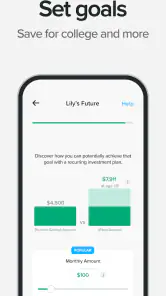
That focus changes the way I think about deposits. A birthday contribution, a recurring family transfer, or a small amount set aside after payday becomes part of one visible objective. The app’s store summary describes the experience as saving, investing, and building wealth for kids, but the important detail is the custodial structure behind those words. It is not simply a child-themed screen placed over a standard personal brokerage account.
For a parent, the strongest benefit is psychological as much as financial. Naming the account around a child makes it easier to discuss why the money exists and why it should not be casually withdrawn for unrelated purchases. I found that useful because long-term saving often fails through small distractions rather than one dramatic decision. A dedicated destination creates a little friction against that habit.
At the same time, a UTMA account should not be treated as a flexible education-only fund. The account is for the child’s benefit, and the custodial arrangement has consequences as the child grows. That makes it important to understand the account terms before depositing money. The app can make the workflow more approachable, but it cannot remove the legal and financial meaning of the account type.
What this capability changes for everyday saving
With a regular savings account, the balance is usually stable and the purpose is easy to understand, but the money may lose purchasing power over a long period. With a general investment account, the parent has more freedom over how funds are used, yet the child-focused goal can become vague. UNest sits between those familiar alternatives by combining a long-term investment mindset with a clearly named beneficiary.
That middle position is its real identity. I would not choose it merely because the interface sounds friendly to families. I would choose it when I want the account structure itself to reinforce the goal. If I already have a disciplined investment plan and need complete control over every dollar, a standard brokerage account may be a better fit. If I need money for a near-term expense, a cash savings product is more appropriate.
The app has attracted more than one hundred thousand installs and holds an average rating of 3.8 from around two and a half thousand ratings, with roughly four hundred thirty written reviews. Those figures suggest a product with a meaningful user base but also a mixed enough response to encourage realistic expectations. I would read the rating as a sign that the concept is useful for the right household, not as proof that every family will find the account process effortless.
How the experience works in practice
The most sensible way to use the app is to begin with the goal rather than the contribution amount. I would first decide what the money is meant to support, how long it may remain invested, and whether the household can tolerate market fluctuations. Only then would I choose a recurring amount or occasional deposit. This order prevents the app from becoming a button I tap impulsively whenever I feel guilty about not saving enough.
Once the account is established, the useful workflow is repetition. Small, predictable contributions are easier to maintain than ambitious deposits that disrupt the family budget. I would schedule the habit around a reliable event, such as the day after income arrives, and then review the account periodically rather than checking it every day. A long-term child account can become stressful if I treat every market movement as a verdict on the plan.
This is one of the less obvious lessons of using a child-investing app: the best experience may involve looking at it less often. The app gives the goal a home, but the parent still has to provide the discipline. Frequent checking can encourage emotional decisions, while completely ignoring the account can allow outdated contact or contribution details to linger. A brief review at a sensible interval is a better compromise.
I also recommend separating “saving for the child” from “teaching the child about money.” The custodial account can support the first objective, but it does not automatically create a lesson about investing. A parent could use a monthly conversation to explain that the balance represents ownership of investments and may rise or fall. That turns the app into a starting point for financial education instead of a mysterious account adults manage behind the scenes.
A realistic family routine
Imagine a parent who wants to make progress without waiting for a large bonus. After setting up the child’s goal, the parent adds a manageable amount after each payday and invites grandparents to contribute when they would otherwise buy another toy. The parent then checks the account during a monthly household review, confirms that the contributions still fit the budget, and talks with the child about patience and long-term growth.
That scenario shows where UNest is most practical. It replaces scattered intentions with one repeatable routine. The parent does not need to decide from scratch every time money becomes available, and relatives receive a clearer alternative to another short-lived gift. The account becomes part of the family’s financial calendar rather than an isolated project opened once and forgotten.
There is also a useful trade-off in that routine. A contribution made for a child is less psychologically available for the parent’s own goals. That is healthy when the household already has emergency savings and manageable debt, but it can be backwards if the adults are neglecting their own financial foundation. I would fund the child account only after covering essential priorities, because a parent’s financial crisis can affect the entire family more immediately than a delayed long-term contribution.
Questions to settle before putting money in
The first question is whether the money needs to remain accessible for the parent’s own use. If the answer is yes, I would not place that money in a custodial account simply because the app makes the process convenient. The second is whether the intended time horizon is long enough to accept investment risk. Money needed soon belongs in a more stable option, while money intended for a distant milestone may have more room to experience market changes.
Another question is who should control the account and how the family wants to handle the child’s eventual ownership. This is where UNest cannot substitute for careful reading of the account agreement or professional advice when circumstances are complicated. Families should think about future control, possible effects on financial aid, and whether the custodial format matches their intentions before treating the app as a permanent home for substantial assets.
Cost also deserves attention. The app itself is free, but it includes in-app purchases ranging from $4.99 to $149.99 per item. I would not assume that “free” means every part of the experience has no cost. Before committing to an optional purchase or paid service, I would check exactly what it provides and whether it improves the account enough to justify the charge. A family using the app for modest contributions should be especially careful that extras do not consume money better directed toward the child’s balance.
The trade-offs behind the friendly concept
The biggest limitation is that the child-centered design can make a serious financial decision feel deceptively simple. A bright, accessible experience is helpful for beginners, but the underlying account still involves investment risk, custodial responsibilities, and a long time horizon. I appreciate the approachable framing, yet I would not want a new investor to mistake ease of setup for certainty of results.
Market exposure is another important trade-off. Investing may offer more growth potential than leaving every contribution in cash, but the account value can fluctuate. That matters when a family has a fixed future expense in mind. If the child will need the money soon, a parent may prefer a lower-volatility place for at least that portion. UNest is more convincing as a long-term habit than as a short-term savings container.
The account’s purpose can also become a source of disagreement. One parent may imagine education costs, while another may think of a first car, housing support, or general adult independence. Because the money is intended for the child, those expectations should be discussed early. The app can organize the money, but it cannot settle family decisions about what “for the child” should mean.
Compared with a traditional bank savings account, the app offers a more investment-oriented route and a stronger sense of a dedicated child goal, but it may feel less suitable for money that must remain predictable. Compared with a broad brokerage account, it is more focused and potentially easier to explain within a family, but it gives up some of the flexibility that makes a general account attractive. Compared with a dedicated education savings arrangement, the UTMA format may be broader in purpose, while an education-specific option can be more tightly aligned with school expenses and related planning.
Those comparisons are not arguments that one product is universally superior. They show why I would start with the job the money must perform. The app is at its best when the job is “build a long-term pool for this child and keep the goal visible.” It is weaker when the job is “keep cash available,” “control every investment decision,” or “reserve funds only for a narrowly defined education expense.”
Small habits that improve the experience
One practical tip is to begin with an amount that can survive an ordinary expensive month. A contribution plan that works only when nothing unexpected happens will eventually be paused, and repeated pauses are discouraging. I would rather establish a modest rhythm and increase it later than create a target that turns the account into another source of household pressure.
A second tip is to record the reason for each major contribution outside the app, even if it is only a note in a family budget. That gives the parent a reference point when the balance changes or when relatives ask what their gift is supporting. It also helps distinguish long-term contributions from money that was intended for a near-term purchase, reducing the temptation to treat the account as a general family wallet.
A third insight is to use the account as a conversation prompt, not as a promise. Telling a child that the money will definitely pay for a particular future item can create expectations that investment performance or changing family circumstances may not support. I would explain the goal honestly: the family is setting money aside and investing it, but the eventual value and use require patience and future decisions.
Finally, I would review the app after major family changes rather than relying on the original setup forever. A new job, a change in household expenses, or a different view of the child’s future may alter how much the family should contribute. The strongest long-term workflow is not automatic deposits alone; it is automatic behavior combined with occasional human judgment.
Who is likely to gain the most
UNest is a good match for parents who want a dedicated investing habit for a child but do not want to build the process from several unrelated financial tools. It is also useful for families who receive irregular gifts and want those contributions directed toward a meaningful long-term purpose. The custodial structure gives the goal a clear identity, which can make saving feel more intentional than adding money to an ordinary account with no visible beneficiary.
It may also suit a beginner who wants a child-specific starting point rather than a wide investment platform filled with choices. The focused purpose can reduce decision fatigue. Instead of opening a general account and wondering what the money is ultimately for, the parent begins with a concrete family objective. That simplicity is valuable when the main obstacle is getting started and maintaining a routine.
I would be more cautious if the household has high-interest debt, no emergency reserve, or an unstable monthly budget. In those situations, locking money into a child-focused long-term plan may create pressure later. I would also look elsewhere if I needed detailed control over investments, wanted a cash-only account, or required a tightly restricted education fund. The app’s convenience does not outweigh a mismatch between the account structure and the financial job.
The age rating of Everyone makes the app broadly approachable, but the responsible decision-maker is still the adult managing the account. A child may understand the goal and participate in conversations, yet the parent should be the one evaluating risk, contribution size, and the consequences of the custodial arrangement. That division keeps the educational value without placing an adult financial decision on a young user.
After weighing the concept, the workflow, and the limitations, I see the strongest case for UNest as a behavior-building tool. It gives parents a concrete place to direct money, a child-centered reason to stay consistent, and an opening for conversations about investing. Its value is not that it makes market risk disappear or replaces broader financial planning. Its value is that it can make one long-term family goal easier to remember and act on.
My recommendation is to use UNest when the account structure matches your intention, your household budget can support patient investing, and you are willing to understand the custodial responsibilities before depositing meaningful sums. I would start cautiously, read the terms, keep near-term needs elsewhere, and treat the app as one part of a family plan. For that specific purpose, it is a thoughtful finance app from UNest Holdings, Inc.; for flexible personal investing or immediately accessible savings, a different option will likely serve you better.
Pros
- Automates recurring investments
- making long-term saving easier.
- Offers goal-based accounts designed specifically for children’s futures.
- Simple interface helps parents monitor contributions and account progress.
- Can support gifting contributions from family and friends.
- Provides educational resources to encourage family financial planning.
Cons
- Investment returns are not guaranteed and accounts can lose value.
- Management fees may reduce returns over the long term.
- Requires personal and financial information during account setup.
- Investment choices may feel limited for experienced investors.
- Withdrawals and account changes may involve restrictions or processing delays.

- Category
- Finance
- Version
- 3.8.1











