Tucker Carlson Network
- 20.00
- 4.1
- Installs
- 10.00K
- Price
- Free

Screenshots




Analysis by Reviewed
I look at a news app differently after the first few days than I do on download day. A polished opening screen can make a strong first impression, but the real test is whether I still have a reason to open it once the novelty wears off. Tucker Carlson Network is a focused choice for people who want to follow Tucker Carlson’s commentary and related content, rather than a broad, neutral newsstand covering every perspective equally.
Why it can click in the first week
The appeal is straightforward: one destination for content associated with Tucker Carlson, without having to search across several services. The app is in the News & Magazines category, comes from Tucker Carlson Network, and is free to download. That makes it easy to try if you already follow his work and want a more direct way to keep up.
On an ordinary morning, I can imagine opening it while having coffee, checking what has been published, and deciding whether a headline or video is worth more of my time. That is a useful routine when I want a particular commentator’s take, not a full survey of the day’s reporting. The trade-off is important: a focused viewpoint is not the same thing as a complete news diet.
Making a daily visit purposeful
A small change in how I use a focused news app can make the difference between a useful stop and an endless scroll. I would decide what I came to check before opening it: perhaps a new commentary piece, a response to a developing story, or a video I had time to watch. After that, I would leave and turn to other reporting if the subject matters beyond one person’s interpretation. This keeps the app’s narrow focus intentional rather than letting it quietly define my entire picture of the news.
For example, during a busy workday, I might have ten minutes between tasks and want to hear Carlson’s take on a headline I have already seen elsewhere. That is a better fit than opening the app expecting it to brief me on every important event. A commentary stop can help me understand how one familiar voice frames an issue; it cannot replace checking the underlying reporting, especially when a claim could affect a decision I need to make.
What keeps it useful after the novelty
The longer-term question is whether its material gives you a reason to return. If you regularly seek out Carlson’s perspective, a dedicated app can reduce the small friction of finding his latest work elsewhere. If you only want occasional clips, though, the habit may not stick; a general news app or a wider mix of sources may serve you better.
I would use it as one stop in a broader routine: check this app for the commentary I came for, then compare important claims with reporting from outlets that approach the subject differently. That does not make the app less useful; it simply puts its strongest role in context. For a reader who values a particular voice, that focused role can be worthwhile. For someone seeking a balanced overview in one place, it may feel narrow over time.
More From Our News Desk

 Gmail
Gmail in a Busy Inbox: Who Benefits Most?
From first account to crowded workday, Gmail earns its place through dependable search and flexible sorting—but its best fit depends on how much inbox maintenance you can tolerate.

 Prime Video
Switching to Prime Video: What Changes in Your Viewing Routine
Prime Video can make a compelling second home for streaming, but switching means learning a different catalog, rental layer, and route from browsing to playback.

 Universal TV Remote Control
 Works Best as a Reliable Backup
A phone remote earns its place through quick setup and reliable habits. Here is how to get more from Universal TV Remote Control—and where its limits show.

 Weather - By Xiaomi
Weather by Xiaomi Review: Clear at a Glance, Less Clear Up Close
Xiaomi’s weather app makes everyday forecasts quick to scan, but its calm surface can leave useful details and recovery paths harder to find than they should be.

 X
X Under Pressure: Can It Recover When Posting Goes Wrong?
A resilience-focused review of X, examining setup, mistaken posts, interruptions, weak connections, and the gaps that matter when recovery needs to be dependable.

 Clash of Clans
 Is Won Between the Battles
Its raids are quick; its community is a long-term project of coordination, teaching, rivalry, and shared responsibility—with all the friction that entails.
Latest News



How it compares with a general news feed
A broad news aggregator is usually the more practical choice when I want a quick scan of stories from several publishers, or when I have not yet decided which topic deserves my attention. TCN has a different job: it is for someone who wants this particular commentator’s material in a dedicated place. I would not judge it by whether it replaces a multi-source news routine, because its appeal depends on the narrower editorial focus.
That distinction also helps answer whether it belongs on a phone long term. If Carlson’s perspective is something I seek out repeatedly, a direct destination can be more convenient than searching for each new piece. If I rarely look for his work on purpose, the app may be redundant beside a general news service. I would treat those as separate needs rather than expecting one app to satisfy both.
Getting Started with the App
Once you download and install the Tucker Carlson Network app, you're greeted with a clean and user-friendly interface. The app is designed for both Android and iOS, ensuring that no matter what device you use, you won't miss out on any updates. Navigating through the app is a breeze, thanks to its intuitive layout.
One of the first things you'll notice is the app's homepage, which features a mix of top headlines and curated content. It's like having a personal news assistant that knows exactly what you want to read. Just tap on a headline that catches your eye, and you're instantly transported to the full story. The app's speed and responsiveness are noteworthy, making it a joy to use.
Content and Features
The strength of the Tucker Carlson Network app lies in its content. It offers a wide array of news topics ranging from politics and economy to lifestyle and entertainment. Each article is well-written and provides a comprehensive view of the subject matter, ensuring you get all the information you need in one place.
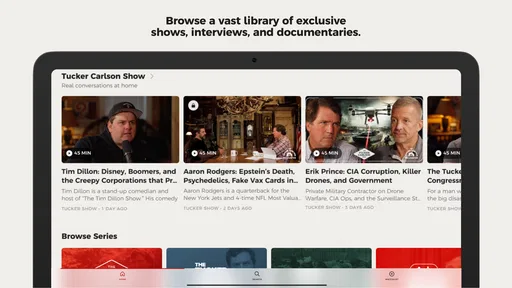
Additionally, the app provides video content, which is a fantastic way to consume news on the go. Whether you're commuting or just lounging at home, you can watch clips of Tucker Carlson delivering his signature commentary. The video quality is crisp, and the streaming is smooth, which is a big plus for any news app.
Choosing when to read or watch
Text and video ask for different kinds of attention, so I would make the choice based on the moment rather than treating every item as equally convenient. A short reading session can fit into a quiet break, while video is better saved for a place where I can listen and watch without distraction. On a commute, I would not assume a clip is practical just because the phone is with me; the surrounding noise, connection, and need to pay attention to what is happening around me can all make reading or waiting until later the smarter option.
There is also a useful habit in separating “I want to hear this viewpoint” from “I need to understand this whole story.” If a video prompts a strong reaction, I would note the specific claim that caught my attention and then look for reporting that establishes the context. That takes a little longer than moving straight to the next clip, but it makes a focused commentary app more valuable as part of a routine rather than a substitute for one.
Personalization and Notifications
The app also offers a range of personalization options. You can tailor your news feed to focus on topics that interest you most. It’s like having a news channel dedicated entirely to your preferences. Furthermore, the app's notification system is robust without being intrusive. You can choose to receive alerts for breaking news or daily summaries, helping you stay informed without feeling overwhelmed.
Maintenance, cost, and everyday trade-offs
Keeping a news app useful is partly about managing its interruptions. I would begin with notifications turned off or limited, then enable only the alerts that genuinely help me decide when to return. That small choice matters: a stream of prompts can turn a quick check-in into a chore, while a deliberate visit keeps the app on my terms. If I mainly watch videos, I would also save them for a moment when I have time and a suitable connection rather than treating every clip as something to consume immediately.
The download is free, but the app includes in-app purchases priced from $8.99 to $71.99 per item. I would check what an offer includes before committing and consider whether I use the free experience often enough to justify paying for anything. The app is rated Everyone 10+, has a 4.0 average from around 64 ratings, and has passed 10,000 installs. Those figures suggest a modest audience and a generally positive reception, but they cannot tell me whether its editorial approach suits my own expectations.
Questions worth settling before making it a habit
Would I need to pay to try it? No: downloading the app is free, though in-app purchases are available. I would not make a purchase simply because I want to test whether the app fits my routine. First, I would establish whether I return for its content and read the terms of any offer carefully, so I know what I am choosing rather than treating a purchase as a vague promise of more value.
Is it meant to replace my usual news app? I would say no, unless my main goal is specifically to follow Carlson’s material. Its focused identity is a reason to use it and also the main trade-off. A broad news source is still more useful for scanning many publishers or building a wider account of a developing story; TCN makes more sense as a chosen viewpoint alongside that wider reading.
Will the app fit an older Android phone? It supports Android 5.0 and newer, and its current version is 1.100.2. For a device owner, the minimum operating-system requirement is a practical first check before downloading. More importantly, I would judge ongoing usefulness by whether the app works with the way I actually consume commentary, not by how many times I open it during the first few days.
Who should keep it, and who should move on
This is most appealing to people who already make time for Carlson’s commentary and want a dedicated place to find it. It is less suitable for readers who expect an app to represent a wide range of viewpoints, or who prefer headlines selected across many publishers. In that situation, a general news aggregator is a better everyday companion; this app can still be a deliberate second stop when you want this particular perspective.
One practical way to judge its staying power is to give it a defined role for a week: open it when you specifically want Carlson’s material, and use other sources for a broader account of major stories. If you find yourself returning without relying on alerts, it has earned a useful place in your routine. If you open it only out of habit or find its focus repetitive, removing notifications—or uninstalling it—is a reasonable choice. Its current version is 1.100.2, and it supports Android 5.0 and newer.
When the focus starts to feel tiring
A single editorial voice can be comfortable because I know what kind of perspective I am opening, but that same consistency can become tiring if I expect every visit to broaden my view. The remedy is not necessarily to stop using the app; it may be to give it a limited role and set a stopping point. I can check the item I came for, then switch to sources with different reporting priorities rather than letting one feed become the default answer to every news question.
I would also pay attention to whether I am opening it because I genuinely want its material or simply because a notification has made me feel behind. If the latter becomes the pattern, muting alerts and revisiting the app only when I have a specific reason is a sensible maintenance step. That is a useful test of recurring value: does the content bring me back on its own, or is the app mostly adding another interruption to my day?
Final Thoughts
In a world where information is abundant but time is limited, the Tucker Carlson Network app stands out by offering a curated, personalized news experience. Its user-friendly interface, combined with high-quality content and video capabilities, makes it a must-have for anyone looking to stay informed in an engaging way.
Whether you're a fan of Tucker Carlson or just someone who appreciates well-curated news, this app is worth checking out. Give it a try, and you'll find yourself reaching for your phone not just for the latest headlines, but for a comprehensive view of what's happening in the world.
Tucker Carlson Network Frequently Asked Questions
Is Tucker Carlson Network available on Android and iOS?
Tucker Carlson Network is an app in the News & Magazines category, and it is available for Android and iOS users. Its store summary describes it as a home for exclusive content guided by the principle “Tell the truth.” The app is developed by Tucker Carlson Network and is rated for Everyone 10+, which is worth considering when choosing content for younger users.
What is the Tucker Carlson Network app?
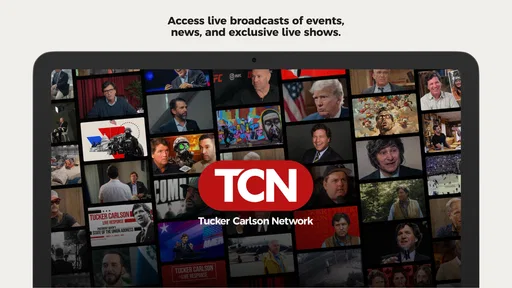
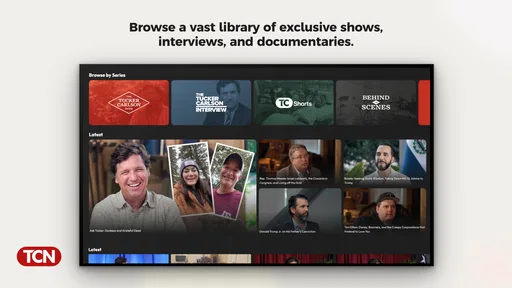
The Tucker Carlson Network app is a mobile application that provides users with access to exclusive content and shows from the renowned political commentator, Tucker Carlson. Available on both Android and iOS platforms, the app offers a variety of features including live streaming, archived episodes, and behind-the-scenes content, all tailored for fans of Tucker Carlson's unique perspective on current events.
Is the Tucker Carlson Network app free to use?
While the Tucker Carlson Network app can be downloaded for free from both Android and iOS app stores, certain premium content may require a subscription or one-time payment. Users can access a selection of free content, but for comprehensive access to all exclusive features and episodes, a subscription plan might be necessary. In-app purchases are listed from $8.99 to $71.99 per item, so review the purchase options before paying.
What features does the Tucker Carlson Network app offer?
The Tucker Carlson Network app offers a wide range of features aimed at enhancing user experience. These include live streaming of shows, access to past episodes, exclusive interviews, and behind-the-scenes content. Notifications for upcoming episodes and the ability to download content for offline viewing are also included, ensuring users never miss out on their favorite content.
How does the subscription model work for the Tucker Carlson Network app?
The subscription model for the Tucker Carlson Network app typically involves a monthly or annual fee, granting users full access to all exclusive content, including live broadcasts and special features. Pricing details can vary, and users often have the option to choose between different subscription tiers, depending on the level of access they desire.
Pros
- User-friendly interface enhances navigation.
- High-quality video streaming available.
- Diverse range of content topics covered.
- Regular updates with new content.
- Accessible on multiple devices.
Cons
- Requires subscription for full access.
- Limited offline content availability.
- Ads present in free version.
- Occasional buffering issues reported.
- Content may not suit all political views.