Tropical Smoothie Cafe
- 6.17K
- 4.0
- Installs
- 1.00M
- Price
- Free

Screenshots


Analysis by Reviewed
I treat a cafe-ordering app as useful only when it makes a real routine easier, not just when its screens look cheerful. Tropical Smoothie Cafe is most compelling for one practical reason: it brings advance ordering, rewards, and cafe finding together for people who already choose this chain. That focus can save a stop from turning into an extra wait, while keeping the menu and loyalty activity in one place.
The practical value of ordering ahead
The best reason to open the app is not simply that it puts a menu on a phone. It lets me make the food decision before I reach the cafe, which changes how I can use a short break or a planned stop. When I know where I am going and what I want, I can handle the decision while I am still at home, at work, or on the way out. That can make the visit feel more organized, especially when I am fitting it between other errands.
The benefit depends on having a reasonably settled plan. An order placed for the wrong location or at a time that no longer suits me can create more friction than walking in and ordering. I would treat the app as a way to prepare for a visit, not as a guarantee that every stop will be faster. The useful habit is to confirm the cafe and the order before committing, particularly if my route is uncertain.
Why ordering ahead matters here
The app is a free food and drink app from Tropical Smoothie Cafe, built around ordering before you arrive. Its average rating is 4.3 from around 44,000 ratings, and it has over a million installs. Those figures suggest a well-used service, but what matters in daily use is whether advance ordering fits your plans: it is most useful when you know which cafe you are heading to and want to make the visit more predictable.
A sensible way to use it is to check the menu before leaving, decide on your drink and any food, then place the order when your destination is clear. That is better than ordering too early while plans are still changing. If your commute, pickup time, or chosen location shifts, the convenience can disappear; an in-person order gives you more flexibility to decide at the counter.
Your Smoothie Adventure Begins!
Have you ever had one of those days where you just crave something refreshing and delicious? Well, with the Tropical Smoothie Cafe app, those cravings can be satisfied with just a few taps on your phone. The app is available on both Android and iOS, so no one misses out on the smoothie fun!
What’s Brewing in the App?
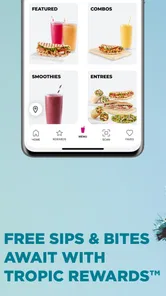
The first thing that caught my eye was the user-friendly interface. It’s got this vibrant tropical vibe that instantly transports you to a beachside cafe. You can easily navigate through the menu, and let me tell you, the options are endless! From classic smoothies to superfood-packed blends, there’s something for everyone.
More From Our News Desk

Weather by Xiaomi Review: Clear at a Glance, Less Clear Up Close

X Under Pressure: Can It Recover When Posting Goes Wrong?

Clash of Clans Is Won Between the Battles

Android Auto Makes the Case for Quieter Car Software

MobiOffice: Transforming Mobile Productivity with Seamless Integration

EA SPORTS FC™ Mobile Soccer: Redefining Mobile Sports Gaming
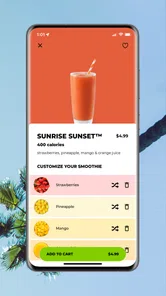
Ordering through the app is a breeze. You can customize your smoothie just the way you like it – whether you’re going for an extra shot of energy or a protein boost. Plus, if you’re feeling a bit peckish, they’ve got a selection of healthy snacks and bowls to complement your drink.
Choosing before the rush
Menu browsing is especially helpful when I want to make a considered choice rather than improvise at the counter. I can look over the drink and food options at my own pace, decide whether I want a smoothie on its own or something alongside it, and then move on to the location and ordering steps. That separation matters: I can avoid holding up a line while weighing options, and I can also pause before sending an order if I am still undecided.
One practical tip is to treat customization as a final check, not a reason to rush. If I am changing a drink, I would reread the selected options before submitting, then make sure any accompanying item is also what I intended. This is a small habit, but it helps prevent the common mistake of focusing on the smoothie and overlooking the rest of the order. If I have a question that depends on staff guidance, I would rather ask in person than guess from a screen.
A realistic cafe run
Picture a weekday lunch break: I have a short window, already know which smoothie sounds good, and want something alongside it. I can use the menu to settle the choice before heading out, then use the location tool to check for a nearby cafe. This is where the app can beat browsing a general map and deciding at the door: it joins the food choice to the cafe search, rather than leaving me to switch between separate tasks.
There is a useful trade-off in that workflow. If I am ordering for someone with a specific preference, I would review the custom choices carefully instead of rushing through checkout; a few extra moments spent checking the drink and accompanying food are better than discovering a mismatch after arriving. If I am unsure what I want, or need to ask staff about an ingredient, ordering face to face is the more comfortable option. The app is a convenience, not a substitute for a conversation when a decision needs clarification.
What the app does—and what it does not replace
This is a chain-specific ordering tool, so its usefulness starts with wanting something from Tropical Smoothie Cafe. It does not serve the same purpose as a broad restaurant app that helps me compare unrelated places or browse a whole neighborhood. For a familiar order, that narrower scope is efficient: I do not have to filter through restaurants I would not choose. For an open-ended meal decision, the broader app or a map search is the better first stop.
It also cannot make an uncertain plan certain. If I am choosing between several nearby cafes, if I have not decided what I want, or if a conversation with staff would help me understand a choice, ordering at the counter gives me more room to adapt. I would not download it expecting it to solve every part of a lunch outing. Its strongest role is to simplify the part that happens after I have already decided this is the cafe I want.
Rewards and Perks
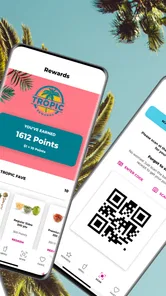
One of the coolest features of the app is its rewards program. Every purchase earns you points that you can redeem for free smoothies. Who doesn’t love free stuff, right? It’s like getting rewarded for indulging in your favorite treat.
Oh, and did I mention the exclusive offers? The app frequently sends out promotions and discounts. So, keep an eye out for those notifications because you never know when you might score a sweet deal.
Rewards are most valuable to people who already stop at Tropical Smoothie Cafe regularly. I would check the app before placing an order if I am hoping to use an offer or keep track of points, rather than assuming every visit will bring the same perk. Occasional customers may still like having their activity in one place, but should not make the app their reason to choose a cafe if another nearby option better fits the day.
Making rewards useful without changing your routine
I would think of rewards as a small benefit attached to visits I was already planning, not as a reason to spend more or make an inconvenient detour. That keeps the value honest: if I am nearby and want my usual order, checking my reward activity or any available offer is sensible; if I would have to change plans just to chase a perk, the extra effort may outweigh it. The app is most helpful when loyalty follows the routine rather than dictating it.
For someone who visits now and then, the practical question is whether having rewards in the same place as ordering makes the app worth keeping. If a customer likes tracking points and occasionally checks for an offer, it may. If the main goal is a single drink during a rare visit, there is no need to build a new habit around the app. I would decide based on how often this cafe already fits my week.
Location, Location, Location
Travelling around and need a smoothie fix? The app’s location feature is a lifesaver. It helps you find the nearest Tropical Smoothie Cafe location, ensuring you’re never too far from your next smoothie break. Trust me, whether you’re on a road trip or just exploring your city, this feature is super handy.
The location search is also useful before I set off, not only when I am already on the road. I can check whether a cafe fits the route I have in mind, then decide whether it makes sense to place an order there. That avoids committing to a pickup at a location that turns out to be awkward for the rest of the trip. When I am exploring without a fixed destination, a general map remains better for comparing all kinds of stops at once.
Where this fits among other food apps
Compared with a general delivery or restaurant app, this one is a narrower tool: it is for people who want this cafe’s menu, ordering, and rewards together, not a way to compare lots of restaurants in one place. That specialization is a strength when the chain is already your choice. It is also the reason I would skip it if I only want to discover nearby food broadly, rarely visit, or prefer choosing after I see the cafe’s options in person.
Compared with simply walking in, the app gives me more time to make a choice and can make a planned stop feel smoother, but the counter wins when I need flexibility or want to ask a question. Compared with a general map, the cafe finder is more relevant once I know which chain I want, while the map is more useful for an open-ended search. The right option depends less on which tool is universally better and more on whether my decision is already made.
Who gets the most from it
I would recommend it most to regular customers who have a go-to smoothie, like adding food to the order, and often know their route in advance. It is also useful for someone exploring an unfamiliar part of town who wants to check for a Tropical Smoothie Cafe without opening a separate search tool. If your visits are spontaneous, your preferred cafe is not convenient, or you want to compare different chains, a general map or restaurant app may serve you better.
It can also suit someone coordinating a quick personal pickup: deciding on a familiar order before leaving makes it easier to fit the stop around work, errands, or travel. The key is that the person using it already has a good idea of the cafe and the order. I would not recommend relying on advance ordering for a group whose preferences are still changing; deciding together first, or ordering at the counter, is less likely to create confusion.
Before making it part of your routine
If you are wondering whether you need an account or how an order behaves at a particular cafe, I would check the current in-app steps and details for the location you plan to visit before relying on it. Ordering, reward activity, and cafe search are the central reasons to use it, but the experience still depends on choosing the correct destination and reviewing the order carefully. That is a better approach than assuming every location or visit will work identically.
For a first visit, I would browse without rushing to submit anything. That lets me learn how the menu is organized, see whether my preferred options are available to select, and decide whether using the app actually saves effort for me. If it feels convenient, I can use it the next time I have a firm plan; if not, ordering in person remains a straightforward alternative.
The app is free, rated for Everyone, and its current version is 6.3.3; it requires operating system version 11 or later. It first appeared on July 21, 2015, and has accumulated around 5,800 written reviews. I see it as a practical companion rather than an essential download: the benefit grows with repeat visits, while a one-off smoothie stop is easy enough to handle at the cafe.
Overall, the Tropical Smoothie Cafe app has made ordering my favorite smoothies easier and more rewarding than ever. It’s a must-have for smoothie enthusiasts wanting convenience right at their fingertips. So, if you haven’t already, go ahead and give it a whirl. Your taste buds will thank you!
Tropical Smoothie Cafe Frequently Asked Questions
Can I use the app to find a Tropical Smoothie Cafe near me?
Yes. Finding cafes is one of the app’s main conveniences, alongside ordering ahead and earning rewards. You can use it to look for a location when planning a visit, then use the ordering features to make your trip more efficient. It is especially handy when you want to bring together cafe discovery and ordering in one place.
Can I place an order ahead for pickup?
Yes. The app is designed to let customers order ahead, which can make picking up a meal or smoothie more convenient than ordering only when you arrive. You can browse the menu, customize your selections, and place an order for pickup through the app. This is useful when you want to plan your order from your phone before visiting a cafe.
Is the Tropical Smoothie Cafe app suitable for families and younger users?
The app has an Everyone content rating, so its store classification is suitable for a broad audience. It focuses on Tropical Smoothie Cafe features such as browsing food and drinks, placing orders, earning rewards, and finding cafes. Parents can still decide whether app-based ordering and account features are appropriate for their children, but the content rating itself is not restricted to adults.
Which devices can run the Tropical Smoothie Cafe app?
Tropical Smoothie Cafe is a Food & Drink app for Android and iOS. Before downloading, check that your device meets the app’s operating-system requirement; on iOS, it requires version 11 or later. The app is free, and its content rating is Everyone, making it suitable for a broad audience. The developer is Tropical Smoothie Cafe.
What features does the Tropical Smoothie Cafe app offer?
The Tropical Smoothie Cafe app offers a range of features designed to enhance your experience. You can easily browse the menu, customize your orders, and pay directly through the app. Additionally, you can earn rewards with every purchase, find the nearest cafe location, and receive exclusive offers and promotions. The app also supports online ordering for quick and convenient pickup.
Pros
- User-friendly interface with easy navigation
- Wide variety of smoothies and food options
- Customizable orders to suit dietary needs
- Loyalty program with rewards and offers
- Fast service and efficient order processing
Cons
- In-app ads can be intrusive at times
- Occasional glitches in the order tracking
- Limited payment options available
- Location-based restrictions on menu items
- Some users report app crashes occasionally











